


The New Era of Enterprise Architecture
In the rapidly evolving landscape of modern business, Enterprise Architecture (EA) serves as the critical bridge between organizational strategy and IT infrastructure. By visualizing the complex web of relationships between business processes, applications, and physical technologies, EA facilitates agility and informed decision-making. At the heart of this discipline is ArchiMate, the open standard modeling language certified by The Open Group.
However, traditional ArchiMate modeling has historically been a labor-intensive process. Architects often face the “blank canvas” problem, requiring deep technical knowledge of specifications and hours of manual drafting to create compliant diagrams. This bottleneck can stifle collaboration and delay critical insights.
Visual Paradigm Desktop (Enterprise Edition) has addressed these inefficiencies with its groundbreaking AI Diagram Generator. Launched in late 2025, this tool leverages generative AI to transform text inputs into fully editable, standard-compliant ArchiMate diagrams. This guide explores how this technology allows architects to reduce diagramming time by up to 90%, shifting the focus from manual drawing to strategic analysis.
Why Automate ArchiMate Modeling?
ArchiMate diagrams are multi-layered, covering business, application, technology, and physical stratums. To communicate effectively with different stakeholders—from C-level executives to network engineers—architects use specific “viewpoints.” Each viewpoint frames the architecture to answer specific concerns.
Manual creation of these viewpoints involves:
- High Skill Requirement: The user must intimately understand the ArchiMate 3.1 specification to select the correct elements and relationships.
- Time Consumption: Manually dragging, dropping, and connecting elements for complex systems is tedious.
- Inconsistency Risk: Manual drafting increases the likelihood of errors or non-standard notation usage.
Visual Paradigm’s AI features eliminate these hurdles. By automating the generation process, the tool ensures strict adherence to ArchiMate 3.1 standards while supporting all 25 official viewpoints. This includes complex views like Application Cooperation, Business Process Cooperation, and Technology Usage. The result is a consistent, professional output that can be customized for tone and audience relevance.
Prerequisites for AI Modeling
To utilize the AI-powered ArchiMate capabilities, ensure the following requirements are met:
- Software Edition: You must be using Visual Paradigm Desktop Enterprise Edition. The features described are not available in the Community or Standard editions.
- Version: Ensure the software is updated to the post-December 3, 2025 release to access the full suite of AI tools.
- Knowledge Base: While the AI handles the heavy lifting, a foundational understanding of EA concepts helps in refining prompts and validating outputs.
Step-by-Step Guide: Generating Diagrams with AI
Generating a complex EA model is now a streamlined, user-friendly process. Follow these steps to create your first AI-assisted diagram: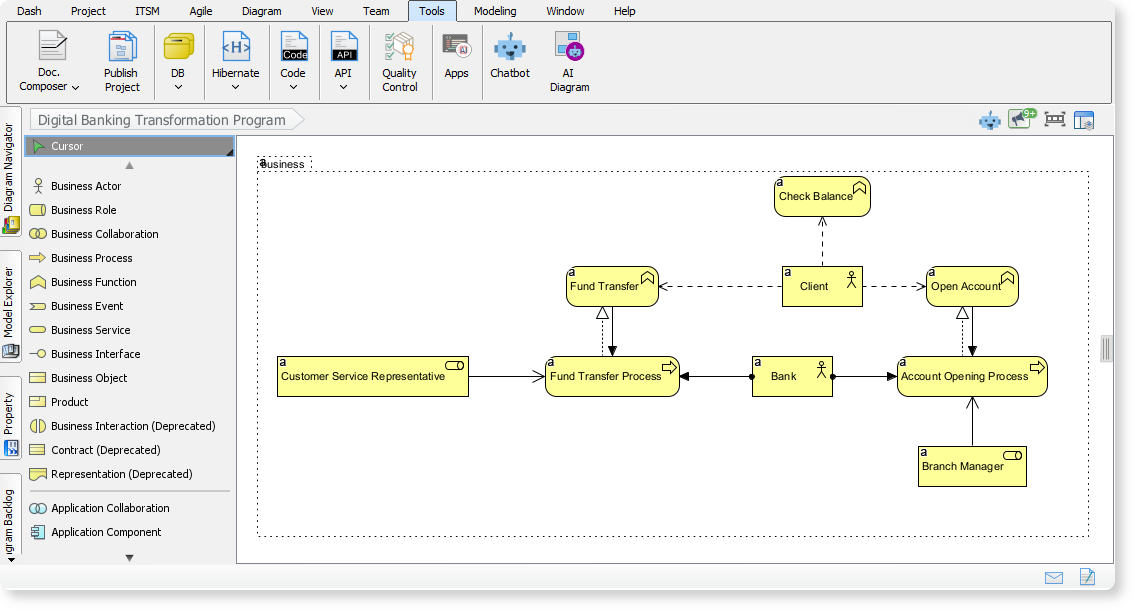
1. Access the Tool
Launch Visual Paradigm Desktop and open your project. Navigate to the Tools menu and select AI Diagram to launch the generator interface.
2. Select Your Viewpoint
Choice is critical in EA. Select the specific ArchiMate viewpoint that matches your stakeholder’s needs from the dropdown menu. For example, choose “Strategy” or “Motivation” for executive presentations, or “Physical” for infrastructure planning. The AI automatically constrains the output to the allowed elements of that viewpoint.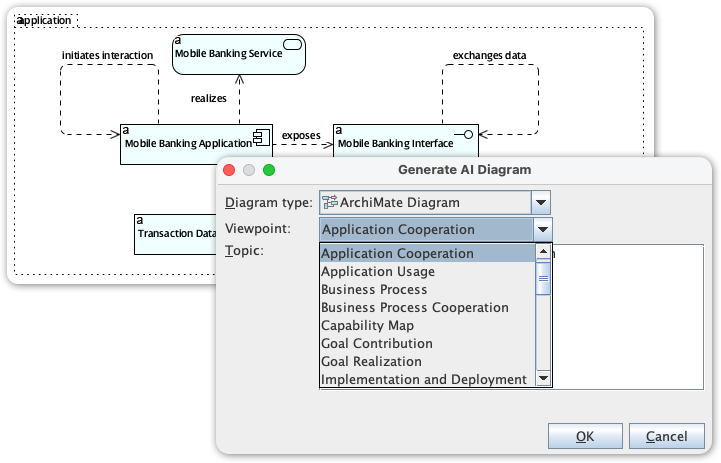
3. Input Your Requirements
Enter a natural language description of the system or scenario you wish to model. Be specific about the scope. You can also define the Audience (e.g., “Management” vs. “Developers”) and the Tone (e.g., “Formal” or “Technical”).
Example Prompt: “A secure online banking system featuring customer onboarding, mobile app interfaces, and cloud-based transaction processing.”
4. Generate and Review
Click Generate. Within seconds, the AI will produce a complete diagram populated with actors, processes, interfaces, and nodes, along with a narrative explanation. The output is not a static image but a fully editable model.
5. Refine and Export
Use Visual Paradigm’s standard modeling tools to tweak the layout, adjust relationships, or add proprietary details. Once finalized, export the diagram as an image or PDF, or integrate it into your project documentation.
Real-World Use Cases
To illustrate the power of this tool, consider the following practical scenarios where AI modeling accelerates delivery:
Scenario 1: Telecom 5G Network Rollout
Viewpoint: Implementation and Deployment
The Challenge: Visualizing the complex infrastructure required for a new network layer.
AI Solution: The AI generates a diagram mapping application services (network management) to physical nodes (base stations, antennas) and technology services (5G Core). This allows planners to visualize dependencies instantly.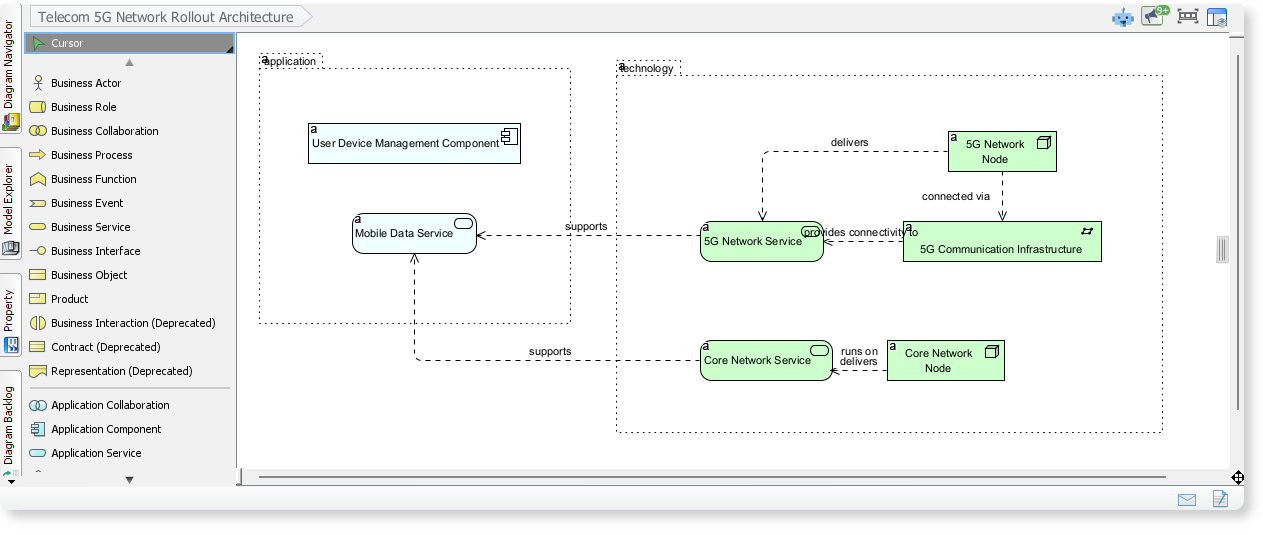
Scenario 2: Digital Banking Transformation
Viewpoint: Business Process Cooperation
The Challenge: Aligning new digital customer journeys with legacy IT backends.
AI Solution: The generator illustrates the flow between business events (Customer requests account), application services (Mobile App API), and back-end technology, ensuring the business and IT layers are synchronized.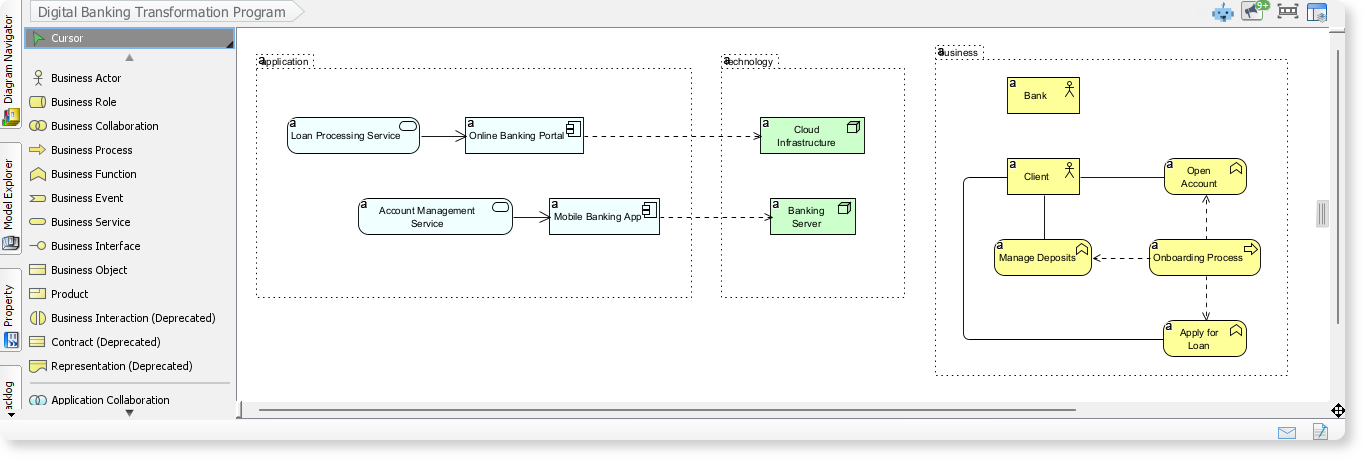
Scenario 3: Healthcare Information Exchange
Viewpoint: Service Realization
The Challenge: Ensuring data privacy and compliance in patient data transfer.
AI Solution: The model depicts the collaboration between hospital actors, secure data portals, and underlying encrypted databases, highlighting the realization of secure service delivery.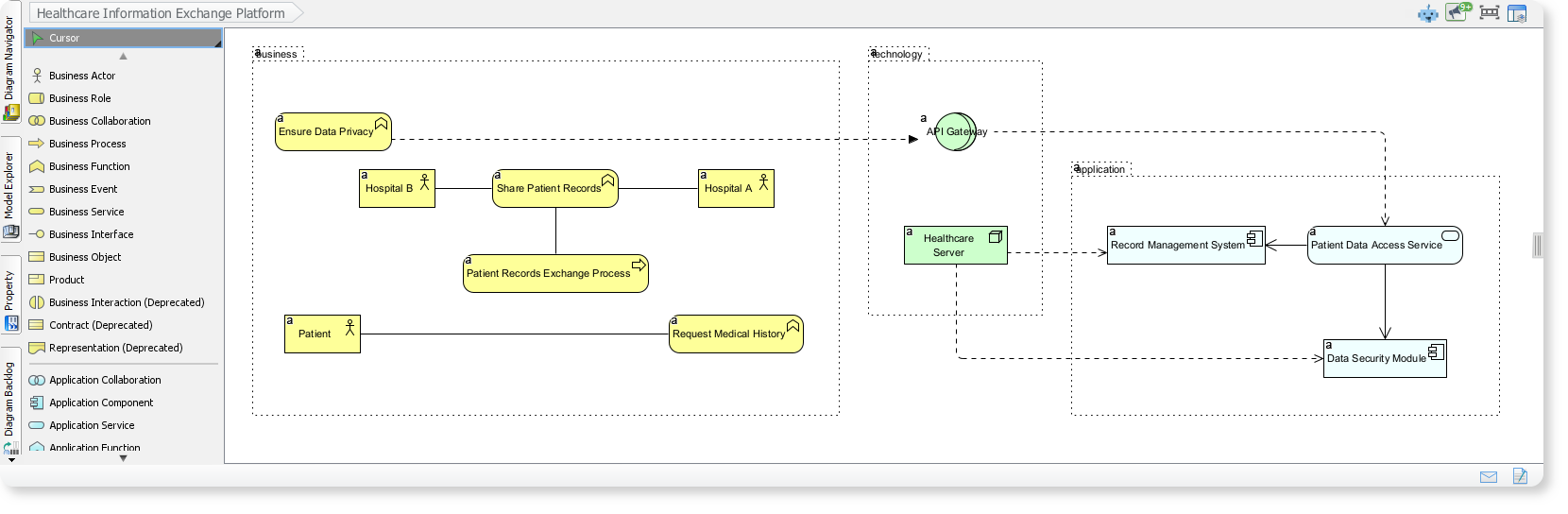
Best Practices for Optimal Results
To get the most out of the AI Diagram Generator, consider these tips:
- Iterative Prompting: Start with a broad topic to get the structural layout, then refine the prompt with specific details for a second pass.
- Leverage the Chatbot: Visual Paradigm includes an AI Chatbot. Use it to converse with your model, asking it to suggest improvements or explain specific relationships.
- Validate Against Standards: Treat the AI output as a high-quality draft. Always perform a final review to ensure it aligns with specific organizational naming conventions.
- Break Down Complexity: For massive enterprise architectures, generate diagrams for specific sub-domains separately before merging them into a master view.
Key Resources and Tools
Visual Paradigm provides a suite of tools to support your journey into AI-assisted Enterprise Architecture. Refer to the table below for essential links and feature descriptions:
| Feature | Description | Resource URL |
|---|---|---|
| AI-Powered ArchiMate Generator | Generates full diagrams from text prompts, supporting all 3.1 viewpoints. | Feature Overview |
| AI Chatbot for Diagramming | Conversational interface for refining and expanding models. | Chatbot Info |
| Official Viewpoints Guide | Documentation on the 25 standard ArchiMate viewpoints supported by the AI. | Viewpoints Guide |
| Free Online ArchiMate Tool | Browser-based editor for quick prototyping without installation. | Online Tool |
Conclusion
The integration of Generative AI into ArchiMate modeling represents a significant leap forward for Enterprise Architecture professionals. By removing the manual labor associated with diagram creation, Visual Paradigm allows architects to dedicate their time to high-value activities: analyzing gaps, optimizing processes, and aligning IT with business goals. For organizations looking to maintain agility in a complex world, upgrading to the Enterprise Edition and adopting these AI workflows is a strategic imperative.
-
Comprehensive Tutorial: Generating ArchiMate Diagrams with AI: In-depth tutorial showing how to use Visual Paradigm’s AI diagram generator to create ArchiMate diagrams and viewpoints efficiently.
-
Introducing AI-Powered ArchiMate Viewpoints Generator in Visual Paradigm: Visual Paradigm’s latest release features an AI-driven ArchiMate viewpoints generator that automates the creation of enterprise architecture views, enhancing modeling efficiency and accuracy.
-
Full ArchiMate Viewpoints Guide (Examples Included): Complete ArchiMate Viewpoint guide, with 23 official ArchiMate example viewpoints, clear ArchiMate diagram examples and explanation, wrote by certified ArchiMate tool vendor.
-
How to Use ArchiMate to Visualize Information Flows with AI: Sep 17, 2025 · Compared to generic AI tools or simple diagram generators, Visual Paradigm ’s AI -powered modeling software stands out because: It understands ArchiMate -specific concepts, including information flows, viewpoints, and business-technology alignment
-
Using Viewpoints to Support Managerial Decision-Making: A comprehensive guide on how selecting appropriate viewpoints enhances strategic decision-making in enterprise architecture.
-
ArchiMate Strategy Viewpoint Guide: The strategy viewpoint allows the business architect to model a high-level, strategic overview of the strategies (courses of action) of the enterprise, the …
-
ArchiMate Motivation Viewpoint Guide: The motivation viewpoint allows the designer or analyst to model the motivation aspect, without focusing on certain elements within this aspect. For example, …
-
ArchiMate Capability Map Viewpoint Guide: The capability map viewpoint allows the business architect to create a structured overview of the capabilities of the enterprise. A capability map typically …
-
Mapping TOGAF ADM Phases to the ArchiMate … – Cybermedian: Visual Paradigm Enterprise Edition is a certified ArchiMate 3.1 enterprise architecture tool that supports all ArchiMate 3 vocabulary, notation, syntax, and semantics. It includes a powerful ArchiMate drawing tool, viewpoint management tool, and TOGAF Guide-through Process.
-
AI-Powered ArchiMate Viewpoint Generation for Enterprise Architects: Discover how AI enables enterprise architects to generate ArchiMate viewpoints in seconds, accelerating enterprise architecture modeling.
Related posts:
 Automating Online Shopping Flows: AI DFD Tutorial for Visual Paradigm
 Comprehensive Guide to Visual Paradigm: Streamlining UML, ERD, and AI-Powered Database Design
 Complete Guide: AI-Assisted UML Class Diagram Generator
From Diagrams to Digital Books: A User’s Journey with Visual Paradigm’s OpenDocs Pipeline
Complete Guide: AI-Assisted UML Class Diagram Generator
From Diagrams to Digital Books: A User’s Journey with Visual Paradigm’s OpenDocs Pipeline