
Architecting the VP 18.1 Unified Platform: AI Ecosystem & Pipeline
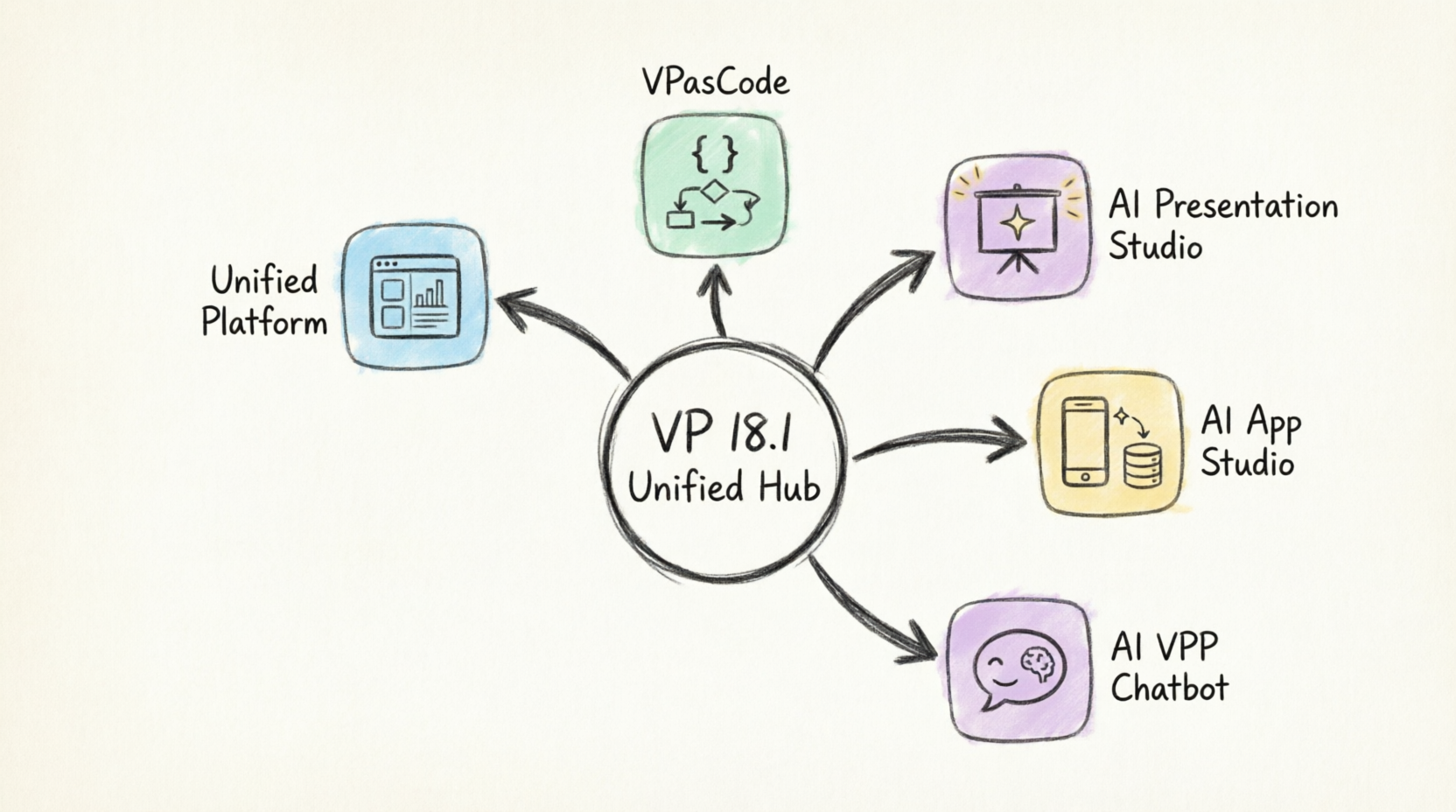
In the landscape of enterprise modeling, the gap between a static diagram and a deployed application has historically been vast. Visual Paradigm Version 18.1 (VP 18.1) seeks to bridge this chasm by introducing a “Unified Hub” architecture. This tutorial explores the technical architecture of the VP 18.1 ecosystem, specifically focusing on how the central hub orchestrates the flow of data and logic into specialized studios like VPasCode, AI Presentation Studio, AI App Studio, and the AI VPP Chatbot.
The Core Architecture: The Unified Hub
At the center of the VP 18.1 system is the Unified Hub. In system architecture terms, this functions as a central orchestration engine or a “Service Bus” for modeling artifacts. It does not merely store files; it manages the context of a project, allowing seamless transitions between different phases of the Software Development Life Cycle (SDLC).
This hub acts as the single source of truth. When you create a model or a diagram, it is registered here. From this central registry, the system routes requests to specific microservices or plugins based on the output format required—whether that is code, a presentation, or a running application.
Pillar 1: VPasCode (The Logic Bridge)
The first pillar of this ecosystem is VPasCode. In modern enterprise architecture, we often deal with “Code Generators.” However, VPasCode represents a shift towards “Programmatic Modeling.”
- Function: It allows developers to define system logic using code-like syntax directly within the modeling environment.
- Integration: It sits directly atop the Unified Hub, translating high-level architectural decisions into executable logic blocks.
- Use Case: Ideal for developers who want to bypass the manual drag-and-drop of complex logic flows and prefer a declarative approach.
Pillar 2: AI App Studio (The Deployment Layer)
One of the most significant architectural shifts in Version 18.1 is the introduction of the AI App Studio. This component transforms the Unified Hub from a design tool into a deployment environment.
Traditionally, a model exists only as a diagram file. With the AI App Studio, the model is “compiled” into a persistent, cloud-backed application. The architecture here follows a Model-View-Controller (MVC) pattern where the diagram serves as the Controller, and the Studio generates the View and Model layers automatically.
Pillar 3: AI Presentation Studio (The Communication Layer)
Enterprise architecture is often lost in translation when stakeholders are involved. The AI Presentation Studio addresses this by acting as a semantic translation layer.
Instead of manually recreating slides, this tool reads the semantic metadata from the Unified Hub (the diagrams) and generates presentation narratives. It extracts the “story” behind the architecture—dependencies, actors, and processes—and structures them into a coherent presentation deck.
Pillar 4: AI VPP Chatbot (The Interactive Interface)
The final pillar, the AI VPP Chatbot, represents the interface layer. It introduces Natural Language Processing (NLP) capabilities to the system.
By connecting to the Unified Hub, the Chatbot allows users to query the system architecture using natural language. “Show me the data flow between the User and the Database,” becomes a valid query that the Chatbot resolves by querying the metadata in the Hub and rendering the relevant diagram.
Putting It All Together: A Unified Workflow
The power of VP 18.1 lies in the bidirectional arrows shown in the ecosystem diagram. The flow is not linear; it is iterative.
- Model: You start in the Unified Platform.
- Encode: You refine the logic using VPasCode.
- Deploy: You push the logic to AI App Studio for testing.
- Present: You use AI Presentation Studio to share progress.
- Query: You use the AI VPP Chatbot to audit the system.
Technical Implementation: The VPasCode Syntax
To understand how the VPasCode pillar interacts with the Unified Hub, we must look at the syntax. VPasCode uses a specific DSL (Domain Specific Language) that maps directly to the system’s internal object model.
// Example: Defining a User Session Logic
// This code runs within the Unified Hub context

function CreateSession(User) {
    // 1. Validate User against Unified Platform Identity Store
    if (User.Validate() == false) {
        throw new AuthenticationError("Invalid Credentials");
    }

    // 2. Generate Token
    Token = GenerateJWT(User);

    // 3. Register Session in Cloud DB (AI App Studio)
    CloudDB.Save("session", {
        userId: User.id,
        token: Token,
        timestamp: Now()
    });

    // 4. Return Response to AI Presentation Studio
    return {
        status: "Success",
        message: "Session Created",
        redirectUrl: "/dashboard"
    };
}
Conclusion
Visual Paradigm 18.1 is not just a collection of tools; it is a unified platform designed to reduce the friction between design, code, and deployment. By centralizing the architecture in the Unified Hub, the system ensures that your diagrams are no longer static images, but living, breathing components of your software ecosystem.