
From Visual Models to Explainable Systems with VP OpenDocs
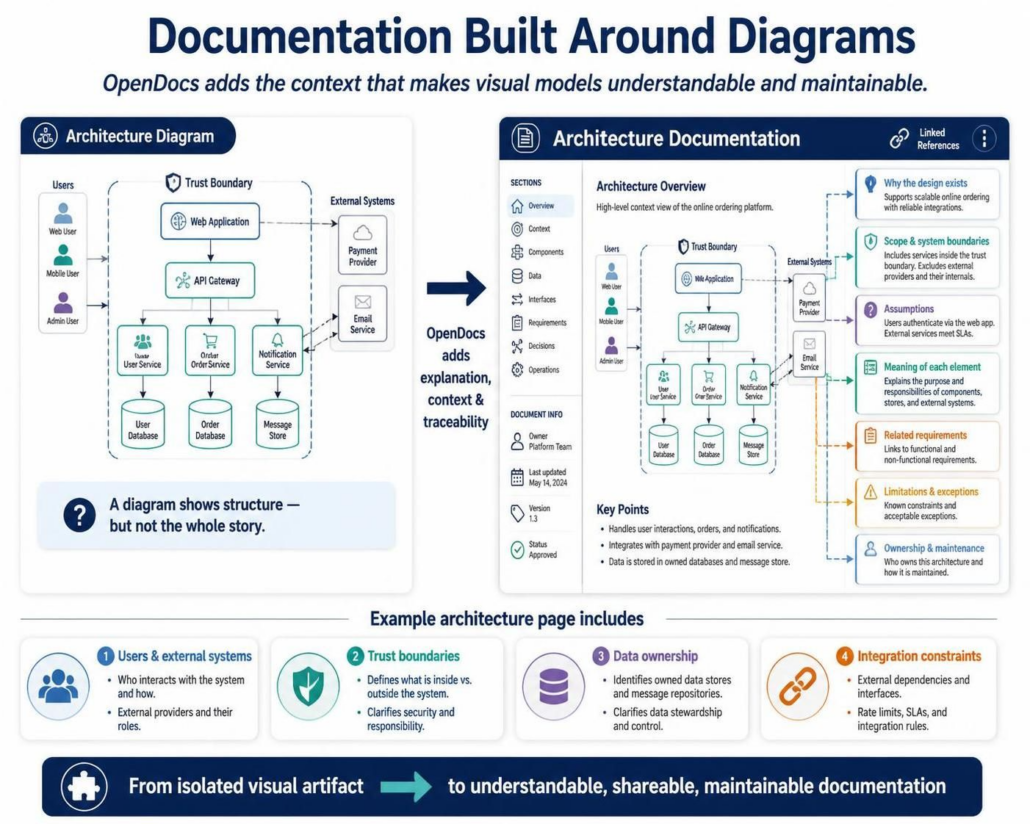
In modern software engineering, a diagram is often just the starting point. While tools like Visual Paradigm allow us to construct complex system views, a static image rarely tells the complete story. It shows what is connected, but it often fails to explain why decisions were made, who is responsible, or what constraints apply. This is where the concept of OpenDocs shines—transforming isolated visual artifacts into comprehensive, maintainable documentation.
The Gap Between Structure and Context
When you look at a standard architecture diagram, you see a hierarchy of components, users, and external systems. However, without surrounding text, the diagram suffers from ambiguity. A visual model alone cannot answer critical questions such as:
- Why does this design exist? What business drivers necessitated this specific microservices split?
- Which parts are in scope? Does the “Payment Provider” box include the settlement logic, or just the API integration?
- What assumptions were made? Is the system designed for a high-availability cloud environment or an on-premise legacy setup?
- What limitations apply? Are there rate limits on the API Gateway or specific latency requirements?
Integrating Diagrams with Narrative
OpenDocs bridges this gap by anchoring explanatory text directly to the visual model. Instead of placing documentation in a separate Word document that inevitably becomes outdated, the text lives alongside the diagram elements.
Consider the Architecture Overview section. This is not just a summary; it is the narrative backbone. It defines the scope of the platform and establishes the boundaries of the system. By explicitly stating what is inside the trust boundary versus what is external, we create a clear mental model for stakeholders.
Key Documentation Elements
To make a diagram truly useful, you must layer the following concepts onto your visual model:
- Users & External Systems
Clearly identify who interacts with the system. This includes internal users (like the Admin or Web User) and external providers (like the Payment Provider). Defining their roles clarifies the interface requirements.
- Trust Boundaries
Security is paramount. A trust boundary defines the perimeter of your control. Everything inside is owned and secured by you; everything outside is a third party. This distinction is crucial for data ownership and liability.
- Data Ownership
Diagrams often show data flowing between components. OpenDocs allows you to specify where data is actually stored (e.g., User Database vs. Order Database) and who is responsible for that stewardship.
- Integration Constraints
Real-world systems have rules. Rate limits, Service Level Agreements (SLAs), and specific integration protocols must be documented. These constraints are often invisible in a standard UML diagram but are critical for implementation.
Traceability and Maintenance
The ultimate goal of this approach is traceability. When a requirement changes, the documentation should reflect it immediately. OpenDocs facilitates this by linking:
- Requirements to Design: Explicitly link the design elements back to the functional requirements that drove them.
- Decisions to Owners: Document who is responsible for maintaining specific parts of the architecture.
- Assumptions to Risks: Highlight any assumptions made during the design phase that could impact future development.
Conclusion
By combining the visual power of diagrams with the precision of structured text, OpenDocs ensures that your architecture documentation remains a living, breathing resource. It moves the conversation from “What does this box mean?” to “Here is the complete context of our system.”