
UML Sequence Diagrams: The Dynamic Narrative of Software Architecture
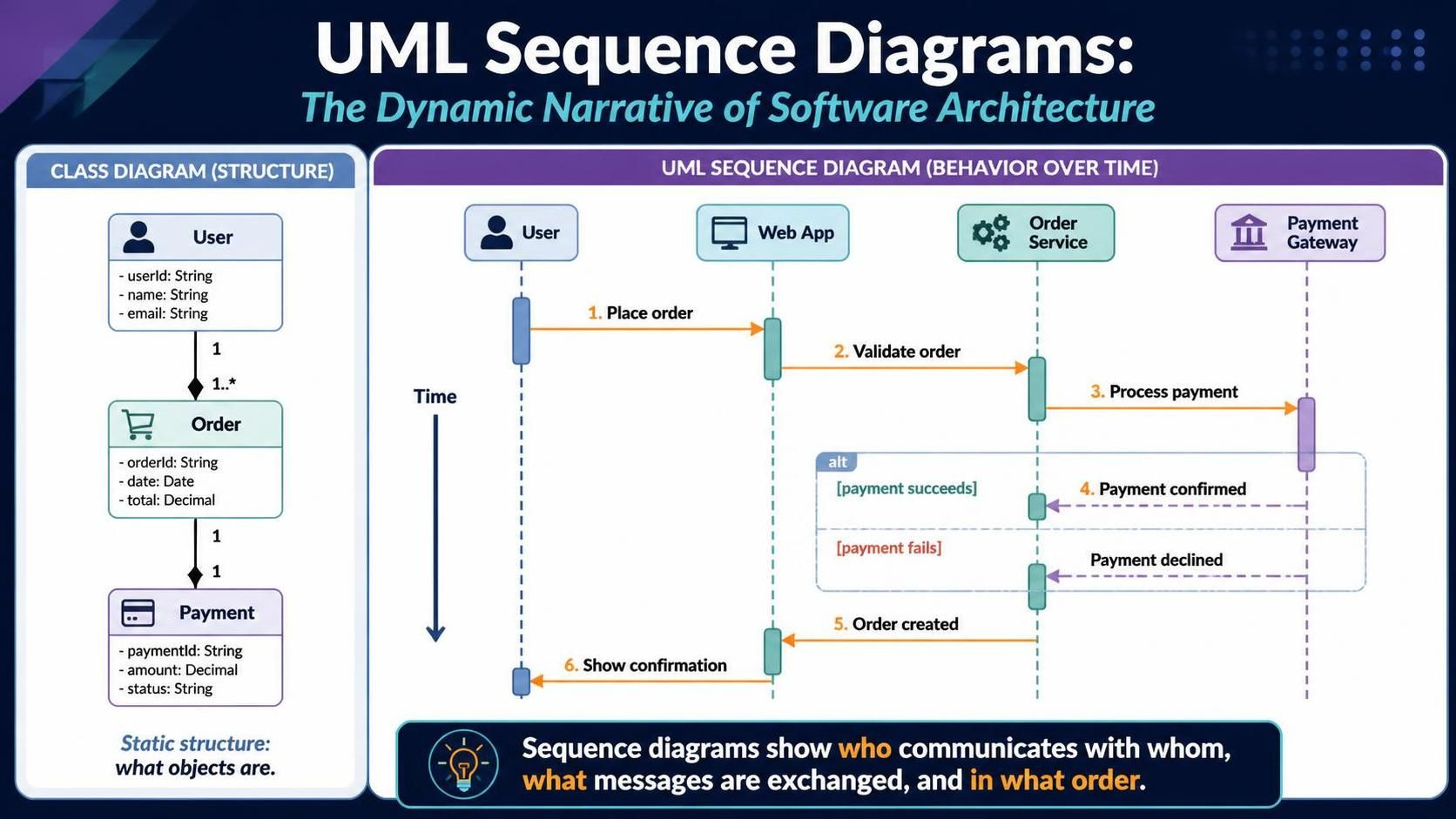
In the complex world of software architecture, understanding how objects communicate is just as critical as knowing what they do. While Class Diagrams provide a static snapshot of a system’s structure, UML Sequence Diagrams (SD) provide the dynamic narrative. They act as a storyboard for your code, mapping out the chronological flow of messages between participants over time.
This guide explores the essential building blocks of sequence diagrams—from basic lifelines to advanced combined fragments—and demonstrates how to leverage Visual Paradigm, a leading industry-standard modeling tool, to create precise, professional-grade interaction models that bridge the gap between design and implementation.
From Static Structure to Dynamic Behavior
Before diving into the sequence diagram, it is crucial to understand the foundation it rests upon. In the provided image, we see a comparison between two fundamental UML views:
- Class Diagram (Structure): On the left, we see the “Who.” This diagram defines the system’s anatomy. It tells us that a
Userplaces anOrder, which contains aPayment. It defines the relationships (composition) and attributes (likeorderIdoremail), but it does not tell us how these classes interact to process a transaction. - Sequence Diagram (Behavior): On the right, we see the “How” and “When.” This diagram takes the static classes identified in the Class Diagram and animates them. It shows the specific flow of data and control that occurs when a user decides to buy something.
Core Components of a Sequence Diagram
To create a Sequence Diagram in Visual Paradigm, you must understand the standard notation elements that bring the diagram to life.
1. Lifelines
Lifelines represent the participants in the interaction. In our example, we have:
- User: The external actor initiating the process.
- Web App: The system interface.
- Order Service: The backend logic handling business rules.
- Payment Gateway: An external system handling financial transactions.
These are drawn as vertical dashed lines extending downwards, representing the passage of time.
2. Messages (The Arrows)
The horizontal arrows connecting the lifelines represent messages. In Visual Paradigm, you can create synchronous (solid line, filled arrowhead) or asynchronous (dashed line, open arrowhead) messages.
- 1. Place order: The trigger event.
- 2. Validate order: A request sent from the Web App to the Order Service.
- 3. Process payment: A request sent from the Order Service to the Payment Gateway.
3. Activation Bars
Notice the thin rectangles on the dashed lines (e.g., on the Web App and Order Service). These are called Activation Bars or Execution Occurrences. They indicate the period during which an object is performing an action or waiting for a response. If a bar is active, the object is busy processing.
Modeling Logic with Combined Fragments
Real-world software is rarely linear. It involves logic, loops, and conditional branching. This is where Combined Fragments come in. In Visual Paradigm, these are the frames with the corner tabs (like alt, opt, loop).
The diagram illustrates an alt (Alternative) fragment. This is used to model conditional logic, similar to an if-else statement in programming.
- The diagram shows a box labeled
altenclosing two sections separated by a dashed line. - Guard Condition 1:
[payment succeeds]. If the Payment Gateway confirms the transaction, the flow follows the top path, returning a Payment confirmed message. - Guard Condition 2:
[payment fails]. If the transaction is declined, the flow follows the bottom path, returning a Payment declined message. - Final Step: Regardless of the outcome, the
Order Servicesends a 5. Order created message back to theWeb App, which finally 6. Shows confirmation to the user.
Tooling: Visual Paradigm
While you can sketch these diagrams on paper, professional software development requires precision. Visual Paradigm is the tool of choice for architects and developers for several reasons:
- Model-Driven Development: Visual Paradigm allows you to generate code from your Sequence Diagrams. By defining the sequence of interactions, you can automatically scaffold the class structure and method signatures in languages like Java, C#, or Python.
- Reverse Engineering: You can import existing code, and Visual Paradigm will generate the corresponding Sequence Diagrams, helping you visualize and document legacy systems.
- Collaboration: The tool supports team-based modeling, allowing multiple architects to work on the same UML model simultaneously, ensuring consistency across the project.
Conclusion
Sequence diagrams are the bridge between the static structure of your system and its dynamic behavior. By using Visual Paradigm to model these interactions, you ensure that your system design is not just structurally sound, but logically robust. Whether you are validating a payment gateway or mapping out a user login flow, the Sequence Diagram is your most powerful tool for storytelling in code.