
Modeling Search Scenarios with UML Sequence Diagrams in Visual Paradigm
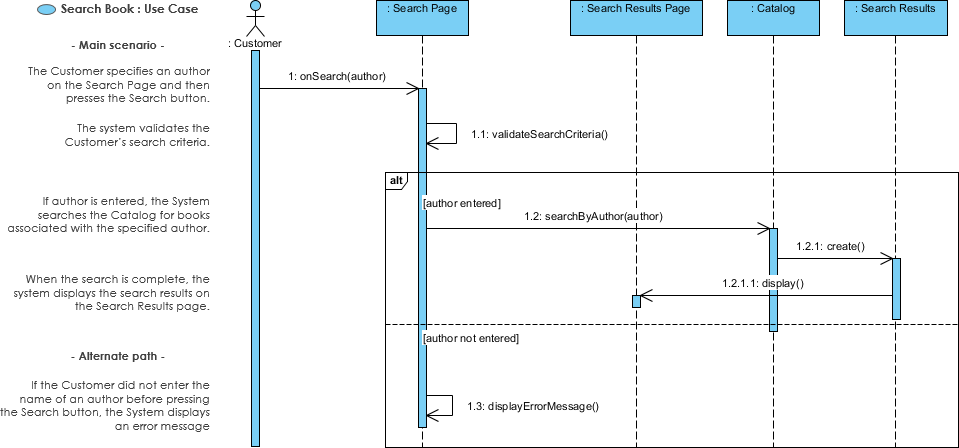
In the world of software engineering and system design, bridging the gap between abstract requirements and concrete code is a critical challenge. Sequence diagrams are the primary tool for visualizing this bridge. They allow developers to model the dynamic behavior of a system by showing how objects interact over time. This tutorial explores the concept of modeling use case scenarios using sequence diagrams, focusing on the “Search Book” scenario illustrated below.
Understanding Use Cases and Scenarios
Before diving into the diagrammatic representation, it is essential to distinguish between a Use Case and a Scenario.
- Use Case: A use case is a collection of interactions between external actors and a system. In UML, it is defined as the specification of a sequence of actions, including variants, that a system can perform while interacting with actors.
- Scenario: A scenario is one specific path or flow through a use case. It describes the sequence of events that occurs during one particular execution of the system. While a use case might have multiple variations (success, failure, alternative inputs), a scenario captures exactly what happens in one instance.
Sequence diagrams are used to elaborate on these scenarios by emphasizing the message exchange between objects. The level of detail in these diagrams is typically higher than diagrams spanning multiple use cases, as they focus on the internal logic of a specific business use case.
Analyzing the “Search Book” Scenario
The diagram provided illustrates a Search Book use case. It models the interaction between an external actor, the Customer, and the system components responsible for handling the search request. This diagram captures both the Main Scenario (success path) and the Alternate Path (error handling).
1. The Actors and System Objects
The diagram identifies the following participants:
- Customer: The human actor initiating the request.
- Search Page: The user interface component that receives the input.
- Search Results Page: The interface component responsible for displaying output.
- Catalog: The internal system component containing the book data.
- Search Results: A data object or sub-component representing the output of the search.
2. The Main Scenario (Success Path)
The flow of events for a successful search is detailed as follows:
- Initiation: The Customer specifies an author on the Search Page and presses the Search button. This triggers the message
onSearch(author). - Validation: The system first validates the input. The Search Page calls itself with
1.1: validateSearchCriteria()to ensure the author name is entered. - Execution (The Alt Block): The diagram uses an
alt(alternative) fragment to handle the validation result.- Condition [author entered]: If the criteria are valid, the Search Page sends the message
1.2: searchByAuthor(author)to the Catalog. - Internal Logic: The Catalog processes the request by executing
1.2.1: create(). - Display: Once the search is complete, the Catalog returns the result. The Search Results Page receives the data and executes
1.2.1.1: display()to show the books to the customer.
- Condition [author entered]: If the criteria are valid, the Search Page sends the message
3. The Alternate Path (Error Handling)
Not all interactions result in success. The diagram also defines an alternate path for when the input is invalid.
- Condition [author not entered]: If the validation check fails (i.e., the author name is missing), the system does not query the catalog. Instead, the Search Page executes
1.3: displayErrorMessage()to inform the user of the error.
Why Model Before Coding?
One might ask, “Why not just code up the algorithm directly?” While sequence diagrams can approach the level of code complexity, they serve a unique purpose in the development lifecycle.
- Language Neutral: A sequence diagram is not tied to a specific programming language (Java, Python, C#). It describes the logic, not the syntax.
- Collaboration: Non-coders, such as business analysts and UX designers, can read and contribute to sequence diagrams. This facilitates easier team communication compared to reading raw code.
- Testing and UX: These diagrams are excellent for planning test cases and wireframing user experiences before a single line of code is written.
Tooling: Visual Paradigm
To create the diagram shown in this tutorial, we utilized Visual Paradigm. Visual Paradigm is a comprehensive UML modeling tool that supports enterprise architecture, agile development, and software engineering. It allows users to generate code from diagrams and reverse engineer code into diagrams, making it an ideal tool for the “Model before Code” approach.