
Mastering UML Use Case Granularity: The Sea Analogy for System Modeling
In the realm of software engineering and requirements engineering, understanding Use Case Granularity is crucial for effective communication between stakeholders and developers. Use case granularity refers to the way in which information is organized within use case specifications and the level of detail at which they are written. Achieving the right balance ensures that projects are planned accurately and that the system meets user needs without becoming bogged down in unnecessary implementation details.
This guide explores how to identify actors and use cases, how to structure your diagrams effectively, and utilizes a powerful visual analogy to understand the different levels of detail required in your system architecture.
Step 1: Identifying the Actors
The requirements elicitation process often begins by identifying the actors. Actors represent the roles played by people or other systems that interact with the system you are designing. Schneider and Winters (1998) suggest a set of probing questions to help you uncover these actors:
- Who uses the system? Identify the primary users.
- Who installs the system? Consider the initial setup phase.
- Who starts up the system? Look for operational triggers.
- Who maintains the system? Identify support roles.
- Who shuts down the system? Consider cleanup or termination roles.
- What other systems use this system? Look for external system integrations.
- Who gets information from this system? Identify downstream consumers.
- Who provides information to the system? Identify upstream data sources.
- Does anything happen automatically at a preset time? Identify time-based triggers.
Step 2: Identifying Use Cases
Once actors are identified, the next step is to determine what value each actor desires from the system. This is done by identifying Use Cases. A use case represents a specific goal or interaction. Ask the following questions to flesh out these interactions:
- What functions will the actor want from the system? Focus on the functional requirements.
- Does the system store information? If so, which actors will create, read, update, or delete (CRUD) this information?
- Does the system need to notify an actor about changes in the internal state? This helps identify monitoring and alerting use cases.
- Are there any external events the system must know about? Identify who informs the system of these events.
Step 3: Tips for Effective Diagramming
To ensure your use case diagrams are effective blueprints for your software project, adhere to these structural tips:
- Structure from the Actor’s Perspective: Always organize the diagram based on the goals and actions of the actors, not the internal logic of the system.
- Start Simple: Begin with the highest view possible. Refine and add detail only after the high-level structure is validated.
- Focus on “What”, not “How”: Use case diagrams describe functionality (the “what”) rather than implementation details (the “how”).
Step 4: The Sea Analogy for Granularity
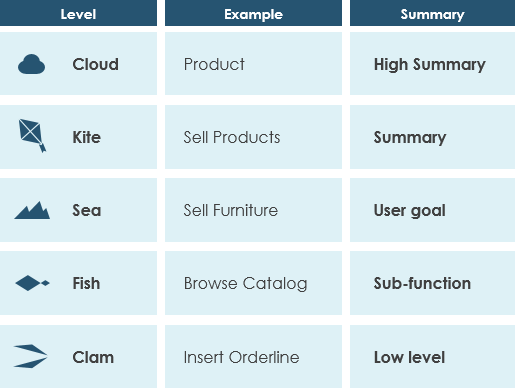
One of the most challenging aspects of modeling is deciding how detailed a use case should be. Alastair Cockburn, in his book Writing Effective Use Cases, provides a brilliant visualization tool to understand granularity levels by comparing them to the sea:
The Hierarchy of Goals
- The Cloud (High Summary): This represents the highest level of abstraction. It is the broadest summary of the system’s purpose.
- Example: “Product”
- Meaning: The general business domain or the overarching product category.
- The Kite (Summary): Moving down, this represents a major summary of a key business function.
- Example: “Sell Products”
- Meaning: A significant business goal that encompasses multiple steps.
- The Sea (User Goal): This is the critical level for most standard use case specifications. It represents a complete user goal that can be accomplished in one session.
- Example: “Sell Furniture”
- Meaning: A specific task that delivers value to the user and is initiated and completed by them.
- The Fish (Sub-function): This level breaks down the user goal into smaller, technical functions.
- Example: “Browse Catalog”
- Meaning: A specific interaction required to achieve the larger goal, but perhaps not valuable on its own to the user.
- The Clam (Low Level): This is the lowest level of detail, often representing a single technical operation or database transaction.
- Example: “Insert Orderline”
- Meaning: A very granular action, usually internal to the system or part of a larger workflow.
Visual Summary of Granularity Levels
| Level | Example | Summary |
|---|---|---|
| Cloud | Product | High Summary |
| Kite | Sell Products | Summary |
| Sea | Sell Furniture | User goal |
| Fish | Browse Catalog | Sub-function |
| Clam | Insert Orderline | Low level |
Best Practices for Diagramming
While a single use case specification might drill into the “Clam” level of detail to handle edge cases, the Use Case Diagram itself is typically used for a higher-level view. It acts as a blueprint for the system, showing the “Sea” level goals and their relationships with actors. It is beneficial to write use cases at a coarser level of granularity with less detail when a high-level overview is sufficient, reserving the deeper levels for complex or critical workflows.
Conclusion
By following the structured approach to identifying actors and use cases, and by applying the Sea Analogy to manage granularity, you can create system models that are both comprehensive and easy to understand. Whether you are using Visual Paradigm or another UML tool, keeping these principles in mind will help you build robust software architectures.