
Mastering UML Sequence Diagrams: A Troubleshooting Guide for VPasCode and PlantUML
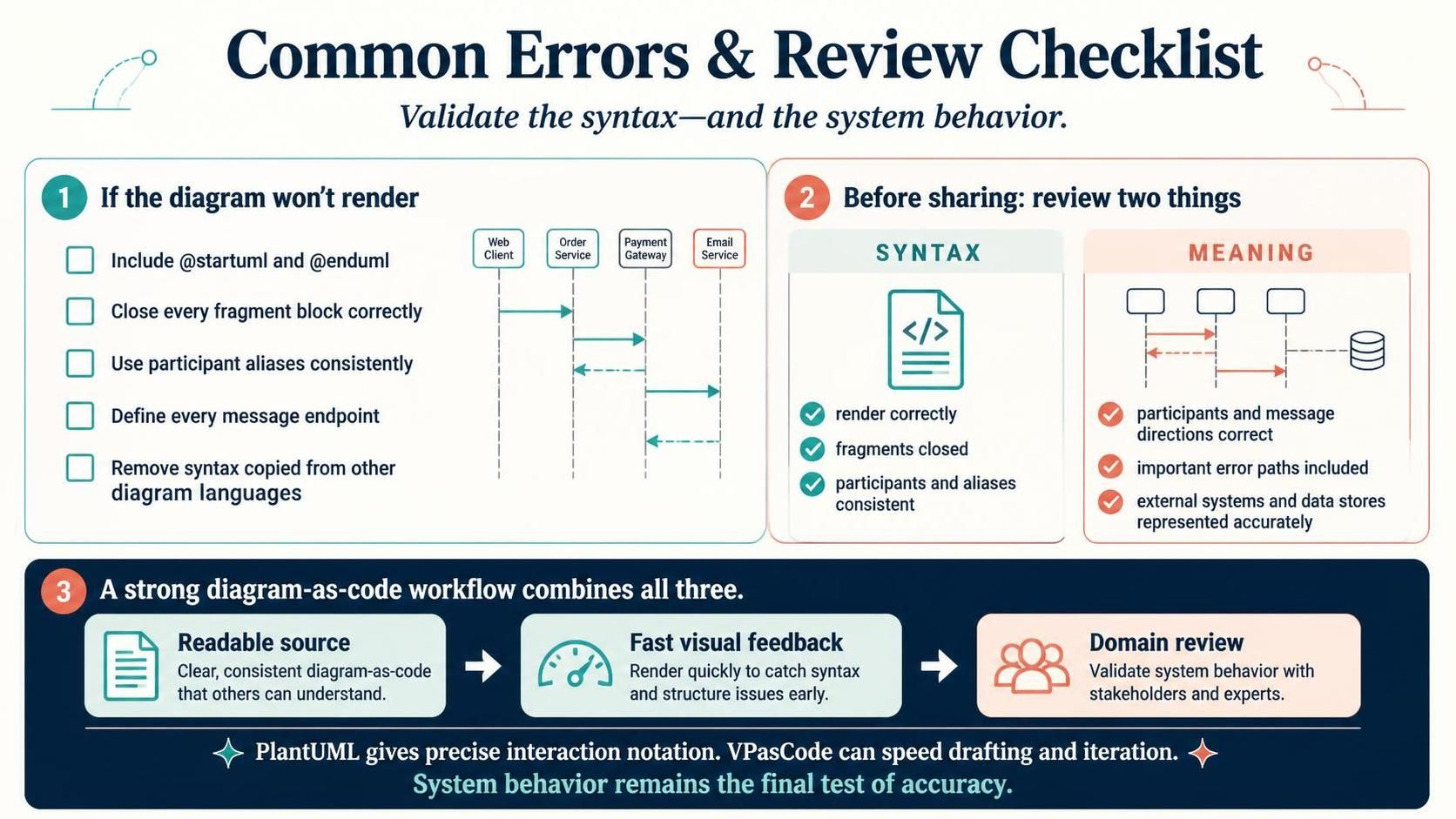
Creating effective system documentation requires more than just drawing boxes and arrows; it demands a rigorous approach to both syntax and semantics. In the modern software development landscape, tools like the Visual Paradigm AI Assisted VPasCode Editor combined with the robust PlantUML engine offer a powerful workflow for defining system interactions. However, the transition from text to visual model can sometimes introduce errors.
This tutorial walks you through the essential steps to validate your UML Sequence Diagrams, ensuring that your code is not only syntactically correct but also semantically accurate to the system behavior.
1. Troubleshooting Rendering Failures
When a diagram fails to render, the issue usually lies in the underlying code structure. Before assuming a tool malfunction, perform a systematic check of the source code to resolve common syntax errors.
- Check the Delimiters: Every PlantUML diagram must be explicitly wrapped in the
@startuml</code> and <code>@enduml - Validate Fragment Blocks: If you are using
opt(optional),alt(alternative), orloopblocks to represent logic, ensure every opening block has a corresponding closing statement. A missingendwill cause the entire rendering process to fail. - Ensure Alias Consistency: PlantUML allows you to define participants with aliases (e.g.,
actor A as User). Verify that you use the alias consistently throughout the diagram when referencing that participant. - Verify Message Endpoints: Check that every message arrow points to a participant that has been defined earlier in the code. Referencing an undefined object will result in a rendering error.
- Sanitize the Source: A frequent error occurs when syntax from other diagram languages (such as Mermaid.js or BPMN) is accidentally pasted into the PlantUML editor. Ensure your code strictly adheres to PlantUML syntax rules.
2. The Dual-Layer Review Checklist
Once your diagram renders successfully, the work is not done. You must validate the diagram on two distinct levels: Syntax and Meaning. This separation ensures that the visual output is both technically sound and logically accurate.
Checking Syntax (The “Can it Render?” Phase)
This phase is automated in many editors but requires manual verification for complex diagrams. Ask yourself:
- Does the diagram render without errors in the preview pane?
- Are all fragment blocks (loops, alt, opt) properly closed?
- Are participants and their aliases consistent throughout the file?
Checking Meaning (The “Does it Make Sense?” Phase)
This phase relies on your domain knowledge and the requirements of the system. It is critical to validate the logic of the interaction. Ask yourself:
- Are the participants and message directions correct? (e.g., Is the request sent from the Client to the Service?)
- Are important error paths included? (e.g., What happens if the payment fails?)
- Are external systems and data stores represented accurately? (Ensure database icons and third-party API lifelines are present where necessary.)
3. The Strong Diagram-as-Code Workflow
The most efficient workflow for creating high-fidelity system models combines three distinct elements: a readable source, fast visual feedback, and a thorough domain review.
Step 1: Readable Source
Start with clear, consistent diagram-as-code. By writing the logic in text, you create a source of truth that others can understand and version control. This clarity is essential for team collaboration.</p>Step 2: Fast Visual Feedback
Utilize the capabilities of tools like VPasCode to render quickly. The ability to catch syntax and structure issues early allows you to iterate faster without getting bogged down in manual drawing.
Step 3: Domain Review
Finally, validate the system behavior with stakeholders and experts. While tools provide precision, the final authority on a diagram’s accuracy is the actual system behavior it is meant to describe.
Conclusion
By adhering to a strict review checklist and understanding the distinction between syntax validity and semantic meaning, you can leverage the power of diagram-as-code to produce professional, accurate, and maintainable UML Sequence Diagrams. Remember, while VPasCode speeds up drafting and PlantUML provides notation precision, the ultimate test of your diagram’s quality is its ability to accurately reflect the system’s behavior.