
Mastering UML Sequence Diagrams with VPasCode and AI for Online Orders
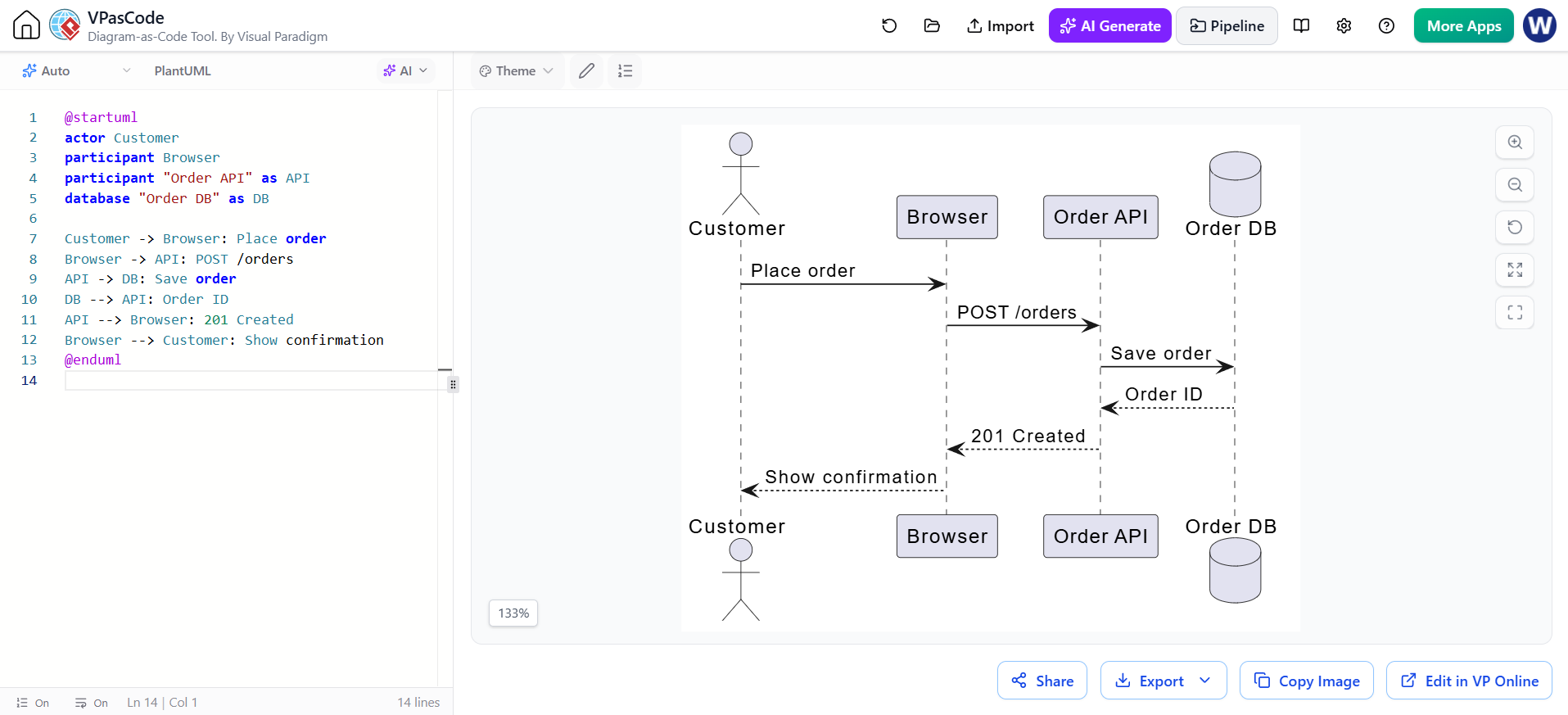
Understanding how software components interact over time is critical for system architects and developers. One of the most effective tools for visualizing these interactions is the UML Sequence Diagram. In this tutorial, we will walk through the architecture of an online order system, demonstrating how to model this flow using PlantUML within the Visual Paradigm AI Assisted VPasCode Editor.
The Power of “Diagram-as-Code”
Traditionally, creating sequence diagrams involves dragging and dropping shapes onto a canvas. While intuitive, this method often leads to layout issues and makes version control difficult. The approach shown here utilizes VPasCode, a tool that allows you to define your entire system architecture using simple text code. This “Diagram-as-Code” methodology offers several distinct advantages:
- Precision: You control the exact structure and flow of messages.
- Version Control: Diagram code is text-based, making it compatible with Git and easy to review in pull requests.
- Speed: Once you learn the syntax, typing a diagram is often faster than manually arranging boxes.
Deconstructing the Order System
Let’s analyze the system components defined in the code snippet. A sequence diagram relies on Participants—the entities that send or receive messages. The code defines four distinct participants, each serving a specific role in the Order Processing workflow.
1. Defining Participants
The diagram begins by declaring the actors and system components. The syntax allows for flexible naming and styling.
@startuml
actor Customer
participant Browser
participant "Order API" as API
database "Order DB" as DB
Notice the specific keywords used:
actor: Represents a human user or external system initiating the interaction (The Customer).participant: A general term for a system object or user interface element (The Browser).database: A specialized participant representing persistent storage (The Order DB).
The syntax as is particularly powerful. It allows you to provide a long, descriptive label for the visual display (e.g., “Order API”) while assigning a short alias (e.g., API) for use in the message arrows. This keeps the diagram clean while maintaining semantic clarity.
2. The Message Flow
Once participants are declared, we define the interactions. The flow of time in a sequence diagram moves from top to bottom. The arrows indicate the type of communication.
Customer -> Browser: Place order
Browser -> API: POST /orders
API -> DB: Save order
DB --> API: Order ID
API --> Browser: 201 Created
Browser --> Customer: Show confirmation
Here is a breakdown of the architectural logic:
- Synchronous Request:
Customer -> Browseris a solid line with a filled arrowhead, indicating a blocking action where the user waits for the UI to respond. - API Interaction: The Browser sends a specific HTTP method,
POST /orders, to the API. This models a RESTful architecture pattern. - Database Persistence: The API passes a request to the
Order DBtoSave order. - Asynchronous Return: Notice the return messages from the Database and the API to the Browser. These use dashed lines with open arrowheads (
-->). This indicates that the response is asynchronous or a return value, which is crucial for modeling non-blocking operations in web architectures.
Visualizing the Result
When this code is processed by VPasCode, it renders the complex interaction logic into a visual timeline. The resulting diagram clearly separates concerns:
- Frontend: The Browser handles the user’s Place order action.
- Backend: The API manages the business logic and the HTTP response code
201 Created. - Data Layer: The DB ensures the Order ID is generated and persisted.
By mastering this text-based approach, you can rapidly prototype system flows, document API contracts, and communicate complex logic to your team without the overhead of graphical editors.