
Mastering UML Sequence Diagrams: The Poke Player Betting Flow
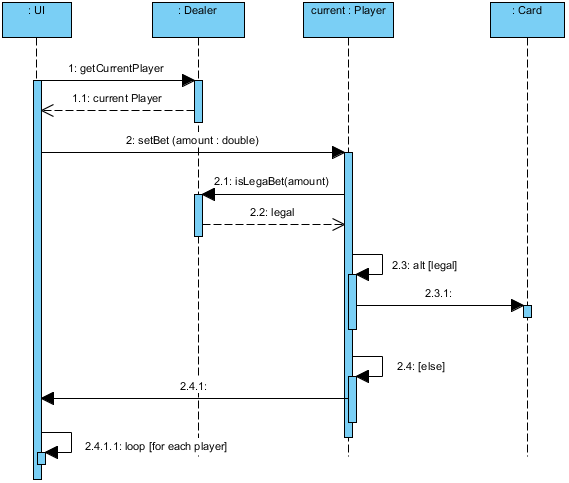
In the world of software engineering, few diagrams are as dynamic and descriptive as the Sequence Diagram. While use cases tell us what a system does, sequence diagrams reveal how the system behaves over time. The diagram provided illustrates a specific interaction flow known as the “Poke Player (Betting Round)”. This scenario is critical in gaming applications, specifically managing the logic of a player placing a bet, validating that bet, and updating the game state.
This tutorial will deconstruct this architecture, analyzing the participants, the message flow, and the logical control structures (Alt and Loop fragments) that make the system robust.
1. Understanding the Participants (Lifelines)
At the top of the diagram, we see four distinct lifelines. These represent the objects or actors involved in the interaction. In a typical Object-Oriented (OO) design, these are often classes or components.
- : UI (User Interface): The entry point for this interaction. This is likely the front-end component where the player clicks the “Bet” button. It acts as the controller for the sequence.
- : Dealer: A backend service or object responsible for managing the game state. In this specific diagram, it seems to act as a gateway or a manager that retrieves the current active player.
- current : Player: This represents the specific instance of the Player object currently involved in the betting round. The “current” label suggests this is an instance variable or a reference to the active entity.
- : Card: An auxiliary object involved in the validation logic, likely checking if the player’s hand or current state allows for a specific bet type.
2. The Message Flow: Step-by-Step
The vertical axis of the diagram represents time. The flow moves from top to bottom, illustrating the chronological order of events.
Step 1: Retrieving the Active Player
The sequence begins with the : UI sending a message to the : Dealer:
1: getCurrentPlayer()The : Dealer processes this and returns the result (Message 1.1):
1.1: current PlayerAnalysis: Notice the use of a dashed line for message 1.1. In UML, this indicates a return message. The UI now holds a reference to the player object and is ready to proceed.
Step 2: Initiating the Bet
Once the UI has the player object, it sends a command to place a bet:
2: setBet (amount : double)This message triggers a long activation bar (the blue rectangle) on the current : Player lifeline. This indicates that the player object is “active” and performing processing logic for the duration of the bet.
3. Logic Control Structures
Complex systems rarely follow a single linear path. They require decision points. The diagram utilizes two powerful UML features: Alt (Alternative) and Loop (Iteration).
The Alternative Fragment (Alt)
Before committing to the bet, the system must validate it. This is shown in the 2.3: alt [legal] frame.
- Validation Check: The Player calls
2.1: isLegaBet(amount)on a : Card object. This suggests a check against the current cards held by the player to ensure the bet amount is valid. - Branching Logic:
- Top Branch (Condition: [legal]): If the bet is valid, the system executes
2.3.1(the arrow pointing to the right). This likely represents a successful state update or a notification to the Dealer. - Bottom Branch (Condition: [else]): If the bet is not legal (e.g., insufficient funds or invalid hand), the system executes
2.4: [else]. The arrow points back to the : UI, indicating an error message is sent back to the user.
- Top Branch (Condition: [legal]): If the bet is valid, the system executes
The Loop Fragment
At the bottom of the diagram, we see 2.4.1.1: loop [for each player]. This indicates that if the validation logic requires iterating over multiple entities (perhaps notifying all players of the result or processing a multi-hand scenario), the system will repeat the enclosed steps for every player in the current game session.
4. Technical Implementation with Visual Paradigm
To recreate this architecture efficiently, engineers often rely on Model-Driven Development (MDD) tools. Visual Paradigm is a leading tool for creating these UML diagrams, offering a seamless transition from design to code generation.
Why Visual Paradigm for Sequence Diagrams?
Visual Paradigm allows developers to visualize the “Poke Player” scenario with precision. Its drag-and-drop interface handles the complex activation bars and message arrows automatically, ensuring that the syntax adheres to the UML 2.5 standards.
When modeling the Alt and Loop fragments shown in this diagram, Visual Paradigm provides a graphical editor for the conditions (like [legal] and [else]). This ensures that the logic is clearly defined and can be easily exported into code skeletons or test cases.
Conclusion
The “Poke Player (Betting Round)” sequence diagram is a textbook example of state validation in a gaming application. By separating the concerns of the UI, the Dealer, and the Player, the architecture ensures that a bet is not processed until it is validated against the game state (the cards). The use of Alt fragments for error handling and Loop fragments for batch processing demonstrates a mature, scalable design approach.
By understanding these diagrams, developers can not only visualize the flow but also identify potential bottlenecks—such as the synchronous call to isLegaBet—before writing a single line of production code.