
Mastering UML Sequence Diagrams: A Step-by-Step Guide to Modeling an Order Process with Visual Paradigm
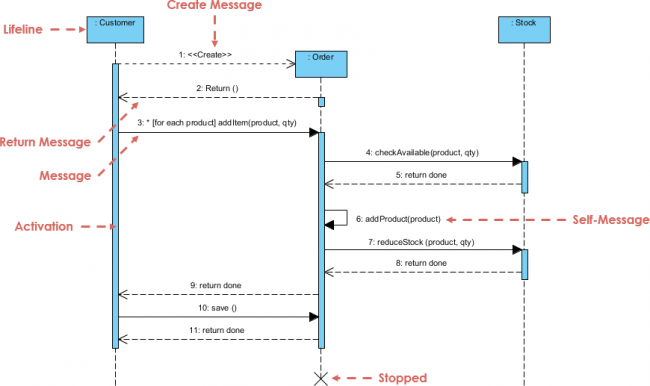
In the world of software engineering, communication is key. Before writing a single line of code, developers and stakeholders must agree on how different parts of a system interact. One of the most powerful tools for visualizing these interactions is the UML Sequence Diagram. In this tutorial, we will break down a complex interaction flow involving a Customer, an Order system, and a Stock management module.
Using the industry-standard tool Visual Paradigm, we will analyze this diagram to understand how dynamic behavior is modeled, how messages are passed, and how system lifecycles are managed.
Understanding the Core Components
A sequence diagram is essentially a timeline of interactions. It focuses on the time ordering of messages. To read the diagram effectively, we first need to identify its building blocks:
1. Lifelines and Participants
At the top of the diagram, you will see rectangles labeled Customer, Order, and Stock. These are the Participants (or Objects) in our system. Below each participant is a vertical dashed line called the Lifeline. This line represents the existence of the object over time. If you look closely at the diagram, the lifelines continue until the very end, indicating that these objects persist throughout the entire process.
2. Activation Bars (Execution Occurrences)
On the vertical lines, you will notice thin blue rectangles. These are called Activation Bars. An activation bar represents a period during which the object is performing an action or is actively executing a method. For example, the Order object has an activation bar when it is processing the customer’s request, and the Stock object has an activation bar when it is checking availability.
3. Messages
The horizontal arrows connecting the lifelines represent Messages. These are the calls or requests passed between objects. The arrows are numbered (1, 2, 3…) to indicate the chronological order of events.
Analyzing the Interaction Flow
Let’s walk through the logic of the diagram step-by-step. This specific scenario models an order placement process.
Step 1: Initialization and Return
The process begins when the Customer initiates a Create action. The diagram shows a message labeled 1: <<Create>> pointing to a new object Order. This creates a new instance of the Order class. Immediately after, the Order object responds with 2: Return (), signaling that it has been successfully instantiated and is ready for use.
Step 2: Iterative Processing
The next message is crucial for understanding complex logic:
3: * [for each product] addItem(product, qty)This arrow contains a specific notation. The symbol indicates a Loop or iteration. The text [for each product] clarifies that the addItem method will be called multiple times, once for every product the customer wants to buy. This is a powerful feature of UML, allowing us to model repetitive logic without drawing hundreds of arrows.
Step 3: Internal Logic and Self-Message
Once an item is added, the system must verify stock. The Order sends a message 4: checkAvailable(product, qty) to the Stock object. The Stock object validates the request and sends back a confirmation 5: return done.
Notice the arrow labeled 6: addProduct(product) that loops back to the Order object itself. This is a Self-Message (or self-call). It indicates that the Order object is performing an internal operation or updating its own state after receiving confirmation from the Stock system.
Step 4: Finalizing the Transaction
The process concludes with a series of return messages and a final action. The Stock system confirms the reduction of inventory with 8: return done. Finally, the Customer triggers a 10: save() operation on the Order object. This likely persists the order data to a database. The diagram ends with a large ‘X’ at the bottom of the lifelines, labeled Stopped, indicating that the interaction has terminated and the objects may be destroyed or the session closed.
Advanced Modeling Features in Visual Paradigm
Visual Paradigm provides a rich set of features to create these diagrams. Here is how the specific elements in this tutorial are utilized:
- Combined Fragments: The loop notation (
[for each product]) is part of a Combined Fragment. This allows you to define the scope of a specific behavior like a loop, an optional block, or an alternative choice. - Message Types: The diagram uses both solid arrows (synchronous calls) and dashed arrows (asynchronous returns). Visual Paradigm makes it easy to switch between these types to accurately reflect the timing and blocking behavior of your system.
Conclusion
Understanding sequence diagrams is vital for designing robust software. By breaking down the flow into distinct messages, activations, and lifecycles, we can spot potential issues—like deadlocks or unhandled exceptions—before the code is even written. With Visual Paradigm, creating these diagrams is intuitive, allowing you to focus on the logic of your system rather than the drawing process.