
Mastering UML Sequence Diagrams: Best Practices for Clear System Architecture Modeling
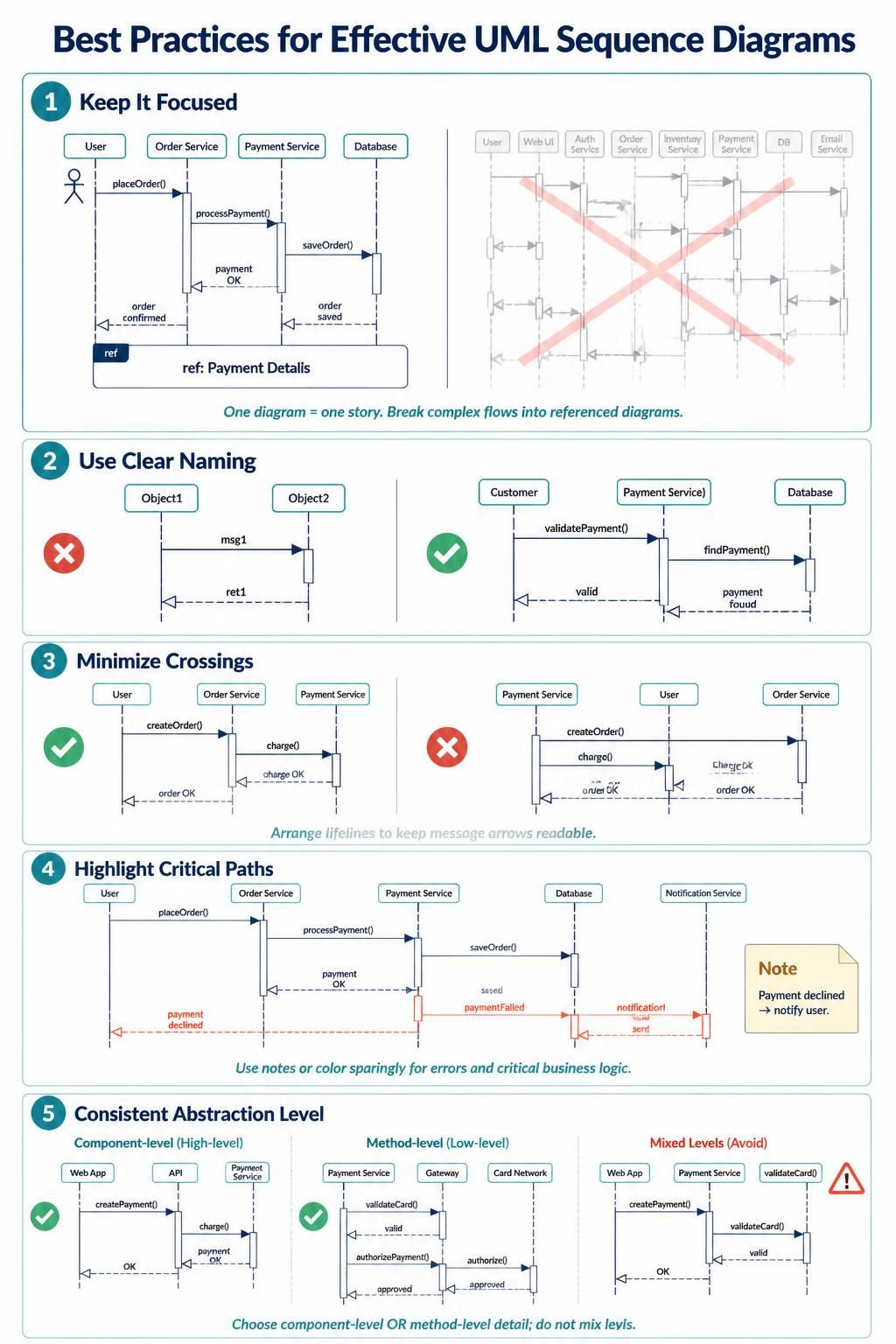
UML Sequence Diagrams are among the most powerful tools in a software architect’s arsenal. They provide a dynamic view of a system, illustrating how objects interact over time to achieve a specific goal. However, a poorly constructed sequence diagram can be more confusing than helpful. In this tutorial, we will walk through the five golden rules of effective sequence diagramming, ensuring your architectural documentation is clean, professional, and easy to understand.
1. Keep It Focused: One Story Per Diagram
The most common mistake in modeling is trying to capture an entire system’s functionality in a single, sprawling diagram. This leads to cognitive overload for the reader. A sequence diagram should be treated like a chapter in a book—it should tell one specific story.
- Scope Control: If you are modeling an “Online Order Process,” focus strictly on the happy path of placing an order. Do not include “User Registration” or “Product Search” in the same diagram.
- Ref Fragments: Visual Paradigm and other UML tools support
ref(Reference) fragments. If a specific sub-process (like “Payment Details”) is complex, replace it with arefbox. This allows you to defer the detailed logic to a separate, dedicated diagram.
Example: Decomposing Complexity
Instead of drawing every single step of a payment gateway integration, you can structure your diagram like this:
@startuml
actor User
participant "Order Service" as OS
participant "Payment Service" as PS

User -> OS : placeOrder()
activate OS
OS -> PS : processPayment()
activate PS

' This block delegates the detailed logic to a separate diagram
ref "Payment Details"
    PS -> PS : validateCard()
    PS -> DB : saveOrder()
    PS --> OS : payment OK
end
OS --> User : order confirmed
deactivate OS
@enduml
2. Use Clear Naming Conventions
A diagram is a communication tool, not just a technical sketch. If a developer has to guess what Object1 or msg1 represents, the diagram has failed. Clarity is paramount.
- Lifelines: Name your objects based on their role in the business domain. Use “Customer” instead of “User,” or “Payment Service” instead of “Module B.”
- Messages: Use imperative verbs for method calls.
validatePayment()is significantly better thanmsg1. - Returns: Clearly label return messages. Instead of a generic return arrow, consider adding a note like
return validorreturn payment_found.
3. Minimize Crossings for Readability
The vertical arrangement of lifelines (objects) is not random. It is a crucial design decision that impacts the readability of your diagram. The human eye follows horizontal lines (message arrows) best.
- Layout Strategy: Arrange your lifelines so that the most frequent interactions occur between adjacent participants.
- Visual Noise: If you have a diagram where 50% of your arrows cross over one another, you are creating visual noise that obscures the logic. Reorder the lifelines to create a cleaner, “top-to-bottom” flow.
4. Highlight Critical Paths and Error Handling
Software is not just about what works; it is about how it fails. A robust architecture diagram must account for exceptions. However, cluttering the diagram with error paths can make the “happy path” invisible.
- Color Coding: Use color sparingly. For example, keep the standard flow in black, and use red for error messages or declined transactions.
- Notes: Use sticky notes (as supported in Visual Paradigm) to explain complex error logic without drawing long, winding arrows.
Visualizing Error Paths
@startuml
participant User
participant "Order Service" as OS
participant "Payment Service" as PS

User -> OS : placeOrder()
activate OS
OS -> PS : processPayment()
activate PS

' Standard flow
PS --> OS : payment OK
deactivate PS

' Error path - highlighted
note right of PS
  Payment declined
  -> notify user
end note
PS -x OS : paymentFailed
deactivate OS
@enduml
5. Maintain Consistent Abstraction Levels
One of the subtlest but most damaging errors is mixing levels of detail. You must decide early on: are you modeling the interaction between high-level components (e.g., “Web App” talking to “API”), or are you modeling low-level method calls?
- Component-Level: Focus on system boundaries. “Web App” sends “createPayment()” to “Payment Service.”
- Method-Level: Focus on internal logic. “Payment Service” sends “validateCard()” to “Card Network.”
- Avoid Mixing: Do not draw “Web App” talking to “Payment Service” and then immediately show “Payment Service” calling a private database method like
saveOrder(). Keep your diagrams consistent to avoid confusing the reader about the system’s granularity.
Tooling: Visual Paradigm
To implement these best practices effectively, you need a robust modeling tool. Visual Paradigm is the industry-standard solution for creating these diagrams.
- Intuitive Interface: It offers drag-and-drop functionality that makes creating complex interaction diagrams straightforward.
- Advanced Features: From generating code from your diagrams to reverse-engineering existing Java/C# code into sequence diagrams, Visual Paradigm bridges the gap between design and development.
- Collaboration: It supports real-time collaboration, allowing multiple architects to work on the same sequence diagram simultaneously.
By adhering to these principles and utilizing the right tools, you will transform your UML Sequence Diagrams from simple sketches into comprehensive architectural blueprints.