
Mastering BPMN Sub-Processes: A Deep Dive into Loop Semantics
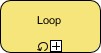
In the world of Business Process Model and Notation (BPMN), clarity is paramount. When modeling complex workflows, we often need to encapsulate a group of activities into a single, manageable unit. This is achieved using a Sub-Process. However, not all sub-processes are created equal. Some run once, while others repeat. Understanding the Loop Marker is essential for accurately modeling repetitive business logic within a streamlined visual diagram.
This tutorial explores the semantics, architecture, and practical implementation of the BPMN Loop Sub-Process using Visual Paradigm.
Understanding the Loop Marker
A standard Sub-Process is essentially a container that hides the complexity of the internal flow. By default, the entire block is treated as a single activity that executes once. When a process needs to repeat a specific set of steps, adding a sub-process is far cleaner than drawing a long loop of sequence flows with explicit gateways.
The Loop Marker is a specific indicator located at the bottom of the sub-process rectangle. It visually signals to the reader and the engine that this container is not a one-time event. Instead, it represents a sequence of iterations.
Visual Identification:
- Shape: A rectangle with rounded corners (standard for collapsed sub-processes).
- Iconography: A circular arrow icon accompanied by a small square containing a plus sign (+).
- Placement: Centered at the bottom edge of the activity box.
Execution Semantics: How the Loop Works
From a technical execution standpoint, the Loop Sub-Process functions as a “while” or “do-while” block in programming. When the process flow reaches this sub-process, the engine enters the internal scope.
- Entry: The flow enters the sub-process.
- Execution: The activities inside the sub-process are executed.
- Iteration Check: Upon completion of the internal flow, the engine checks the exit condition.
- Repeat or Exit:
- If the condition is met (or if no condition is explicitly defined, depending on the tool’s default behavior), the flow exits the sub-process.
- If the condition dictates a repeat, the flow loops back to the start of the sub-process.
Architecture: Visual Paradigm Implementation
Visual Paradigm (VP) provides a robust environment for defining these logical structures. To model a Loop Sub-Process effectively, you must understand how the tool interprets the marker.
Configuration Steps in Visual Paradigm
To create a Loop Sub-Process in Visual Paradigm, you do not simply drag and drop the icon. You must configure the behavior properties to ensure the engine knows how to handle the repetition.
- Create the Sub-Process: Drag a
Sub-Processelement from the palette onto your canvas. - Apply the Loop Marker:
Right-click the Sub-Process > Select 'Loop' marker. Alternatively, in the 'Diagram Properties' toolbar, look for the 'Loop' icon. - Define the Iteration Logic: The marker alone tells the story of “repetition,” but Visual Paradigm allows you to define when it stops.
1. Double-click the Loop Sub-Process to open the Diagram Editor.
2. Open the 'Properties' view (usually on the right side).
3. Locate the 'Behavior' or 'Loop' tab.
4. Set the 'Loop Condition' (e.g., 'While Count < 5').
5. Define the 'Iteration Variable' (e.g., 'i = 1').
The following diagram snippet illustrates the logical structure of a Loop Sub-Process in BPMN XML notation, which Visual Paradigm generates internally:
<subProcess id="LoopSubProc" isClosed="false">
  <extensionElements>
    <loopMarker>Loop</loopMarker>
  </extensionElements>
  <!-- Sequence flows and tasks inside the loop -->
</subProcess>
Best Practices for Loop Modeling
While powerful, Loop Sub-Processes can introduce complexity if not used correctly. Here are architectural guidelines to ensure your models remain readable and executable.
- Avoid Infinite Loops: Always ensure a termination condition is defined. Without a specific exit condition (like a counter or a boolean flag), the process will run indefinitely, causing system errors.
- Keep Internal Logic Simple: If the sub-process contains a complex decision tree that requires multiple exit points, a standard sequence flow with gateways might be clearer than a single Loop Sub-Process.
- Variable Scope: In Visual Paradigm, be mindful of variable scope. Variables defined inside the loop may not be accessible outside unless explicitly mapped to the parent process scope.
Conclusion
The Loop Sub-Process is a fundamental building block for modeling iterative business scenarios. By leveraging the Loop marker, you transform a static process diagram into a dynamic representation of real-world repetition. Using Visual Paradigm’s specialized tools, you can define the logic, constraints, and behaviors of these loops with precision, ensuring your models are both visually intuitive and technically accurate.