
Mastering AI-Assisted Sequence Diagrams with VPasCode and Visual Paradigm
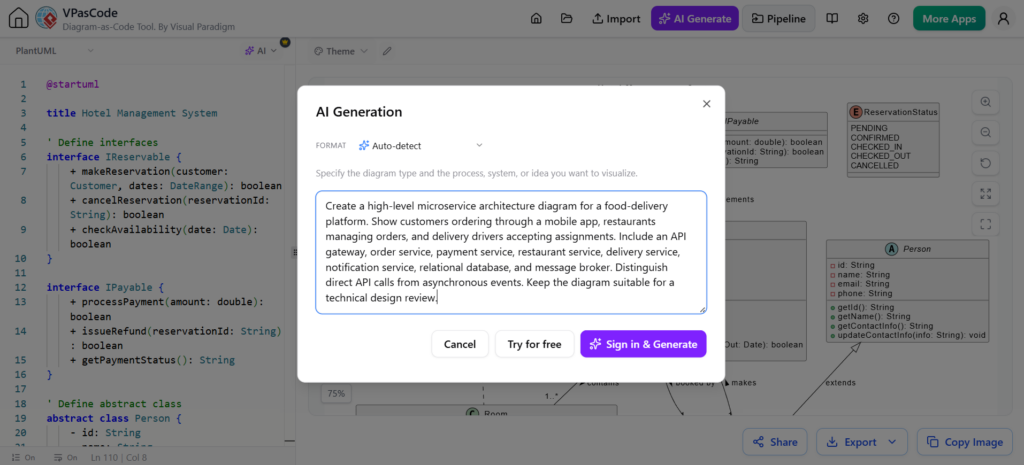
In modern software development, visualizing system interactions is as critical as writing the code itself. However, manual diagramming can be time-consuming and prone to inconsistency. This is where VPasCode, an advanced diagramming tool by Visual Paradigm, transforms the workflow. By integrating AI capabilities, VPasCode allows developers to describe complex system behaviors in natural language and instantly generate high-fidelity code for review and editing.
This tutorial explores how to leverage VPasCode’s AI features to create professional Sequence Diagrams, specifically focusing on a common industry-standard scenario: OAuth 2.0 Authentication.
Understanding the Core Concept: Sequence Diagrams
Before diving into the tool, it is essential to understand what we are building. A Sequence Diagram is a type of interaction diagram in UML (Unified Modeling Language). It emphasizes the time ordering of messages exchanged between objects or components.
Key elements include:
- Lifelines: The vertical dashed lines representing the participants (e.g., User, Server, Database).
- Messages: Arrows representing the flow of data or control.
- Activation Bars: Rectangles on the lifeline indicating when an object is active or processing a request.
Step-by-Step: Generating an OAuth 2.0 Diagram
VPasCode utilizes a text-to-diagram approach. Instead of dragging and dropping boxes, you provide a prompt that describes the architecture. The AI then generates the underlying code (often PlantUML or Mermaid), which renders the diagram.
1. The Input Prompt
To achieve accurate results, your prompt must be specific about the participants and the flow. Consider the following scenario: A user attempts to sign in using OAuth 2.0. The system must involve a browser, an identity provider, an authorization server, an application server, and a database.
A robust prompt for VPasCode would look like this:
Create a sequence diagram for a user signing in with OAuth 2.0. Include the browser, identity provider, authorization server, application server, and database.
2. The AI Generation Process
When you submit this prompt to the VPasCode editor, the AI analyzes the request and constructs the structural code. It understands that OAuth 2.0 involves specific steps: redirection to the provider, token exchange, and user validation.
3. Analyzing the Output
The AI generates a diagram code that includes:
- Participants: Distinct lifelines for the Browser, Identity Provider, Authorization Server, Application Server, and Database.
- Message Flows: The sequence of redirects and API calls.
- Authentication Steps: The specific handshake required for OAuth 2.0.
- Conditional Branches: Handling of success vs. failure states.
Code Structure: What the AI Produces
VPasCode typically outputs standard PlantUML syntax. Below is a representation of the structured logic the AI might generate based on the prompt above. This code defines the “contract” of the interaction.
@startuml
title OAuth 2.0 Authentication Sequence Diagram

participant "Browser" as Browser
participant "Identity Provider" as IdP
participant "Authorization Server" as AuthServer
participant "Application Server" as AppServer
participant "Database" as DB

Browser -> AuthServer: 1. GET /authorize (client_id, redirect_uri)
AuthServer -> IdP: 2. Redirect to Login Page
IdP --> Browser: 3. User Credentials
Browser -> IdP: 4. POST Login
IdP --> Browser: 5. Authorization Code
Browser -> AuthServer: 6. POST Code + Client Secret
AuthServer -> AppServer: 7. Verify Code
AuthServer -> DB: 8. Validate User
DB --> AuthServer: 9. User Record
AuthServer -> AppServer: 10. Access Token
AppServer -> AuthServer: 11. Validate Token (Optional)
AuthServer --> AppServer: 12. Token Status
AppServer --> Browser: 13. Redirect to App (with Token)
@enduml
Best Practices: The “First Draft” Philosophy
It is crucial to view the AI-generated result as a first draft. While VPasCode is powerful, it does not have visibility into your specific internal business logic. Developers must perform a rigorous review of the generated diagram.
When reviewing the output, ask the following questions:
- Does the flow reflect the actual system? Does your specific implementation use PKCE (Proof Key for Code Exchange)? If so, the AI might have missed that specific step.
- Are security assumptions correct? Ensure that the diagram shows tokens being passed securely (e.g., via HTTPS) and not exposed in URL parameters where possible.
- Is the detail level appropriate? Does the diagram contain unnecessary noise, or is it abstracting the complexity correctly for a high-level design review?
Conclusion
By utilizing VPasCode’s AI-assisted diagram generation, teams can drastically reduce the time spent on documentation. The ability to describe a system in natural language and receive a structured, editable sequence diagram empowers developers to focus on system architecture and logic rather than the mechanics of drawing lines.