
Visual modeling is a cornerstone of software design and system analysis. Among the many tools available, the Unified Modeling Language (UML) stands out as the standard for communicating complex logic. Within this suite of diagrams, the Activity Diagram is often misunderstood. Many professionals avoid it, assuming it is too technical or time-consuming. This hesitation stems from common misconceptions that cloud judgment.
It is time to clear the fog. The reality is that activity diagrams are straightforward visual representations of workflows. They map out the dynamic behavior of a system without requiring deep coding knowledge. By understanding the core mechanics, you can leverage them to clarify processes, identify bottlenecks, and align teams. This guide strips away the confusion and presents a practical approach to using these diagrams effectively.
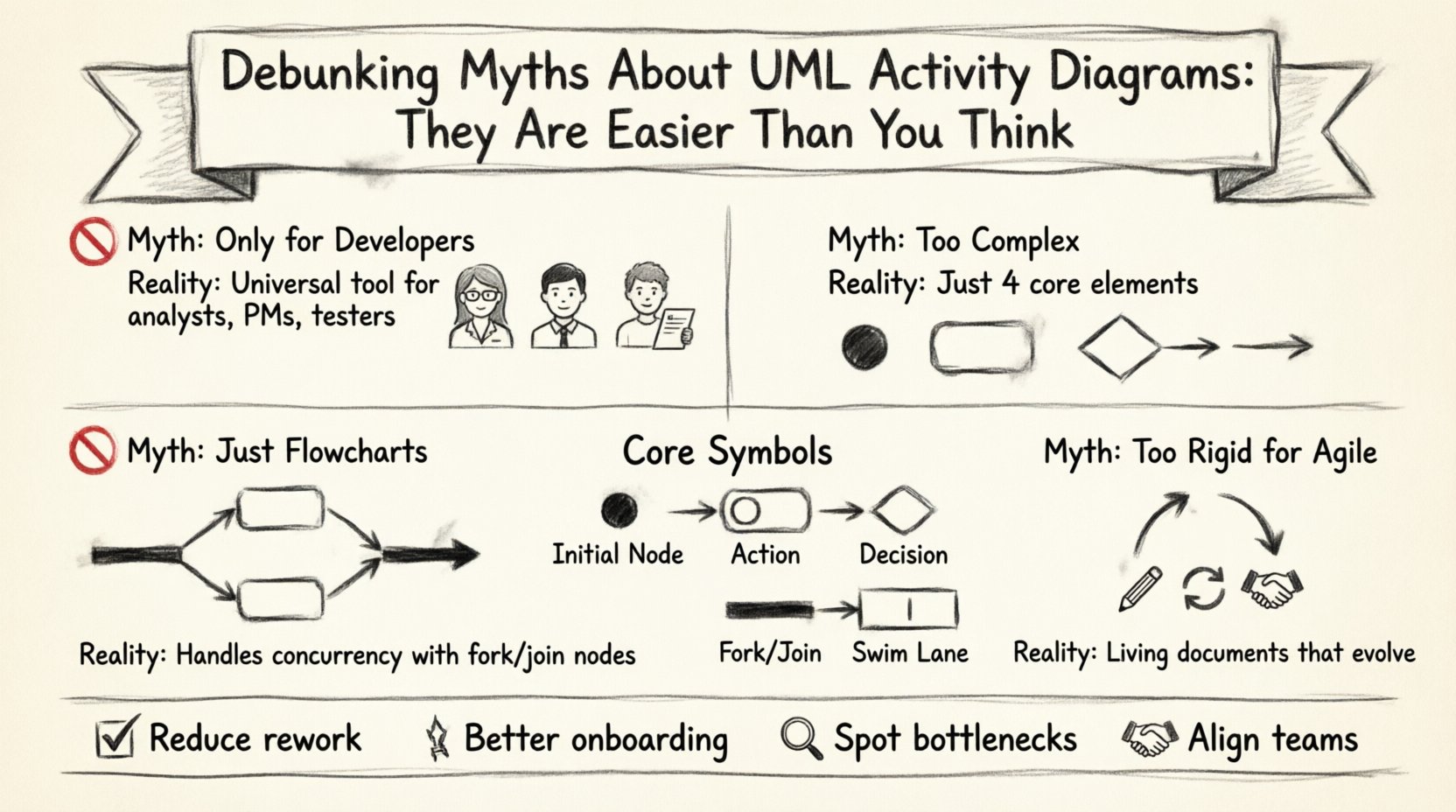
🛑 Myth 1: Activity Diagrams Are Only for Developers
One of the most persistent misconceptions is that these diagrams are exclusively for software engineers. While developers certainly use them to design algorithms, their utility extends far beyond the code editor. They serve as a universal language for business analysts, project managers, and stakeholders.
- Business Process Mapping: Non-technical teams use them to document standard operating procedures. This ensures everyone understands the workflow before implementation begins.
- Stakeholder Communication: A visual flow is often easier to grasp than a written requirement document. It bridges the gap between technical constraints and business goals.
- Testing Scenarios: Testers rely on these diagrams to derive test cases. They provide a clear path to follow when verifying system behavior under different conditions.
When you view the diagram as a communication tool rather than a coding specification, the intimidation factor drops significantly. It becomes a map for collaboration, not a blueprint for syntax.
🛑 Myth 2: They Are Too Complex to Draw Quickly
Another barrier is the fear of complexity. People imagine needing to master dozens of obscure symbols to create a valid diagram. In truth, a functional activity diagram relies on a small subset of notation. You do not need to be a UML expert to create value.
Most diagrams consist of just a few core elements:
- Actions: Representing a step in the process.
- Decisions: Indicated by diamonds, showing where the path splits based on a condition.
- Flows: Arrows connecting actions to show direction.
- Start/End Nodes: Defining the boundaries of the workflow.
Advanced features like object flows and swim lanes exist, but they are optional enhancements. Starting with a basic flowchart-like structure is perfectly acceptable. You can add detail as the project evolves. Perfection is not required at the initial stage; clarity is.
🛑 Myth 3: They Replace Flowcharts Entirely
Some assume that activity diagrams are just fancy flowcharts and that using one means abandoning the other. While they share similarities, there is a distinct difference in scope and capability.
A standard flowchart often depicts a linear process with simple inputs and outputs. An activity diagram is more robust. It handles concurrency, which is a critical aspect of modern software systems. It can show multiple threads of activity happening simultaneously. This is a feature that traditional flowcharts struggle to represent accurately.
Consider a banking transaction system. A simple flowchart might show a user requesting money, the system checking funds, and the transfer completing. An activity diagram can simultaneously show the system logging the event, sending a notification email, and updating the ledger. These parallel processes are modeled using fork and join nodes.
🛑 Myth 4: They Are Static and Useless for Agile
In fast-paced environments, documentation is sometimes viewed as a hindrance. The belief is that activity diagrams are too rigid to change. This is a false dichotomy. They are meant to be living documents that evolve with the system.
- Iterative Refinement: You can start with a high-level overview and refine the details in subsequent sprints.
- Dynamic Updates: When a requirement changes, the diagram updates. It does not require a complete rewrite.
- Visual Regression Testing: The diagram serves as a visual regression test. If the actual flow deviates from the diagram, it signals a potential issue.
Agile teams use them as lightweight artifacts. They are not meant to be exhaustive 100-page manuals. They are quick sketches to aid discussion and alignment.
🔍 Core Components of an Activity Diagram
To build a diagram, you must understand the vocabulary. Below is a breakdown of the essential notation elements.
| Symbol | Shape | Function |
|---|---|---|
| Initial Node | Filled Circle | Starts the activity. There should be only one per diagram. |
| Final Node | Double Filled Circle | Ends the activity. Signals successful completion. |
| Action State | Rounded Rectangle | Represents a task or operation. Contains the name of the activity. |
| Control Flow | Arrow | Directs the sequence of actions from one to another. |
| Decision Node | Diamond | Branches the flow based on a condition. Requires labels (e.g., Yes/No). |
| Fork/Join Node | Thick Line | Splitting or merging concurrent flows. Used for parallel processing. |
| Swim Lane | Partitioned Area | Categorizes actions by responsible actor or system component. |
Understanding these shapes allows you to construct logical representations of any process. The standard is consistent across the industry, ensuring that anyone trained in the language can read your work.
📝 How to Construct a Diagram Step-by-Step
Creating a diagram does not require a formal methodology. Follow these practical steps to get started.
1. Define the Scope
Start by identifying what you are modeling. Is it a user login process? A data export function? A customer onboarding flow? Defining the boundary prevents the diagram from becoming overwhelming.
2. Identify the Actors
Determine who or what performs each action. In a complex system, this might involve users, external APIs, internal services, or databases. Grouping these into swim lanes provides immediate clarity on responsibility.
3. Map the Primary Flow
Draw the happy path first. This is the sequence of actions that leads to success without errors. Ignore edge cases for now. Get the main logic down on paper.
4. Add Decision Points
Once the main path is clear, insert the decision nodes. Where does the system need to make a choice? What conditions must be met to proceed? Label the outgoing flows clearly to avoid ambiguity.
5. Handle Concurrency
If multiple tasks happen at the same time, use fork and join nodes. This is crucial for systems that must perform background tasks while waiting for user input.
6. Review and Refine
Walk through the diagram logically. Does every path lead to a final node? Are there dead ends? Is the flow intuitive? This review phase is often more valuable than the drawing phase itself.
🚫 Common Mistakes to Avoid
Even with the right knowledge, errors can creep in. Being aware of common pitfalls helps maintain the integrity of your models.
- Too Much Detail: Including every single database query or error handling routine can clutter the diagram. Focus on the high-level logic. Detail belongs in code or separate specifications.
- Crossed Lines: A diagram should be readable. If lines cross excessively, it becomes a tangled web. Use orthogonal routing or swim lanes to keep it clean.
- Missing Labels: Every decision branch needs a label. Leaving a path unlabeled leaves the reader guessing the condition.
- Ignoring Exceptions: While you don’t need every error case, you must show where the process fails. A path that leads nowhere is confusing.
- Inconsistent Notation: Stick to one style. Do not mix hand-drawn symbols with standard shapes. Consistency aids comprehension.
💡 Advanced Techniques for Complex Systems
As you gain proficiency, you can introduce more advanced concepts to handle sophisticated scenarios.
Object Flows
While control flow shows the order of events, object flow shows the data moving between activities. This is useful when you need to track the state of an entity throughout the process. For example, a document moving from “Draft” to “Review” to “Published”.
Exception Handling
Systems rarely run perfectly. You can model exception handling using specific nodes or by creating parallel paths for error recovery. This shows that the system is robust and prepared for failure.
Subgraphs
For very large processes, breaking them down into subgraphs is essential. You can define a specific activity that calls another diagram. This modular approach keeps the main diagram manageable while retaining detailed logic in separate files.
🤝 Collaboration and Maintenance
One of the greatest benefits of activity diagrams is their role in team alignment. They are not created in a vacuum. They require input from various roles to be accurate.
Workshops
Conducting a diagramming workshop can be highly effective. Gather stakeholders in a room (or virtual space) and draw the process together. This real-time collaboration often reveals gaps in understanding immediately.
Living Documents
Keep the diagram accessible. If it is stored in a locked repository, it will become outdated. Use version control or collaborative platforms where changes are tracked and visible to the team.
Feedback Loops
Encourage feedback. If a developer finds the diagram does not match the implementation, update the diagram. If a tester finds a missing path, add it. The diagram must reflect the reality of the system.
📊 Benefits of Clarity
Why invest the time? The return on investment comes from reduced ambiguity. When everyone sees the same flow, there is less room for misinterpretation. This leads to fewer bugs, faster development cycles, and smoother deployments.
- Reduced Rework: Catching logic errors early saves time during coding.
- Better Documentation: The diagram serves as a reference for future maintenance.
- Onboarding: New team members can understand the system logic quickly.
- Gap Analysis: It is easy to spot missing steps or redundant processes.
🎯 When to Use Them
You do not need a diagram for every feature. Use your judgment. Here are scenarios where they are most valuable.
- Complex Workflows: When logic involves multiple steps and conditions.
- Inter-System Communication: When data moves between different services or applications.
- State-Heavy Processes: When the status of an item changes frequently.
- Performance Analysis: When you need to identify bottlenecks in a sequence of operations.
For simple, linear tasks, a list of steps might suffice. But once branching and concurrency enter the picture, a visual model becomes indispensable.
🔚 Wrapping Up
The barriers to using activity diagrams are mostly psychological. They appear complex because they look technical, but they are fundamentally about logic and flow. By demystifying the notation and focusing on the core purpose, you can integrate them into your workflow without the stress.
Start small. Map a simple process. Add a decision node. Introduce a swim lane. As you become comfortable, the diagrams will naturally expand to meet your needs. They are tools to aid thinking, not obstacles to hinder it. With the right approach, you can create clear, actionable models that drive success in your projects.
Remember, the goal is clarity. If the diagram helps you understand the system better, it has done its job. Do not let perfectionism stop you from drawing. Iterate, refine, and communicate. The path to better design is paved with clear visuals.