
Designing complex systems requires more than just drawing boxes and arrows. It demands a structured approach to modeling behavior that can grow alongside the software itself. When you construct UML activity diagrams without modularity, the visual model becomes a tangled web that is difficult to understand, maintain, or update. This guide explores the architectural principles behind creating reusable components within activity diagrams to support scalable systems. We will focus on techniques that enhance clarity, reduce redundancy, and facilitate long-term maintenance without relying on specific tooling.
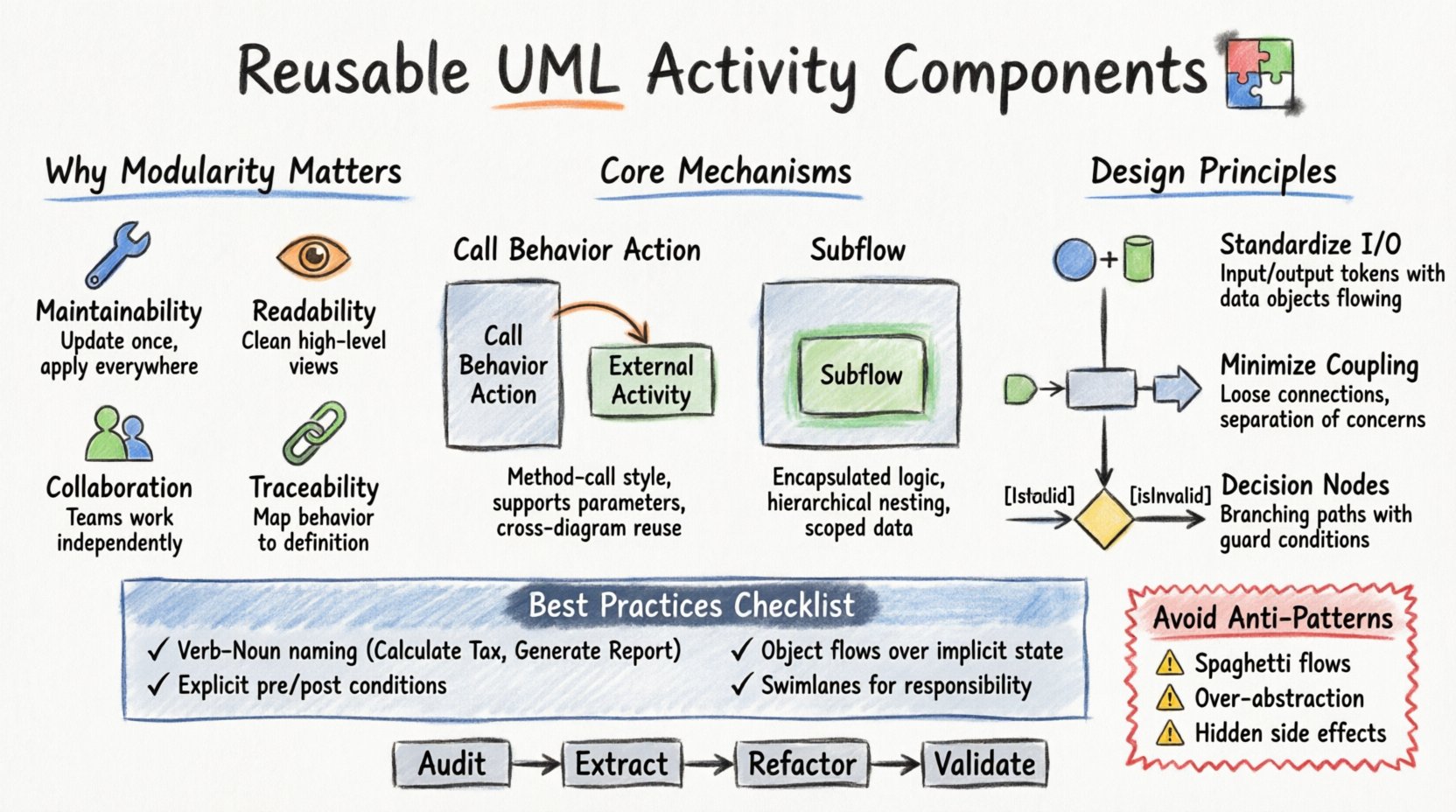
Understanding the Challenge of Activity Diagram Complexity 🧩
Activity diagrams represent the flow of control and data within a system. While they are powerful for visualizing workflows, they often suffer from a lack of abstraction as systems grow. A single diagram attempting to describe an entire business process can quickly become overwhelming. This is where the concept of reusability becomes critical.
Without reusable components, modelers often fall into the trap of copying and pasting sub-sections of a diagram to handle similar logic in different contexts. This leads to model fragmentation, where a change in logic must be applied manually across multiple diagrams, increasing the risk of inconsistency. To build scalable systems, you must treat activity fragments as modular units that can be invoked from multiple locations.
Why Modularity Matters
- Maintainability: Updating a standard process once updates it everywhere it is used.
- Readability: High-level diagrams remain clean while details are hidden in sub-flows.
- Collaboration: Different teams can work on distinct components without interfering with the main flow.
- Traceability: It is easier to map a specific behavior back to its definition.
Core Concepts of Reusability in UML 🛠️
In the Unified Modeling Language, reusability is primarily achieved through the abstraction of behavior. You are not just drawing steps; you are defining behaviors that can be executed. There are two main mechanisms for achieving this: Call Behavior Actions and Subflows.
1. Call Behavior Action
A Call Behavior Action represents a request to perform a specific behavior defined elsewhere. It acts as a method call in programming. When you place this node in an activity diagram, you are saying, “Execute this logic now.”
- Definition: The behavior is defined in a separate activity or class operation.
- Invocation: It can be called from multiple activities.
- Parameters: It supports input and output parameters, allowing data to flow in and out of the reusable block.
2. Subflow Activity
A Subflow is a named activity that is defined as part of a larger activity. It encapsulates a sequence of steps. While similar to a Call Behavior Action, a Subflow is often used for internal organization within the same model namespace.
- Encapsulation: Keeps the main diagram clean by hiding internal logic.
- Nesting: Allows for hierarchical modeling where a high-level view zooms into a detailed view.
- Scope: Variables and data objects can be scoped to the subflow.
Techniques for Designing Reusable Components 🔧
Creating reusable components is not just about splitting a diagram. It requires a disciplined design process. Below are the technical strategies for ensuring your components are robust and adaptable.
Standardize Inputs and Outputs
Just like a function in code, a reusable activity component should have well-defined entry and exit points. Avoid relying on global state or implicit data flow. Explicitly define the data objects that enter the component and the data objects that leave it.
- Input Tokens: Clearly mark the objects required to start the process.
- Output Tokens: Define the result produced by the process.
- Data Objects: Use object nodes to represent data passing through the component.
Minimize Coupling
Reusability is hindered by high coupling. If a component relies heavily on the internal structure of the calling activity, it cannot be easily moved. Keep dependencies loose.
- Control Flow: Ensure the order of execution is determined by the logic, not the diagram layout.
- Object Flow: Connect components via data objects, not direct links to specific nodes in the parent diagram.
- Separation of Concerns: One component should handle one logical concept (e.g., “Validate User” vs. “Process Payment”).
Use Decision Nodes for Variability
Not all executions of a component will follow the exact same path. Use decision nodes to handle branching logic within the reusable component. This allows the component to adapt to different conditions without needing multiple copies.
- Guard Conditions: Label the edges leaving decision nodes with specific conditions (e.g.,
[isValid],[isInvalid]). - Alternative Paths: Define distinct paths for success and failure scenarios.
Structuring Data Flow for Scalability 📊
Data flow is the lifeblood of an activity diagram. When scaling, managing how data moves between reusable components is vital. Improper data flow leads to bottlenecks and confusion.
Object Nodes vs. Control Flows
Distinguish between the control of execution and the movement of data.
- Control Flow: Indicates the order of operations (e.g., “Do A, then Do B”).
- Object Flow: Indicates that an object is passed from one node to another (e.g., “Send Document to Processor”).
When reusing components, object flows allow you to pass the same data object into different activities. This reduces the need to recreate data structures for every new diagram.
Partitioning and Swimlanes
Swimlanes organize activities by actor, department, or system. For scalability, define reusable components within specific swimlanes to clarify ownership.
- Responsibility: A component in the “Backend” swimlane should not contain logic belonging to the “Frontend” swimlane.
- Integration: Use the boundaries of swimlanes to define clear interfaces between system parts.
- Parallelism: Swimlanes allow you to see which components can run simultaneously.
Best Practices for Naming and Documentation 📝
A model is useless if no one understands it. Naming conventions and documentation are essential for reusable components.
Naming Conventions
Use descriptive names that indicate the action and the scope.
- Verb-Noun Structure: Use names like
Calculate TaxorGenerate Report. - Consistency: Do not use
Process Datain one diagram andHandle Informationfor the same logic elsewhere. - Uniqueness: Ensure names do not conflict with other behaviors in the system.
Documentation Standards
Each reusable component should have an associated description.
- Preconditions: What must be true before this component runs?
- Postconditions: What is guaranteed after it finishes?
- Exceptions: What happens if an error occurs?
Managing Complexity and Maintenance 🔄
As the system evolves, so must the model. A scalable model must be easy to update.
Versioning Behaviors
When a business process changes, you should only need to update the definition of the behavior, not every diagram that uses it.
- Central Definition: Keep the detailed logic in the subflow or behavior definition.
- Link Updates: When the definition changes, all references automatically reflect the new logic.
- Deprecation: Mark old behaviors as deprecated rather than deleting them immediately to maintain traceability.
Handling Changes
Changes often introduce new edge cases. Use the following checklist when updating a component.
- Impact Analysis: List all diagrams that reference this component.
- Regression Testing: Verify that the change does not break existing workflows.
- Communication: Inform stakeholders of the logic change.
Common Anti-Patterns to Avoid ⚠️
Even experienced modelers can fall into traps that reduce reusability. Identifying these patterns helps maintain a clean model.
1. The Spaghetti Diagram
This occurs when control flows cross each other chaotically. It makes tracing the logic difficult. Always use swimlanes and clear entry/exit points to prevent tangled flows.
2. Over-Abstraction
Creating a reusable component for every single step reduces the value of abstraction. Group related steps into logical chunks. If a component only has one step, it is not a component; it is a step.
3. Hidden Side Effects
Do not modify global state inside a reusable component without it being visible. If a component updates a database record, the data flow should explicitly show the object being updated.
Comparison of Modularization Approaches 📋
Understanding the differences between various modeling techniques helps in selecting the right approach for your system.
| Approach | Best Use Case | Pros | Cons |
|---|---|---|---|
| Call Behavior Action | Reusing logic across multiple diagrams | High reusability, clean references | Requires external definition management |
| Subflow | Hiding detail within a single diagram | Good for hierarchical views | Can get lost in deep nesting |
| Object Flow | Passing data between activities | Clear data lineage | Can clutter the diagram with many lines |
| Partitioning | Separating responsibilities | Clarifies ownership | Can fragment the flow if overused |
Integrating with Other Models 🔗
Activity diagrams do not exist in isolation. They are part of a larger system architecture. Reusability in activity diagrams should align with class diagrams and sequence diagrams.
Alignment with Class Diagrams
Ensure that the data objects used in activity flows correspond to actual classes in your system. This ensures that the model reflects the implementation.
- Class Mapping: Map activity object nodes to class attributes.
- Operation Mapping: Map activity nodes to class operations.
Alignment with Sequence Diagrams
Use activity diagrams to define the overall process and sequence diagrams to define the interaction details. A reusable activity component can be expanded into a sequence diagram for detailed protocol design.
Ensuring Consistency Across the Model 🧭
Consistency is the hallmark of a professional model. When you use reusable components, consistency is easier to achieve, but it requires discipline.
Visual Consistency
- Shape Usage: Use the same shape for the same type of action (e.g., rounded rectangles for actions).
- Color Coding: Use color to denote system boundaries or status (e.g., green for success, red for failure).
Logical Consistency
- Termination: Every flow must end in a final node or a loop back.
- Deadlocks: Ensure there are no points where the flow stops unexpectedly.
- Reachability: Every node should be reachable from the initial node.
Scaling for Enterprise Environments 🌍
In large organizations, multiple teams may work on the same system. Reusable components facilitate this collaboration.
Team Ownership
Assign ownership of specific reusable behaviors to specific teams. A team responsible for “Authentication” owns the Authenticate User behavior. Other teams call this behavior without needing to know the internal details.
Interoperability
Define interfaces for behaviors that allow different systems to interact. If a behavior is called by an external system, the input and output parameters must be strictly defined to ensure compatibility.
Refining Your Modeling Skills 🎯
Mastering the art of reusable modeling takes practice. Start by identifying repetitive patterns in your current diagrams. Is there a standard login process? A standard reporting workflow? Extract these into reusable components.
- Audit: Review existing diagrams for duplication.
- Extract: Move duplicated logic into a single definition.
- Refactor: Update references to point to the new definition.
- Validate: Check that the system behavior remains unchanged.
By following these guidelines, you create a modeling environment that supports growth. The diagrams become living documents that evolve with the system rather than becoming obsolete artifacts.
Final Thoughts on Sustainable Modeling 🚀
Building scalable systems is about managing complexity. Reusable components in UML activity diagrams are a primary tool for this management. By focusing on modularity, clear data flow, and strict naming conventions, you create models that are robust and easy to maintain.
Remember that the goal is not just to draw a diagram, but to communicate the system’s behavior effectively. A well-structured model reduces ambiguity for developers and stakeholders alike. As you continue to design, keep the principles of reusability at the forefront of your decision-making process.
Investing time in proper component design now saves significant effort during the maintenance phase later. Your diagrams will serve as a reliable foundation for the entire software development lifecycle.