


Reader Experience & Configurable Settings
Purpose: This comprehensive guide focuses exclusively on the reader-side experience and author-configurable settings that shape how audiences interact with flipbooks created via Visual Paradigm Online’s Fliplify platform. Whether you’re a reader exploring a flipbook or an author optimizing content delivery, this guide provides actionable insights for maximizing engagement and accessibility.
🎯 Introduction: What Is the Visual Paradigm Flipbook Reader?
The Visual Paradigm Flipbook Reader (powered by Fliplify) delivers an immersive, interactive digital reading experience that bridges the tactile satisfaction of physical books with the dynamic capabilities of modern web technology. Designed for e-books, catalogs, reports, portfolios, and marketing materials, the reader combines realistic page-turn animations with powerful digital conveniences to create engagement that static PDFs simply cannot match.
Key Value Proposition:
- ✅ Realistic, animated page-flip effects that mimic physical books
- ✅ Fully responsive design optimized for desktop, tablet, and mobile
- ✅ Author-controlled customization for branding, accessibility, and security
- ✅ Rich sharing and embedding options for seamless distribution
- ✅ Built-in analytics and SEO features for performance tracking
🧭 Part 1: Reader-Side Features & Interaction Controls
Readers enjoy a rich suite of intuitive features designed for effortless navigation, personalization, and engagement. Below is a complete breakdown of available reader controls.
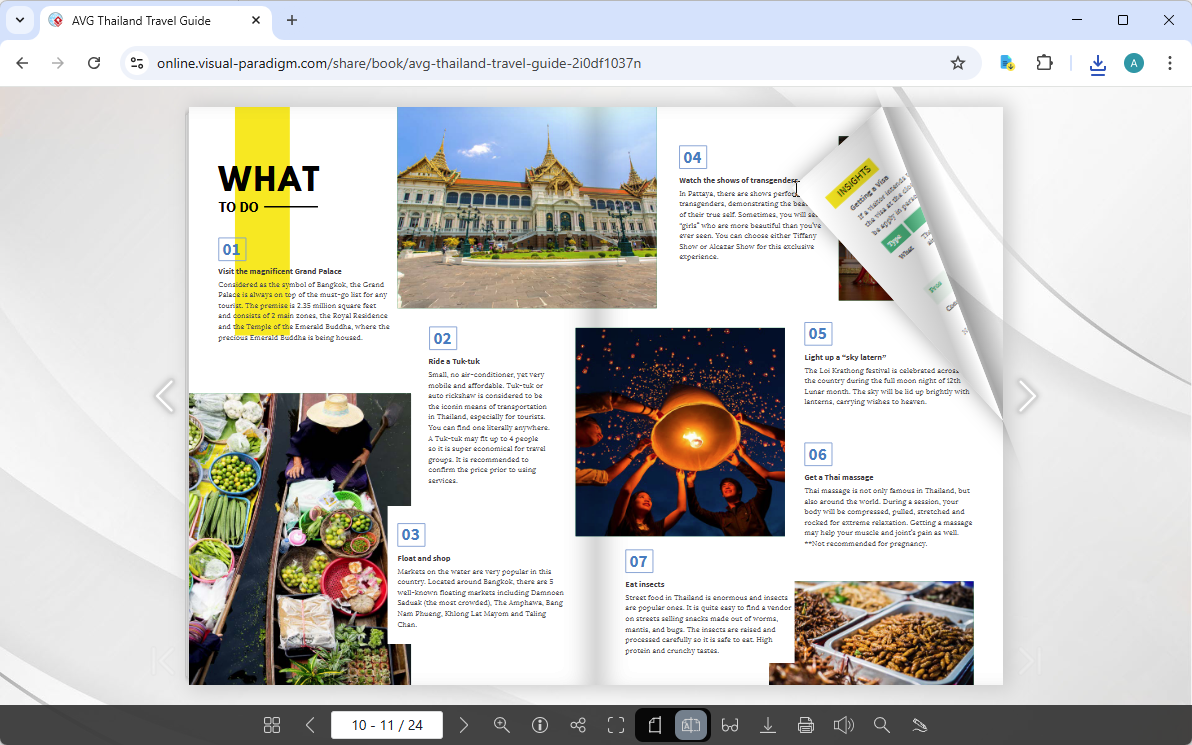
🔹 Core Navigation & Viewing
| Feature | Description | Reader Benefit |
|---|---|---|
| Natural Page-Flip Animation | Realistic page-turn effects with physics-based motion | Creates an engaging, lifelike reading experience that encourages longer session times |
| Thumbnail Navigation | Grid view of all pages with clickable previews | Jump instantly to any section without sequential scrolling |
| Page Navigation Controls | Arrow buttons, keyboard shortcuts (←/→), and page-number input | Flexible navigation suited to different reading preferences |
| Single/Double Page Toggle | Switch between single-page (mobile-optimized) and double-page spread (desktop book-like) views | Adapts the reading experience to device size and content type |
| Zoom & Pan | Pinch-to-zoom on touch devices or click controls to enlarge content | Inspect details in images, diagrams, or small text without losing context |
| Full-Screen Mode | Toggle distraction-free full-screen viewing | Maximize screen real estate for immersive reading |
🔹 Content Interaction & Accessibility
| Feature | Description | Reader Benefit |
|---|---|---|
| Distraction-Free Reading Mode | A clean and focused reading environment by removing unnecessary elements and interruptions | Reduces eye strain and improves focus during extended reading sessions |
| Text Search | Search pane to find keywords or phrases within flipbook content | Quickly locate specific information without manual page-by-page scanning |
| Text Selection & Copy | Select and copy text content (when enabled by author) | Enables note-taking, citation, or content reuse |
| Annotation Tools | Add highlights, notes, or drawings on pages (if author-enabled) | Supports active reading, collaboration, and personalized markup |
| Font Size Adjustment | Adjust text scaling in Reading Mode | Improves readability for users with visual preferences or accessibility needs |
🔹 Multimedia & Sensory Controls
| Feature | Description | Reader Benefit |
|---|---|---|
| Background Music Toggle | Enable/disable author-uploaded ambient audio | Personalize audio environment; mute for quiet settings |
| Page-Flip Sound Effects | Toggle realistic page-turn sounds on/off | Enhance immersion or enable silent reading as preferred |
| Embedded Multimedia Support | Play videos, animated GIFs, audio clips, or interactive elements directly within pages | Engage with rich, dynamic content without leaving the flipbook |
🔹 Output & Portability Options
| Feature | Description | Reader Benefit |
|---|---|---|
| Open as PDF | Download or view the source PDF file (if permitted) | Access content offline or print using familiar PDF tools |
| Print Selected Pages | Print specific pages or the entire flipbook (if enabled) | Create physical copies of key sections for reference |
| QR Code Access | Scan a QR code to open the flipbook on mobile devices | Seamless cross-device continuation of reading sessions |
🔹 Sharing & Social Integration
| Feature | Description | Reader Benefit |
|---|---|---|
| Social Media Sharing | One-click share to Facebook, X (Twitter), LinkedIn, etc. | Easily recommend valuable content to networks |
| Direct Link Copy | Copy the unique flipbook URL for email or messaging | Share precise content with colleagues or friends |
| Embed Code Generator | Copy HTML iframe code to embed flipbook in blogs or websites | Publishers and educators can integrate flipbooks into existing platforms |
⚙️ Part 2: Author-Configurable Settings That Shape the Reader Experience
Authors and publishers customize flipbook behavior through Fliplify’s settings panel. These configurations directly determine which reader features are available and how content is presented.
🎨 Appearance & Branding
| Setting | Options | Impact on Reader Experience |
|---|---|---|
| Background Customization | Choose from preset images/colors or upload custom background; adjust fill mode (scale, center, tile) | Creates visual atmosphere aligned with brand or content theme |
| Lock Screen Icon | Upload custom loading/locked state icon | Reinforces brand identity during initial load |
| Brand Logo Placement | Display custom logo in reader interface | Strengthens brand recognition throughout the reading session |
| Custom Favicon | Set browser tab icon for the flipbook page | Professional polish when readers bookmark or multi-tab |
| Contact Button | Add clickable button linking to website, email, or form | Enables direct reader engagement and lead generation |
🔐 Feature Access Control (Enable/Disable Per Book)
Authors can granularly control which reader tools are available:
✓ Thumbnail view ✓ Sharing options ✓ Full-screen toggle
✓ Page layout selection ✓ Open as PDF ✓ Distraction-free mode
✓ Printing permissions ✓ Text copying ✓ Annotation tools
Strategic Use Cases:
- 🔒 Protected Content: Disable printing, copying, and PDF download for confidential reports
- 🎓 Educational Materials: Enable annotations and text selection to support student note-taking
- 🛍️ Product Catalogs: Enable sharing and contact buttons to drive conversions
- 📱 Mobile-First Content: Default to single-page mode and disable double-page toggle for optimal small-screen UX
🔄 Page Transition & Animation
| Setting | Options | Reader Impact |
|---|---|---|
| Transition Effects | 70+ page-flip and transition animations | Match animation style to content tone (elegant fade for portfolios, dynamic flip for catalogs) |
| Animation Speed | Adjustable transition duration | Control pacing: faster for skimmable content, slower for narrative immersion |
| Animated Elements | Add motion to shapes, text, or images that trigger on page view | Creates “wow” moments that highlight key content and increase engagement |
🔊 Audio Configuration
| Setting | Options | Reader Impact |
|---|---|---|
| Background Music | Upload MP3/WAV; enable looping; set default on/off state | Sets emotional tone; readers retain control to mute if preferred |
| Page-Flip Sounds | Toggle sound effects library on/off | Enhances realism for immersive experiences or enables silent reading |
📊 Analytics & Performance Tracking
| Setting | Integration | Value for Authors |
|---|---|---|
| Google Analytics | Connect GA4 property to track views, time-on-page, navigation patterns | Data-driven insights to optimize content structure and marketing strategy |
🔐 Security & Access Management
| Setting | Options | Reader Impact |
|---|---|---|
| Password Protection | Require password to access flipbook | Restricts content to authorized audiences (clients, employees, subscribers) |
| Domain Restriction | Limit embed access to specific websites | Prevents unauthorized redistribution while allowing controlled sharing |
| Self-Hosting Option | Host flipbook on your own domain/server | Full control over security, branding, and data compliance |
♿ Part 3: Accessibility & Mobile Optimization
Visual Paradigm prioritizes inclusive design to ensure flipbooks are accessible to all readers.
📱 Mobile-First Responsiveness
- Adaptive Layout: Automatically optimizes page display for smartphones, tablets, and desktops
- Touch-Optimized Controls: Large tap targets, swipe navigation, and pinch-zoom support
- Data Efficiency: Optimized asset loading for slower connections without sacrificing quality
👁️ Accessibility Features
- Reading Mode Color Themes: Light, dark, and sepia modes reduce eye strain and support light sensitivity
- Keyboard Navigation: Full support for tab navigation and arrow-key page turning
- Text Scaling: Adjustable font sizes in Reading Mode accommodate low-vision readers
🌍 Multilingual & Global Readiness
- Unicode Support: Renders text in virtually any language or script
📤 Part 4: Sharing, Embedding & Distribution Options
Maximize reach by leveraging Fliplify’s flexible distribution tools.
🔗 Direct Sharing Methods
| Method | Best For | Setup |
|---|---|---|
| Unique URL | Email campaigns, social bios, QR codes | Auto-generated upon publishing |
| Social Media Buttons | Viral sharing on Facebook, X, LinkedIn | One-click integration in reader toolbar |
| QR Code | Print materials, presentations, event displays | Generated in Share panel; scannable by any smartphone |
| Email Integration | Direct distribution to contacts | Send flipbook link with custom message |
💻 Embedding & Integration
| Option | Use Case | Implementation |
|---|---|---|
| HTML Embed Code | Blogs, company websites, LMS platforms | Copy iframe code from Share panel |
| Page-Specific Embed | Link directly to a specific page in embedded view | Add #page=N parameter to embed URL |
| Display Hall Integration | Curated showcase of multiple flipbooks | Drag published flipbooks into Visual Paradigm’s Display Hall editor |
| Self-Hosted Deployment | Enterprises requiring full data control | Deploy flipbook assets to your own server via Publication Server |
🔒 Controlled Distribution
- Password Protection: Require access code for sensitive content
- Expiration Dates: Auto-revoke access after a set date (premium feature)
- View-Only Mode: Disable downloading, printing, and copying while allowing reading
🎯 Part 5: Best Practices for Authors Optimizing Reader Experience
✅ Do This:
- Test on Multiple Devices: Preview flipbooks on desktop, tablet, and mobile to ensure responsive behavior
- Enable Reading Mode by Default: Improve accessibility and reduce bounce rates for long-form content
- Use Single-Page Mode for Mobile-Heavy Audiences: Optimize for smartphone readers who dominate traffic
- Integrate Analytics Early: Connect Google Analytics at launch to capture baseline engagement data
- Brand Consistently: Apply logo, favicon, and color scheme to reinforce professional identity
❌ Avoid This:
- Disabling All Sharing: Even protected content benefits from controlled sharing options
- Ignoring Load Times: Optimize image sizes to ensure fast initial page renders
- Forgetting Print Permissions: If readers might need hard copies, explicitly enable printing
- Using Complex Transitions for Text-Heavy Content: Save elaborate animations for visual showcases
📈 Pro Tips for Engagement:
- Add a “Contact” Button: Place a prominent CTA for inquiries, demos, or purchases
- Use Page-Specific Links: When embedding, link to the most relevant starting page, not just page 1
- Leverage QR Codes in Physical Spaces: Place scannable codes in stores, events, or print ads to bridge offline/online experiences
- Enable Annotations for Collaborative Work: Let teams comment directly on proposals or reports
🔗 Verified Reference Resources
| Resource | Description | URL |
|---|---|---|
| Fliplify Main Platform | Create, customize, and publish flipbooks with full reader feature set | online.visual-paradigm.com/flipbook-maker |
| Reading Mode Guide | Details on distraction-free viewing, color themes, and accessibility | features/flipbook-maker-reading-mode |
| Page Mode Tutorial | How to toggle single/double page views for optimal device adaptation | blog: single/double page mode |
| Why Fliplify Stands Out | Competitive advantages including realism, multimedia, and analytics | fliplify.com/why-visual-paradigm… |
| Sharing & Embedding Guide | Step-by-step instructions for URLs, QR codes, and website embedding | blog: share via URL |
| Self-Hosting Documentation | Deploy flipbooks on your own infrastructure for maximum control | knowhow: self-host flipbook |
| Accessibility Overview | Web accessibility features across Visual Paradigm’s platform | features/desktop-accessibility |
💡 Final Thought: The Visual Paradigm Flipbook Reader succeeds by respecting both reader autonomy and author intent. By thoughtfully configuring settings and leveraging the reader’s intuitive feature set, you can create digital publications that are not just viewed—but experienced, shared, and remembered.
Related posts:
 🎬 The Complete User Journey: Creating Animated Flipbooks with Visual Paradigm Online’s Flipbook Maker
 Comprehensive Guide to Creating Animated Content for Flipbooks with Visual Paradigm Online’s Flipbook Maker
 The Complete Non-IT Professional’s Journey to Mastering Fliplify Flipbook Tool
 Flipbook Maker: A Comprehensive Guide to Interactive Digital Publishing