


Introduction: Your Path to Professional Diagramming
Welcome to your comprehensive journey through creating professional Class Diagrams using Visual Paradigm Online’s free edition. This guide will walk you through every step of your experience, from discovering the tool to creating your first professional diagram.
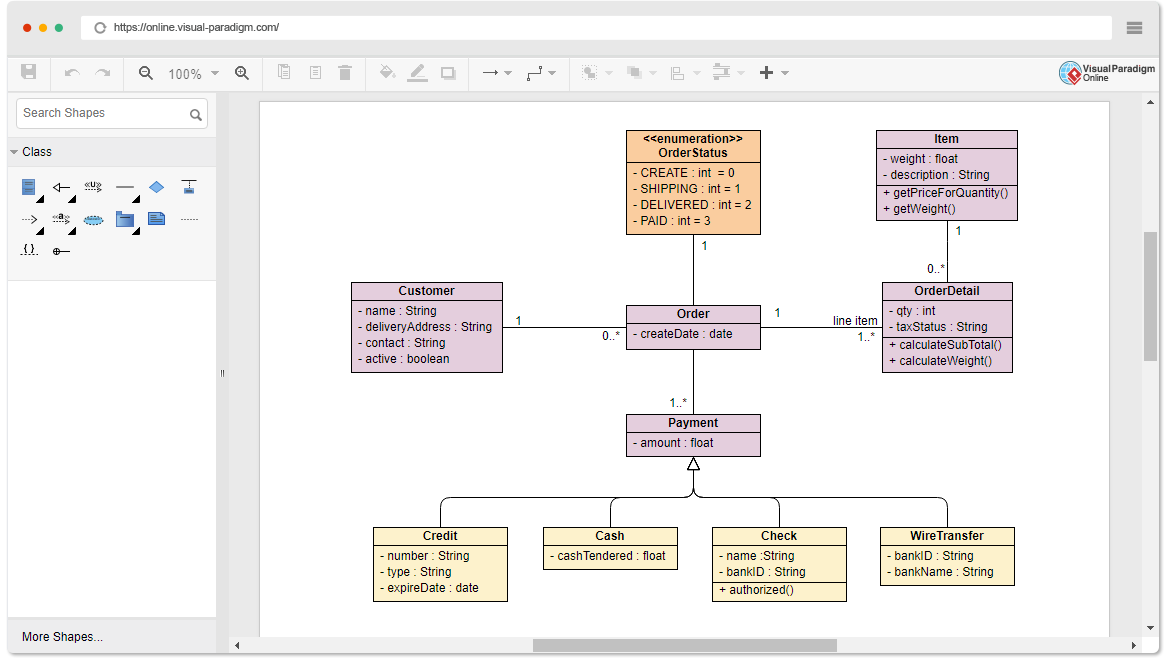
Phase 1: Discovery – Finding the Right Tool
The Challenge
You need a reliable, free Class Diagram tool that won’t limit your creativity or impose restrictive barriers. Whether you’re a student, educator, or professional, you deserve access to quality diagramming software without hidden costs or limitations.
The Solution
Visual Paradigm Online (VP Online) Free Edition answers this need perfectly. It’s a completely free online drawing software that supports:
-
Class Diagrams
-
Other UML diagrams
-
ERD (Entity Relationship Diagrams)
-
Organization Charts
What Makes It Different:
-
✅ No advertisements
-
✅ No limited period of access
-
✅ No limitations on number of diagrams or shapes
-
✅ You own your diagrams for personal and non-commercial use
Phase 2: Getting Started – Your First Steps
Setting Up Your Workspace
The beauty of VP Online is its simplicity. There’s no complex installation or configuration required. Simply access the tool through any web browser on Windows, Mac, or Linux.
Understanding the Interface
The editor features a simple yet powerful design that makes UML diagramming both simple and fun. Here’s what awaits you:
Core Features You’ll Love:
-
Drag-to-create shapes: Intuitive drag-and-drop functionality
-
Smart connectors: Well-attached connectors that never separate apart
-
Inline editing: Edit Class Attributes and Operations directly
-
Custom shapes: Draw your own diagrams with your own shapes
-
Rich templates: Access hundreds of diagram examples and templates
Phase 3: Creation – Building Your Diagram
Precision and Control
Position shapes precisely using the alignment guide. The tool ensures professional results every time.
Formatting Tools at Your Disposal
Make your diagrams visually impressive with comprehensive formatting options:
Shape & Line Formatting:
-
Shape and line format customization
-
Font style options
-
Rotatable shapes
-
Shape alignment and distribution
-
Embed images and URLs
-
Shadow effects
-
Solid and gradient paint options
-
40+ connector types
-
RTF caption support
Advanced Capabilities
-
Visio Integration: Import Visio drawings and stencils
-
Media Embedding: Easily embed text, external images, and web links
-
Google Drive Integration: Save and sync your work seamlessly
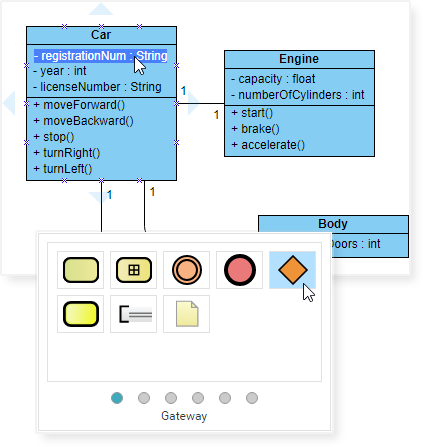
Phase 4: Learning from Examples – Real-World Applications
Don’t start from scratch! Explore these ready-to-use examples to understand best practices and inspire your own designs. Click “Open Diagram” to edit and customize any example.
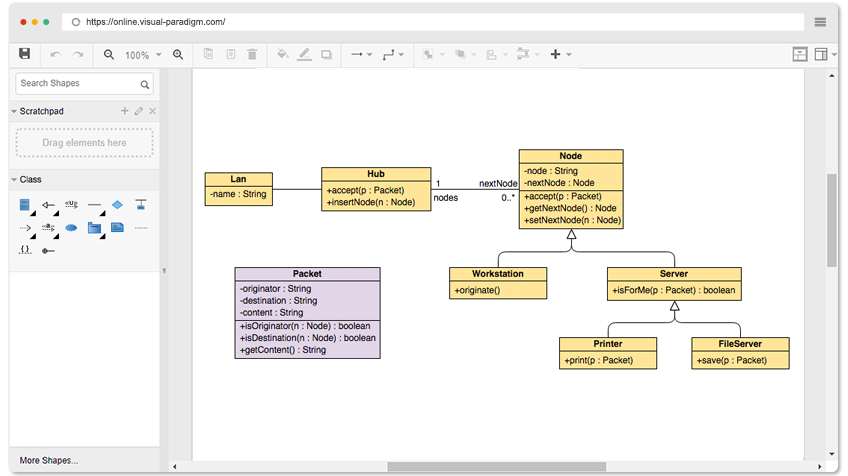
Example 1: Star-Based LAN
Learn network topology representation through this comprehensive LAN diagram.
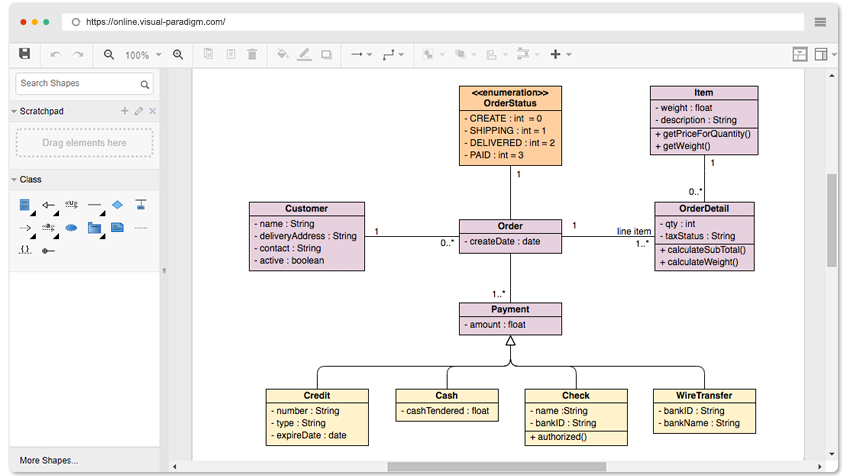
Example 2: Sales Order System
Understand business process modeling with this complete sales order system diagram.
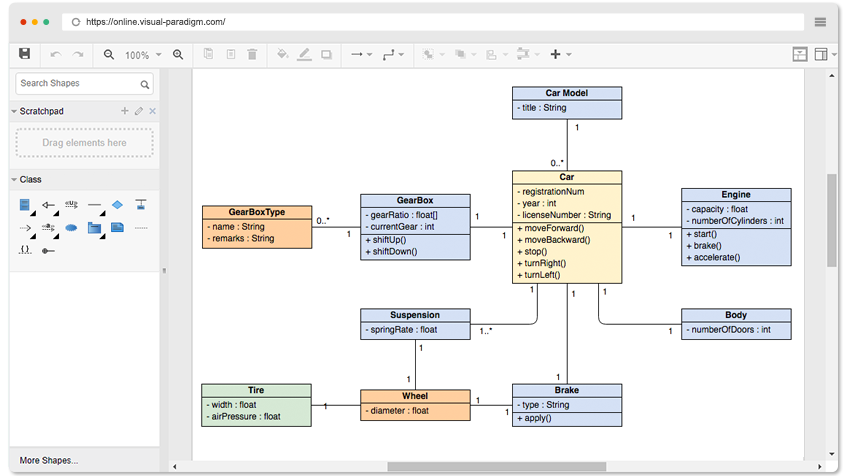
Example 3: Car System
Explore object-oriented design principles through this automotive class structure.
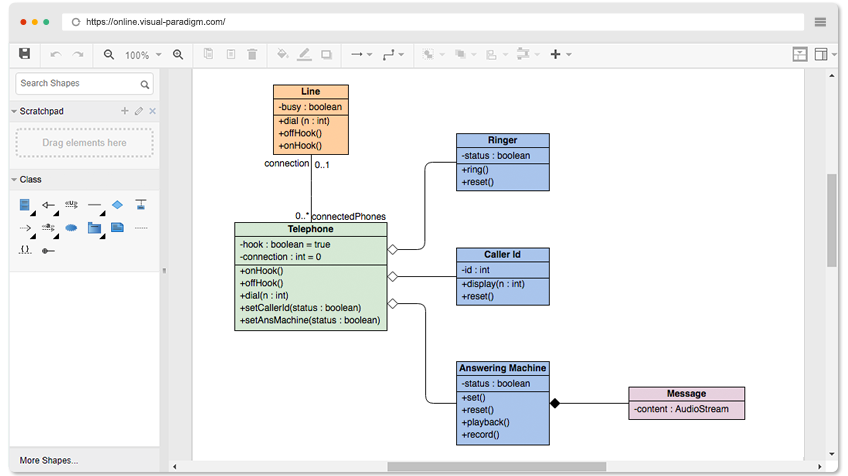
Example 4: Telephone System
Master association relationships with this telephone system example.
Phase 5: Exporting and Sharing – Showcasing Your Work
Multiple Export Formats
Once your diagram is complete, share it in the format that best suits your needs:
-
PNG – Perfect for web and presentations
-
JPG – Universal image format
-
SVG – Scalable vector graphics
-
GIF – Animated or simple graphics
-
PDF – Professional document format
Additional Options
-
Print directly from the tool
-
Share via Google Drive
-
Export unlimited diagrams with no restrictions
Phase 6: Expanding Your Skills – Beyond Class Diagrams
Explore Other Diagram Types
Your journey doesn’t stop with Class Diagrams. VP Online offers comprehensive diagramming solutions:
UML Diagrams:
-
Sequence Diagrams
-
Use Case Diagrams
-
Component Diagrams
-
Activity Diagrams
Other Solutions:
-
ERD Tool
-
Organization Chart Maker
-
Floor Plan Designer
-
ITIL Diagrams
-
Business Concept Diagrams
Upgrading When You’re Ready
While the free edition is incredibly powerful, you can upgrade to paid editions for additional diagram types and advanced features when your needs grow.
Phase 7: Your Ongoing Journey – Best Practices
Tips for Success
-
Start with Templates: Use the hundreds of available templates to accelerate your work
-
Leverage Smart Connectors: Let the tool handle alignment and connections automatically
-
Use Inline Editing: Edit attributes and operations directly on the canvas
-
Apply Consistent Formatting: Use the formatting tools to maintain professional appearance
-
Save Regularly: Take advantage of Google Drive integration for automatic backups
-
Explore Examples: Study the provided examples to learn best practices
-
Experiment Freely: With unlimited diagrams and shapes, there’s no limit to your creativity
No Risk, No Commitment
-
✅ No limited period of access
-
✅ No limitations on diagrams or shapes
-
✅ No cancellation fees
-
✅ No obligations
Conclusion: Your Next Step
You now have everything you need to begin creating professional Class Diagrams. The tool is free, powerful, and ready to use. Whether you’re documenting software architecture, planning a database, or teaching UML concepts, Visual Paradigm Online Free Edition provides all the features you need.
Remember:
-
Draw as many diagrams as you like
-
Export in multiple formats
-
Access from any device with a web browser
-
Own your work completely
Ready to Begin?
Get Started Now – Create Your First Class Diagram
No limitations. No obligations. No cancellation fees. Just pure diagramming freedom.
Reference List
- Make a Class Diagram: Access the free online Class Diagram editor to start creating your diagrams immediately with no registration required.
- Pricing and Upgrades: Explore paid edition options for additional diagram types and advanced features beyond the free edition.
- Free Sequence Diagram Tool: Create professional sequence diagrams online for free to visualize object interactions and message flows.
- Free Use Case Diagram Tool: Design use case diagrams at no cost to capture functional requirements and system interactions.
- Free Component Diagram Tool: Build component diagrams freely to illustrate system architecture and component relationships.
- Free Activity Diagram Tool: Create activity diagrams without charge to model workflows and business processes.
- Easy Diagram App: Access the comprehensive diagramming application with cross-platform support and cloud integration.
- Star-Based LAN Example: Editable Class Diagram example demonstrating network topology design for a star-based local area network.
- Sales Order System Example: Editable Class Diagram example showing complete sales order system architecture and class relationships.
- Car System Example: Editable Class Diagram example illustrating object-oriented design principles using an automotive system.
- Telephone System Example: Editable Class Diagram example demonstrating association relationships in a telephone system design.
Related posts:
 UML Timing Diagrams Explained: A Beginner’s Guide to Visualizing Real-Time System Interactions
 Troubleshooting UML Timing Diagrams: What to Do When Your System Behavior Doesn’t Match the Model
 Myth-Busting UML Timing Diagrams: Separating Confusion from Clarity in Modern Software Architecture
 UML Timing Diagram Deep Dive: Understanding Activation Bars, Lifelines, and Time Triggers