


Introduction: The Evolution of Project Scheduling in the AI Era
The complexity of global project execution—whether it’s organizing a multinational conference or launching a consumer-facing software product—demands precision, clarity, and agility in timeline planning. Traditional project scheduling methods, such as manual PERT (Program Evaluation Review Technique) charting, are no longer sufficient in today’s fast-paced, data-driven environments. These methods require extensive time investment to map dependencies, calculate critical paths, and maintain visual consistency—activities that are prone to human error and scalability limitations.
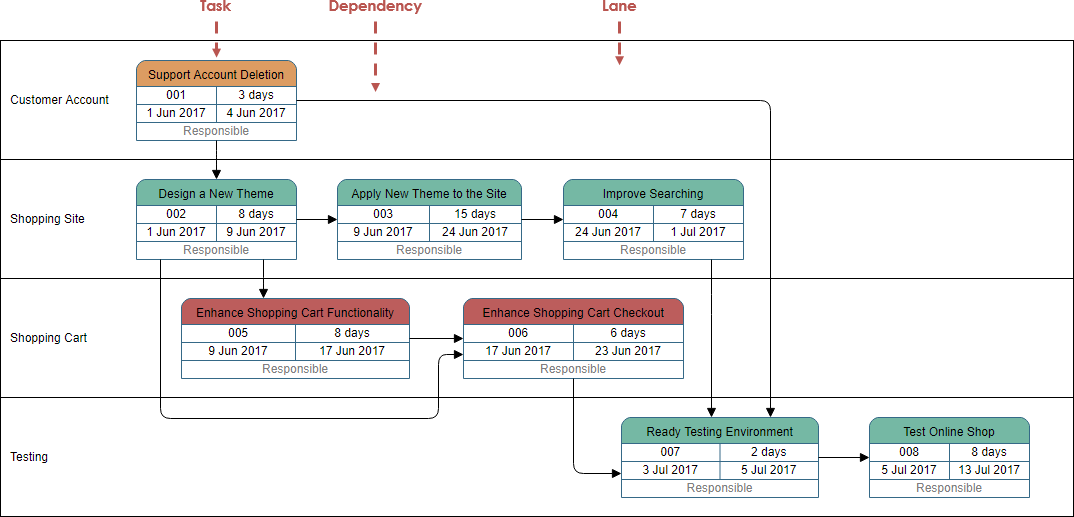
Enter AI-powered PERT chart generation as a transformative solution. By leveraging natural language processing and generative modeling, modern tools like those in Visual Paradigm’s AI-driven visual modeling ecosystem enable project managers to convert high-level project descriptions into fully structured, editable, and analyzable network diagrams in seconds. This shift from labor-intensive hand-drawing to intelligent automation marks a pivotal advancement in how organizations approach project timelines and risk mitigation.
How AI-PERT Works: From Text to Timeline
At the core of AI-driven PERT charting is a sophisticated process that transforms natural language input into a professionally structured project network diagram. This process begins with a user entering a project description in plain English—such as “Plan a global tech conference from ideation to execution, including marketing, venue booking, speaker coordination, and on-site operations.”
 The AI engine parses the input and applies contextual logic to:
- Identify key phases and activities
- Map logical dependencies between them (e.g., “Marketing begins after the final agenda is confirmed”)
- Group tasks into coherent swimlanes (e.g., Planning, Marketing & Promotion, Logistics, Execution)
- Assign task durations, personnel, and default time estimates
The result is a rich, interactivePERT chart that visually represents the project lifecycle with event nodes (circles or rectangles) and activity arrows, fully compliant with industry standards such as those defined by the Project Management Institute (PMI).
Key Technical Features Behind the Scenes
The AI doesn’t simply draw lines—it performs complex project scheduling calculations automatically. Here’s what happens beneath the surface:
| Function | Technical Implementation | Value to the User |
|---|---|---|
| Forward Pass Calculation | Computes the earliest start and finish times for all tasks, beginning from the project start node. | Provides a baseline schedule with clear task sequencing. |
| Backward Pass Calculation | Determines the latest start and finish times, identifying how much flexibility exists in non-critical tasks. | Highlights slack (float) and critical path tasks requiring immediate attention. |
| Slack & Critical Path Identification | Uses the PERT three-point estimate formula: TE = (O + 4ML + P) / 6 to compute expected durations based on optimistic, most likely, and pessimistic forecasts. | Enables proactive risk control and decisions on resource allocation. |
| Dependency Resolution | Infers logical relationships from text (e.g., ‘after,’ ‘before,’ ‘concurrently’) and applies them as constraints in the model. | Eliminates scheduling gaps and avoids false assumptions about task order. |
End-to-End Workflow: From Brainstorm to Strategic Planning
Here is a practical, real-world workflow that demonstrates how professionals can use this technology in a typical enterprise setting:
Workflow 1: From Concept to Visual Schedule (Desktop Mode)
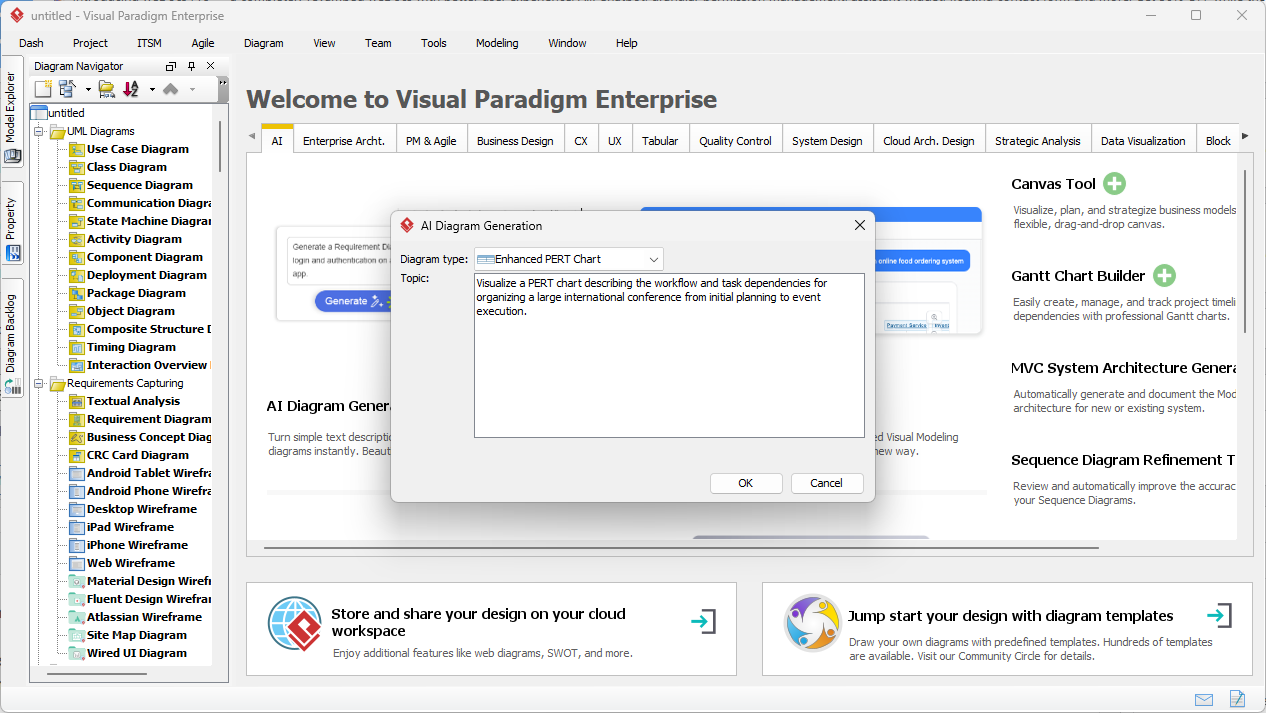
- Initiate the AI Diagram Generator: Launch the Visual Paradigm Desktop application and open the AI Diagram Generation panel.

- Input the Project Scope: Type a clear, descriptive summary in natural language. Example: “We are launching a new mobile app targeting Gen Z users. The process includes market research, competitor analysis, UI/UX design, development, QA testing, and public beta launch. Marketing and user acquisition follow, with key milestones at each stage.”
- Generate the Initial PERT Chart: The AI parses the input and generates a structured network diagram with clear swimlanes, task IDs, durations, and dependencies.
- Identify the Critical Path: The software highlights the longest path through the network—this is the minimum possible project duration.
- Refine and Validate: Project leads adjust durations, add lags, or modify dependencies based on team input or risk assessments. The diagram updates in real time.
- Save and Share: Export the finalized PERT chart as a PDF, PNG, or embedded model for stakeholder review or integration into project management systems.
Workflow 2: Scenario Testing and Risk Modeling
One of the most powerful capabilities of AI-PERT is scenario analysis. This allows project teams to explore alternative timelines:
- Best-case Scenario: Modify the prompt to include optimistic time estimates (e.g., “Marketing can be completed in 3 weeks instead of 6”).
- Worst-case Scenario: Introduce pessimistic delays (e.g., “Supply chain delays may extend development by 2 weeks”).
- Generate and Compare Charts: Regenerate the PERT chart with new inputs to compare total project duration, critical path shifts, and risk exposure.
- Present to Stakeholders: Use side-by-side visual comparisons to build trust and demonstrate risk-aware planning.
This capability transforms project management from a static planning document into a dynamic, responsive decision-support system.
Real-World Applications Across Industries
AI-PERT generation is not limited to conferences or software launches. Its versatility enables use across diverse sectors:
- Event Management: Plan global conferences with complex dependencies such as speaker travel, venue setup, and regulatory compliance.
- Software Development: Break down agile sprints into measurable, dependency-aware timelines.
- Manufacturing: Model supply chain dependencies and production validation cycles with accurate time buffers.
- Construction: Track phased work, permitting, and material delivery timelines with risk-informed scheduling.
Accessibility: AI Chatbot for Non-Technical Teams
For users who prefer a lightweight, browser-based experience, Visual Paradigm offers an AI-powered Chatbot Interface accessible via any modern web browser.
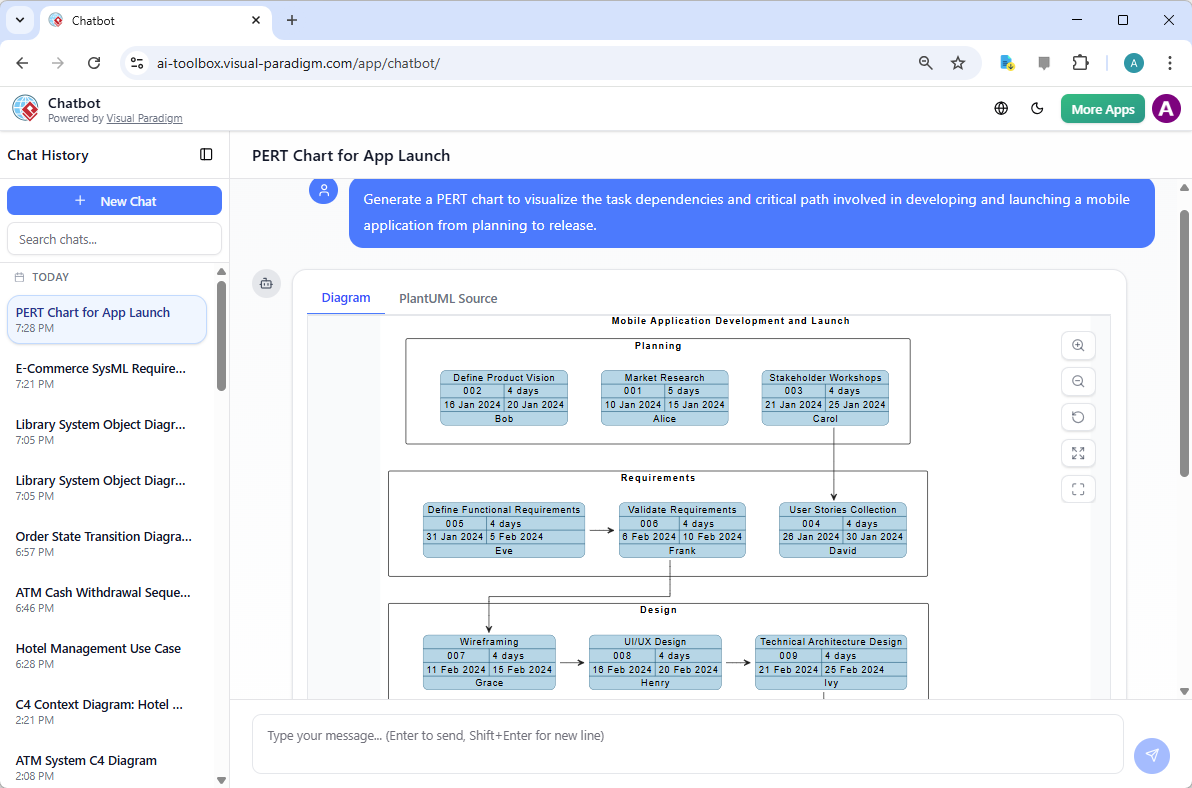
Simply type: “Generate a PERT chart for a mobile app launch.” The system responds with a fully rendered, interactive diagram—complete with phases like Market Research, Design, Testing, and Launch—along with clear dependency logic.
What sets this apart is the transparency layer. The user can view the underlying logic (e.g., PlantUML code) and verify the AI’s inference process. This level of transparency builds trust, especially in environments where project accuracy and auditability are paramount.
Why This Matters: Beyond Efficiency
While automation improves speed and reduces manual effort, the true value lies in its impact on:
- Decision-Making: Teams can focus on high-impact questions—like “What if we reduce marketing spend by 20%?”—without re-drawing entire timelines.
- Risk Mitigation: Early identification of critical path tasks and slack time allows proactive contingency planning.
- Team Collaboration: A shared, editable diagram serves as a living project artifact visible to all stakeholders—including non-technical executives.
- Compliance & Reporting: Outputs adhere to PMI, IEEE, and ISO project management standards, enabling use in formal audits or PMP-level documentation.
Seamless Integration and Scalability
Visual Paradigm’s platform supports both:
- Deep Desktop Modeling for large-scale enterprise projects requiring full control, versioning, and team collaboration.
- Lightweight Online Chatbot for rapid ideation, meeting support, or executive briefing.
Whether you are a project manager, product owner, or operations lead, the platform supports a hybrid workflow where AI handles the structural and mathematical backbone, while humans retain ownership of strategic decisions and creative oversight.
Conclusion: The Future of Project Scheduling
The integration of generative AI into project management workflows is not a fleeting trend—it is a necessary evolution. As projects grow in complexity and stakeholders demand transparency, tools that can transform unstructured ideas into dynamic, analyzable timelines are becoming essential.
By automating the labor-intensive aspects of PERT charting—such as dependency mapping, critical path identification, and time estimation—AI-powered modeling empowers teams to shift focus from execution overhead to strategic planning, risk forecasting, and value creation.
With Visual Paradigm’s AI-PERT generator, organizations gain:
- Rapid prototyping of project timelines
- Dynamic scenario analysis
- Compliance with professional standards
- Real-time visibility into project health
Ultimately, the future of project management lies not in more spreadsheets or Gantt bars, but in intelligent, human-in-the-loop visual modeling that turns vague ideas into actionable, traceable, and adaptable plans.
Recommended Next Steps for Implementation
Organizations looking to adopt AI-PERT generation should begin with a pilot project—such as launching a new product or organizing a major event—and evaluate performance on metrics like:
- Time to create a project timeline
- Accuracy of predicted critical paths
- Number of scheduling errors reduced
- Stakeholder adoption and engagement
Once validated, the model can be scaled to support cross-functional initiatives and integrated into existing project management software ecosystems.
Further Resources
- Step-by-Step Flowchart Tutorial for Beginners and Experts
- PERT Chart Tool – Visual Paradigm Online
- Complete PERT Chart Tutorial – Visual Paradigm
- PERT Chart User Guide – Visual Paradigm
- Free PERT Chart Templates – Visual Paradigm
- PERT Chart Tutorial – Visual Paradigm Knowledge Base
- Enhanced PERT Chart Features – Visual Paradigm
Start Today: Explore the full AI-powered modeling experience with Visual Paradigm. Download the Desktop Edition to access full AI diagram generation features, or try the AI Chatbot online to test your project ideas in seconds.
Visit: Download Visual Paradigm
Related posts:
 omprehensive Guide: Mastering AI-Powered SysML Internal Block Diagram Generation with Visual Paradigm
 AI-Powered SysML Block Definition Diagram Generation: Revolutionize System Modeling with Visual Paradigm
 AI-Powered SysML Parametric Diagrams Made Easy: Build, Refine, and Document with Visual Paradigm
 The Modern Guide to UML Modeling with AI: A Visual Paradigm Approach