
Mastering Visual Paradigm VPasCode: A Deep Dive into Class Diagrams with PlantUML
In the realm of software engineering, communicating complex system architectures is just as important as writing the code itself. Visual Paradigm’s VPasCode tool bridges the gap between abstract thinking and concrete visualization by allowing developers to define diagrams using code. This tutorial explores how to leverage the power of PlantUML within VPasCode to create robust Class Diagrams, specifically focusing on association relationships, cardinality constraints, and the nuanced addition of notes.
The Philosophy of Diagram as Code
Traditionally, drawing diagrams involves dragging and dropping shapes onto a canvas. While intuitive, this method often leads to misalignment, loss of formatting, and difficulty in version control. Diagram as Code flips this paradigm. By treating the diagram definition as text, developers can:
- Version control their architecture alongside their source code.
- Automate diagram generation.
- Ensure consistency across large projects.
VPasCode utilizes the PlantUML syntax, a widely adopted standard that allows for rapid iteration of architectural designs.
Defining the Building Blocks: Classes
Every Class Diagram starts with the definition of the classes themselves. In PlantUML, the syntax is remarkably straightforward. To define a class, you simply use the class keyword followed by the name of the class.
@startuml
class Team
class Player
@enduml
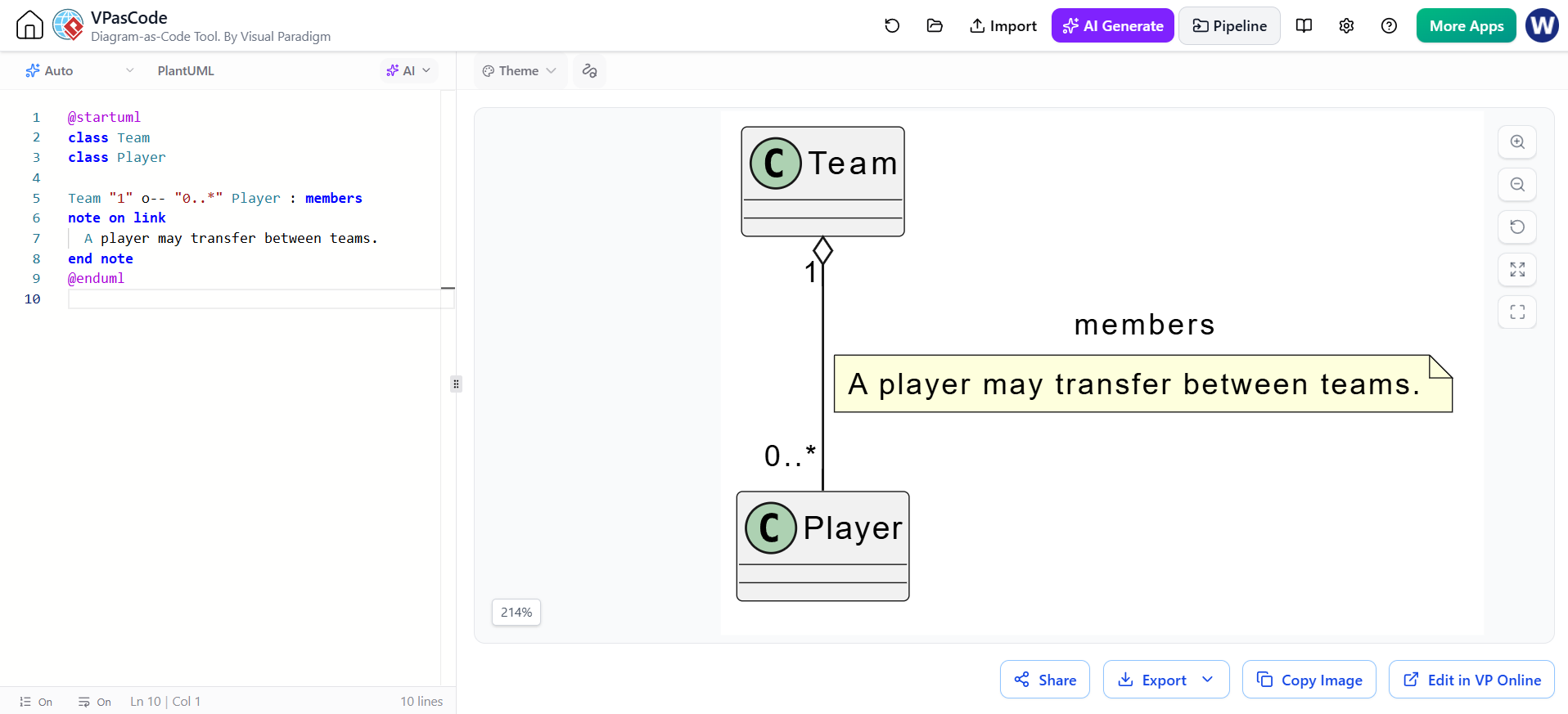
When VPasCode processes this snippet, it renders two distinct boxes on the canvas. In the context of our example, these represent the entities Team and Player. The interface in VPasCode allows you to toggle between the code editor view (left) and the rendered diagram view (right), providing immediate feedback.
Mapping Relationships and Cardinality
Once the classes are defined, the next step is to define how they interact. In object-oriented modeling, this is often an association or aggregation relationship. The syntax for connecting classes in PlantUML uses specific connectors.
The Aggregation Relationship
The relationship between a Team and its Players is often modeled as an aggregation (a “whole/part” relationship). In the provided context, we see the --o syntax. The open diamond (o) represents aggregation, indicating that a Team is composed of Players, but the Players can exist independently of the Team.
Team "1" o-- "0..*" Player : membersLet’s break down this specific line of code:
- The Direction: The line connects
TeamtoPlayer. - The Symbol:
--ocreates a line with an open diamond at the Team end. - The Multiplicity (Cardinality):
"1"near the Team indicates that a specific instance of the relationship (or the “whole”) is associated with exactly one Team."0.."near the Player indicates that a Team can have zero to many Players.
- The Role Name: The text
: membersdefines the role of the Player within the context of the Team relationship.
Adding Context with Notes
Diagrams are not just about structure; they are about communication. Sometimes, a symbol isn’t enough to explain a business rule. PlantUML allows you to attach notes to links or classes using the note on link directive.
note on link
  A player may transfer between teams.
end note
This snippet creates a sticky-note style annotation attached to the relationship line. This is crucial for documenting constraints that aren’t strictly structural, such as the lifecycle of a player or business logic regarding transfers.
Reading Multiplicities Correctly
One of the most common pitfalls in modeling is misinterpreting the numbers. In PlantUML and UML standards, the multiplicity is always read relative to the class it is nearest to.
Example Analysis:
Consider the line Team "1" o-- "0.." Player.
- From the perspective of a Team: The “1” is next to it. This implies the relationship instance is owned by the Team.
- From the perspective of a Player: The “0..” is next to it. This means a single Team can be associated with zero or many Players.
VPasCode renders this visually, placing the “1” near the Team box and “0..” near the Player box, making the logic instantly clear.
Conclusion
By utilizing VPasCode, developers can maintain a “living” documentation system. The separation of logic (code) and presentation (rendered diagram) ensures that your architectural diagrams remain accurate and up-to-date. Whether you are defining simple associations or complex aggregation hierarchies with detailed notes, the code-first approach provides precision and flexibility that drag-and-drop tools struggle to match.