
Mastering VPasCode: AI-Driven Diagramming in the Visual Paradigm Ecosystem
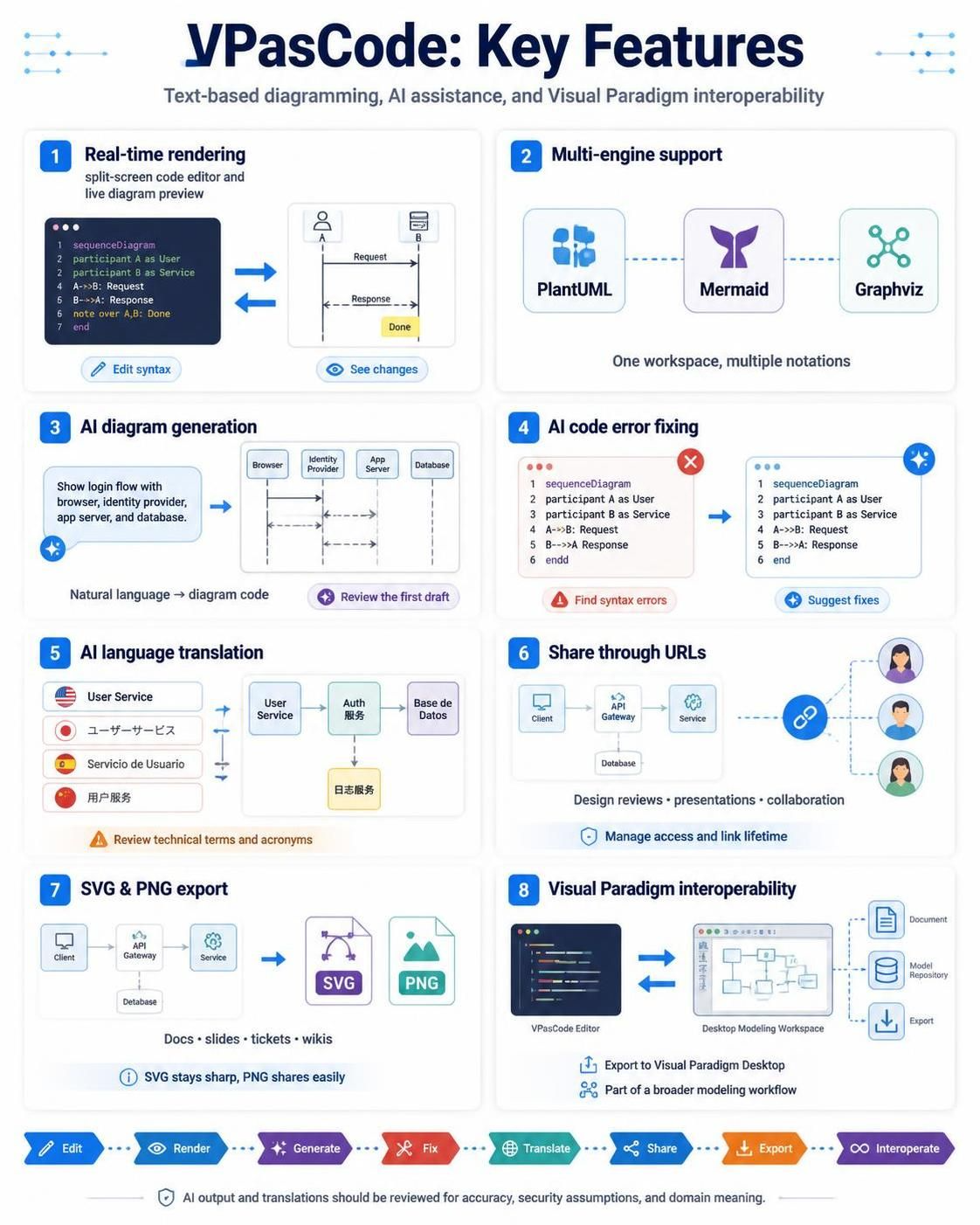
Welcome to the comprehensive guide on VPasCode, the revolutionary editor that bridges the gap between text-based programming and visual system modeling. In the modern software architecture landscape, the ability to rapidly prototype, document, and communicate complex system designs is paramount. VPasCode transforms the traditional drag-and-drop interface into a powerful, code-centric workflow, leveraging AI to accelerate the design process.
This tutorial will deconstruct the eight key pillars of VPasCode as depicted in its core feature set. We will explore how it handles real-time rendering, supports multiple diagramming engines, and integrates seamlessly into the broader Visual Paradigm ecosystem.
1. The Core Paradigm: Real-Time Rendering
At the heart of VPasCode is the concept of Text-Based Diagramming. Unlike traditional tools where you manually position boxes and lines, VPasCode relies on a declarative syntax. You write code, and the tool renders the visual representation instantly.
This is achieved through a split-screen interface:
- Code Editor: A dedicated pane for writing syntax (such as PlantUML or Mermaid).
- Live Preview: A real-time visualization of the diagram as you type.
Consider the following example of a Sequence Diagram written in VPasCode syntax:
sequenceDiagram
participant A as User
participant B as Service

A->>B: Request
B-->>A: Response
note over A,B: Done
end
This approach offers distinct advantages for technical writers and architects: it is version-control friendly, easier to edit programmatically, and reduces the “canvas clutter” associated with complex visual tools.
2. Multi-Engine Support: One Workspace, Multiple Notations
One of the most critical architectural decisions in a modeling tool is the choice of rendering engine. VPasCode solves the problem of fragmentation by supporting multiple engines within a single workspace. This allows users to choose the best notation for their specific needs without switching applications.
The supported engines include:
- PlantUML: The industry standard for text-based UML diagrams, offering extensive library support.
- Mermaid: A lightweight, JavaScript-based tool gaining popularity for its simplicity in documentation (e.g., Markdown files).
- Graphviz: A powerhouse for graph visualization, ideal for dependency trees and network topologies.
By unifying these engines, VPasCode ensures that whether you need a detailed class diagram or a high-level flowchart, you have the right tool immediately available.
3. AI Diagram Generation: From Natural Language to Code
The barrier to entry for learning syntax can be high. VPasCode removes this friction using AI Diagram Generation. Instead of memorizing commands like participant or link, users can describe their intent in plain English.
The Workflow:
- Input: The user types a prompt: “Show login flow with browser, identity provider, app server, and database.”
- Generation: The AI parses the intent and constructs the corresponding code snippet.
- Refinement: The user reviews the first draft and makes minor edits if necessary.
This feature democratizes modeling, allowing non-technical stakeholders to contribute to architectural diagrams while maintaining technical accuracy.
4. AI Code Error Fixing
Code-based diagramming is powerful, but syntax errors can break the rendering. VPasCode integrates an intelligent Error Fixing engine. When the parser encounters a syntax error (such as a missing end statement or an undefined participant), it highlights the issue and suggests a fix.
For example, if a user forgets to close a sequence block:
sequenceDiagram
participant A as User
participant B as Service
A->>B: Request
B-->>A: Response
end
The AI detects the mismatch in the logic structure and provides a “Suggest fixes” action to automatically correct the code, ensuring the diagram renders correctly.
5. AI Language Translation
Software architecture is a global activity. VPasCode addresses localization needs through AI Language Translation. This feature is particularly useful for international teams where technical terms might vary.
It translates labels and descriptions within the diagram into various languages (e.g., English to Japanese, Spanish, or Chinese) while preserving the underlying structure. This ensures that a “User Service” component remains consistent across different localized documentation sets.
6. Share Through URLs
Collaboration is a key requirement for modern development teams. VPasCode enables Share through URLs, allowing users to generate a unique link for their diagram. This facilitates:
- Design Reviews: Stakeholders can view the latest architecture without needing a license or software installation.
- Presentations: Live links can be embedded in slide decks.
- Access Management: Administrators can manage link lifetimes and access permissions.
7. SVG & PNG Export
Once a diagram is finalized, it needs to be integrated into other documentation. VPasCode supports high-fidelity export formats:
- SVG (Scalable Vector Graphics): Perfect for embedding in wikis, technical docs, or slides where the diagram might need to be zoomed in without losing quality. SVG files remain sharp at any resolution.
- PNG (Portable Network Graphics): Ideal for quick sharing, tickets, or social media where a raster image is preferred.
8. Visual Paradigm Interoperability
Finally, VPasCode is not an isolated tool; it is part of the broader Visual Paradigm ecosystem. The Interoperability feature allows for bidirectional flow between the text editor and the Visual Paradigm Desktop Modeling Workspace.
This means you can:
- Export your VPasCode diagrams to the Desktop application for further refinement using visual tools.
- Import existing models from the Desktop workspace into VPasCode for rapid text-based editing.
- Synchronize changes across the Document and Model Repository.
Conclusion
By combining the precision of code with the accessibility of AI, VPasCode represents the next generation of modeling tools. Whether you are generating a quick sequence diagram via natural language or exporting a complex SVG for your engineering wiki, VPasCode provides the flexibility and power required for modern system design.