
Mastering UML Sequence Diagrams: Modeling ATM Constraints in Visual Paradigm
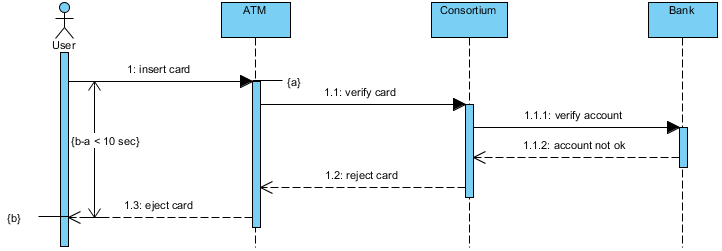
When designing complex software systems like Banking or ATM networks, understanding the precise order of events and the timing constraints between different actors is crucial. A Sequence Diagram is the industry-standard UML tool used to visualize this interaction. In this tutorial, we will break down the architecture of an ATM transaction system, specifically focusing on how to model time constraints and conditional flows using Visual Paradigm.
We will analyze a specific scenario where a User attempts to use an ATM, but the transaction fails due to a security timeout or a rejected account. By the end of this guide, you will understand how to represent lifelines, activation bars, and strict temporal logic in your own diagrams.
1. Understanding the System Architecture
Before drawing a single line, we must identify the participants (or “Lifelines”) involved in the system. In our ATM example, the architecture consists of four distinct entities:
- User (Actor): Represented by the stick figure, this is the human interacting with the system.
- ATM (System): The physical machine that acts as the interface between the user and the backend banking network.
- Consortium: A critical intermediary entity in banking. This represents the payment gateway or clearinghouse that connects the local ATM to the specific bank network.
- Bank: The final destination where the account data resides. This entity holds the truth about the user’s account status.
2. Modeling the Interaction Flow
Sequence diagrams read from top to bottom, representing the passage of time. Let’s walk through the specific logic shown in the diagram.
Step A: The Initial Request
The process begins when the User initiates contact with the ATM. This is represented by a solid line with a filled arrowhead:
- 1: insert card: The user physically inserts their card. The ATM receives this input and activates a vertical bar (activation bar) to show it is processing.
Step B: Backend Verification (The Consortium)
Once the ATM has the card, it cannot verify the balance itself. It must delegate this task to the backend. The diagram shows a sequential chain of calls:
- 1.1: verify card: The ATM sends a request to the Consortium.
- 1.1.1: verify account: The Consortium acts as a router and forwards the request to the Bank.
- 1.1.2: account not ok: This is a Return Message. It is represented by a dashed line with an open arrowhead, indicating a response is being sent back. The Bank sends a rejection signal (“account not ok”) back to the Consortium.
Step C: The Rejection Loop
The flow returns to the ATM. The Consortium (1.1.2) tells the ATM the account is invalid. Consequently, the ATM must take action:
- 1.2: reject card: The ATM sends a signal back to the Consortium (or simply processes the rejection internally before returning to the user).
- 1.3: eject card: Finally, the ATM sends a final command back to the User to eject the card and end the session.
3. Modeling Time Constraints
One of the most powerful features of UML sequence diagrams is the ability to define Time Constraints. These are essential for real-time systems like ATMs where speed and security are paramount.
Understanding the (a) Region
In the diagram, you will notice a region marked (a) surrounding the backend verification process. This is a logical grouping or a “frame” used to encapsulate a specific sequence of events. It tells the reader: “Everything inside this box is the verification phase.”
Understanding the (b) Region and Mathematical Logic
The region marked (b) represents the total interaction time between the User and the ATM. The constraint (b-a) < 10 sec is a critical business rule.
- a: The time the User inserts the card (Start Time).
- b: The time the User receives the card back (End Time).
- (b-a): The total duration of the interaction.
This constraint dictates that the entire process—from inserting the card to receiving the rejection and ejecting it—must occur in under 10 seconds. If this system architecture takes longer, the ATM might time out the user’s session for security reasons.
4. Implementation with Visual Paradigm
To recreate this architecture effectively, follow these steps using the Visual Paradigm UML tool:
- Create a New Diagram: Select File > New > Diagram > UML > Interaction > Sequence Diagram.
- Add Lifelines: Drag and drop the four objects (User, ATM, Consortium, Bank) onto the canvas. Ensure the “User” is set as an Actor.
- Add Messages: Right-click on the lifeline of the ATM and select Add Message. Enter the text “1: insert card”. Repeat this for all interactions, ensuring you use “Return Message” for the dashed lines (1.1.2).
- Apply Time Constraints: Select the interaction frame covering the backend calls. In the “Stereotype” or “Constraint” field, input the formula
(b-a) < 10 sec. Visual Paradigm will format this nicely within the frame boundary.
Why Use Visual Paradigm for this?
While many tools can draw shapes, Visual Paradigm excels at enforcing UML standards. It automatically manages the activation bars (the vertical blue rectangles), ensuring they start and end exactly when a message is sent or received. This prevents the common error of drawing “floating” bars that do not align with the actual logic flow.
Conclusion
Mastering sequence diagrams allows you to document not just what the system does, but when it does it. By clearly defining the relationship between the User, ATM, Consortium, and Bank, and by applying strict time constraints, you ensure that your software architecture is robust, secure, and efficient.