
Now Reading: 🌟 Highly Recommended: Why Visual Paradigm’s AI Is a Game-Changer for Professional AWS Architecture
-
01
🌟 Highly Recommended: Why Visual Paradigm’s AI Is a Game-Changer for Professional AWS Architecture


🌟 Highly Recommended: Why Visual Paradigm’s AI Is a Game-Changer for Professional AWS Architecture
As a cloud architect who spends countless hours juggling services like EC2, S3, and Lambda, I can tell you one truth: Manually drawing AWS architecture diagrams is a nightmare. It requires balancing hundreds of components, ensuring every connection adheres to security best practices, and maintaining a clean layout. It’s rarely just “drag and drop.”
That is why I strongly recommend Visual Paradigm, specifically its AI Cloud Architecture Studio. This tool has completely transformed how we design and document infrastructure. Instead of struggling with manual icon placement, we now benefit from an AI-powered architecture generator that understands deep cloud logic.
Here is why I believe this is the essential tool for any modern engineering team.
🚀 Why You Need Visual Paradigm AI
In the past, I often spent nights in PowerPoint or Workbench, worrying about whether a VPC icon was perfectly aligned or if the NAT gateway was placed correctly. With Visual Paradigm, that nightmare ended. We now treat architecture like a dialogue with an expert.
Just describe your requirements in plain English, and the AI builds a standards-compliant, high-fidelity AWS diagram-in minutes.
If you are looking for:
-
✅ Natural Language Design: No technical diagrams required; just talk to the AI to build the blueprint.
-
✅ High-Availability & Multi-Region Patterns: Experts automatically suggest resilient strategies based on your business needs.
-
✅ Official Iconography: Get pristine, up-to-date graphics that match current AWS, Azure, and GCP standards (no more outdated or generic icons).
The Verdict: If you want to speed up your MVP launches or enterprise migrations without sacrificing quality, Visual Paradigm is an absolute must-have.
🛠️ My Experience: From Description to Blueprint
Here is exactly how our workflow looks now:
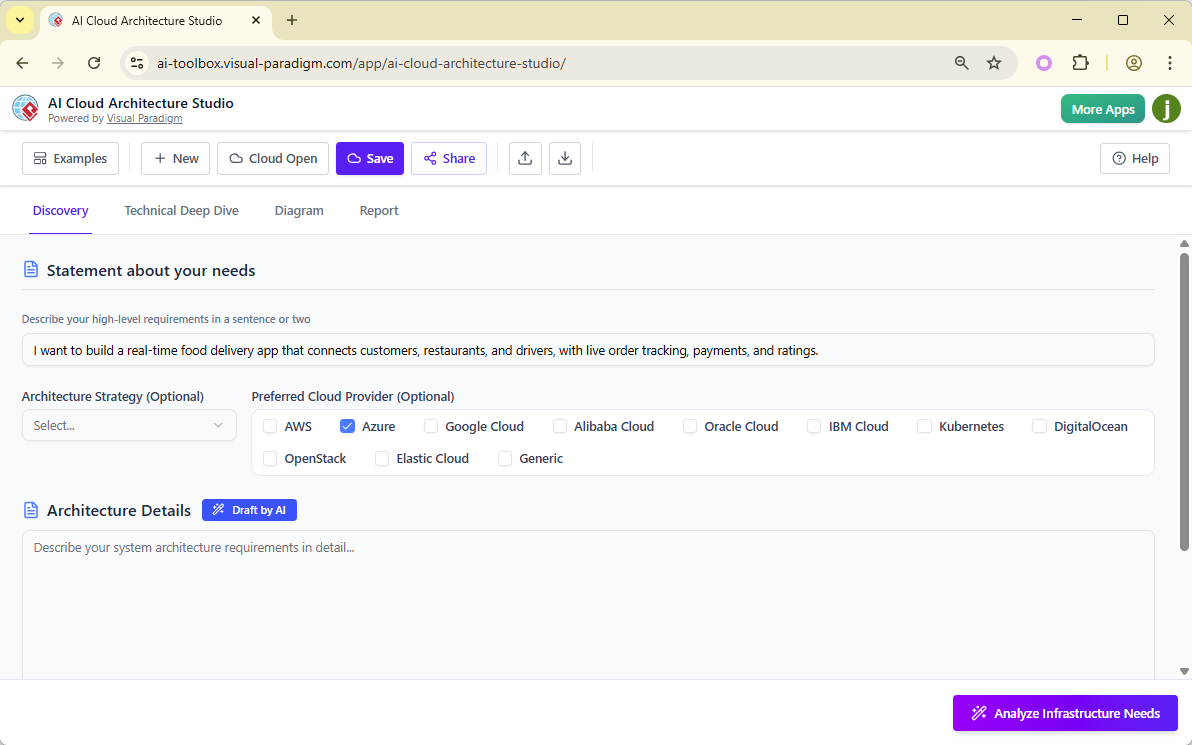
1️⃣ Describe Your System (The Prompt)
We jump straight to the Discovery tab. It’s just like chatting with a colleague:
“I need to build a real-time food delivery app with live order tracking, secure payments, and user ratings.”
No工程专业 knowledge needed to start! The AI understands the context immediately.
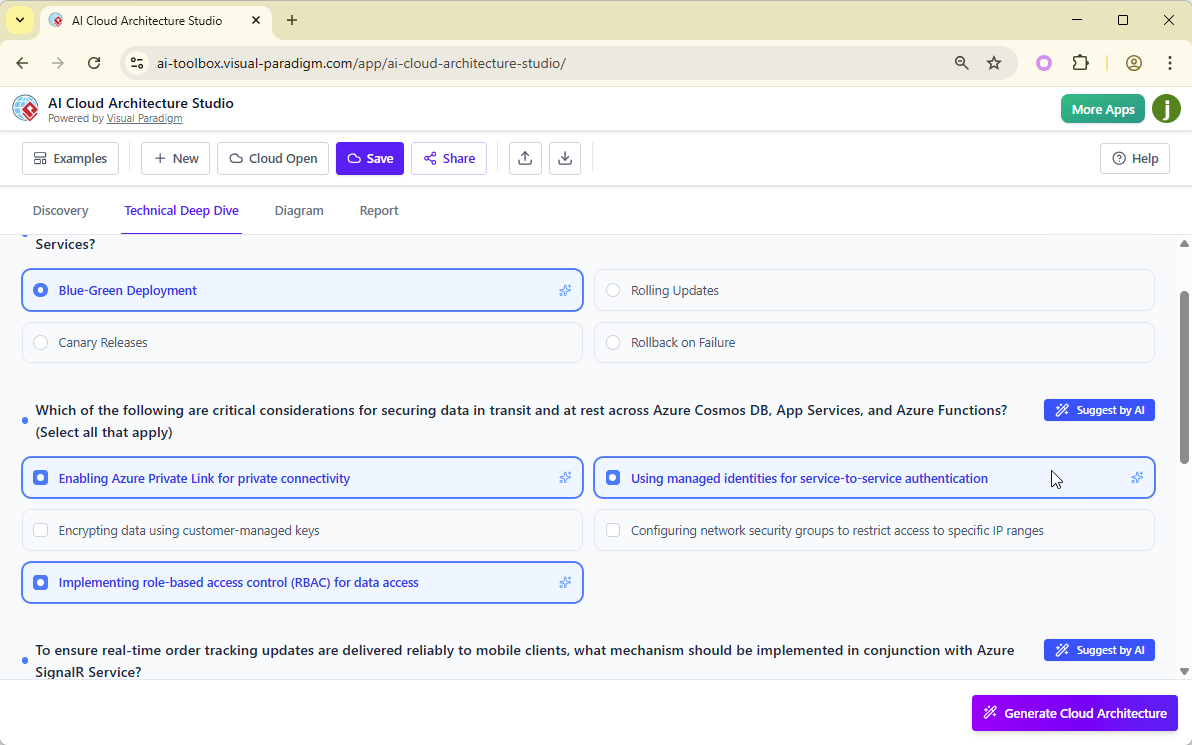
2️⃣ The AI Asks the Right Questions
The AI doesn’t just guess. It recognizes your scale and asks for clarification to refine the stack:
-
“Are we aiming for a Low-Cost MVP or a High-Availability Global Deployment?”
-
“For user data, should we choose Relational (RDS) or NoSQL (DynamoDB)?”
This ensures the architecture fits your actual business logic, not just random templates.
3️⃣ Generate & Iterate Instantly
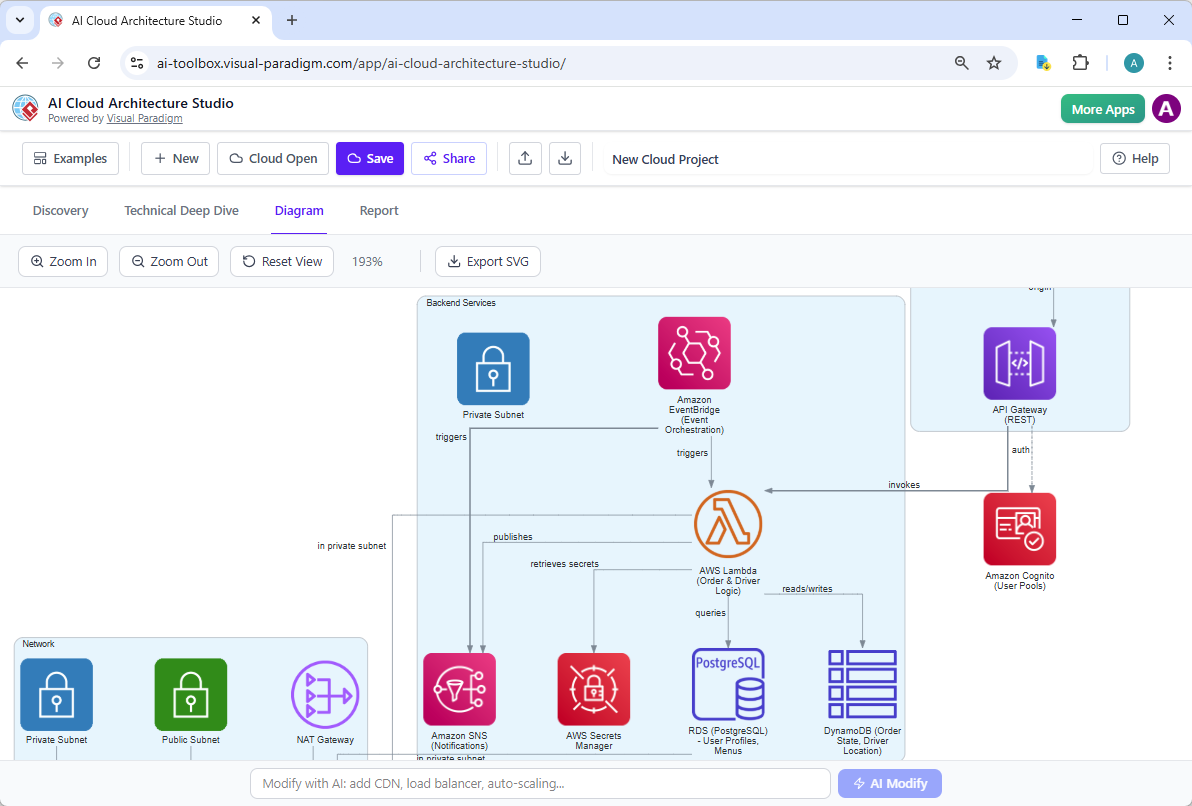
Once you confirm the strategy, click Generate. Within seconds, a clean, interactive diagram springs to life.
But the real magic happens with the AI Modify tool. We don’t stop at the first generation.
-
I typed: “Add WAF, Security Groups, and CloudWatch monitoring for compliance.”
-
Result: The AI instantly updated the diagram, placing the WAF in front of the API Gateway, adding the specific security groups, and initializing logs.
4️⃣ Integration & Collaboration
It’s not just a standalone tool. Visual Paradigm’s ecosystem keeps us aligned:
-
VP Desktop: Deep offline modeling for complex UML, BPMN, and ERD workflows.
-
OpenDocs: Embed these AWS diagrams directly into our technical wikis. When the architecture changes in the Studio, the documentation updates in real-time, eliminating the “drawings vs. reality” gap.
-
AI Chatbot: Rapidly prototype supporting logic like sequence diagrams or use cases that complement the physical infrastructure.
📊 The Reality Check: AI vs. Traditional Tools
We tested this against standard drawing tools and other AI generators. The results were clear.
| Feature | Visual Paradigm AI | Standard Drawing Tools | Generic AI Generators |
|---|---|---|---|
| Logical Depth | Advisory: Asks questions to build a real, logical stack. | Static: Templates don’t understand context. | Random: Puts icons together without logic. |
| Visual Consistency | Official Icons: Uses current AWS/Azure/GCP assets. | Generic: Often uses outdated or mismatched symbols. | Inconsistent: Shapes and colors often clash. |
| Scalability | Enterprise Ready: Handles multi-region and HA patterns. | Single View: Hard to scale complex topologies. | Limited: Often fails on complex logic. |
✅ Final Recommendation
Stop struggling with manual icon placement. Visual Paradigm’s AI Cloud Architecture Studio is designed to scale with your team’s complexity, from simple MVP prototypes to massive, multi-region enterprise cloud environments.
It allows your architects to focus on solving actual technical problems rather than wrestling with layout and metadata.
🚀 Ready to automate your blueprint process?
Give Visual Paradigm’s AI Cloud Architecture Studio a try today. Transform your workflow from “hand-crafting” to “intelligent automation.”
Reference List
- AWS Architecture Diagram Tool: AWS-Ready Diagrams & Components: Introduces specialized components and templates designed for building accurate AWS architecture diagrams directly within the Visual Paradigm platform.
- Comprehensive TOGAF ADM Tutorial: A Step-by-Step Guide: Provides a detailed walkthrough of the Architecture Development Method, guiding users through establishing frameworks and managing architecture lifecycles.
- AWS Architecture Diagram Tool: Features & Usage: Details the specific features of the cloud diagramming tool, including pre-built AWS shapes and cloud-specific configuration options.
- Production Version of AWS Architecture Diagram Tool: Highlights the professional capabilities of the tool for enterprise-grade architectural modeling and documentation.
- Solutions Overview: Free AWS Architecture Diagram Tool: Offers an overview of the available solutions and provides access to the tool for creating cloud architecture diagrams efficiently.
- French Language Solution: Free AWS Architecture Diagram Tool: Provides French-language resources and access to the cloud diagramming solutions, catering to international users.
- Updates Release: AI Cloud Architecture Studio Launch: Announces the latest release of the AI-driven studio capable of generating and refining cloud architecture designs automatically.
- Revolutionizing Cloud Design: A Deep Dive by Cybermedian: An external analysis discussing how Visual Paradigm’s new AI studio is transforming the speed and accuracy of cloud design processes.
- YouTube Video: AI Cloud Architecture Studio Overview: A video tutorial demonstrating the launch and core functionalities of the AI Cloud Architecture Studio.
- YouTube Video: AI Cloud Architecture Studio: Generating and Refining: A detailed video explanation of how the AI tool assists in generating diagrams, refining designs, and exporting reports.
- YouTube Video: Discover How AI Cloud Architecture Studio Works: A supplementary video guide exploring the capabilities of the AI studio in cloud architecture generation and documentation.
- Guide: Cloud Services Architecture & AWS: Provides an educational overview of cloud services architecture, specifically focusing on AWS implementation strategies and design principles.