


Visual Paradigm is a leading all-in-one visual modeling and design platform that empowers software teams to accelerate application development through integrated UML (Unified Modeling Language), ERD (Entity Relationship Diagram), and AI-driven automation. With a strong focus on model-driven development (MDD) and code-generation capabilities, Visual Paradigm bridges the gap between conceptual design and physical implementation—especially in object-oriented and database systems.

This guide provides a complete, structured overview of how Visual Paradigm streamlines the software design lifecycle—from initial idea to production-ready code and database schema—leveraging both comprehensive traditional tools and cutting-edge AI-powered features.
🧩 1. All-in-One Feature Tools: A Unified Modeling Environment
Visual Paradigm offers a fully integrated, unified environment for creating and managing various types of diagrams essential for modern software engineering.
✅ Integrated Modeling Environment
The platform supports a wide array of diagram types, including:
-
UML Class Diagrams – For object-oriented design and modeling of classes, attributes, methods, and relationships.
-
Entity Relationship Diagrams (ERDs) – For designing logical and physical database schemas.
-
Use Case Diagrams, Sequence Diagrams, Activity Diagrams, and more.
This unified interface allows developers, analysts, and architects to work within a single environment without switching between multiple tools.
🔗 Visual Paradigm – ERD Tool
🔗 Visual Paradigm – Free ERD Tool
✅ Model-Driven Development (MDD)
Visual Paradigm embraces model-driven development, enabling teams to:
-
Start with conceptual models (e.g., UML Class Diagrams).
-
Progressively refine them into logical and physical database schemas.
-
Maintain consistency across all stages of design.
This approach ensures that the application’s business logic and data structure evolve cohesively and predictably.
✅ Synchronization & Traceability
One of the platform’s most powerful features is bi-directional synchronization between:
-
UML Class Diagrams ↔ ERDs
Changes made in one diagram are automatically reflected in the other, ensuring:
-
Design consistency
-
Traceability between object models and database schemas
-
Elimination of manual updates and errors
✅ Code and Database Generation
Visual Paradigm automates the generation of executable code and database artifacts directly from models:
🔹 ORM Code Generation
-
Generates Object-Relational Mapping (ORM) code for popular frameworks such as:
-
Hibernate
-
JPA (Java Persistence API)
-
Entity Framework (C#)
-
This reduces boilerplate code and accelerates backend development.
🔗 Generating ORM Code from Models
🔗 Generating ORM Code – Part 2
🔹 SQL DDL Script Generation
-
Automatically produces SQL Data Definition Language (DDL) scripts.
-
Supports major databases: MySQL, PostgreSQL, Oracle, SQL Server, SQLite, etc.
-
Enables direct deployment to production or test environments.
✅ Reverse Engineering
For legacy systems or existing databases, Visual Paradigm provides reverse engineering capabilities:
-
Import existing databases (e.g., MySQL, Oracle) into ERDs.
-
Convert ERDs back into UML Class Diagrams.
-
Facilitates documentation, refactoring, and modernization of outdated systems.
🔗 Reverse Engineering Databases into ERDs
🔗 Reverse Engineering – User Guide
🤖 2. AI-Powered Feature Tools: Accelerating Design with Intelligence
Visual Paradigm integrates artificial intelligence (AI) to dramatically reduce manual effort, speed up prototyping, and improve design accuracy.
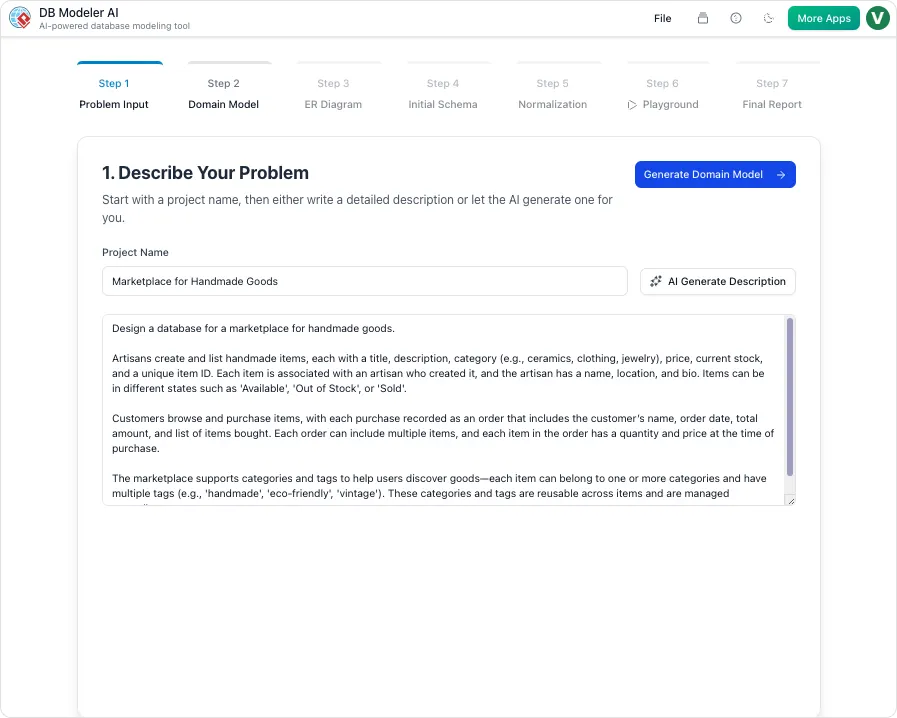
✅ Natural Language Processing (NLP) with DBModeler AI & AI Chatbot
The platform introduces AI-powered tools that interpret natural language inputs and convert them into structured models:
-
DBModeler AI: Analyzes plain-text descriptions (e.g., “Users can place orders, each order has multiple items”) and identifies:
-
Entities (classes)
-
Attributes
-
Relationships
-
Cardinalities
-
-
AI Chatbot: Acts as a conversational assistant, allowing users to:
-
Prompt: “Add a ‘status’ attribute to the ‘Order’ class.”
-
Prompt: “Create a one-to-many relationship between Customer and Order.”
-
Receive instant diagram updates and validation feedback.
-
🔗 AI Diagram Generation Review – Flipfify
🔗 YouTube – DBModeler AI Demo
✅ Automated Diagram Generation
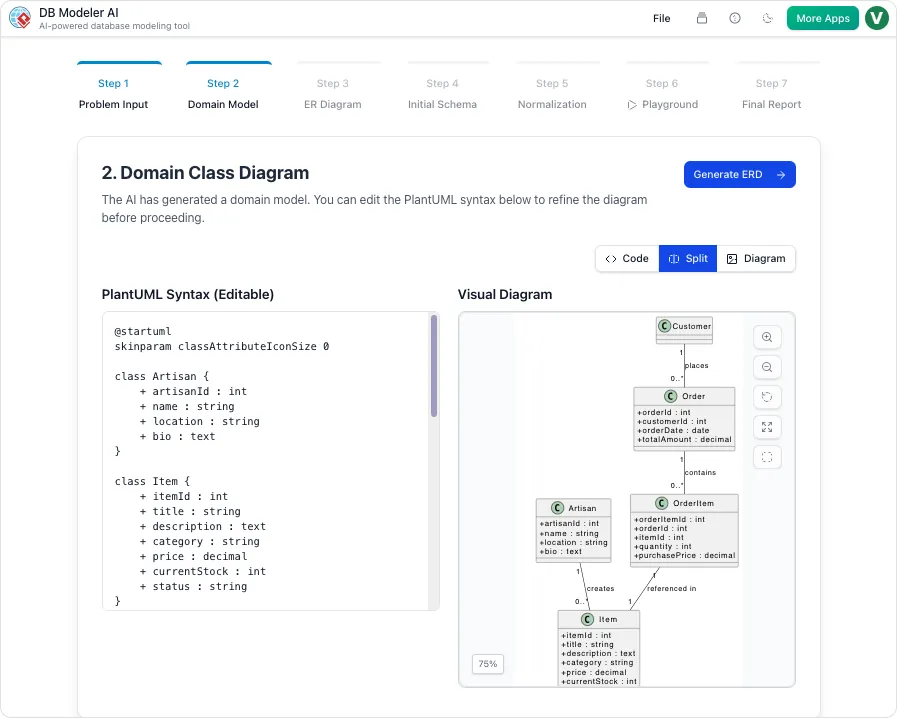
With just a few lines of plain text, Visual Paradigm generates:
-
Initial UML Class Diagrams
-
ERDs (Entity Relationship Diagrams)
This eliminates the need for time-consuming manual drawing and allows teams to start with a structured blueprint immediately.
✅ Intelligent Database Normalization
DBModeler AI doesn’t just generate schemas—it intelligently applies database normalization rules:
-
1NF (First Normal Form) – Eliminates repeating groups.
-
2NF (Second Normal Form) – Removes partial dependencies.
-
3NF (Third Normal Form) – Eliminates transitive dependencies.
Each transformation is explained step-by-step, helping users understand and validate the changes.
This ensures:
-
Reduced data redundancy
-
Improved data integrity
-
Better performance and scalability
✅ Interactive Refinement via AI Chatbot
The AI Chatbot enables iterative, conversational refinement:
-
Modify diagrams using natural language.
-
Get real-time feedback on best practices.
-
Perform automated quality checks (e.g., naming conventions, relationship consistency).
This makes it ideal for both beginners and experienced developers.
✅ Live SQL Playground
A groundbreaking feature: Live SQL Playground.
-
Automatically generates a fully populated SQL environment with sample data.
-
Allows teams to:
-
Run queries instantly
-
Test schema behavior
-
Validate constraints and relationships
-
Simulate real-world usage before deployment
-
This reduces risk and accelerates testing cycles.
🚀 3. How Visual Paradigm Streamlines the Development Process
By combining traditional modeling tools with AI-powered automation, Visual Paradigm enables teams to:
| Phase | Benefit |
|---|---|
| Requirement Capture | Use plain language to generate initial models (via AI). |
| Design & Prototyping | Rapidly create accurate UML and ERD diagrams with minimal effort. |
| Database & Code Generation | Automatically generate ORM code and SQL DDL scripts. |
| Validation & Testing | Use the Live SQL Playground to test schema behavior. |
| Legacy System Modernization | Reverse engineer existing databases into models. |
| Collaboration & Traceability | Maintain bi-directional sync between models and code. |
✅ Result: Significantly shortened development cycles, fewer errors, and higher consistency between design and implementation.
⚠️ Important Note: AI Can Make Mistakes
While Visual Paradigm’s AI features are powerful and accurate in most cases, AI-generated outputs are not infallible. Always:
-
Review and validate the generated diagrams and code.
-
Verify normalization rules and relationship logic.
-
Test SQL queries in the Live Playground before production use.
📚 Reference List
- Use Case Modeling Studio – Visual Paradigm: An in-depth look at Visual Paradigm’s Use Case Modeling Studio, highlighting its role in creating, managing, and generating use cases with AI assistance.
- Visual Paradigm – Benefits of Model-Driven Development: Details the advantages of using a model-driven approach in software development.
- Visual Paradigm – ERD Tool (Chinese): Overview of the ERD tool with features tailored for database design.
- Visual Paradigm – Free ERD Tool: Accessible version of the ERD tool with core functionality for database modeling.
- Visual Paradigm – Generating ORM Code: Step-by-step guide on generating ORM code from class diagrams.
- Visual Paradigm – Generating ORM Code (Part 2): Additional insights into ORM code generation and configuration.
- Synchronization Between Class and ER Diagrams: Demonstrates bi-directional synchronization for consistency.
- Visual Paradigm – User Guide – Reverse Engineering: Explains how to reverse engineer databases into models.
- Visual Paradigm – Data Modeling Gallery: Collection of real-world data modeling examples and templates.
- Visual Paradigm – ER Diagram Tool: Comprehensive overview of ERD creation and management.
- Visual Paradigm – AI Diagram Generation (YouTube Demo): Video walkthrough of AI-powered diagram generation.
- Fliplify – Comprehensive Review of Visual Paradigm’s AI Features: In-depth analysis of DBModeler AI and AI Chatbot functionality.
- Visual Paradigm – AI Normalization & Schema Design (YouTube Demo): Demonstration of intelligent normalization and schema refinement.
- Visual Paradigm – Database Design with ERD Tools: Full feature overview including AI, code generation, and Live SQL Playground.
✅ Final Thoughts
Visual Paradigm stands out as a next-generation modeling platform that merges enterprise-grade modeling tools with AI-driven intelligence. Whether you’re designing a new system from scratch or modernizing a legacy database, its all-in-one suite enables faster, smarter, and more consistent development.
By leveraging model-driven design, bi-directional synchronization, and AI-powered automation, teams can focus more on problem-solving and less on repetitive tasks—delivering high-quality software faster than ever.
🛠️ Pro Tip: Use the AI tools for rapid prototyping, then manually review and refine the output for production-grade accuracy.
📌 Start Your Journey Today
👉 Download Visual Paradigm Free Version
👉 Explore AI Features Live