
Running a successful product increment demo is one of the most critical responsibilities of a Scrum team. It is not merely a presentation; it is a structured inspection of the work completed and a catalyst for future collaboration. When executed with precision, this event transforms raw development effort into tangible value for stakeholders. It bridges the gap between technical execution and business strategy. Without proper preparation, the demo can become a disjointed showcase of features that fails to generate the necessary feedback or alignment. This guide provides a comprehensive framework for teams seeking to refine their demo practices and maximize the impact of their increments.
🧐 Understanding the Purpose of the Sprint Review
Before diving into logistics, it is essential to distinguish between the Sprint Review and a simple status update. The Sprint Review is a working session where the Scrum Team and stakeholders inspect the outcome of the Sprint and determine future adaptations. It is distinct from a formal demonstration intended solely to please an audience. The goal is transparency and feedback.
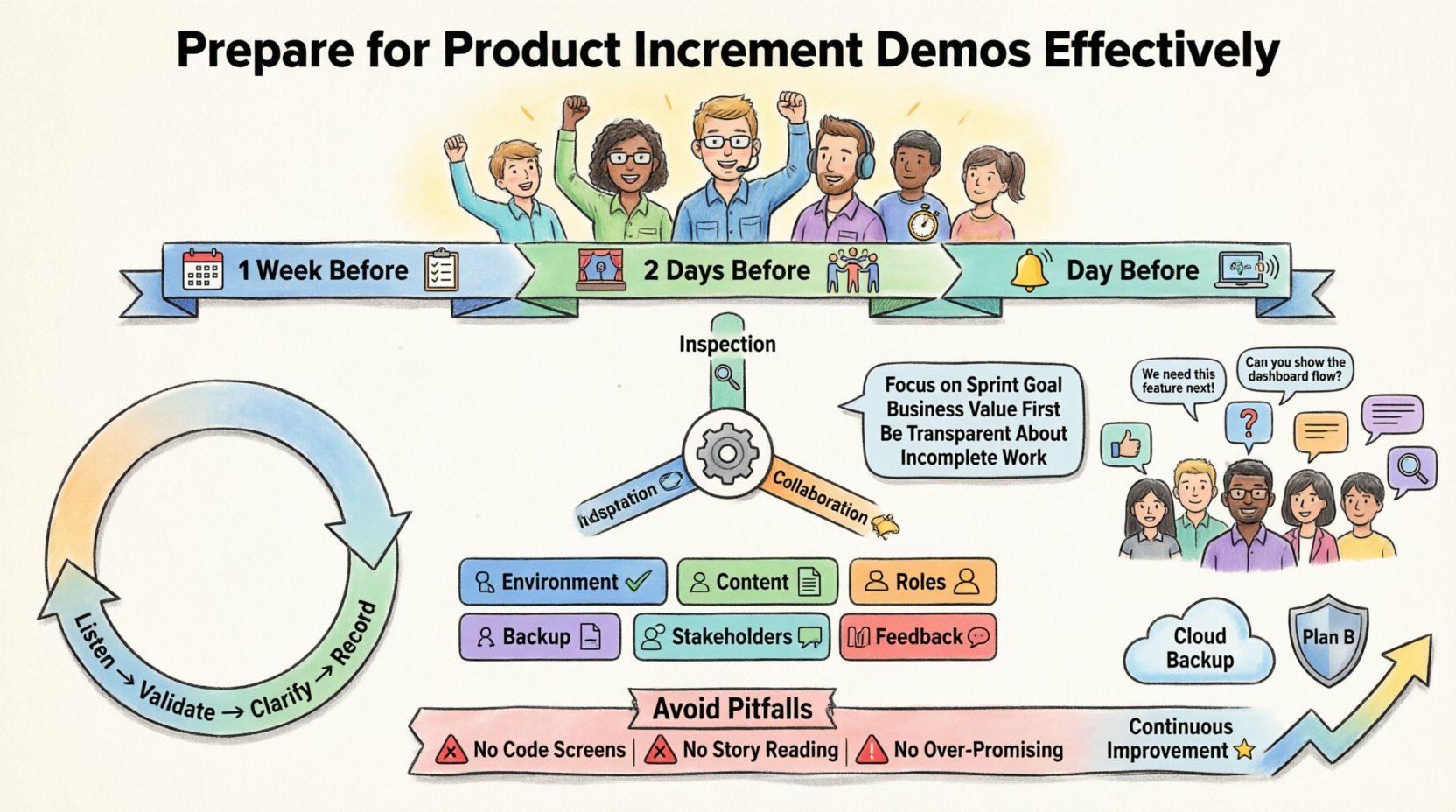
- Inspection: Review the product increment against the Sprint Goal.
- Adaptation: Discuss what the Product Owner should do next based on feedback.
- Collaboration: Invite stakeholders to discuss changes to the Product Backlog.
Many teams mistake the demo for a performance review. This mindset shift is crucial. Stakeholders do not want to watch a script; they want to see working software and discuss how it solves their problems. The focus should remain on the value delivered, not the code written.
📅 The Preparation Timeline
Effective preparation does not happen overnight. It requires a phased approach leading up to the Sprint Review. Rushing through the final hours often leads to technical glitches or missing context. A structured timeline ensures that the team is ready to showcase the increment confidently.
Phase 1: One Week Before the Demo
At this stage, the focus is on selection and readiness. The team should review the Sprint Goal to ensure the increment aligns with the original intent. If the goal was missed, the team needs to understand why and be prepared to explain it without defensiveness.
- Verify that all selected user stories meet the Definition of Done.
- Ensure the demo environment is accessible and stable.
- Identify potential risks in the current increment that might require explanation.
- Notify stakeholders of the date and time, including the agenda.
Phase 2: Two Days Before the Demo
During this window, the team rehearses the flow. This is not a full dress rehearsal but a walkthrough of the critical paths. The objective is to identify any broken links, missing data, or navigation hurdles.
- Run through the critical user journeys end-to-end.
- Check that all data required for the demo is present (e.g., test accounts, sample records).
- Assign roles: who is demonstrating, who is answering technical questions, and who is managing time.
- Prepare backup materials, such as screenshots or recorded clips, in case the live environment fails.
Phase 3: The Day Before the Demo
The focus shifts to logistics and communication. This is the final check before the event. It is also the time to ensure the Product Owner is ready to discuss the roadmap.
- Confirm the room booking or virtual meeting link.
- Test audio and video equipment one final time.
- Send a reminder email to stakeholders with the agenda.
- Prepare the backlog items for potential re-ordering based on feedback.
📋 Pre-Demo Readiness Checklist
To ensure nothing is overlooked, teams should utilize a standardized checklist. This table outlines the key areas of focus that must be verified before the Sprint Review begins.
| Category | Checklist Item | Status |
|---|---|---|
| Environment | Demo server is online and accessible | ☐ |
| Content | Stories selected align with the Sprint Goal | ☐ |
| Roles | Presenter and Q&A lead are identified | ☐ |
| Backup | Screenshots or videos available if live demo fails | ☐ |
| Stakeholders | Invitations sent and RSVPs tracked | ☐ |
| Feedback | Feedback mechanism (e.g., whiteboard, form) ready | ☐ |
🎬 Curating the Content
What you show matters more than how much you show. A common mistake is attempting to demonstrate every single task completed during the Sprint. This leads to fatigue and dilutes the message. The Product Owner and the Development Team must collaborate to select the most valuable increments.
Focus on the Sprint Goal
The primary narrative of the demo should revolve around the Sprint Goal. If the goal was to improve the checkout process, every story shown should contribute to that narrative. Avoid showing features that are unrelated to the goal, even if they are complete. Irrelevant features can confuse stakeholders about the team’s priorities.
Story Selection Criteria
When choosing which stories to demo, apply the following criteria:
- Business Value: Does this feature solve a real problem for the user?
- Completeness: Is the story fully tested and ready for production?
- Novelty: Does this feature offer something new or improved?
- Risk: Are there known issues that need discussion?
Handling Incomplete Work
Not everything will be perfect. If a story was partially completed or moved to the backlog, be transparent. Do not hide incomplete work. Explain the barriers encountered and the plan to address them in the next Sprint. Honesty builds trust, whereas hiding delays erodes it.
- State clearly: “This story is 80% complete, but we encountered a technical dependency.”
- Explain the impact: “This means the feature will be available next Sprint.”
- Propose the solution: “We have added this to the backlog with high priority.”
👥 Managing the Audience
The quality of the feedback received depends heavily on who is in the room. A Sprint Review is not a closed-door meeting for the Scrum Team. It requires the right mix of internal and external participants to be effective.
Who Should Attend?
- Scrum Team: Product Owner, Scrum Master, and Developers.
- Product Owner: Must be present to discuss the Product Backlog and roadmap.
- Stakeholders: Customers, users, or business representatives who benefit from the product.
- Management: Leadership who need to understand progress and resource allocation.
Setting Expectations
Before the demo starts, set the ground rules. This prevents the meeting from becoming a debate or a critique session. The atmosphere should be collaborative, not adversarial.
- Encourage questions: “What would you like to know about this feature?”
- Clarify the goal: “We are here to inspect the increment and adapt the backlog.”
- Manage time: Remind participants of the timebox to keep the meeting focused.
Engagement Techniques
Passive listening leads to disengagement. Use techniques to keep stakeholders involved.
- Live Interaction: Allow stakeholders to try the feature themselves if possible.
- Scenario-Based: Walk through a specific user story from start to finish.
- Visual Aids: Use diagrams or flowcharts to explain complex logic.
- Open Floor: Dedicate the last 15 minutes specifically for feedback and discussion.
🗣️ Handling Feedback and Critique
Feedback is the fuel for improvement. However, receiving negative feedback can be challenging for the team. It is vital to separate the work from the team members. Critique the product, not the people.
Types of Feedback
Stakeholders may provide different types of feedback. Understanding these helps in responding appropriately.
- Positive: “This feature works exactly as I expected.” Acknowledge this to validate the team’s effort.
- Constructive: “I think the navigation is confusing here.” Ask for specific examples to improve.
- Challenging: “This doesn’t meet our business needs.” Discuss the gap between expectation and delivery.
Responding to Critique
When a stakeholder points out a flaw, avoid becoming defensive. Instead, use the “Yes, and…” approach to validate their concern and move forward.
- Listen: Let them finish their thought without interruption.
- Validate: “I understand why that feels confusing based on your experience.”
- Clarify: “Can you elaborate on what you expected to happen?”
- Record: Capture the feedback for the Product Owner to prioritize later.
🛠️ Technical Readiness and Environment
Nothing kills momentum faster than a broken demo environment. If the software crashes during the presentation, the focus shifts from value to troubleshooting. Technical stability is a prerequisite for a successful demo.
Environment Configuration
Ensure the demo environment mirrors the production environment as closely as possible. Discrepancies between staging and production can lead to false positives during the demo.
- Use the same database structure as production.
- Ensure third-party integrations (e.g., payment gateways) are configured for testing.
- Clear out test data that might clutter the interface.
- Disable non-essential notifications or pop-ups that distract from the core flow.
Contingency Planning
Technology can fail. Always have a plan B. If the live environment goes down, you should not be stuck without a way to show progress.
- Prepare video recordings of the critical flows.
- Have screenshots of the final state available.
- Keep a static HTML page ready if the application is completely unavailable.
- Assign a technical support person to monitor the environment during the demo.
📉 Post-Demo Follow-Up
The Sprint Review does not end when the meeting closes. The work done after the demo is just as important as the demo itself. This phase ensures that the feedback is acted upon and the backlog is updated.
Immediate Actions
- Send a summary email to all attendees within 24 hours.
- Include links to the recorded demo if applicable.
- List the action items agreed upon during the session.
Backlog Updates
The Product Owner is responsible for updating the Product Backlog based on the feedback received. This might involve adding new items, re-prioritizing existing ones, or removing items that are no longer relevant.
- Review the feedback notes immediately after the meeting.
- Convert vague feedback into specific user stories.
- Discuss the new priorities with the Development Team in the next Sprint Planning.
Retrospective Integration
While the Sprint Review is for the product, the Sprint Retrospective is for the process. If the demo preparation was difficult, discuss it in the retrospective. How can the team improve their preparation workflow for the next Sprint?
- Did we run out of time preparing the demo?
- Were there technical issues that could have been avoided?
- Did stakeholders understand the context of the increment?
🏆 Common Pitfalls to Avoid
Even experienced teams can fall into traps during the Sprint Review. Awareness of these common pitfalls helps teams navigate the event more smoothly.
- Showing Code: Stakeholders care about the product, not the code. Avoid showing the IDE or terminal screens unless specifically requested.
- Reading User Stories: Do not read the ticket description. Demonstrate the functionality that fulfills the description.
- Ignoring the Goal: Do not deviate from the Sprint Goal to show off unrelated features.
- Over-Promising: Do not commit to timelines or features during the demo. Stick to the current increment.
- Skipping the ‘No’: If a feature is not ready, do not pretend it is. Be honest about the status.
🌟 Continuous Improvement
The process of preparing for a product increment demo is iterative. Each Sprint offers an opportunity to refine the approach. Teams should treat the demo as a learning event. By analyzing what worked and what didn’t, the team can increase the efficiency and effectiveness of future reviews.
Success in this area is not defined by a flawless presentation, but by the quality of the conversation that follows. When stakeholders feel heard and the team feels supported, the Scrum framework functions as intended. The demo becomes a bridge, not a barrier, connecting development effort with business value.
By following these guidelines, teams can ensure that their product increment demos are robust, transparent, and valuable. This discipline strengthens the trust between the team and the stakeholders, paving the way for sustainable product growth.