
In the Scrum framework, clarity is currency. Teams that understand their work deeply deliver value faster and with fewer defects. One of the most powerful tools for achieving this clarity is User Story Mapping. It transforms a flat list of requirements into a visual representation of the user journey. However, even experienced teams stumble when applying this technique. Without careful execution, a story map can become a static artifact that gathers dust rather than a living guide for development.
This guide explores the frequent pitfalls teams encounter during the User Story Mapping process. By understanding these errors, you can build a robust foundation for your product backlog. We will look at planning, execution, collaboration, and maintenance. Each section provides actionable advice to ensure your mapping efforts translate into successful product increments.
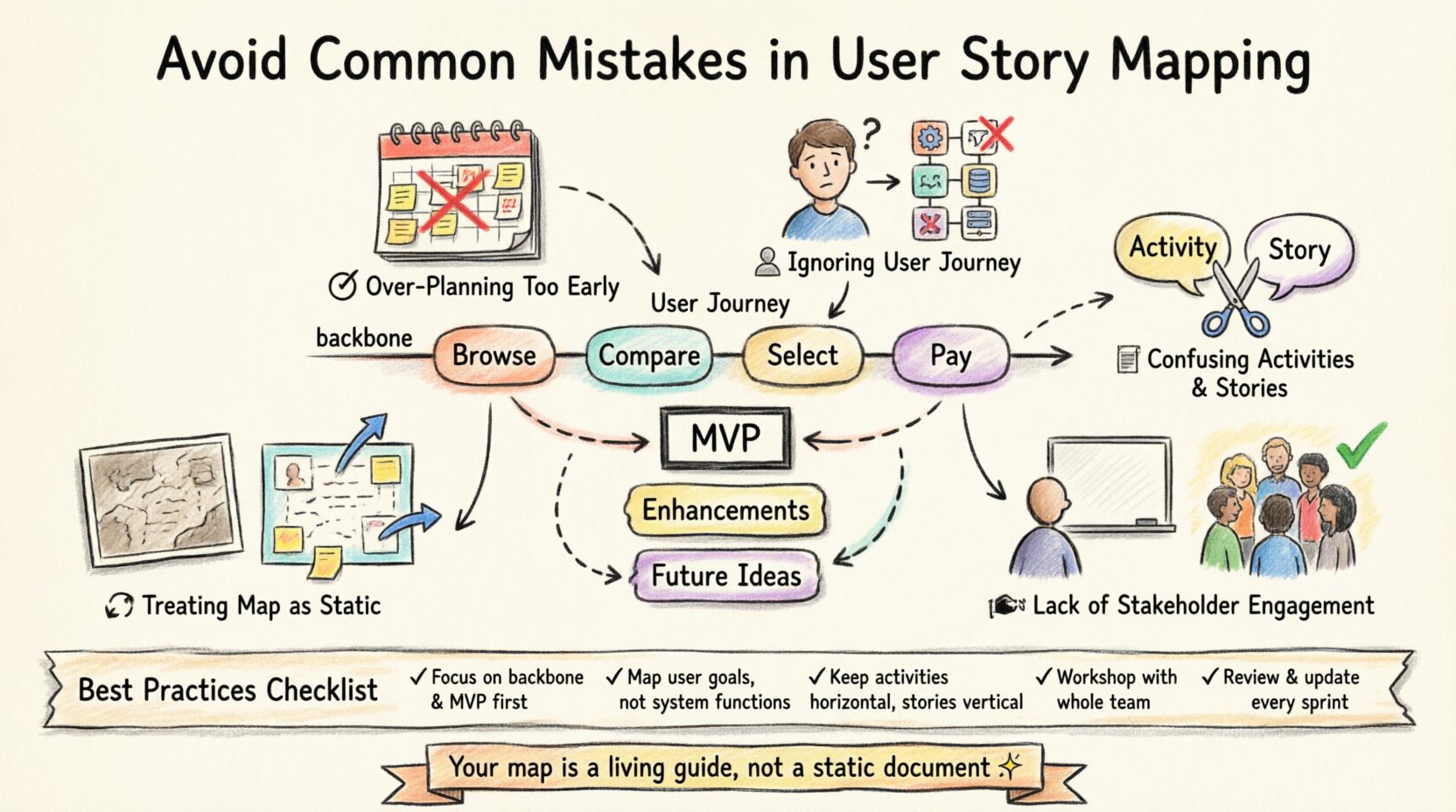
Understanding the Backbone of User Story Mapping 🧱
Before diving into mistakes, it is essential to define the core components. A User Story Map consists of two primary axes. The horizontal axis represents the user journey or activities. This is the backbone. It outlines the steps a user takes to achieve a goal. The vertical axis represents the priority or granularity of stories within each activity. Top items are the minimum viable product, while lower items add value over time.
Many teams confuse this structure with a simple Gantt chart or a task list. The goal is not to track time but to visualize flow. When the map is done correctly, it guides sprint planning and backlog refinement. It helps the Product Owner prioritize features that deliver the most value to the user. It also helps developers understand how their code fits into the larger picture.
Mistake 1: Over-Planning the Backlog Too Early ⏳🛑
One of the most common errors is attempting to map every single story before starting development. Teams often feel pressure to have a complete picture before writing a single line of code. This leads to a phenomenon known as “analysis paralysis.” The team spends weeks refining details that may change or become irrelevant.
- Why it happens: Fear of the unknown drives teams to seek certainty. They want to ensure nothing is missed.
- The consequence: By the time the map is finished, requirements have shifted. The map is outdated before work begins.
- The fix: Focus on the backbone first. Define the activities. Then, flesh out the stories for the first few releases only. Leave the later stories as rough ideas until you are closer to them.
Agility requires adaptability. A map is a hypothesis, not a contract. It should evolve as you learn more about the user. Do not try to predict the future perfectly. Instead, plan just enough to start the next sprint. This keeps the work relevant and reduces wasted effort on features that might not be needed.
Mistake 2: Ignoring the User Journey 👤❌
Teams sometimes build maps based on system functions rather than user needs. For example, a map might start with “Login,” “Search,” and “Checkout.” While these are system actions, they do not tell the story of the user. A user does not care about the system function; they care about the outcome.
Instead of focusing on features, focus on the narrative. What is the user trying to achieve? Start with the goal. For an e-commerce platform, the goal is “Buy a Product.” The activities would be “Browse Items,” “Compare Options,” “Select Size,” and “Pay.” This shift in perspective ensures that every story maps to real user value.
- Bad Practice: Mapping based on database tables or API endpoints.
- Good Practice: Mapping based on the user’s emotional and logical flow.
- Benefit: The team delivers a cohesive experience rather than a collection of disconnected features.
When the user journey is clear, prioritization becomes easier. If a step in the journey is broken, the user cannot complete the goal. Therefore, fixing that step is a high priority. If the team focuses on system functions, they might optimize the search bar while the checkout process remains broken. This is a critical error in value delivery.
Mistake 3: Confusing Activities with User Stories 📝🔀
There is a distinct difference between an Activity and a Story. An Activity is a major step in the journey, like “Place Order.” A Story is a specific piece of work that enables that step, like “Select Credit Card Payment.” When teams mix these up, the map becomes cluttered and unusable.
Activities should remain high-level. They form the backbone of the map. Stories should be placed underneath them. If you turn every activity into a story, you lose the context. The map loses its shape. It becomes a long list of tasks rather than a strategic visualization.
Use the vertical stacking to manage complexity. The top row represents the essential stories for the first release. Stories below that row represent enhancements for future releases. This visual hierarchy helps the Product Owner decide what to build next. It ensures that the core functionality is delivered before nice-to-have features.
Mistake 4: Lack of Stakeholder Engagement 🤐🚫
User Story Mapping is not a solo activity for the Product Owner. It requires collaboration. Often, teams create the map in isolation and present it to stakeholders for approval. This leads to misunderstandings and missed requirements.
The best maps are built in workshops. Developers, designers, testers, and business representatives should participate. Their diverse perspectives reveal hidden dependencies and edge cases. For example, a developer might know a technical constraint that limits a feature. A customer support agent might know a common user complaint that needs addressing.
- Who should be involved: The whole Scrum team plus key stakeholders.
- How to engage: Use a physical or digital whiteboard. Encourage active discussion.
- Outcome: Shared understanding and buy-in from all parties.
When stakeholders participate, they feel ownership of the product. They understand the trade-offs involved in prioritization. This reduces friction during sprint planning. It also ensures that the map reflects the reality of the business, not just the ideal scenario. If you exclude voices from the process, the map will likely miss critical business rules or user expectations.
Mistake 5: Treating the Map as Static 📉🗄️
A common error is creating a map once and never looking at it again. Teams print it out, hang it on the wall, and ignore it. While physical maps are great for initial workshops, they must be maintained. The product evolves, and the map must evolve with it.
If the map is static, it becomes a relic. It no longer reflects the current state of the backlog. This leads to confusion during planning. Developers might work on stories that were deemed low priority in the past but are now critical. The map loses its value as a planning tool.
Regularly review and update the map. After every sprint, assess what was built. Move completed stories to the right or archive them. Add new stories that emerged from feedback. This keeps the map relevant. It serves as a single source of truth for the product direction.
Common Pitfalls vs Best Practices 📊
To summarize the key differences, refer to the table below. It contrasts common mistakes with the recommended approach for each area.
| Area | Common Mistake | Best Practice |
|---|---|---|
| Scope | Map every story before starting. | Focus on the backbone and MVP stories first. |
| Focus | Map system functions. | Map user goals and journeys. |
| Structure | Mix activities and stories. | Keep activities as the horizontal backbone. |
| Collaboration | Product Owner creates alone. | Workshop with the whole team and stakeholders. |
| Maintenance | Create once, never update. | Review and update after every sprint. |
| Detail | Write long specifications upfront. | Keep stories concise; elaborate during refinement. |
Maintaining the Map Over Time 🔄
Maintaining the map requires discipline. It is not enough to just create it; you must integrate it into your workflow. Schedule time for map reviews. Make it part of your backlog refinement sessions. When new ideas come in, place them on the map immediately.
Use the map to guide your roadmap. The horizontal axis represents time or releases. The vertical axis represents priority. This alignment helps you communicate the product vision to leadership. It shows exactly what is planned for the next quarter and what is on the backlog for later.
Don’t let the map become a bottleneck. If the process of updating the map slows down development, simplify it. Use digital tools that allow for easy dragging and dropping. Or, keep a physical copy that is updated weekly. The goal is to keep the information accessible and current. If the map is hard to update, people will stop using it.
Integrating with Sprint Planning 🏃🚀
The map is a strategic tool, but sprint planning is tactical. Teams often struggle to bridge this gap. They look at the map and don’t know how to select stories for the sprint. The map shows the long-term view, while the sprint requires immediate focus.
To connect them, look at the vertical columns. Select stories from the top rows that fit into the upcoming sprint capacity. Ensure that the selected stories complete a vertical slice of functionality. This means delivering value from the user’s perspective, not just completing a technical task.
- Step 1: Identify the next activity on the backbone.
- Step 2: Select the highest priority stories for that activity.
- Step 3: Break these stories down into tasks for the sprint.
- Step 4: Ensure the sprint goal aligns with the map’s vision.
This approach ensures that every sprint moves the product forward on the map. It prevents the team from getting stuck in a feature factory mode. It keeps the focus on user value. If a sprint finishes without delivering a vertical slice, revisit the map. Adjust the stories to ensure the next sprint does better.
Measuring Success Without Vanity Metrics 📏✅
How do you know if your User Story Mapping is working? Do not measure success by the number of stories created. That is a vanity metric. Instead, measure the flow of value.
- Velocity Consistency: Is the team delivering predictable amounts of value?
- Stakeholder Feedback: Are users finding the features useful?
- Backlog Health: Is the backlog organized and prioritized correctly?
- Team Alignment: Does everyone understand the product direction?
If the team is consistently delivering working software that users love, the map is serving its purpose. If the team is constantly surprised by requirements, the map needs adjustment. Use feedback loops to improve the mapping process. The map should get better with every iteration.
Final Thoughts on Continuous Improvement 🌱
User Story Mapping is a journey in itself. It requires practice to get right. Do not expect perfection on the first attempt. Embrace the mistakes as learning opportunities. Every team faces challenges when visualizing work. The key is to recognize them quickly and adjust.
Focus on the value delivered to the user. Keep the map simple. Involve the whole team. Update it regularly. By avoiding the common pitfalls outlined in this guide, you can build a map that truly guides your product to success. Remember, the map is a tool for thinking, not just a document for tracking. Use it to spark conversation, drive alignment, and deliver value consistently.
Start small. Pick one project. Apply these principles. Watch how the clarity improves. Over time, the map will become an essential part of your Scrum practice. It will help you navigate complexity and deliver products that users truly need.