


In today’s fast-paced software development landscape, designing clear, scalable, and maintainable systems is essential. Enter Unified Modeling Language (UML) — the industry-standard visual language for software design that helps teams blueprint complex systems with clarity and precision.
But let’s be honest: creating UML diagrams by hand can be time-consuming, error-prone, and intimidating — especially for beginners. That’s where AI-powered modeling tools like Visual Paradigm come in, transforming how we design, document, and collaborate on software systems.
This guide explores the power of UML, how Visual Paradigm enhances the modeling process, and how AI-driven tools are revolutionizing software design — making it faster, smarter, and more accessible than ever.
What is UML?
Unified Modeling Language (UML) is a standardized visual language used in software engineering to specify, visualize, construct, and document the artifacts of a system. Think of it as the architectural blueprint for software — just as architects use drawings to plan buildings, developers use UML to plan software systems.
Key Features of UML:
- Not a programming language, but a set of graphical notations based on object-oriented principles.
- Designed to communicate system design across teams — developers, architects, and stakeholders.
- Supports both static structure and dynamic behavior of systems.
UML Diagram Types: Two Main Categories
| Category | Purpose | Common Diagrams |
|---|---|---|
| Structural Diagrams | Show the static structure of a system | Class, Component, Deployment, Object, Package, Composite Structure |
| Behavioral Diagrams | Illustrate dynamic behavior and interactions | Use Case, Sequence, Activity, State Machine, Communication, Timing, Interaction Overview |
With 14 standardized diagram types in UML 2.x, UML provides a comprehensive framework for modeling everything from high-level business processes to detailed class hierarchies.
💡 Pro Tip: UML is not just for large-scale systems — even small projects benefit from visual modeling to clarify logic and reduce misunderstandings.
How Visual Paradigm Empowers UML Modeling
Visual Paradigm is a powerful, all-in-one modeling platform that supports the entire software development lifecycle — from idea to deployment.
Why Developers and Architects Choose Visual Paradigm:
✅ Full UML 2.x Support
Visual Paradigm supports all 14 UML diagram types, including:
- Class, Object, Component, Deployment
- Use Case, Sequence, Activity, State Machine
- Communication, Timing, Interaction Overview, etc.
This makes it ideal for end-to-end system modeling, whether you’re designing a microservice architecture or a full-scale enterprise application.
✅ Bidirectional Traceability
One of the most powerful features:
- Code Generation: Automatically generate code (Java, C#, Python, etc.) from your UML diagrams.
- Reverse Engineering: Extract UML diagrams from existing source code — perfect for documentation and refactoring.
This ensures your models stay in sync with your actual implementation, reducing the risk of design drift.
✅ IDE Integration
Visual Paradigm integrates seamlessly with popular development environments:
- Eclipse
- IntelliJ IDEA
- Visual Studio
This allows developers to switch between coding and modeling without leaving their IDE — boosting productivity and workflow efficiency.
✅ Team Collaboration Tools
Work collaboratively with your team using:
- PostMania: Real-time discussion and feedback on diagrams.
- Cloud-Based Editing: Share models in real time, review changes, and co-create with remote teams.
Whether you’re in a startup or a large enterprise, Visual Paradigm enables smooth, transparent collaboration across roles and locations.
AI-Powered UML Generation: The Future of Modeling
The next evolution in UML modeling is AI-powered diagram generation — and Visual Paradigm is leading the charge.
Visual Paradigm Desktop: AI Enabled Modeler
VP Desktop is Visual Paradigm’s flagship application, blending robust offline modeling with integrated AI capabilities.
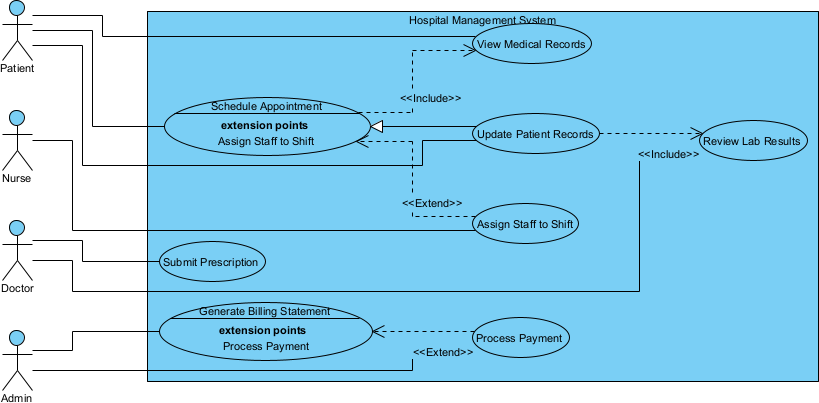
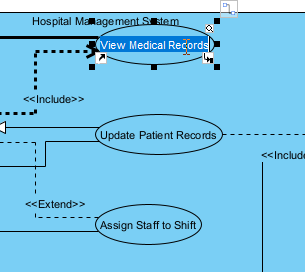
It appears as a fully editable, native Visual Paradigm diagram (not just an image). You can rename elements and update the layout:
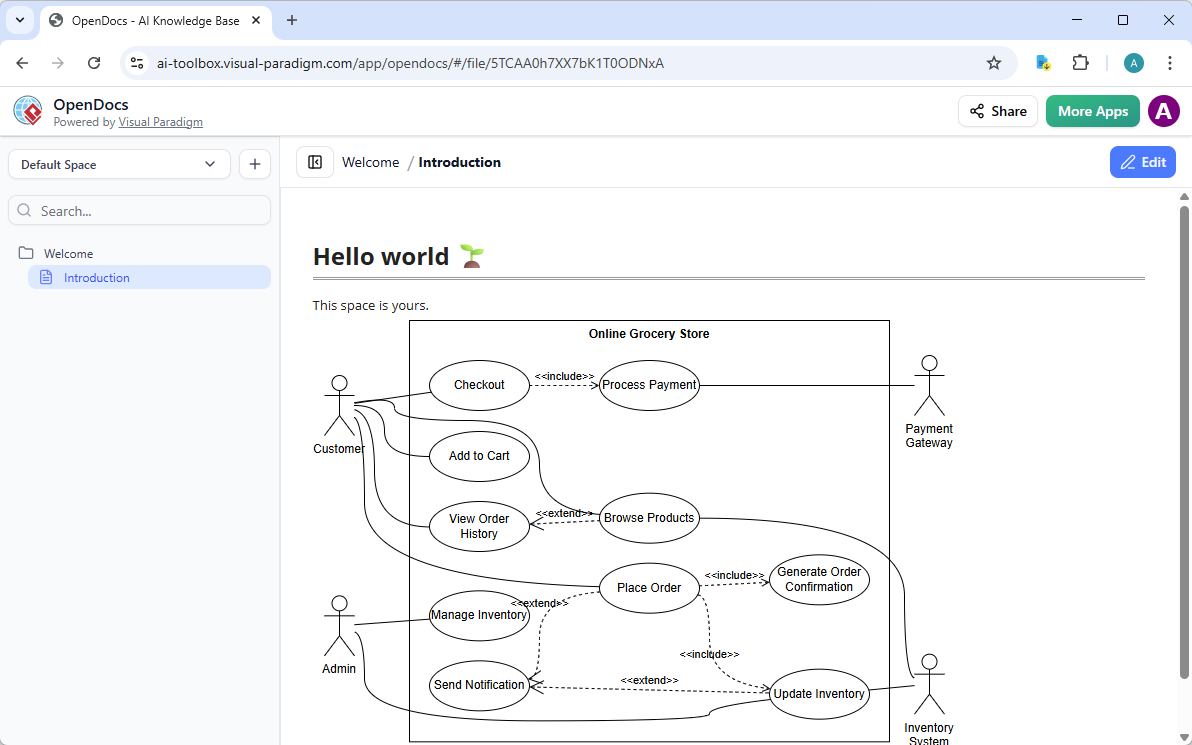
Visual Paradigm OpenDocs: Smart, AI Powered Knowledge Management Platform
OpenDocs redefines knowledge sharing by combining document creation with AI-assisted diagramming. Think of it as a smart wiki or Notion-like platform where use case diagrams become living, editable elements within your content.
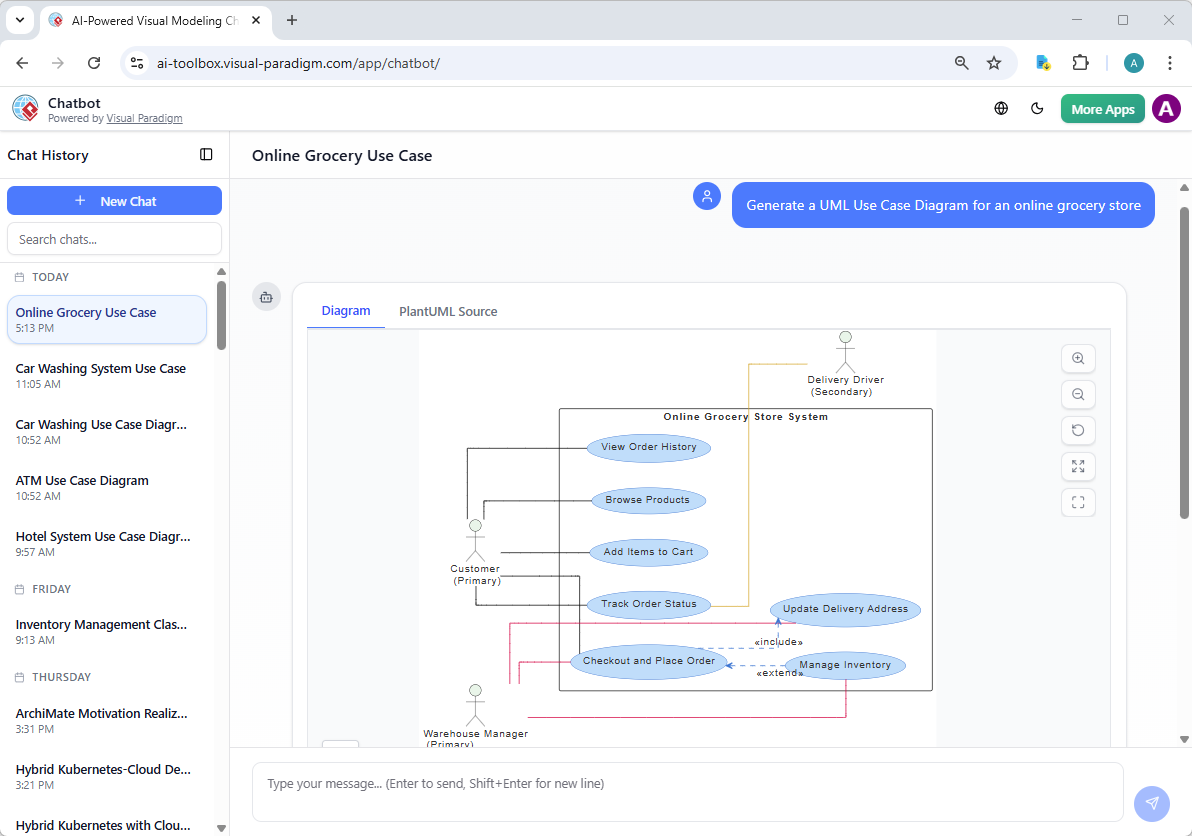
Visual Paradigm AI Chatbot for Visual Modelers
The AI Visual Modeling Chatbot turns diagramming into an interactive conversation. Available standalone or integrated with other platforms, it’s perfect for brainstorming, quick prototyping, and iterative design.
Benefits of AI in UML Modeling
| Benefit | Impact |
|---|---|
| Increased Speed | Reduces manual diagramming time by up to 70% during early-stage modeling. |
| Lower Barrier to Entry | Beginners can create complex diagrams without deep UML syntax knowledge. |
| Improved Accuracy | AI ensures OMG-compliant diagrams, minimizing syntax and structural errors. |
| Living Models | Unlike generic AI image generators, Visual Paradigm creates editable, data-driven models that can be integrated directly into the software development workflow. |
💡 Living models mean your diagrams are not static images — they’re connected to code, requirements, and test cases, enabling continuous evolution throughout the development lifecycle.
Example: Natural Language Prompt to Generate a UML Diagram
Try this prompt in Visual Paradigm’s AI tool:
“Create a UML Use Case Diagram for an e-commerce system where customers can browse products, add items to a cart, and check out using a payment gateway. Include the ‘Admin’ role who can manage inventory.”
The AI will generate a fully structured Use Case Diagram with actors, use cases, and relationships — all in UML 2.x standard.
You can then refine it interactively, add constraints, or convert it into a Sequence Diagram for the checkout process.
Why Visual Paradigm Stands Out
While many tools offer basic UML modeling or AI diagram generation, Visual Paradigm combines:
- Full UML support
- AI-powered design
- Code integration
- Team collaboration
- Standards compliance (OMG)
This makes it not just a tool — but a complete modeling ecosystem that adapts to your workflow.
Conclusion: The Future is Visual, AI-Powered, and Collaborative
UML is more relevant than ever — but traditional modeling methods are slow and complex. With Visual Paradigm’s AI-powered UML modeling, you can:
- Design faster with natural language
- Build smarter with AI-driven analysis
- Collaborate better with real-time team tools
- Stay compliant with industry standards
Whether you’re a seasoned architect or a junior developer, Visual Paradigm makes UML modeling intuitive, efficient, and powerful.
🚀 Ready to transform your software design process? Try Visual Paradigm today and experience the future of AI-powered UML modeling.
References
- What is UML? – Visual Paradigm UML Guide: Comprehensive introduction to the Unified Modeling Language (UML) as the industry-standard visual notation for specifying, visualizing, constructing, and documenting object-oriented software systems; covers history, OMG standardization, structural/behavioral diagram categories, and its critical role in modern software analysis, design, and stakeholder communication.
- Practical Guide to UML Modeling – Visual Paradigm: Step-by-step resource for applying UML in real projects: selecting appropriate diagrams, best practices for notation and modeling, common patterns, integration with development processes, and tips for effective use in requirements gathering, design, implementation, and documentation.
- UML – A Comprehensive Guide – Visual Paradigm Blog: In-depth exploration of UML fundamentals, all 14 diagram types, key concepts (classes, relationships, interactions, behaviors), modeling best practices, real-world examples, and how UML supports the full software development lifecycle from concept to maintenance.
- Comprehensive Guide: UML Sequence Diagrams with AI-Powered Generation – ArchiMetric: Detailed tutorial on sequence diagrams (lifelines, messages, activations, combined fragments, interactions); covers AI-assisted creation from text scenarios, iterative refinements via chat, automatic layout, and best practices for capturing dynamic object collaborations and system behaviors.
- UML Modeling Tool – Visual Paradigm: Overview of Visual Paradigm’s full UML 2.5 support: all 14 diagram types, drag-and-drop editing, model validation/rules, code engineering (generation/reverse), documentation generation, teamwork/cloud collaboration, and integrated AI for accelerated diagram creation and refinement.
- Overview of the 14 UML Diagram Types – Visual Paradigm: Complete reference to UML 2.5 diagrams: structural (class, object, package, component, composite structure, deployment, profile) and behavioral (use case, activity, state machine, sequence, communication, interaction overview, timing); includes purpose, primary elements, and usage scenarios for each.
- UML Modeling Tool – Visual Paradigm (Chinese Edition): Localized overview of Visual Paradigm’s UML capabilities for Chinese-speaking users: full diagram support, AI-assisted generation, code synchronization, teamwork features, and enterprise-grade modeling in a multilingual interface.
- AI-Assisted UML Class Diagram Generator – Visual Paradigm: Browser-based AI tool that builds editable class diagrams from natural language or guided prompts; automatically identifies classes, attributes, operations, relationships, multiplicities, and validations; includes PlantUML previews, SVG exports, AI critiques, and project saving for fast, accurate object-oriented design.
- AI-Powered Use Case to Activity Diagram Conversion – Visual Paradigm: AI feature that transforms detailed textual use case descriptions (actors, flows, preconditions, exceptions) into standards-compliant UML activity diagrams; detects missing steps, suggests improvements, analyzes flow logic, and generates reports for enhanced process visualization and analysis.
- The Next Evolution: AI-Powered UML Modeling – Visual Paradigm: Section highlighting how AI transforms traditional UML modeling: instant diagram generation from text, conversational refinement, standards compliance, reduced manual work, and rapid progression from high-level concepts to detailed architectures in seconds.
- What Makes Visual Paradigm’s AI Chatbot Different from Other AI Diagram Tools? – Visual Paradigm Blog: Explains unique advantages: training on formal UML/SysML standards, contextual/iterative editing within a unified workspace, high-quality compliant outputs, model-aware suggestions, and superior results over generic text-to-diagram generators.
- Visual Paradigm AI vs. Standard Text-to-Diagram Tools: Guide to Living Models – Cybermedian: Comparison emphasizing Visual Paradigm’s strengths—standards-trained AI, living models (synchronized diagrams/code), iterative refinements, contextual understanding, and better quality/consistency compared to basic or generic AI diagram tools.
- Comprehensive Review: Visual Paradigm’s AI Diagram Generation Features – Fliplify: Third-party assessment of AI capabilities: standards compliance across UML types, conversational editing, time savings, accessibility for all skill levels, integration with Visual Paradigm ecosystem, and strong impact on professional modeling productivity.
- Comprehensive Guide to Visual Paradigm’s AI-Powered UML & Modeling Ecosystem (2025–2026) – Cybermedian: In-depth forward-looking analysis of AI as a modeling co-pilot: text-to-UML automation, real-time assistance, code generation, smart validation, traceability, and full workflow enhancements for UML/SysML in future software and systems engineering.
- Use Case Modeling Studio – Visual Paradigm: AI-powered platform that converts high-level goals or text into structured use case specifications, generates related UML diagrams (use case, activity, sequence, class, ERD), produces test cases, and supports interactive refinement to streamline requirements-to-design transition.