


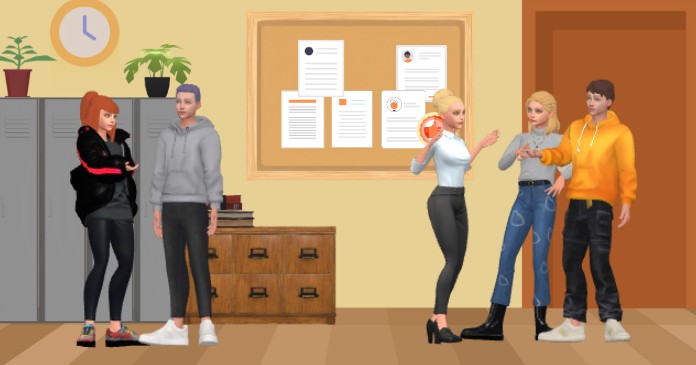
Imagine a bustling school hallway, where students chat, laugh, and exchange notes—now animated with vibrant 3D characters and dynamic interactions. This snapshot, created using Visual Paradigm’s Animation Maker (AniFuzion), showcases how an online, AI-powered tool can transform a simple classroom setting into a lively, engaging scene. With its intuitive drag-and-drop interface and extensive 3D character library, AniFuzion allows users to craft compelling visual narratives without needing advanced design skills. Whether you’re an educator creating an interactive lesson, a marketer producing a product demo, or a content creator telling a story, this easy-to-use animation software empowers you to bring any idea to life with stunning 2D and 3D animations.
At the heart of this animation is the seamless integration of lifelike characters and realistic environments. The scene features a diverse group of students, each with distinct appearances and postures, standing in a school hallway complete with lockers, a bulletin board, and a wooden cabinet. The characters are not just static figures; they are animated with natural movements and gestures, thanks to AniFuzion’s pre-built actions and motion library. This allows for expressive interactions, such as pointing, gesturing, or even holding a phone, which adds depth and realism to the narrative. The result is a dynamic, engaging visual experience that captures attention and enhances understanding.
One of the standout features of AniFuzion is its ability to handle complex animations with ease. The tool’s drag-and-drop interface allows users to simply drag characters and props onto the canvas, making the process intuitive and accessible even for beginners. The extensive 3D character library offers a wide range of customizable options, from cartoonish styles to more realistic designs, ensuring that users can find the perfect fit for their project. Additionally, the pre-built actions and motion library provide over 2,000 dynamic movements, allowing for smooth, professional animations without the need for manual keyframing. This means that even those without animation experience can create high-quality content quickly and efficiently.
Another key aspect of AniFuzion is its AI-powered capabilities, which significantly enhance the animation process. The AI Text-to-Speech (TTS) feature allows users to generate voiceovers with various accents and emotions directly from their script, eliminating the need for external voice actors. When combined with automatic lipsync, the character’s mouth movements are perfectly synchronized with the audio, creating a more immersive and realistic experience. This feature is particularly useful for creating explainer videos, educational content, or any project that requires dialogue. The result is a polished, professional animation that feels lifelike and engaging.
For users looking to add more visual flair, AniFuzion offers a range of shape effects and animation presets. These can be applied to text, shapes, and objects to create dynamic effects like fades, bounces, or transitions. This not only enhances the visual appeal of the animation but also helps to emphasize key points and maintain viewer interest. The tool also provides ready-to-use scenes, props, and templates, allowing users to build environments rapidly and focus on the creative aspects of their project.
Exporting and sharing the final animation is just as straightforward. AniFuzion allows users to output their creations as MP4 videos or interactive flipbooks, which can be shared via hyperlinks, embed codes, or social media. This flexibility makes it easy to integrate the animation into websites, presentations, or marketing campaigns. The browser-based nature of the tool means that users can work on their projects from any device with internet access, making collaboration and sharing seamless.
Key Takeaways
-
Easy-to-Use Animation Software: AniFuzion’s drag-and-drop interface and intuitive tools make it accessible for beginners and professionals alike.
-
AI-Powered Features: AI Text-to-Speech and automatic lipsync enhance realism and reduce production time.
-
Extensive 3D Character Library: Customize and animate characters with a wide range of styles and movements.
-
Pre-Built Actions and Motion Library: Save time with over 2,000 dynamic actions and gestures.
-
Versatile Export Options: Share your animations as MP4 videos or interactive flipbooks.
Whether you’re creating an educational video, a marketing campaign, or a personal project, AniFuzion provides the tools you need to bring your ideas to life. With its powerful features and user-friendly design, this online animation maker is the perfect solution for anyone looking to create engaging, high-quality animations. Don’t miss the opportunity to explore the full potential of AniFuzion—start creating your own animated scenes today.
Related Links
Visual Paradigm provides an advanced animation suite, primarily through the AniFuzion platform, which allows users to create professional-grade 2D and 3D animations, motion graphics, and explainer videos. These tools are designed for non-professional animators, offering intuitive interfaces, AI-driven features like text-to-speech, and automatic motion retargeting to streamline the creative process.
-
Mastering Anifuzion: A Comprehensive Guide to Creating Professional Animations: A deep dive into core features and advanced techniques for producing high-quality animations.
-
AniFuzion: Online Animation Maker: The main hub for creating stunning 2D and 3D animations using customizable characters and pre-made actions.
-
Animated Video Maker: Comprehensive Guide to Visual Paradigm Anifuzion: A complete walkthrough for using AniFuzion as a powerful tool to take an animated video from concept to final output.
-
2D Animation Maker – Create Expressive 2D Characters: A specialized tool for bringing stories to life with vibrant 2D characters, scenes, and effects.
-
Bring Your Ideas to Life with Visual Paradigm Anifuzion 3D Video Maker: A web-based application that empowers users to create immersive 3D videos with ease.
-
Creating Seamless Animations in Anifuzion with Automatic Motion Retargeting: This article explores how automatic motion retargeting enables realistic movement across different character models with minimal effort.
-
Getting Started with Anifuzion: Your First Steps to Animated Design: A beginner-friendly resource covering the interface and foundational skills needed to start creating engaging animations.
-
Unlocking Creativity with Anifuzion: A Step-by-Step Tutorial Guide: A hands-on tutorial that guides creators through every stage of the animation process to build practical design skills.
-
Anifuzion Feature Overview: Advanced Animation Capabilities: An interactive overview of the software’s key tools for building dynamic and professional animations.
-
Comprehensive Guide to Creating Animated Videos with Visual Paradigm Anifuzion: A step-by-step guide focused on producing professional videos for marketing, training, and presentations.
Related posts:
 AniFuzion: A Comprehensive Guide to Unleashing Your Animation & Video Creation Potential
Animating Your Vision: A Complete Guide to Creative Possibilities with Visual Paradigm AniFuzion
Unleash Your Imagination with AniFuzion: The Ultimate Animation Tool from Visual Paradigm Online
Unleash Your Imagination with AniFuzion: A Comprehensive Guide to Animation Creation
AniFuzion: A Comprehensive Guide to Unleashing Your Animation & Video Creation Potential
Animating Your Vision: A Complete Guide to Creative Possibilities with Visual Paradigm AniFuzion
Unleash Your Imagination with AniFuzion: The Ultimate Animation Tool from Visual Paradigm Online
Unleash Your Imagination with AniFuzion: A Comprehensive Guide to Animation Creation