


Looking for a fast, efficient way to write and format content for the web? Visual Paradigm’s online Markdown Editor is the ultimate tool for creating professional-looking documents, blog posts, and technical documentation with minimal effort. This powerful, web-based editor combines a clean, intuitive interface with real-time preview, letting you focus on your writing while it handles the formatting. Whether you’re a developer, technical writer, or content creator, this tool streamlines your workflow and ensures your content looks polished before it goes live. The Markdown Editor is designed to be both powerful and easy to use, making it the best choice for anyone who values speed, portability, and clean content creation.
Quick Summary
-
Visual Paradigm‘s Markdown Editor offers a dual-view interface for real-time content preview.
-
It supports both WYSIWYG and direct Markdown editing for maximum flexibility.
-
Users can import existing Markdown or HTML files and export as .md or .html.
-
Features include an example gallery, local file control, and no sign-up required.
-
Perfect for technical writing, blogging, and documentation.
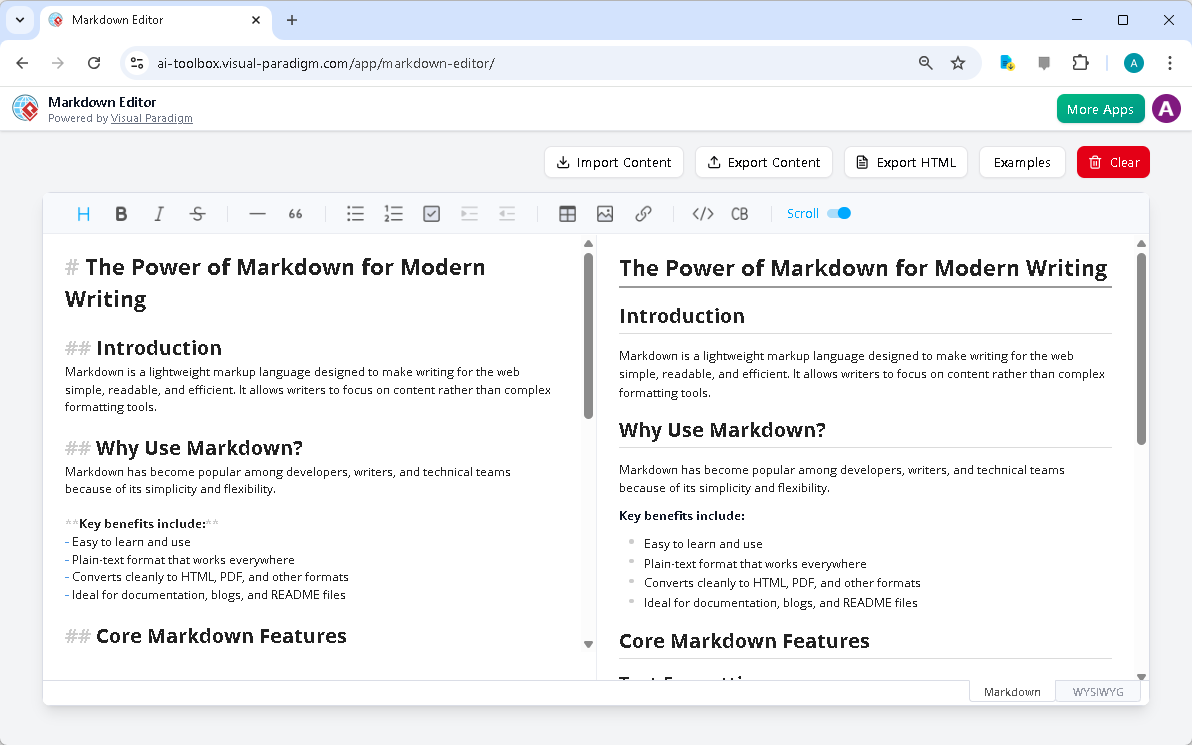
What is the Markdown Editor? It’s a powerful web-based tool designed to simplify the process of writing, editing, and previewing Markdown content. The core of its appeal lies in its dual-view interface: on the left, you write your plain-text Markdown code, and on the right, you see a live, rendered preview of the formatted output. This instant feedback loop allows you to see exactly how your headings, lists, links, and code blocks will appear without needing to compile or refresh. It’s the perfect environment for anyone who wants to write efficiently and see their work come to life in real-time.
One of the standout features is its comprehensive editing experience. The editor includes a full toolbar with options for bold, italic, headings, lists, links, images, and code blocks, making it easy to structure your content. It supports both a “What You See Is What You Get” (WYSIWYG) mode and a direct Markdown editing mode, catering to users with different writing styles. Whether you prefer to see the formatting as you type or to write the raw syntax, the editor adapts to your needs. This flexibility, combined with the live preview, creates a highly productive workspace that feels intuitive and powerful.
Who is it for? This tool is ideal for a wide range of users. Technical writers can use it to draft documentation, README files, and API guides in a format that’s perfect for version control. Bloggers and content creators can write articles and tutorials that are easily published across multiple platforms. Developers can create project notes and commit messages, while students and academics can write papers and reports in a clean, distraction-free environment. Essentially, anyone who values the efficiency and portability of Markdown will find this editor to be a game-changer.
Another key benefit is the ability to import and export content locally. You can easily import existing Markdown or HTML files from your computer, which is great for continuing work on existing documents or converting content between formats. When you’re ready to share your work, you can export it as a raw Markdown (.md) file for easy sharing or as a complete HTML (.html) file, ready for direct web publication. This local data control ensures your content remains private until you choose to share it, giving you full ownership over your work.
Visual Paradigm’s Markdown Editor also includes an “Example Gallery” that provides a library of pre-written Markdown examples. This is a fantastic resource for inspiration, learning new syntax, or quickly getting started with a structured document. If you’re new to Markdown, the live preview helps you understand how your syntax translates into formatted text, making it a great learning tool. The editor also features a simple “Clear” button, allowing you to quickly reset your workspace and start a fresh document without any distractions.
Here’s how you can get started:
-
Launch the editor and begin typing your content in the left pane. Watch the live preview on the right update instantly.
-
Use basic Markdown syntax like
# My Titlefor headings and**bold text**for bold. -
Click “Import Content” to load an existing .md or .html file.
-
Click “Examples” to browse a gallery of pre-filled documents.
-
When you’re done, click “Export Content” to save as a .md file, or “Export HTML” for a web-ready file.
How to Use the Markdown Editor – Core Workflows
Drafting a Technical Document
For technical documentation, the editor shines. Start by writing your content with clear headings, bullet points, and code blocks. As you type, the live preview ensures your formatting is correct. Once you’re satisfied, export the file as a .md, which can be easily integrated into your documentation system or version control.
Converting an HTML Article to Markdown
Need to convert an existing HTML article? Simply click “Import Content” and select your .html file. The editor will extract the original Markdown if it’s embedded, or convert the HTML to a clean Markdown representation. Review the content, make any adjustments, and export as a .md file.
Preparing Content for a Website
To prepare web content, write your article in the editor, adding relevant links and structure. When ready, export as an HTML file. This file is ready to be published directly to your website or content management system.
It’s important to note that this is a pure editor, not an AI tool. It doesn’t generate content but provides a powerful environment for manual input and formatting. Your content is managed locally in your browser, and if you close the tab without exporting, your work will be lost. However, you can use standard keyboard shortcuts like Ctrl+Z for undo and Ctrl+Y for redo.
With its intuitive interface, powerful features, and focus on productivity, Visual Paradigm’s Markdown Editor is a must-have for anyone who writes content. It’s the perfect tool for creating professional, well-structured documents quickly and efficiently. Ready to see how it works? Try the Markdown Editor now and experience the power of modern writing.
Learn More about the tool and its features at Visual Paradigm’s official page.
Visual Reference:
Related Links
-
Markdown Editor – Visual Paradigm AI: Our real-time rendering engine eliminates the guesswork, showing you the final, perfectly formatted HTML output alongside your Markdown source. Focus purely on your content. The editor features a clean, intuitive interface designed to minimize distractions, offering a peaceful and highly efficient writing environment with only the necessary tools visible.
-
Real-Time Markdown Editor with Live Preview – Visual Paradigm: The Markdown Editor is a web-based, real-time Markdown editor . It provides a seamless writing experience with live preview, rich formatting tools, and autosave features.
-
AI Markdown Presentation Maker | Text to Slides Instantly: Your single source for writing and customizing content using simple Markdown. See all your animations and changes reflected instantly in a live preview. Our built-in Generate Prompt AI doesn’t just fill in the blanks;…
-
Creating a Professional AI Presentation in Minutes with Markdown: Transform simple text into dynamic AI-powered presentations using Markdown with the AI Markdown Presentation Maker from Visual Paradigm .
-
Guide to Visual Paradigm’s AI Markdown Presentation Maker: Learn how to create professional, animated presentations in seconds using Visual Paradigm ‘s AI Markdown tool. A step-by-step guide on generating, editing, and exporting HTML slides.
-
Introducing Our New Free Markdown Editor – Visual Paradigm …: Streamline your writing with Visual Paradigm ‘s new free markdown editor . Enjoy real-time preview, easy formatting, and seamless integration.