
Now Reading: Enhancing Team Productivity and Visual Modeling Quality with Visual Paradigm’s AI C4 Studio
-
01
Enhancing Team Productivity and Visual Modeling Quality with Visual Paradigm’s AI C4 Studio


Enhancing Team Productivity and Visual Modeling Quality with Visual Paradigm’s AI C4 Studio
Introduction: The Challenge of Hierarchical Consistency in Software Architecture
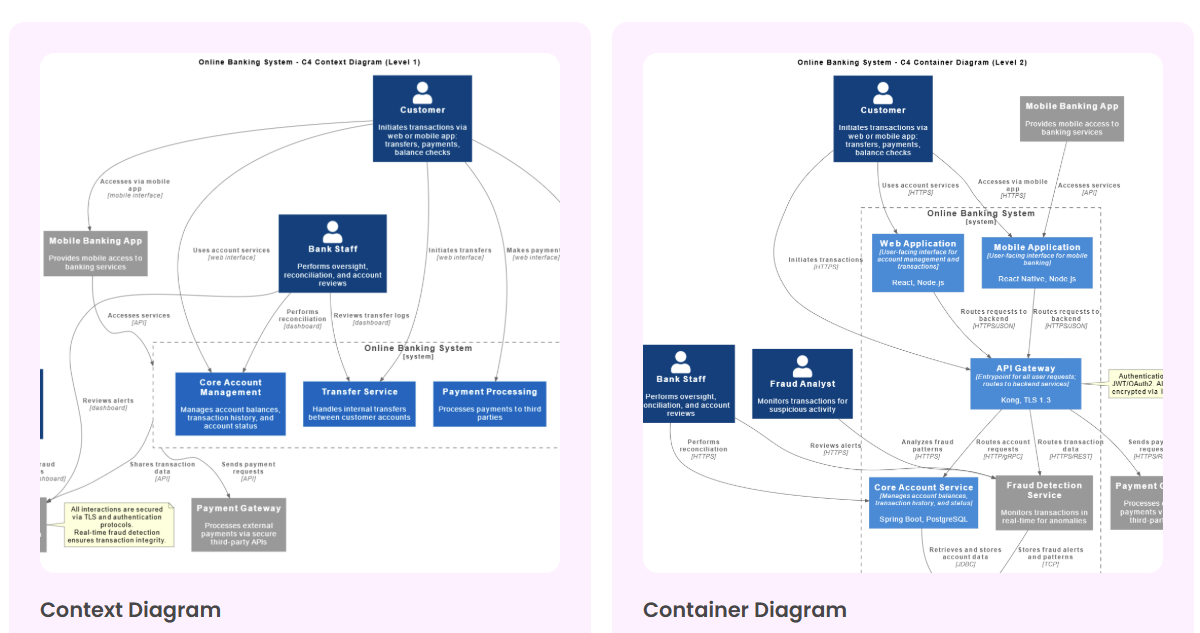
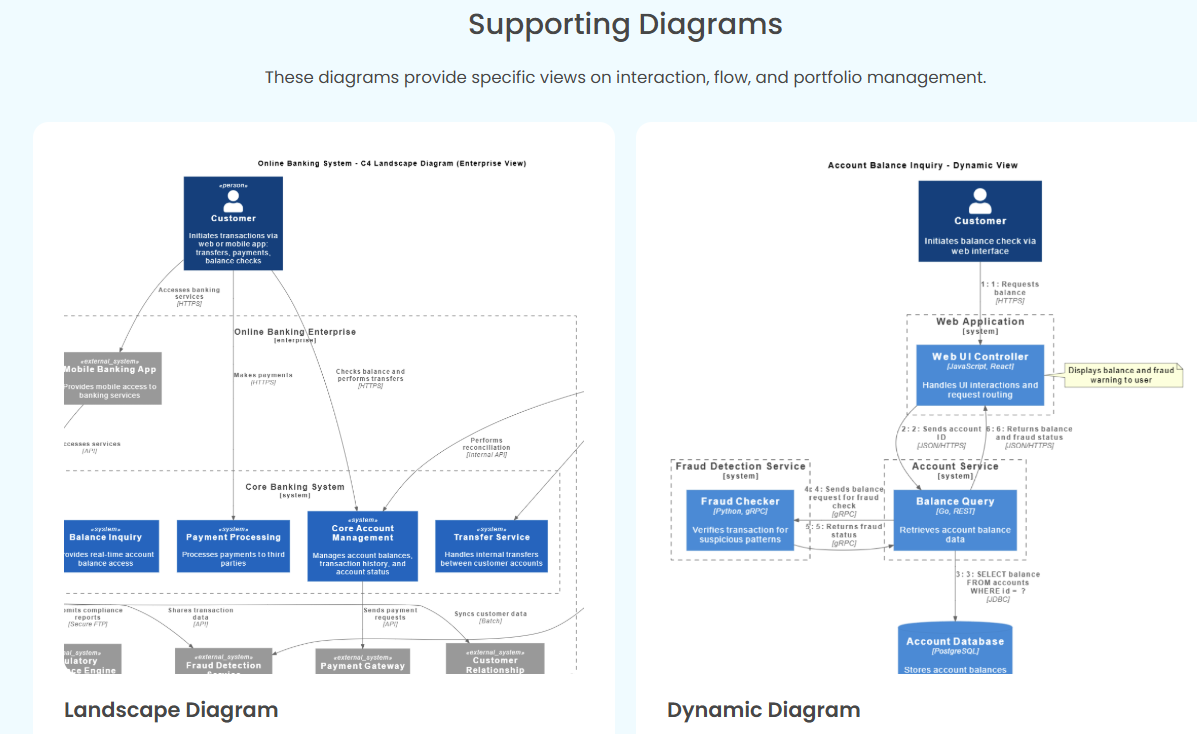
In modern software development, maintaining hierarchical consistency across architectural diagrams is critical. A System Context diagram should seamlessly align with Container and Component diagrams, ensuring that every level of abstraction accurately reflects the system’s structure. However, generic AI tools—while useful for quick diagram generation—often fail to maintain this consistency, leading to fragmented, unreliable, and misleading visual representations.
Visual Paradigm’s AI C4 Studio addresses this challenge by enforcing structural “building codes”—rules that ensure every architectural view is linked, consistent, and automatically updated. This article explores how AI C4 Studio enhances team productivity and visual modeling quality, making it an indispensable tool for architects, developers, and technical teams.
The Problem: Independent Generation and Fragmented Diagrams
1. Generic AI’s Limitations
Generic AI tools, such as large language models (LLMs), generate diagrams independently of one another. This approach creates several issues:
- Misaligned Hierarchies: A System Context diagram might describe a high-level interaction, but the corresponding Container or Component diagrams could contradict it—leading to confusion rather than clarity.
- Manual Reconciliation: Teams waste time manually cross-checking and correcting inconsistencies between diagrams.
- Unreliable Documentation: Inaccurate or conflicting diagrams undermine trust in the architecture, slowing down decision-making and increasing the risk of errors.
Example: A generic AI might generate a System Context diagram showing a “Payment Service” as an external system, but the Container diagram could incorrectly represent it as an internal component—breaking the hierarchical relationship.
The Solution: AI C4 Studio’s Structural “Building Codes”
Visual Paradigm’s AI C4 Studio is designed to enforce consistency across all levels of the C4 model. Here’s how it works:
1. Linked Architectural Views
- Automatic Synchronization: When you update a System Context diagram, AI C4 Studio ensures that changes propagate to Container and Component diagrams.
- Hierarchical Validation: The AI checks for inconsistencies (e.g., a missing container in a component diagram) and flags errors in real time.
2. Smart Relationship Management
- Correct-by-Construction: The AI understands C4 relationships (e.g., “uses,” “depends on”) and ensures they are applied correctly across all diagrams.
- Error Prevention: If a user attempts to create an invalid relationship (e.g., connecting a component to a system context), the AI provides instant feedback and suggests corrections.
3. Version Control and Collaboration
- Shared Workspaces: Teams can collaborate on the same set of diagrams, with changes automatically reflected for all members.
- Change Tracking: AI C4 Studio maintains a version history, allowing teams to roll back to previous states if needed.
How AI C4 Studio Boosts Team Productivity
1. Faster Diagram Creation
- Natural Language Input: Describe your architecture in plain English, and the AI generates consistent, standards-compliant diagrams in seconds.
- Reduced Manual Work: No need to manually align diagrams—AI C4 Studio handles synchronization automatically.
2. Fewer Errors, More Reliability
- Automated Compliance Checks: The AI ensures that every diagram follows C4 standards, reducing the risk of miscommunication.
- Real-Time Feedback: Teams receive instant notifications if a change introduces an inconsistency, allowing for quick corrections.
3. Seamless Collaboration
- Single Source of Truth: All team members work from the same synchronized diagrams, eliminating version conflicts.
- Integration with DevOps Tools: AI C4 Studio integrates with platforms like Jira, Confluence, and Git, ensuring diagrams stay up-to-date with code changes.
4. Improved Documentation Quality
- Always Accurate: Diagrams reflect the current state of the system, making documentation more reliable.
- Export Flexibility: Generate PlantUML, SVG, or PNG outputs for reports, presentations, and technical docs.
Key Benefits of AI C4 Studio for Teams
| Feature | Generic AI Tools | AI C4 Studio |
|---|---|---|
| Hierarchical Consistency | ❌ Manual alignment required | ✅ Automatically synchronized |
| Error Detection | ❌ No validation | ✅ Real-time feedback |
| Collaboration | ❌ Fragmented workflows | ✅ Shared, version-controlled |
| Compliance | ❌ Unreliable | ✅ Enforced C4 standards |
| Productivity Gain | ❌ High manual effort | ✅ 50%+ faster workflow |
Use Cases: Who Benefits from AI C4 Studio?
1. Software Architects
- Rapid Prototyping: Quickly iterate on architectural designs without worrying about inconsistencies.
- Stakeholder Communication: Present accurate, up-to-date diagrams to clients and executives.
2. Development Teams
- Reduced Miscommunication: Ensure everyone works from the same consistent visual model.
- Automated Updates: Diagrams evolve with the codebase, reducing documentation debt.
3. Technical Writers & Documentation Teams
- Reliable Visuals: Embed error-free diagrams in manuals, APIs, and guides.
- Efficient Updates: Diagrams stay in sync with development, minimizing rework.
4. Agile & DevOps Teams
- CI/CD Integration: Automatically update diagrams as part of the pipeline.
- Sprint Planning: Use accurate architecture views to scope and prioritize tasks.
Conclusion: A New Standard for Visual Modeling
Visual Paradigm’s AI C4 Studio transforms visual modeling from a manual, error-prone process into a streamlined, AI-assisted workflow. By enforcing hierarchical consistency and structural “building codes,” it ensures that teams can: ✅ Work faster with automated diagram synchronization. ✅ Collaborate seamlessly with a single source of truth. ✅ Deliver higher-quality documentation with accurate, up-to-date visuals.
For teams adopting C4 modeling, AI C4 Studio is more than a tool—it’s a productivity multiplier that elevates the entire software development lifecycle.
Next Steps
- Explore AI C4 Studio: Visual Paradigm’s Official Site
- Learn C4 Modeling: C4 Model Official Documentation
Discussion Question: How does your team currently manage architectural consistency, and where do you see the biggest opportunities for improvement with AI-assisted tools?
-
Ultimate Guide to C4 Model Visualization Using Visual Paradigm’s AI Tools: A comprehensive guide on leveraging Visual Paradigm’s AI-powered tools to automate and enhance C4 model visualization for faster, smarter software architecture design.
-
Leveraging Visual Paradigm’s AI C4 Studio for Streamlined Architecture Documentation: A detailed guide on using Visual Paradigm’s AI-enhanced C4 Studio to create clean, scalable, and maintainable software architecture documentation.
-
The Ultimate Guide to C4-PlantUML Studio: Revolutionizing Software Architecture Design – Visual Paradigm Blog: Software architecture documentation is often a bottleneck—time-consuming, error-prone, and quickly outdated.
-
A Comprehensive Guide to Visual Paradigm’s AI-Powered C4: Enter Visual Paradigm ’s AI-Powered C4 PlantUML Studi