


Unlock the Future of Systems Engineering
Create, Refine, Collaborate, and Trace Requirements—Effortlessly with AI
🌟 Introduction: Why SysML Requirement Diagrams Matter
In systems engineering, requirements are the foundation of every successful project. Whether you’re developing autonomous vehicles, medical devices, aerospace systems, or industrial automation, capturing, organizing, and tracing requirements is critical.
Traditional methods of manually creating SysML Requirement Diagrams are time-consuming, error-prone, and lack integration with design, testing, and documentation workflows. Enter Visual Paradigm — the world’s leading AI-powered visual modeling platform, offering a unified ecosystem to generate, edit, embed, and manage professional-grade SysML Requirement Diagrams with intelligence and precision.
This guide walks you through four powerful platforms in the Visual Paradigm ecosystem — each designed for different stages of your modeling journey — all powered by advanced AI to streamline your work, enhance traceability, and accelerate delivery.
🔧 1. VP Desktop: Professional AI-Driven SysML Requirement Diagram Creation & Editing
✅ The Ultimate Desktop Environment for Engineers
VP Desktop is Visual Paradigm’s flagship native desktop application, built for enterprise-grade systems engineering. It offers full offline access, deep integration with code generation, version control (Git), and full compliance with SysML v1.6 standards.
🚀 Key Features
-
AI-Powered Diagram Generation: Describe your system in natural language → AI generates a complete, structured SysML Requirement Diagram instantly.
-
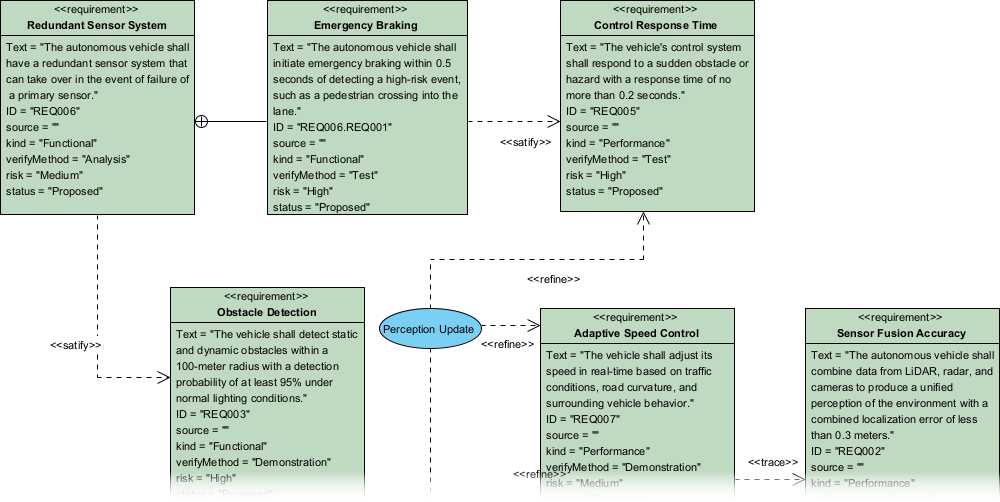
Full SysML Compliance: Includes all key elements:
-
«requirement»blocks -
deriveReqt(derivation) -
satisfy(design satisfaction) -
verify(test verification) -
trace(bi-directional traceability)
-
-
Advanced Editing Capabilities:
-
Customize requirement types (e.g., functional, non-functional, safety-critical)
-
Add user-defined properties (e.g., priority, status, owner)
-
Build hierarchies using containment relationships
-
Drag-and-drop layout optimization
-
-
Seamless Integration:
-
Export to PDF, PNG, SVG
-
Generate documentation & reports
-
Integrate with Git for team collaboration
-
Generate code from models (C++, Java, Python, etc.)
-
🛠️ How to Generate a SysML Requirement Diagram with AI in VP Desktop
-
Open VP Desktop and create a new project or open an existing one.
-
Go to Tools > AI Diagram Generation.
-
In the dialog:
-
Select Diagram Type:
Requirement Diagram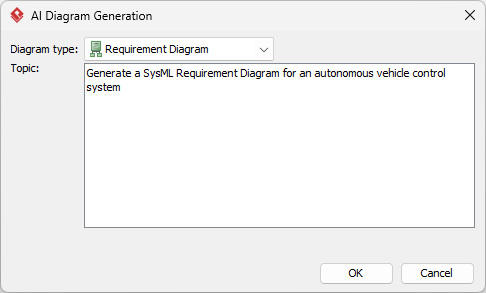
-
Enter a detailed description of your system (e.g., “Design a requirement model for an autonomous drone that must maintain altitude within 1m of target, avoid obstacles autonomously, and comply with FAA safety regulations.”)
-
-
Click OK.
-
✅ The AI generates a fully editable SysML diagram in seconds.
-
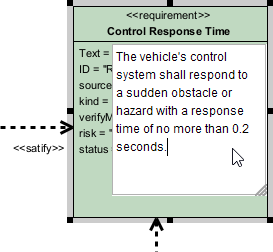
Refine the diagram:
-
Add more requirements
-
Link to blocks, use cases, or test cases
-
Adjust colors, fonts, and layout
-
-
Export or integrate:
-
Save as image/PDF
-
Generate documentation
-
Push to Git for version control
-
💡 Pro Tip: Use AI to generate the base model, then refine it manually for audit readiness and compliance.
📚 2. OpenDocs: Embed & Collaborate on AI-Generated SysML Requirement Diagrams
🤝 Turn Your Diagrams into Living Knowledge Assets
OpenDocs is Visual Paradigm’s smart collaborative knowledge base — think of it as a dynamic wiki with embedded, interactive diagrams. It’s perfect for teams that need to share, discuss, and evolve requirements documentation in real time.
🌐 Why OpenDocs Stands Out
-
Embed AI-generated diagrams directly into pages — not static images.
-
Click-to-edit functionality: Team members can refine the diagram inline without leaving the document.
-
Real-time collaboration: Multiple users can comment, suggest changes, or verify links.
-
Traceability at scale: Link requirements to design artifacts, test cases, or stakeholder needs — all in one place.
📌 Use Case Example
In a defense project, you embed a requirement diagram showing:
Stakeholder need → Top-level requirement → Derived safety/performance sub-requirements → Satisfied by system blocks → Verified by test cases
Colleagues can click into the diagram, update a
verifylink, or add a note: “This test case needs to be updated post-firmware v2.1.”
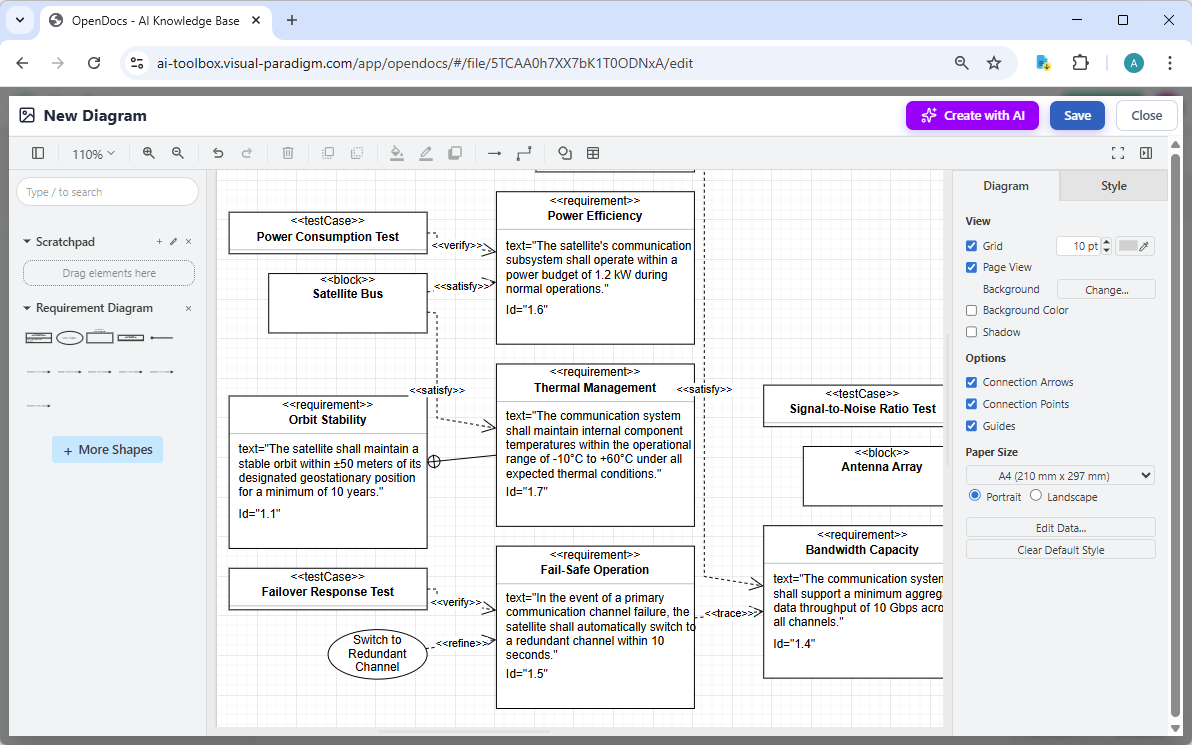
🧩 How to Insert an AI-Generated SysML Requirement Diagram into OpenDocs
-
Log in to your Visual Paradigm Online workspace.
-
Navigate to OpenDocs > Open or create a new page.
-
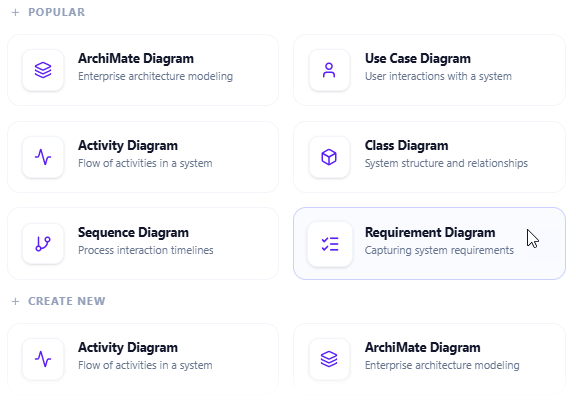
In the page editor, click Insert > Diagram > Requirement Diagram.
-
In the diagram editor window, click Create with AI (top-right corner).
-
Type a clear description:
“Generate a SysML requirement diagram for a medical infusion pump with safety-critical requirements: must deliver precise dosage (±0.1 mL), prevent air embolism, and shut down if temperature exceeds 40°C.”
-
Click Generate.
-
Review & refine the diagram:
-
Move elements
-
Add notes or labels
-
Adjust styles
-
-
Click Save, then Close.
-
✅ The diagram is now embedded as a live, editable block in your OpenDocs page.
🔄 Benefits: No more outdated screenshots. Everyone sees the current, interactive model — reducing miscommunication and ensuring audit readiness.
💬 3. AI Visual Modeling Chatbot: Conversational AI for Rapid Prototyping & Refinement
🚀 Chat Your Way to a Perfect SysML Requirement Diagram
The AI Visual Modeling Chatbot turns natural language into professional diagrams through conversation — ideal for brainstorming, rapid prototyping, and iterative refinement.
🧠 How It Works
-
Describe your system in plain English.
-
AI generates a compliant SysML Requirement Diagram instantly.
-
Keep chatting to refine:
-
“Add a
verifyrelationship to test case TC-003” -
“Explain the
deriveReqtchain from safety requirement to subsystems” -
“Generate a summary report of all requirements”
-
“Export this diagram as a PDF”
-
🎯 Ideal For
-
Agile teams in sprint planning
-
Students learning SysML
-
Engineers overcoming “blank page” syndrome
-
Quick validation of stakeholder needs
🔗 How to Use the AI Chatbot
-
Open the Chatbot:
-
VP Desktop: Tools > Chatbot
-
Click New Chat.
-
Type a prompt:
“Create a SysML Requirement Diagram for a smart home security system with the following: The system shall detect unauthorized entry, alert the homeowner via mobile app, and trigger a 10-minute alarm if motion is detected after 10 PM.”
-
Press Enter.
-
✅ AI generates the diagram with proper notation.
-
Refine via chat:
-
“Add a
deriveReqtfrom ‘alert homeowner’ to ‘send push notification’” -
“Highlight all safety-critical requirements in red”
-
“Export this to a PDF report”
-
📌 Pro Tip: Use the chatbot to prototype during standups, then move to VP Desktop for final polish and traceability.
🌐 4. Web Apps: Guided, Step-by-Step Modeling with AI Assistance
🛠️ Structured Workflows for Consistency & Best Practices
Web Apps are browser-based tools designed for guided, methodical modeling — perfect for teams standardizing processes or integrating with enterprise systems.
While not the primary tool for full SysML requirement diagrams, Web Apps support:
-
Step-by-step requirement definition
-
Enforced modeling rules
-
Consistent structure across projects
-
Interoperability with other models (e.g., Use Case, Activity, Block Definition Diagrams)
🎯 Best Use Cases
-
Onboarding new team members
-
Enforcing company-wide modeling standards
-
Integrating with PLM, ERP, or Jira workflows
-
Creating templates for recurring projects
⚠️ Note: Web Apps currently offer lighter AI support for SysML Requirement Diagrams compared to the other platforms. However, they are excellent for ensuring consistency and cross-model traceability.
🏆 Why Visual Paradigm Is the Ultimate AI SysML Requirement Diagram Tool
| Feature | Visual Paradigm | Competitors |
|---|---|---|
| ✅ Full SysML Support | ✔️ Yes | ❌ Limited |
| ✅ AI Diagram Generation | ✔️ Yes (in all platforms) | ❌ Often basic |
| ✅ Real Traceability (satisfy, verify, deriveReqt) | ✔️ Yes | ❌ Rarely |
| ✅ Multi-Platform Ecosystem | ✔️ Yes (Desktop, Web, Chat, OpenDocs) | ❌ Single-tool focus |
| ✅ Collaboration & Version Control | ✔️ Git, OpenDocs, Cloud Sync | ❌ Often missing |
| ✅ Code Generation & Documentation | ✔️ Yes | ❌ Limited |
| ✅ Enterprise-Grade Security & Compliance | ✔️ Yes | ❌ Variable |
🏁 Bottom Line: Most tools generate diagrams. Visual Paradigm generates intelligent, traceable, collaborative models — ready for implementation, audits, and scaling.
🚀 Ready to Transform Your SysML Workflow?
Stop juggling disconnected tools. Stop wasting hours on manual drawing. Start building smarter, faster, and more traceable systems with Visual Paradigm’s AI-powered ecosystem.
✅ Try It Today – Free for 30 Days
No credit card required. No strings attached.
📌 Summary: Your AI Modeling Workflow at a Glance
| Use Case | Recommended Platform | Key Advantage |
|---|---|---|
| Fast Prototyping | AI Chatbot | Natural language → diagram in seconds |
| Deep Modeling & Precision | VP Desktop | Full control, code export, offline use |
| Team Collaboration & Documentation | OpenDocs | Live, editable diagrams in wikis |
| Standardized, Guided Modeling | Web Apps | Enforced best practices, templates |
📣 Final Words: Build Smarter, Together
Your next requirement diagram isn’t just a sketch — it’s a blueprint for success.
With Visual Paradigm, you’re not just generating diagrams — you’re building intelligent, traceable, and collaborative models that evolve with your project.
Whether you’re a solo engineer, part of an agile team, or leading an enterprise MBSE initiative, Visual Paradigm’s AI-powered ecosystem gives you the tools to model with confidence, clarity, and speed.
🌐 Visit Us: https://www.visual-paradigm.com
📬 Contact Support: [email protected]
📅 Next Generation of Systems Engineering Starts Now
✨ Let’s build your next system — better, faster, and smarter.
Visual Paradigm: Where AI Meets Engineering Excellence.
-
Creating SysML Block Definition Diagrams with an AI Chatbot: This article explains how users can simply describe their ideas in plain English—such as requesting a SysML Block Definition Diagram for a weather forecasting system—and have the AI chatbot generate the diagram instantly.
-
Mastering AI-Driven Systems Engineering: A Comprehensive Guide to ArchiMate and SysML Diagram Generation: A detailed guide exploring how specialized AI chatbots act as modeling partners to enhance efficiency and simplify complex workflows in systems engineering.
-
AI Diagram Chatbot Update: Better ArchiMate & SysML Support: This release note highlights updates that bring higher stability and improved relevance to the chatbot when handling complex prompts for SysML and ArchiMate.
-
Visual Paradigm AI Suite: A Comprehensive Guide to Intelligent Modeling Tools: This resource outlines how the AI chatbot facilitates systems engineering by supporting the generation of SysML Block Definition, Internal Block, and Requirement diagrams.
-
AI Chatbot for Diagramming: How It Works with Visual Paradigm: Explains how the chatbot serves as an AI-powered modeling assistant that converts natural language into professional diagrams, removing the need to learn specific SysML syntax.
-
Visual Paradigm SYSML Diagram Tool – Advanced Modeling for Systems Engineering: An overview of a comprehensive tool designed for Model-Based Systems Engineering (MBSE), which integrates with AI features for seamless diagram creation.
-
MBSE and SysML: A Guide to Systems Engineering with Visual Paradigm: A guide detailing how SysML supports systems engineering and how AI-powered development plans can transform project ideas into actionable roadmaps.
-
Visual Paradigm AI-Powered Diagram Generation Tutorial: A tutorial demonstrating how to use AI-driven features to automatically generate diagrams from natural language, applicable to technical system designs.
-
Introducing Visual Paradigm AI Chatbot: A Smarter Way to Create Diagrams: This update showcases how conversational AI enables contextual analysis and smart editing for enterprise-level systems modeling.
-
AI Chatbot Feature – Intelligent Assistance for Visual Paradigm Users: Introduces the core chatbot functionality designed to provide instant guidance and task automation, significantly boosting productivity for system architects.