
Now Reading: AI Assist Brainstorming Review: An Instant Solution for Structured Ideation
-
01
AI Assist Brainstorming Review: An Instant Solution for Structured Ideation


AI Assist Brainstorming Review: An Instant Solution for Structured Ideation
In the landscape of productivity tools, the initial phase of any project—the brainstorm—is often the most chaotic. Creative blocks and the intimidation of a blank page can stall progress before it even begins. Visual Paradigm’s AI Assist Brainstorming is a web-based application designed to solve this specific problem by combining visual mind mapping with generative AI. This review explores its capabilities, workflow, and how it serves as a bridge between abstract thoughts and structured execution.
What is AI Assist Brainstorming?
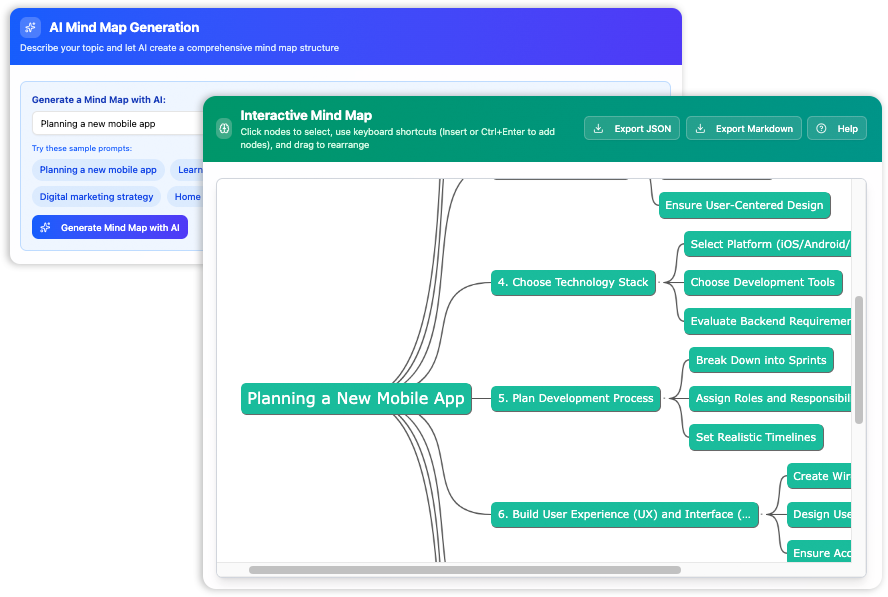
AI Assist Brainstorming is a lightweight, interactive tool that allows users to generate, visualize, and edit mind maps with high velocity. Unlike traditional diagramming software that acts merely as a digital canvas, this application centers around an AI engine. Users provide a single topic or concept, and the AI instantly constructs a comprehensive, multi-level mind map. This creates a detailed foundation that users can then refine, reorganize, and export.
The tool is particularly notable for its accessibility. It requires no account registration, no login, and is completely free to use, lowering the barrier to entry for anyone needing immediate organizational help.
Core Features and Functionality
Instant AI Generation
The primary value proposition of the tool is its ability to eliminate the “blank page” problem. By simply typing a prompt such as “Plan the launch of a new company website” or “The key events of the American Revolution,” the AI generates a hierarchical structure populated with relevant categories and sub-topics. This feature acts as a knowledgeable brainstorming partner, often suggesting connections or categories the user might not have considered.
Keyboard-Driven Editing
While many mind mapping tools rely heavily on mouse interaction, AI Assist Brainstorming is optimized for speed through keyboard shortcuts. This design choice allows users to capture ideas as fast as they think them. Key interactions include:
- F2: Edit the text of a selected node.
- Insert (or Ctrl+Enter): Add a new child node to branch out an idea.
- Enter: Add a sibling node at the current level.
- Delete: Remove irrelevant nodes.
This fluid, hotkey-based workflow makes the process feel more like a creative game than data entry.
Drag-and-Drop Reorganization
For structural changes, the tool supports intuitive drag-and-drop functionality. Users can click any node and drag it to a new position in the tree. This moves the selected node and all of its children, allowing for rapid re-prioritization of entire branches of thought without manual cutting and pasting.
Export Capabilities: From Visual to Text
One of the most practical features of AI Assist Brainstorming is how it handles data portability. Recognizing that a mind map is often just the first step in a larger project, the tool offers two distinct export formats:
- Markdown Export: This converts the visual map into a clean, text-based nested list. This is ideal for writers and content creators who need to move from a visual outline directly into a drafting phase in a text editor.
- JSON Export: This saves the mind map as a structured data file, preserving the hierarchy for potential programmatic use or record-keeping.
Target Audience and Use Cases
The tool’s simplicity and speed make it versatile across various disciplines. Students and researchers can use it to outline essays or organize complex study notes. Product Managers can utilize it to break down feature sets or map out user flows. Writers and marketers will find it invaluable for structuring articles and campaign strategies. Essentially, it serves any visual thinker looking to organize complex information quickly.
Limitations to Consider
While AI Assist Brainstorming excels at speed and generation, it does have specific limitations that users should be aware of regarding data persistence and customization:
- No Cloud Save or Import: The application does not save work to a server. If the page is refreshed, the mind map is lost. Furthermore, there is no “Import” feature to load a previously exported JSON file. Users must finish their session and export their work before closing the tab.
- Fixed Visual Style: The aesthetic of the mind map—colors, fonts, and layout—is fixed. Users cannot customize the visual appearance of the nodes.
- Single-User Only: There are no real-time collaboration features, making it a tool strictly for individual work rather than team brainstorming sessions.
Final Verdict
AI Assist Brainstorming is a potent utility for overcoming creative blocks and organizing thoughts rapidly. It strips away the complexity of bloated software suites to focus entirely on ideation and structure. While the inability to save and reload projects within the app is a significant constraint, the efficient AI generation and seamless Markdown export make it an excellent “starting block” tool for anyone who needs to turn a vague idea into a concrete plan in minutes.