
Mastering BPMN Gateways: The Architect’s Guide to Process Branching
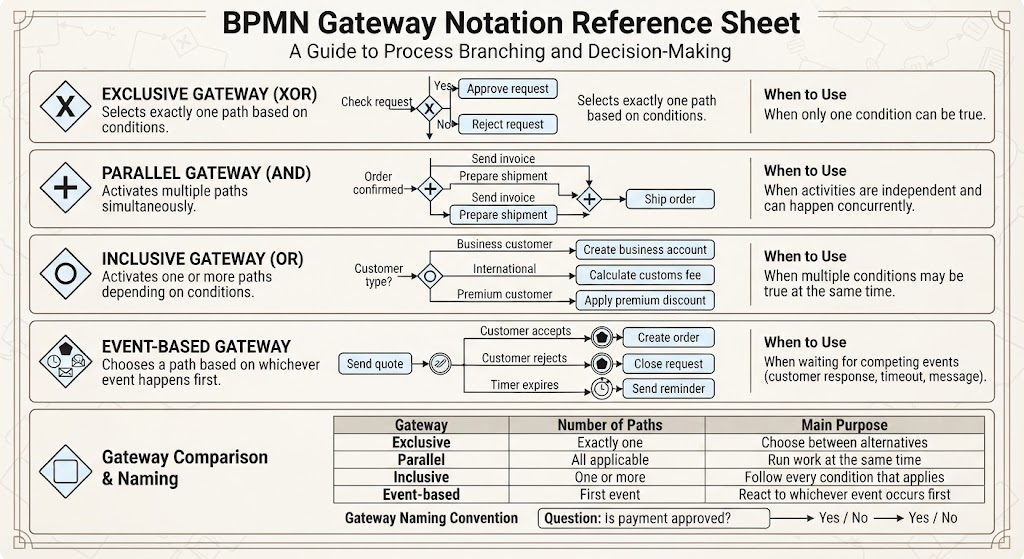
In the world of Business Process Model and Notation (BPMN), the flow of a process is rarely a straight line. Real-world business logic is complex, involving decisions, parallel execution, and waiting for external events. This is where Gateways come into play. Think of a gateway as the traffic controller of your process flow, determining exactly how the process branches, merges, or makes critical decisions.
This tutorial will guide you through the architecture of the four primary gateway types: Exclusive (XOR), Parallel (AND), Inclusive (OR), and Event-based. We will also explore how to structure this logic using modern modeling tools.
1. The Exclusive Gateway (XOR): The Decision Maker
The Exclusive Gateway, often represented by a diamond with an X inside, is the most common gateway used for simple decision-making. Its primary function is to select exactly one path based on a set of conditions.
How it Works
Imagine a process where an order must be checked. If the order value is low, it goes one way; if it is high, it goes another. You cannot do both simultaneously for a single transaction.
- Logic: Condition A is true OR Condition B is true (but not both).
- Outcome: Only one outgoing sequence flow is activated.
Visual Representation
When modeling this in a diagram, you define the specific conditions on the outgoing sequence flows. The gateway itself does not calculate the logic; it simply routes the flow based on the evaluation of those conditions.
          [Check Request]
                 |
                 v

             /       \
           Yes         No
           /             \
          v               v
  [Approve Request]   [Reject Request]
When to Use
Use an Exclusive Gateway when only one condition can be true at a time. This is typical for “If/Else” logic in programming.
2. The Parallel Gateway (AND): The Concurrency Engine
While the Exclusive Gateway splits the path, the Parallel Gateway (represented by a diamond with a + inside) does the opposite or splits into multiple simultaneous paths. It represents the concept of concurrency.
Forking and Joining
The Parallel Gateway is used in two distinct scenarios:
- Forking (Splitting): When the process splits into multiple branches that must all be executed. For example, upon order confirmation, the system might need to send an invoice AND prepare the shipment immediately.
- Joining (Merging): When multiple parallel branches need to synchronize. The process cannot proceed to the next step until all incoming branches have completed.
       [Order Confirmed]
              |
              v

         /    \
        /      \
       v        v
[Send Invoice] [Prepare Shipment]
       \        /
        \      /

              |
              v
         [Ship Order]
When to Use
Use a Parallel Gateway when activities are independent and can happen concurrently. It ensures that no steps are skipped in a batch process.
3. The Inclusive Gateway (OR): The Flexible Selector
The Inclusive Gateway (diamond with a circle inside) is the most versatile and often misunderstood gateway. Unlike the Exclusive gateway, which allows only one path, the Inclusive Gateway can activate one or more paths depending on the conditions.
Multiple Conditions
This gateway is ideal when multiple conditions can be true at the same time. For instance, a customer might be both a “Business Customer” AND an “International Customer.” Both conditions should trigger their respective processes.
       [Customer Type?]
              |
              v

          /   |   \
         /    |    \
        /     |     \
      Yes    Yes    Yes
     /       |       \
    v        v        v
[Create Biz] [Customs] [Premium]
  Account    Fee     Discount
When to Use
Use an Inclusive Gateway when you have a set of conditions where one, two, or even all of them might be true simultaneously.
4. The Event-Based Gateway: The Reactor
The Event-Based Gateway (diamond with a clock or envelope) is unique because it waits for a trigger event rather than evaluating a data condition. It is used when the process must wait for an external occurrence.
Choosing the Fastest Path
This gateway is perfect for scenarios involving timeouts or competing events. The process flow will follow the path associated with whichever event happens first.
- Scenario: A quote is sent to a customer.
- Events:
- Customer accepts (Creates Order)
- Customer rejects (Closes Request)
- Timer expires (Sends Reminder)
      [Send Quote]
           |
           v

      /  |  \
     /   |   \
    /    |    \
  Accept Reject Timer
   /      |      \
  v       v       v
[Create  [Close   [Send
 Order]  Request] Reminder]
When to Use
Use this when waiting for competing events such as a customer response, a timeout, or a message from another system.
Conclusion
Mastering BPMN gateways is essential for creating accurate and executable process models. By understanding the difference between choosing a single path (Exclusive), running multiple paths (Parallel), handling flexible conditions (Inclusive), and reacting to external events (Event-based), you can build robust process architectures that mirror real-world complexity.
To effectively visualize and implement these complex logic flows, it is highly recommended to use professional modeling tooling. Specifically, Visual Paradigm BPMN offers a comprehensive suite of features for drawing these diagrams with precision. Furthermore, integrating AI capabilities into your modeling workflow can significantly accelerate the design process by suggesting optimal gateway structures and validating your logic for potential bottlenecks.