
Mastering BPMN 2.0: A Comprehensive Guide to Activities and Markers
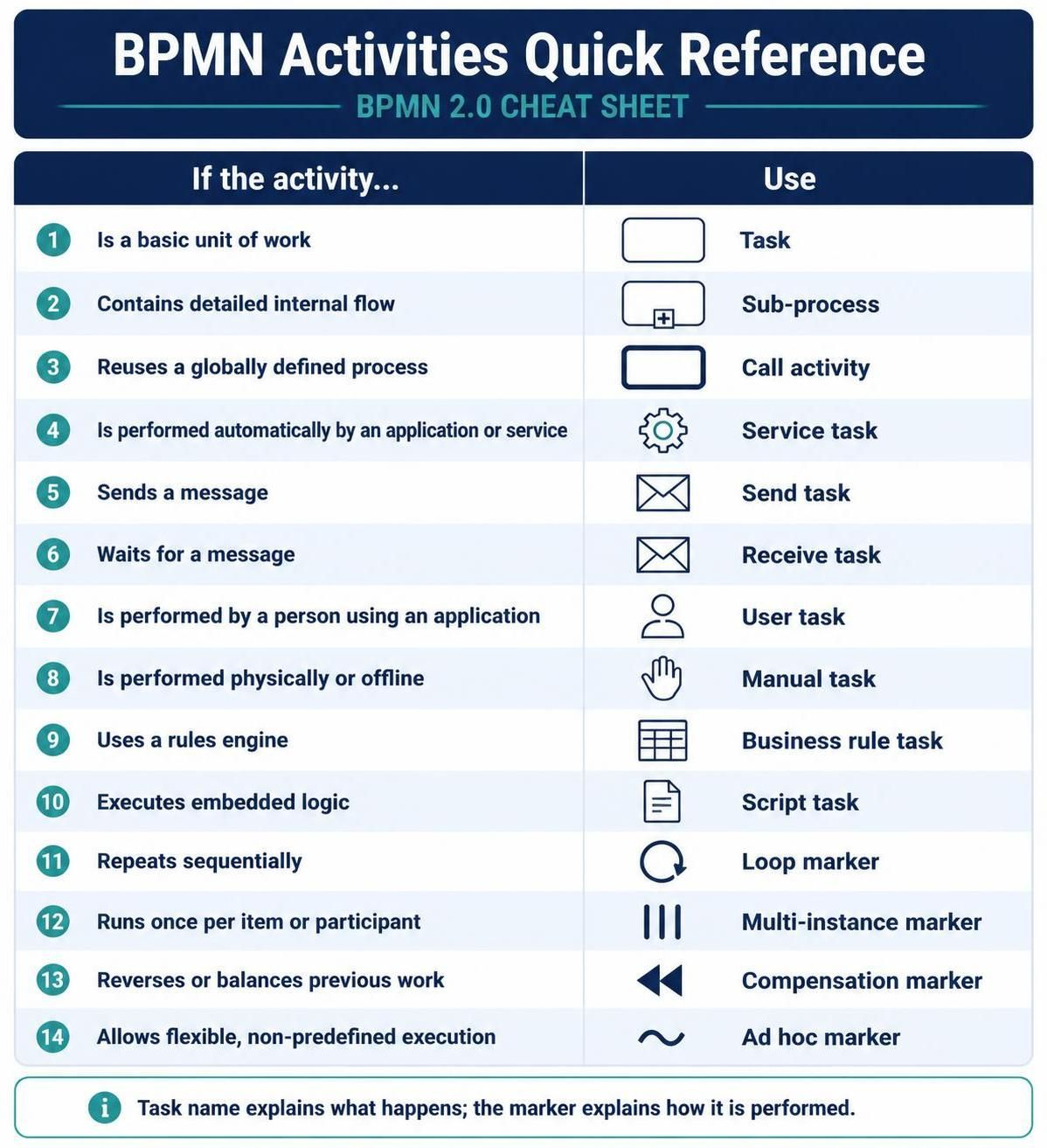
Business Process Model and Notation (BPMN) is the industry standard for visualizing business processes. However, mastering BPMN 2.0 requires more than just knowing how to connect boxes; it requires a deep understanding of the specific Activities that represent work and the Markers that define their behavior. This tutorial breaks down the essential components of a BPMN diagram, transforming a complex reference sheet into actionable architectural knowledge.
Understanding the Hierarchy of Work
The foundation of any BPMN diagram lies in its ability to represent work at different levels of granularity. The notation distinguishes between a simple unit of work and a complex, nested process.
1. The Basic Unit of Work: Task
A Task is the most fundamental activity in BPMN. It represents a single, indivisible unit of work. When modeling, if a step is atomic and does not need further breakdown, a standard Task is used. It is the building block of your process.
2. Nested Complexity: Sub-process
When a specific step in your process is too complex to be represented as a single line, you use a Sub-process. Visually, this is indicated by a small plus sign (+) at the bottom of the activity box. It contains a detailed internal flow, allowing you to hide complexity while maintaining the high-level overview of the main process.
3. Reusable Components: Call Activity
If you need to reuse a process that has been defined globally—perhaps in a different part of your organization or in a shared library—you use a Call Activity. Unlike a Sub-process, which is defined locally within the current diagram, a Call Activity references an external, globally defined process definition.
Categorizing Performers and Automation
One of the most critical aspects of BPMN modeling is answering the question: Who or what performs this work? The notation provides specific icons to distinguish between human interaction, system automation, and external communication.
Human Interaction
- User Task: This is the standard activity for work performed by a person using an application. It implies human decision-making or input is required.
- Manual Task: Use this when the work is performed physically or offline, without the aid of a computer application. For example, “Deliver physical package” is a Manual Task.
System and Service Automation
- Service Task: This task is performed automatically by an application, service, or backend system. It does not require human intervention. Examples include “Send Email” or “Calculate Tax.”
- Script Task: This task executes embedded logic. It is often used when the logic is written in a specific scripting language (like Groovy or JavaScript) and embedded directly within the task definition.
External Communication
- Send Task: This activity is used to send a message to an external participant or system.
- Receive Task: Conversely, this task waits for a message from an external source. It is crucial for modeling asynchronous interactions where the process pauses until a specific event occurs.
Integrating Business Logic
Processes are rarely just linear flows; they require decision-making and rule enforcement. BPMN provides specific activities for handling this logic.
- Business Rule Task: This task utilizes a rules engine (like Drools) to make decisions based on defined business policies. It separates the execution logic from the process flow, making the process more maintainable.
Advanced Behaviors: Markers and Iteration
Markers are symbols attached to the bottom of an activity to modify its behavior without changing the core logic. They answer the question: How does the activity behave within the process?
Looping and Iteration
Complex processes often require repeating work.
- Loop Marker: This indicates that the activity repeats sequentially. It is often used when a process must iterate until a specific condition is met.
- Multi-instance Marker: This is used when a task must be performed once for each item or participant in a list. For example, “Send Invoice” might be a multi-instance task running once per customer in a batch.
Exception Handling and Flexibility
- Compensation Marker: This marker is used to indicate that the task can be reversed or that previous work can be balanced if an error occurs later in the process. It is essential for long-running processes where rollback logic is required.
- Ad Hoc Marker: This allows for flexible, non-predefined execution. It is used when the order of activities within a group is not fixed and can vary dynamically based on runtime conditions.
Conclusion
A well-designed BPMN activity notation sheet serves as a bridge between business stakeholders and technical architects. By clearly defining what work is being performed, who or what is performing it, and how the activity behaves, you ensure that diagrams are not just pictures, but executable specifications.
To leverage these concepts effectively in your organization, it is recommended to utilize Visual Paradigm BPMN as your primary modeling tool. Its robust feature set supports all the markers and activities discussed above, ensuring your diagrams are compliant with the BPMN 2.0 standard. Furthermore, integrating AI capabilities into your modeling workflow can significantly accelerate the design phase, helping you generate process flows and validate logic automatically.