
Mastering BPMN: A Comprehensive Guide to Using Pools and Lanes for Clear System Architecture
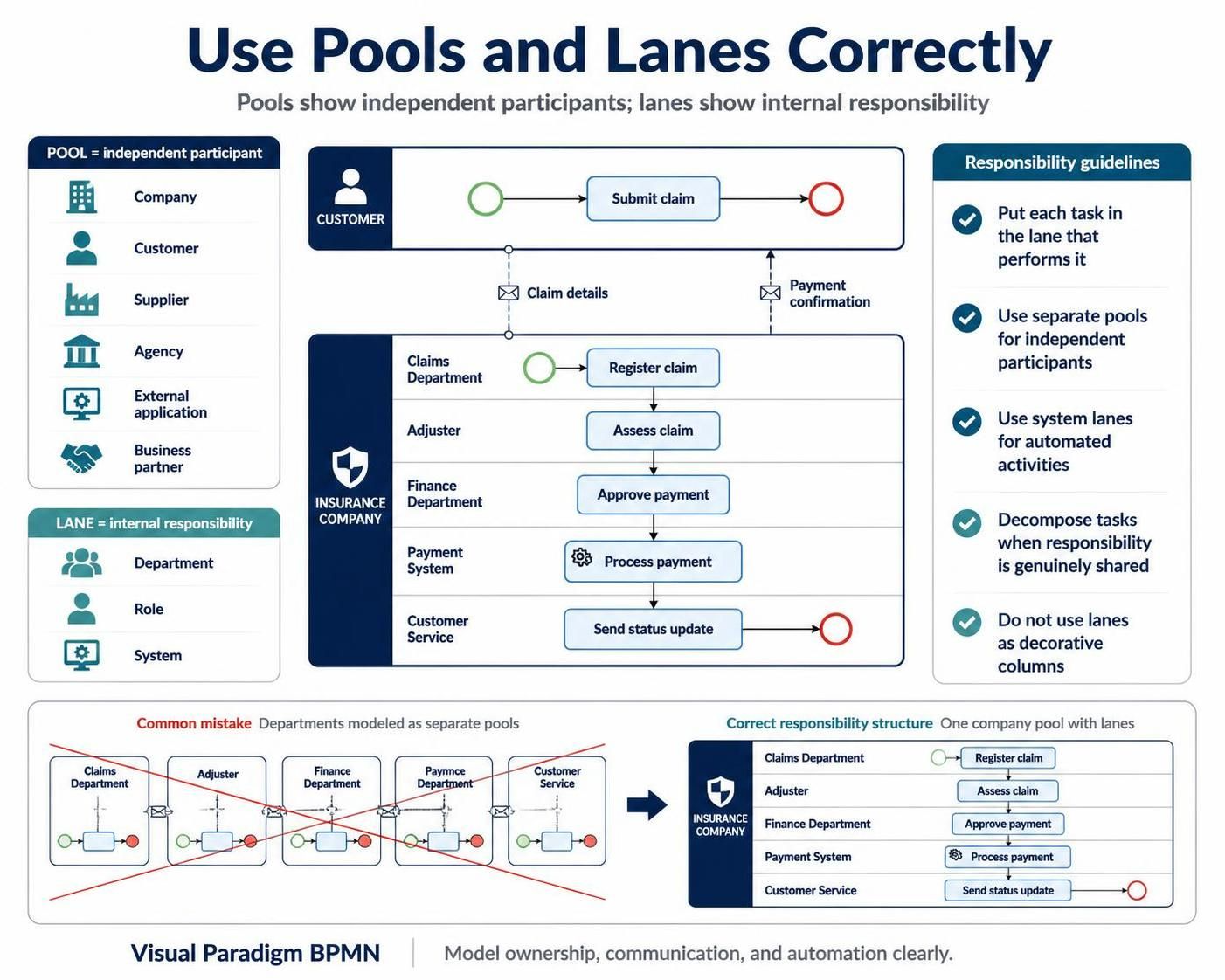
In the realm of Business Process Model and Notation (BPMN) and system architecture, clarity is paramount. When modeling complex workflows, the distinction between external collaboration and internal responsibility is often the difference between a diagram that confuses stakeholders and one that drives action. This tutorial explores the architectural concepts of Pools and Lanes, using the context of an insurance claims process to demonstrate how to model ownership, communication, and automation correctly.
1. The Concept of Pools: Independent Participants
A Pool in BPMN represents a distinct, independent participant in a business collaboration. Think of a pool as a container that defines the boundary of an entity’s control and responsibility. When you create a separate pool, you are stating that this participant has its own internal logic that is not directly visible to the outside world.
When to Use Separate Pools
You should utilize separate pools for entities that have independent control over their processes or when the communication between them needs to be shown explicitly. Common examples of independent participants include:
- Organizations: A specific company or a government agency.
- External Entities: A customer, a supplier, or a business partner.
- Systems: An external application or a third-party service.
The Visual Language of Pools
Visually, a pool acts as a “black box” from the perspective of other pools. Communication between pools is represented by Message Flows (typically dashed lines with an envelope icon), signifying that data is being passed across organizational boundaries.
2. The Concept of Lanes: Internal Responsibility
Once you have defined the external participant (the Pool), you must define who inside that participant is doing the work. This is the function of a Lane. Lanes divide a pool into internal roles, departments, systems, or responsibility areas.
Defining Internal Roles
Lanes are not just decorative columns; they are critical for assigning ownership. In a complex process like an insurance claim, you might see lanes for:
- Customer: The initiator of the process.
- Claims Department: The administrative intake.
- Adjuster: The individual responsible for assessment.
- Finance Department: The team approving payments.
- Payment System: The automated software executing the transaction.
3. Step-by-Step: Modeling a Claims Process
Let’s walk through a specific example to illustrate the interaction between pools and lanes. Consider an Insurance Company processing a claim. The architecture should ideally consist of two primary Pools: the Customer and the Insurance Company.
Step 1: The External Handshake
The process begins with the Customer pool. The customer performs the action “Submit claim.” This is a task owned by the customer, not the insurance company. To initiate the workflow, the customer sends a message containing the claim details.
Step 2: The Internal Workflow
The message enters the Insurance Company pool. Here, the process splits into various lanes based on internal responsibility:
- Claims Department: Receives the message and performs “Register claim”.
- Adjuster: Takes the registered claim and performs “Assess claim”.
- Finance Department: Reviews the assessment and performs “Approve payment”.
- Payment System: An automated system lane that executes the actual “Process payment”.
Step 3: Closing the Loop
Once the payment is processed, the Customer Service lane performs “Send status update,” sending a message back to the Customer pool to close the interaction.
4. Responsibility Guidelines and Best Practices
To ensure your architecture diagrams are accurate and maintainable, adhere to the following strict guidelines regarding responsibility assignment:
Assign Tasks to Specific Owners
Place every task in the lane of the role or system responsible for performing it. If a task is not in a lane, its ownership is ambiguous. For instance, if the “Process Payment” task is floating in the pool without a lane, it is unclear whether a human or a computer is doing the work.
Use System Lanes for Automation
Use specific lanes when the system performs an automated activity. In the example above, the Payment System lane is distinct from the Finance Department lane because the finance team approves the logic, but the system executes the action. This distinction is vital for understanding where human intervention is required versus where automation takes over.
Decompose Shared Responsibilities
A common architectural error is assigning one task to several lanes unless the responsibility is genuinely shared. If multiple departments collaborate on a single step, consider whether that task should be decomposed into smaller, distinct tasks assigned to specific owners.
5. Common Pitfalls: The “Decorative Column” Mistake
The most frequent mistake in BPMN modeling is treating lanes merely as decorative columns or, conversely, using pools for every department.
Incorrect: Departments as Separate Pools
Do not model internal departments (like Claims, Finance, and Adjusters) as separate Pools. If you do this, you are implying that these departments are independent companies that exchange messages rather than collaborating internally. This creates a “spaghetti” diagram filled with unnecessary message flows and obscures the internal workflow.
Correct: One Company Pool with Lanes
Instead, create a single pool for the “Insurance Company” and use lanes to separate the departments. This clearly shows that while the departments have different roles, they belong to the same organization and share the same process context.
Summary
By correctly utilizing Pools for independent participants and Lanes for internal responsibility, you create a diagram that clearly communicates system architecture. Remember: Pools show who you are talking to, and Lanes show who is doing the work.