
Now Reading: The Complete Guide to UML Class Diagrams
-
01
The Complete Guide to UML Class Diagrams


The Complete Guide to UML Class Diagrams
Introduction
What is a Class Diagram in UML?
A class diagram describes the structure of an object-oriented system by showing the classes in that system and the relationships between the classes. A class diagram also shows constraints, and attributes of classes.
💡 Try it! Finding an online Class Diagram tool? Just click the Draw button below to create your Class Diagram online. Visual Paradigm Online is free* and intuitive. You can also go through this Class Diagram tutorial to learn about Class Diagram before you get started.
Class Diagram Notations
Class
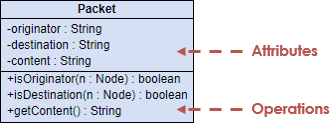
The UML representation of a class is a rectangle containing three compartments stacked vertically, as shown in the Figure:
Attribute
The attribute section of a class lists each of the class’s attributes on a separate line. The attribute section is optional, but when used it contains each attribute of the class displayed in a list format. The line uses this format:
name : attribute type
Example: cardNumber : Integer
Operation
The operations are documented in the bottom compartment of the class diagram’s rectangle, which also is optional. Like the attributes, the operations of a class are displayed in a list format, with each operation on its own line. Operations are documented using this notation:
name (parameter list) : type of value returned
Example: calculateTax (Country, State) : Currency
Relationships
Association
Some objects are made up of other objects. Association specifies a “has-a” or “whole/part” relationship between two classes. In an association relationship, an object of the whole class has objects of part class as instance data.
In a class diagram, an association relationship is rendered as a directed solid line.
Unidirectional Association
In a unidirectional association, two classes are related, but only one class knows that the relationship exists. A unidirectional association is drawn as a solid line with an open arrowhead pointing to the known class.

Bidirectional (Standard) Association
An association is a linkage between two classes. Associations are always assumed to be bi-directional; this means that both classes are aware of each other and their relationship, unless you qualify the association as some other type. A bi-directional association is indicated by a solid line between the two classes.

Multiplicity
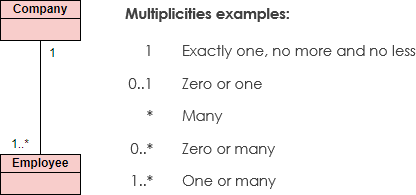
Place multiplicity notations near the ends of an association. These symbols indicate the number of instances of one class linked to one instance of the other class.
Example: One company will have one or more employees, but each employee works for one company only.
| Notation | Meaning |
|---|---|
1 |
Exactly one |
0..1 |
Zero or one |
* or 0..* |
Zero or more |
1..* |
One or more |
0..3 |
Zero to three |
Visibility
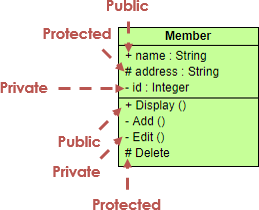
Visibility is used to signify who can access the information contained within a class denoted with +, -, # and ~ as shown in the figure:
| Symbol | Visibility | Description |
|---|---|---|
+ |
Public | Accessible from any other class |
- |
Private | Accessible only within the class itself |
# |
Protected | Accessible within the class and its subclasses |
~ |
Package | Accessible within the same package |
Generalization
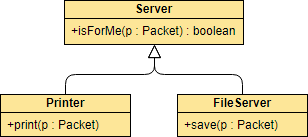
A generalization is a relationship between a general thing (called the superclass) and a more specific kind of that thing (called the subclass). Generalization is sometimes called an “is a kind of” relationship and is established through the process of inheritance.
In a class diagram, generalization relationship is rendered as a solid directed line with a large open arrowhead pointing to the parent class.
Abstract Classes and Methods
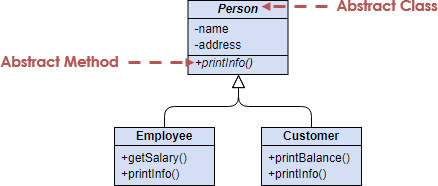
In an inheritance hierarchy, subclasses implement specific details, whereas the parent class defines the framework its subclasses. The parent class also serves a template for common methods that will be implemented by its subclasses.
-
The name of an abstract Class is typically shown in italics; alternatively, an abstract Class may be shown using the textual annotation, also called stereotype
{abstract}after or below its name. -
An abstract method is a method that does not have implementation. In order to create an abstract method, create an operation and make it italic.
Realization
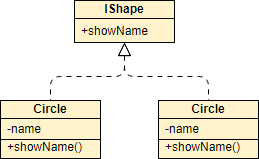
A realization is a relationship between two things where one thing (an interface) specifies a contract that another thing (a class) guarantees to carry out by implementing the operations specified in that contract.
In a class diagram, realization relationship is rendered as a dashed directed line with an open arrowhead pointing to the interface.
Dependency
Dependency indicates a “uses” relationship between two classes. In a class diagram, a dependency relationship is rendered as a dashed directed line.
If a class A “uses” class B, then one or more of the following statements generally hold true:
-
Class B is used as the type of a local variable in one or more methods of class A.
-
Class B is used as the type of parameter for one or more methods of class A.
-
Class B is used as the return type for one or more methods of class A.
-
One or more methods of class A invoke one or more methods of class B.

When to Draw Class Diagrams?
Most of the UML diagrams cannot be mapped directly with any object-oriented programming languages except class diagrams. In other words, class diagrams ideally can have one-to-one mapping to UML class diagrams. Besides, class diagrams are useful in the following situations:
-
Describing the static view of the system – Capture the structure of classes and their relationships at a point in time.
-
Modeling the collaboration among the elements of the static view – Show how classes interact through associations and dependencies.
-
Describing the functionalities performed by the system – Link operations to classes to illustrate behavior.
-
Construction of software applications using object-oriented languages – Serve as a blueprint for implementation in languages like Java, C#, or Python.
-
Performing code forward engineering for the target systems – Generate skeleton code directly from class diagrams.
-
Classifying classes or components as library for future reuses – Document reusable components for modular development.
How to Draw a Class Diagram?
Follow these step-by-step instructions to create effective class diagrams:
-
Identify the objects in the problem domain, and create classes for each of them.
Example: Teacher, Student, Course for an enrollment system. -
Add attributes for those classes.
Example:name,address,telephonefor the Student class. -
Add operations for those classes.
Example:addStudent(student)for the Course class. -
Connect the classes with appropriate relationships.
Example: Relate Teacher and Course with an association. -
Optionally specify the multiplicities for association connectors’ ends.
Example: Input0..3for the Course side of the association that connects Teacher and Course, to signify that one teacher can teach up to three courses.
Additional Best Practices
-
Draw packages for logical categorization of classes to improve organization and readability:
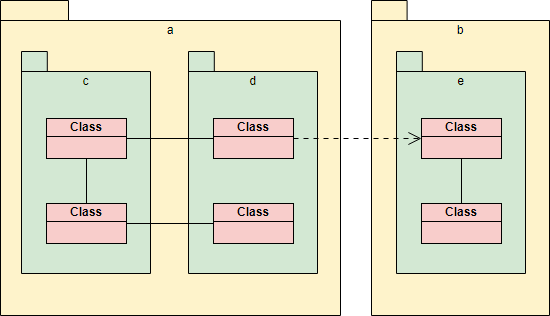
-
Use meaningful, singular nouns for class names (e.g.,
Customer, notCustomers). -
Keep diagrams focused: one diagram per subsystem or feature area.
-
Apply consistent naming conventions for attributes and operations.
-
Document constraints using notes or OCL (Object Constraint Language) when necessary.
Class Diagram Examples
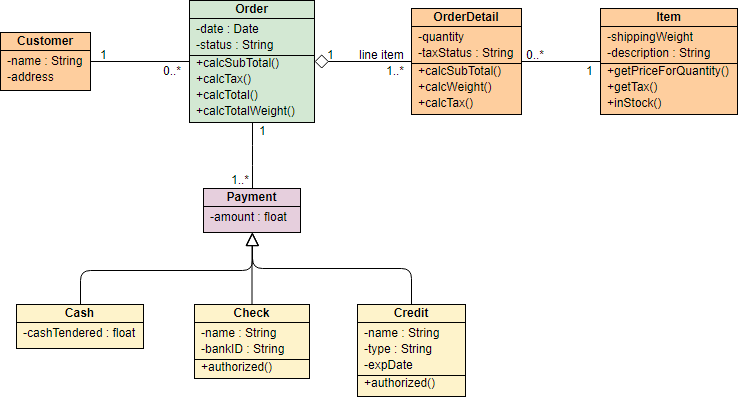
Example 1: Sales Order System
The class diagram example below shows the classes involved in a sales order system. Notice the use of <<enumeration>> class in the class model.

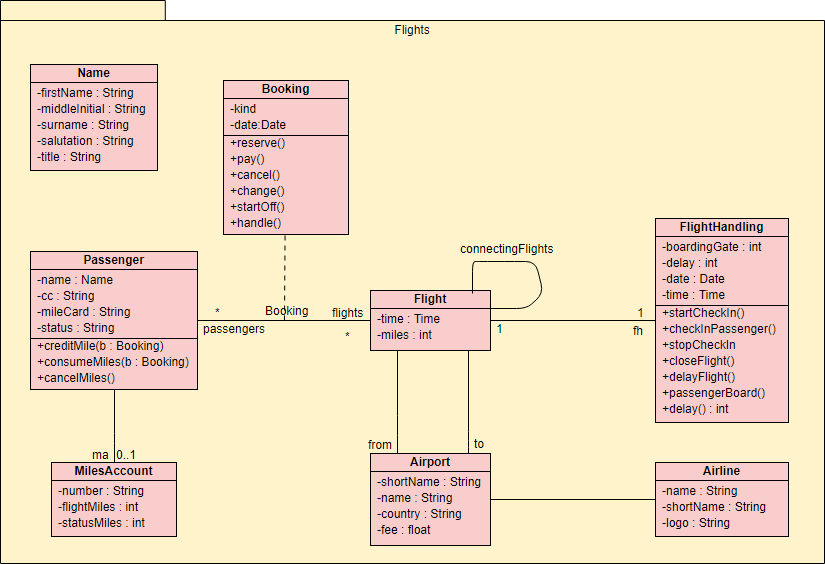
Example 2: Flight Management System
The class diagram example below shows a set of classes related to flight management. The classes are grouped under a package.
Want to Draw a Class Diagram?
You’ve learned what a Class Diagram is and how to draw a Class Diagram step-by-step. It’s time to get your hands dirty by drawing a Class Diagram of your own. Draw UML diagrams free* with Visual Paradigm Online. It’s easy-to-use, intuitive.
* The Free edition supports free usage of Visual Paradigm Online for non-commercial use only.
Conclusion
🎯 Key Takeaway: A great class diagram isn’t about perfection—it’s about clarity, communication, and creating a shared understanding that drives better software. Start simple, iterate often, and let your diagrams evolve alongside your system.
Reference List
-
What is UML? A Comprehensive Guide to Unified Modeling Language: This in-depth introduction explains the purpose of UML, its key diagram types, and how it supports software design and system modeling.
-
What Is a Class Diagram? – A Beginner’s Guide to UML Modeling: This informative overview explains the purpose, components, and critical importance of class diagrams in both software development and system design.
-
Complete UML Class Diagram Tutorial for Beginners and Experts: A step-by-step tutorial designed to walk users through the entire process of creating and understanding UML class diagrams to master software modeling.
-
AI-Powered UML Class Diagram Generator by Visual Paradigm: This advanced AI-assisted tool utilizes natural language descriptions to automatically generate UML class diagrams, significantly streamlining the design phase,.
-
Overview of the 14 UML Diagram Types – Visual Paradigm: A resource detailing the large volume of diagramming notation categorized into 14 distinct UML models, each serving unique purposes in software engineering.
-
Class Diagrams vs Object Diagrams in UML: Key Differences: This guide provides a clear comparison between class and object diagrams, highlighting their specific structures and clarifying when to use each type.
-
From Problem Description to Class Diagram: AI-Powered Textual Analysis: An exploration of how generative AI converts natural language problem descriptions into accurate class diagrams for structured software modeling.
-
Mastering Class Diagrams: An In-Depth Exploration with Visual Paradigm: A comprehensive technical guide that provides an in-depth look at creating class diagrams within the Visual Paradigm modeling environment.
-
Real-Life Case Study: Generating UML Class Diagrams with Visual Paradigm AI: This study demonstrates how an AI assistant successfully transformed textual requirements into precise UML class diagrams for a real-world engineering project.
-
Step-by-Step Class Diagram Tutorial Using Visual Paradigm: A practical instructional guide covering the specific software steps to open a project, add classes, and build a full diagram for system architecture.