
Now Reading: Review: Agile Affinity Mapping Planner – Streamlining Workshop Preparation with AI
-
01
Review: Agile Affinity Mapping Planner – Streamlining Workshop Preparation with AI


Review: Agile Affinity Mapping Planner – Streamlining Workshop Preparation with AI
Introduction to Structured Session Planning
Affinity mapping, often referred to as affinity diagramming, is a cornerstone technique for Agile teams, UX researchers, and product managers. It transforms chaotic brainstorms and raw data into structured themes and actionable insights. However, the success of an affinity mapping session relies heavily on the preparation phase—a step that is often rushed or overlooked. The Agile Affinity Mapping Planner is a specialized tool designed to solve this problem by providing a rigorous, step-by-step framework for planning these critical sessions.
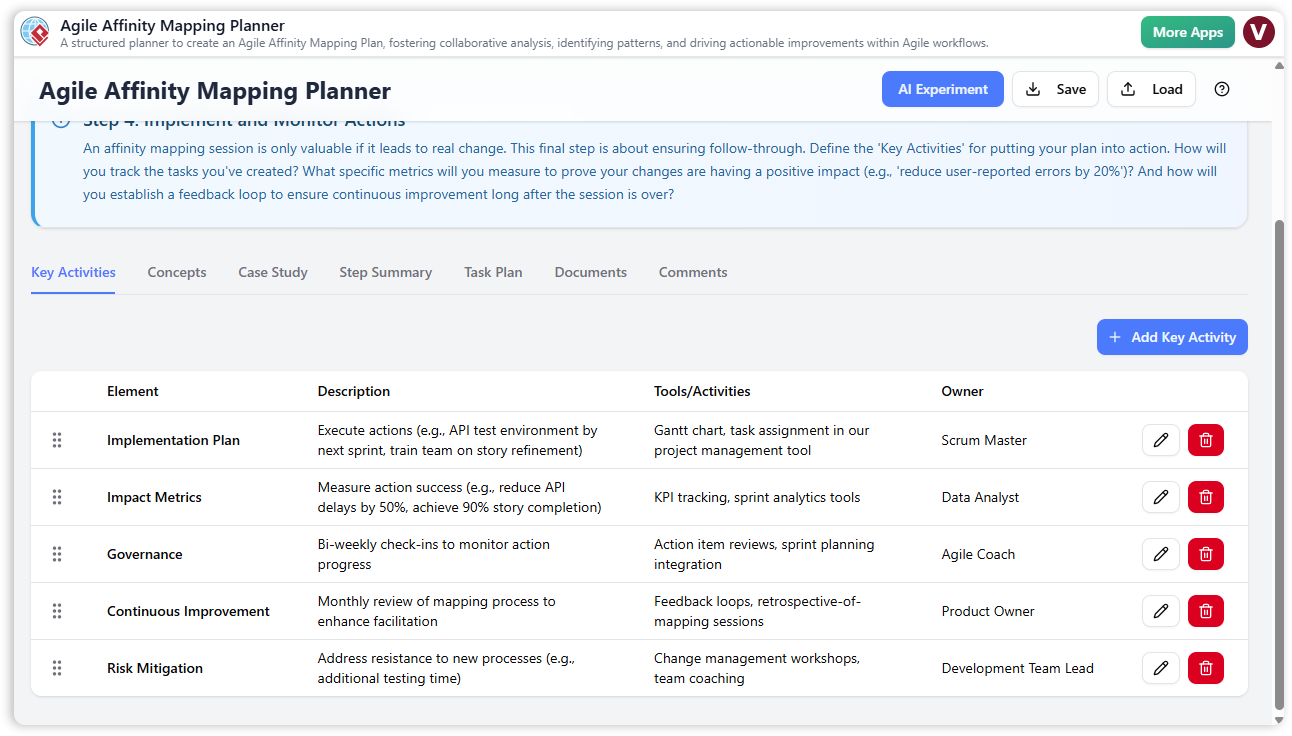
This application functions not as a digital whiteboard for the mapping itself, but as a comprehensive planner. It guides facilitators through the entire lifecycle of a session, from defining initial goals to generating a final report. With the integration of AI capabilities, it promises to reduce hours of manual preparation into a few minutes of review and refinement.
Core Features and Functionality
The tool is built around a guided wizard interface that breaks the planning process down into manageable chunks. Below are the standout features that define the user experience.
The AI Experiment: Automated Plan Generation
The most significant feature of the Agile Affinity Mapping Planner is the “AI Experiment.” This function allows users to input a high-level description of their objective—such as “Analyze user feedback from the Q3 satisfaction survey”—and receive a fully populated plan in return. The AI generates content across all core steps, suggesting key activities, task lists, and document requirements. For facilitators, this feels less like data entry and more like delegating the heavy lifting to an expert assistant.
The 5-Step Guided Wizard
To ensure no detail is missed, the application enforces a logical flow through five distinct stages:
- Step 1: Session Definition: Clarifying goals and scope.
- Step 2: Preparation & Data Gathering: organizing logistics and inputs.
- Step 3: Affinity Mapping Session: Planning the actual workshop agenda.
- Step 4: Analysis & Action Plan: Determining how results will be synthesized.
- Step 5: Final Report: Compiling the plan into a shareable format.
Multi-Tab Organization
Within each of the first four steps, the interface is divided into specific tabs to keep information compartmentalized. Users can switch between “Key Activities” for high-level planning, “Task Plan” for granular to-do lists, and educational tabs like “Concepts” and “Case Studies.” This structure acts like a digital binder, preventing the planning process from becoming cluttered.
Workflow Scenarios
The tool supports various workflows depending on the user’s needs and the complexity of the session.
Workflow 1: AI-Assisted Planning
For users needing a quick start, the AI workflow is the primary draw. By clicking the “AI Experiment” button and describing the session constraints (e.g., “2-hour remote retrospective for 6 developers”), the tool populates the entire wizard. The user then reviews the suggested activities, edits them to fit specific team dynamics, and proceeds to the final report. This workflow effectively eliminates “blank page syndrome.”
Workflow 2: Manual Construction
For highly specific or sensitive projects, users can build a plan from scratch. Starting at Step 1, facilitators manually enter every key activity and task. The tool supports drag-and-drop reordering within the “Key Activities” list, allowing for flexible prioritization of agenda items. This method is ideal for experienced facilitators who have a rigid existing process they wish to digitize and document.
Data Privacy and File Management
In an era of cloud-first software, the Agile Affinity Mapping Planner takes a different approach regarding data storage. It operates with a local save/load mechanism.
- Local JSON Files: All plans are saved directly to the user’s computer as
.jsonfiles. There is no cloud database storing project details. - Security: This offline-first approach (excluding the AI generation call) ensures that sensitive project information remains in the user’s control.
- Templating: Users can save a “Master Plan” as a template file and reload it for future sessions, modifying only the specifics for the new project.
Target Audience
While useful for anyone running a meeting, this tool is specifically tailored for:
- Agile Coaches & Scrum Masters: For planning retrospectives and brainstorming sessions that require thematic grouping.
- UX Researchers: For structuring the synthesis of qualitative data, such as interview transcripts or usability test notes.
- Product Managers: For organizing feature requests and customer feedback into prioritized themes.
Pros and Cons
Pros
- AI Acceleration: Drastically reduces setup time by generating comprehensive drafts in seconds.
- Educational Value: Built-in “Concepts” and “Case Study” tabs help novice facilitators learn best practices as they plan.
- Structured Output: The consolidated Final Report provides a professional-looking agenda that can be printed to PDF and shared immediately.
- Privacy: Local file management ensures sensitive data is not exposed to third-party cloud storage.
Cons
- Not a Whiteboard: It is crucial to understand that this is a planning tool, not a tool for moving digital sticky notes. The actual mapping must occur in a separate tool (like Miro or Mural) or on a physical wall.
- No Real-Time Collaboration: Because files are local, multiple users cannot edit the plan simultaneously.
- Internet Requirement for AI: While the tool works offline, the AI generation features require an active internet connection.
Conclusion
The Agile Affinity Mapping Planner is a robust utility for professionals who value preparation. By separating the planning of a session from the execution, it ensures that facilitators enter their workshops with a clear strategy, defined goals, and a solid agenda. For those who frequently lead data synthesis or brainstorming meetings, the combination of structured wizards and AI generation makes this an invaluable addition to the productivity toolkit.