


Unlock the Future of Systems Engineering – From Idea to Professional Diagram in Seconds
Whether you’re an embedded systems engineer, aerospace architect, automotive designer, or a student learning systems modeling, Internal Block Diagrams (IBDs) in SysML are essential for visualizing how components interact inside a system. But creating them manually is time-consuming, error-prone, and often leads to inconsistent layouts.
Enter Visual Paradigm – the world’s leading AI-powered SysML Internal Block Diagram generator, offering a complete, integrated ecosystem that turns natural language into precise, editable, and traceable diagrams — instantly.
This comprehensive guide walks you through every aspect of using Visual Paradigm’s AI capabilities to generate, refine, collaborate on, and embed professional-grade SysML Internal Block Diagrams (IBDs) across four powerful platforms.
🌐 Why AI-Powered SysML IBD Generation Is a Game-Changer
Before diving into tools, let’s understand why traditional IBD creation falls short:
| Challenge | Impact |
|---|---|
| Manual layout design | Time-consuming; hard to align parts and ports |
| Lack of standard compliance | Risk of incorrect use of connectors, item flows, or binding constraints |
| No traceability | Hard to link diagrams to requirements or other models |
| Collaboration friction | Version conflicts, image-only sharing, no real-time updates |
With AI-driven modeling, you eliminate these bottlenecks:
✅ Generate IBDs in seconds from plain English
✅ Auto-generate ports, item flows, and binding connectors
✅ Maintain full traceability and model integrity
✅ Edit, refine, and share seamlessly across teams
✅ Visual Paradigm is not just a diagram generator — it’s a full lifecycle AI-powered systems modeling platform.
🛠️ Four Platforms That Power Your SysML IBD Workflow
Visual Paradigm’s ecosystem is built around one unified model, accessible from multiple interfaces. Each platform serves a unique role in the modeling lifecycle:
| Platform | Role | Best For |
|---|---|---|
| VP Desktop | Full-featured modeling environment | Professional engineers, complex systems, code generation |
| OpenDocs | Living documentation with embedded diagrams | Knowledge sharing, reports, team wikis |
| AI Chatbot | Conversational diagram creation | Rapid prototyping, brainstorming, onboarding |
| Online Web Platform | Cloud-based collaboration | Remote teams, real-time editing, accessibility |
Let’s explore each in detail.
🖥️ 1. VP Desktop: The Professional AI-Driven Modeling Powerhouse
For engineers who demand precision, control, and full SysML compliance.
VP Desktop is Visual Paradigm’s flagship desktop application — ideal for enterprise-grade systems engineering. With deep integration of AI and full SysML support, it’s the go-to tool for creating production-ready Internal Block Diagrams.
🔧 Key Features
-
✅ AI Diagram Generation – Generate IBDs from natural language
-
✅ Full SysML Toolset – Supports ports, item flows, binding connectors, constraints
-
✅ Model Traceability – Link IBD elements to requirements, other diagrams, or test cases
-
✅ Code Generation – Export to C++, Java, Python, or generate documentation
-
✅ Version Control Integration – Use Git or SVN to manage model evolution
-
✅ Simulation & Validation – Validate model consistency and compliance
📌 Step-by-Step: Generate an IBD with AI in VP Desktop
-
Open VP Desktop and load your project (or create a new one).
-
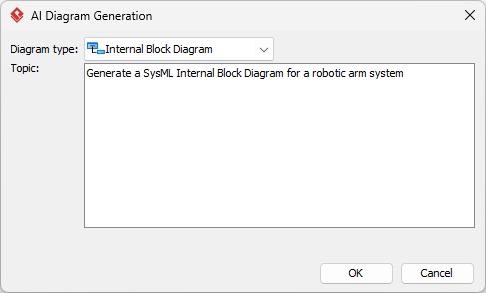
From the top menu, go to:
Tools > AI Diagram Generation -
In the AI Diagram Generation window:
-
Select Internal Block Diagram from the dropdown
-
In the text area, enter a clear description:
“Create an Internal Block Diagram for a smart home thermostat. Include a microcontroller, temperature sensor, display, Wi-Fi module, and power supply. Show item flows for temperature data (sensor → MCU), commands (MCU → actuators), and power flow (power supply → all components).”
-
-
Click OK → Wait a few seconds.
-
✅ The AI generates a fully editable, native SysML diagram.
-
Now you can:
-
Drag and reposition blocks
-
Adjust port types (in, out, bidirectional)
-
Add item flows with types (e.g.,
temperature,command,power) -
Add constraints like
must be stable at 24°C -
Link to requirements via traceability links
-
💡 Pro Tip: Use
Ctrl+Shift+Gto open the AI generator quickly.
📊 Use Case: Automotive ECU Design
Engineers at an EV manufacturer use VP Desktop to generate an IBD for a battery management system (BMS). After AI generation, they add detailed item flows for voltage, current, and temperature data, and link to safety-critical requirements. The model is then exported to code and verified with simulation tools.
📄 2. OpenDocs: Embed Living SysML IBDs in Dynamic Documentation
Turn static diagrams into interactive, updatable knowledge assets.
OpenDocs transforms your documentation into a living system model repository — perfect for design reviews, stakeholder communication, and compliance reporting.
Unlike static images, embedded diagrams in OpenDocs are live and editable.
🎯 Key Benefits
-
✅ Diagrams stay synchronized: Change the source → All embedded versions update
-
✅ Readers can zoom, pan, and inspect details without leaving the document
-
✅ Supports collaboration: Multiple users can comment, edit (with permissions), or annotate
-
✅ Ideal for design rationale, verification plans, and system overviews
📌 Step-by-Step: Insert an AI-Generated IBD into OpenDocs
-
Log in to your Visual Paradigm Online workspace.
-
Navigate to OpenDocs and either:
-
Open an existing page
-
Click + New Document Page to create one
-
-
In the page editor, click Insert → Diagram → Internal Block Diagram
-
The diagram editor opens. Click Create with AI (top-right corner).
-
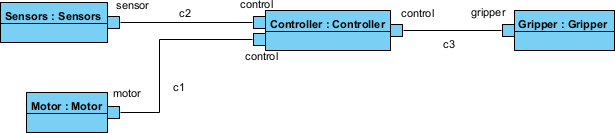
In the AI prompt box, type:
“Generate an Internal Block Diagram for a solar-powered drone charging station. Include a solar panel, battery bank, DC-DC converter, charge controller, and a drone docking port. Show item flows for electrical power (solar → battery → converter → drone) and control signals (controller ↔ drone).”
-
Click Generate
-
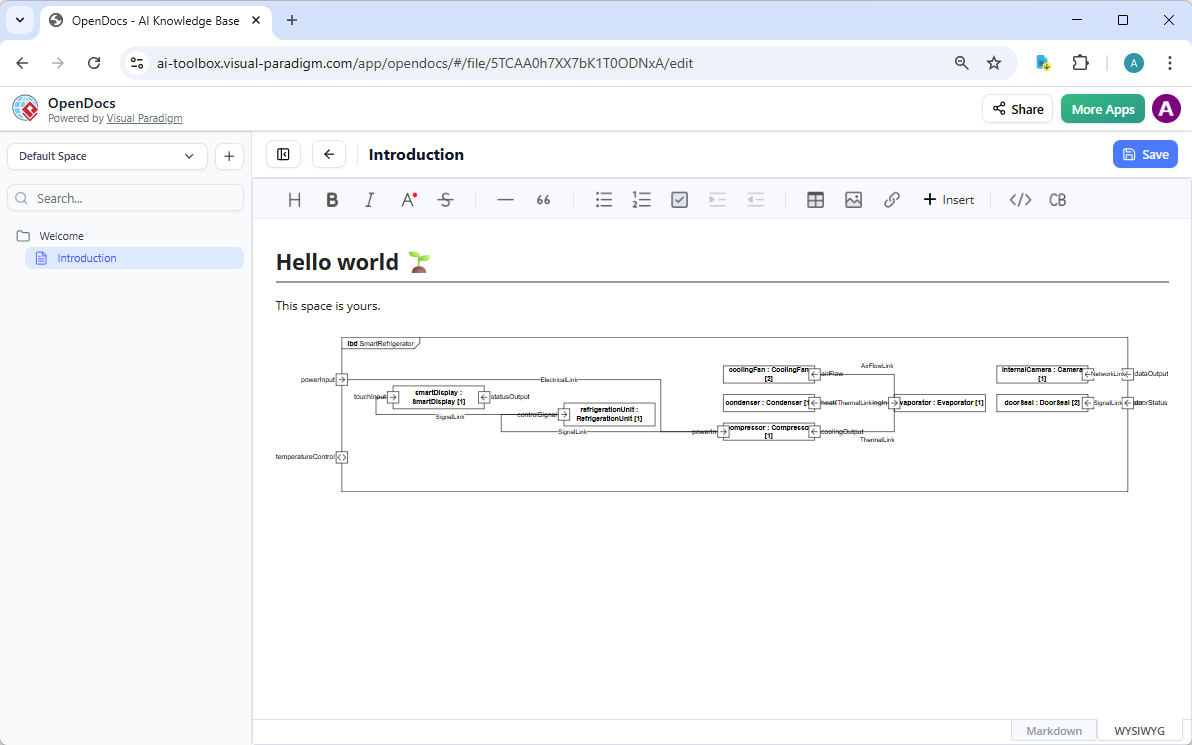
Review and refine the diagram:
-
Move blocks for better layout
-
Rename ports: e.g.,
Power In,Control Signal Out -
Add notes: “Charge controller ensures no overcharging”
-
-
-
Click Save, then Close
-
✅ The live diagram is now embedded in your OpenDocs page.
🔄 Magic: If you later edit the original IBD in VP Desktop or the AI chatbot, the OpenDocs version automatically updates.
📌 Use Case: System Design Documentation
A team documents their autonomous delivery robot’s power architecture. They embed an AI-generated IBD showing power flow from battery to motors and sensors. Stakeholders can interact with the diagram directly in the report, ensuring clarity and reducing miscommunication.
💬 3. AI Visual Modeling Chatbot: Conversational IBD Creation
Design with your voice — no menus, no confusion, just conversation.
The AI Visual Modeling Chatbot is ideal for rapid prototyping, brainstorming, or when you’re stuck on where to start.
It speaks natural language, understands SysML semantics, and even explains its choices.
🧠 How It Works
-
You type or speak a prompt
-
AI generates a compliant IBD
-
You refine via follow-up commands
-
Export to VP Desktop, OpenDocs, or share
📌 Step-by-Step: Generate an IBD Using the Chatbot
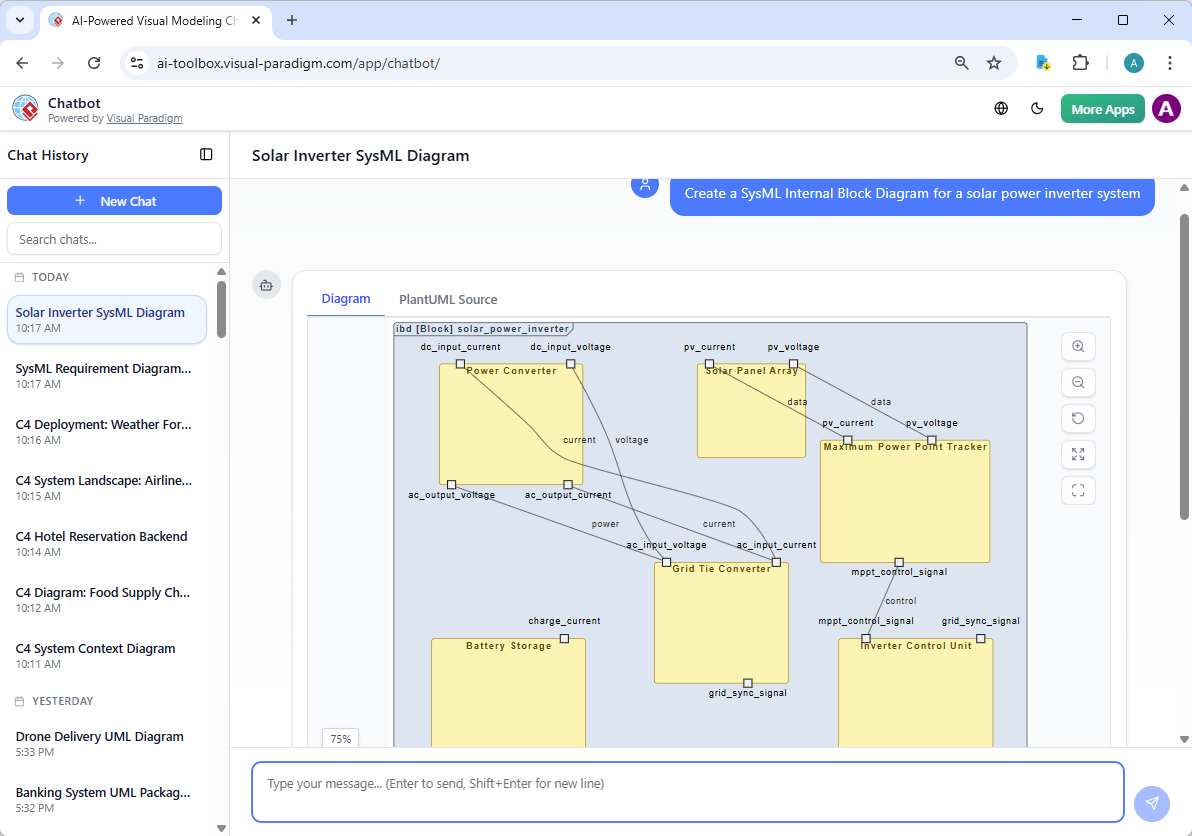
Option A: Web Access (Easiest for Quick Use)
-
Click New Chat (top-left)
-
Type:
“Create a SysML Internal Block Diagram for a drone’s flight control system. Include a flight controller, IMU sensor, GPS module, motor drivers, and propellers. Show item flows for telemetry data (sensor → controller), control commands (controller → motors), and power flow (battery → all components).”
-
Press Enter
-
✅ The AI generates a clean, professional IBD instantly.
Option B: From VP Desktop
-
In VP Desktop, go to:
Tools > Chatbot -
Start a new chat and enter the same prompt
-
The chatbot generates the diagram inside your model workspace
💬 You can now interact with the AI:
-
“Add a proxy port for the external telemetry interface”
-
“Explain the item flow between the flight controller and motor drivers”
-
“Generate a Block Definition Diagram (BDD) for context”
-
“Export this IBD to OpenDocs”
🎯 Why Teams Love It
-
🚀 Zero learning curve – No need to memorize tools or menus
-
🔄 Iterative refinement – Keep asking: “Make the power flow clearer,” “Add a fail-safe circuit”
-
📚 Explanations built-in – Ask: “Why is the IMU connected via a binding connector?”
-
🔗 Seamless handoff – Export to VP Desktop for deep editing or to OpenDocs for documentation
🔍 4. Why Visual Paradigm Stands Out: The Full Ecosystem Advantage
| Feature | Visual Paradigm | Typical AI Diagram Tools |
|---|---|---|
| AI Diagram Generation | ✅ Yes (with context) | ✅ Yes (one-off) |
| Editable, native model | ✅ Yes | ❌ Often just images |
| Traceability (Req ↔ Diagram) | ✅ Yes | ❌ Rarely |
| Cross-platform sync | ✅ Yes (cloud + desktop) | ❌ Siloed |
| Code generation | ✅ Yes | ❌ No |
| Team collaboration | ✅ Yes (Git, OpenDocs) | ❌ Limited |
| Conversational AI | ✅ Yes | ❌ Basic or absent |
🏆 Visual Paradigm is not a diagram generator — it’s a model-driven AI platform.
You’re not generating a picture. You’re building a living model that evolves with your system.
🎯 Best Practices for AI-Generated SysML IBDs
| Tip | Why It Matters |
|---|---|
| Be specific in prompts | Use clear structure: “Create IBD for X, with Y components, showing Z flows” |
| Use technical terms correctly | e.g., “binding connector”, “item flow”, “proxy port” |
| Refine iteratively | Don’t expect perfection on first try — use follow-up prompts |
| Link to requirements | Use traceability to ensure design aligns with specs |
| Validate with SysML rules | Check for correct port multiplicity, flow types, and connectors |
🧪 Example Prompt:
“Generate an Internal Block Diagram for a medical infusion pump. Include a control unit, syringe driver, sensor (flow rate), display, and emergency stop button. Show item flows for control commands (control unit → driver), flow rate data (sensor → control unit), and power (battery → all components). Add a binding connector between control unit and emergency stop.”
🚀 Ready to Transform Your SysML Workflow?
Stop wasting time on manual drawing, messy layouts, and disconnected documentation.
Visual Paradigm gives you everything you need to create, refine, share, and maintain professional-grade SysML Internal Block Diagrams — powered by AI.
✅ Try It Today
| Option | How to Get Started |
|---|---|
| Download VP Desktop (Free Trial) | Download Visual Paradigm Desktop |
| Start the AI Chatbot | https://chat.visual-paradigm.com/ |
| Try OpenDocs | Log in to your VP Online account → OpenDocs → Create your first page |
🎁 Free Trial Includes:
Full AI diagram generation
Unlimited diagrams
Model export (PDF, PNG, SVG)
OpenDocs & collaboration features
🏁 Final Thoughts: The Future of Systems Modeling is Here
The era of manual SysML IBD creation is ending. With Visual Paradigm’s AI-powered ecosystem, you can:
-
Generate accurate IBDs in seconds
-
Refine with natural conversation
-
Embed in living documentation
-
Maintain traceability and code integration
-
Collaborate across teams and platforms
Whether you’re a senior architect, junior engineer, or student learning systems modeling, Visual Paradigm turns complex design challenges into simple conversations.
📣 Call to Action: Start Your AI Modeling Journey Now
🚀 Your next SysML Internal Block Diagram is just one prompt away.
👉 Visit https://www.visual-paradigm.com today
👉 Download VP Desktop
👉 Try the AI Chatbot
👉 Create your first OpenDocs page
Stop drawing diagrams. Start designing systems.
💬 “Visual Paradigm turned our 3-hour IBD session into a 3-minute conversation. The AI got it right on the first try — and even explained the flows.”
— Maria T., Lead Systems Engineer, Aerospace
✅ Visual Paradigm: The Only AI SysML IBD Generator You’ll Ever Need
✅ From Idea to Architecture — All in One Platform
✅ Built for Engineers. Powered by AI. Trusted by Teams Worldwide.
-
Creating SysML Block Definition Diagrams with an AI Chatbot: This article explains how users can simply describe their ideas in plain English—such as requesting a SysML Block Definition Diagram for a weather forecasting system—and have the AI chatbot generate the diagram instantly.
-
Mastering AI-Driven Systems Engineering: A Comprehensive Guide to ArchiMate and SysML Diagram Generation: A detailed guide exploring how specialized AI chatbots act as modeling partners to enhance efficiency and simplify complex workflows in systems engineering.
-
AI Diagram Chatbot Update: Better ArchiMate & SysML Support: This release note highlights updates that bring higher stability and improved relevance to the chatbot when handling complex prompts for SysML and ArchiMate.
-
Visual Paradigm AI Suite: A Comprehensive Guide to Intelligent Modeling Tools: This resource outlines how the AI chatbot facilitates systems engineering by supporting the generation of SysML Block Definition, Internal Block, and Requirement diagrams.
-
AI Chatbot for Diagramming: How It Works with Visual Paradigm: Explains how the chatbot serves as an AI-powered modeling assistant that converts natural language into professional diagrams, removing the need to learn specific SysML syntax.
-
Visual Paradigm SYSML Diagram Tool – Advanced Modeling for Systems Engineering: An overview of a comprehensive tool designed for Model-Based Systems Engineering (MBSE), which integrates with AI features for seamless diagram creation.
-
MBSE and SysML: A Guide to Systems Engineering with Visual Paradigm: A guide detailing how SysML supports systems engineering and how AI-powered development plans can transform project ideas into actionable roadmaps.
-
Visual Paradigm AI-Powered Diagram Generation Tutorial: A tutorial demonstrating how to use AI-driven features to automatically generate diagrams from natural language, applicable to technical system designs.
-
Introducing Visual Paradigm AI Chatbot: A Smarter Way to Create Diagrams: This update showcases how conversational AI enables contextual analysis and smart editing for enterprise-level systems modeling.
-
AI Chatbot Feature – Intelligent Assistance for Visual Paradigm Users: Introduces the core chatbot functionality designed to provide instant guidance and task automation, significantly boosting productivity for system architects.