


Introduction
In the complex ecosystem of modern enterprises, communication gaps between business leaders and technology experts can lead to strategic misalignment and project failure. ArchiMate serves as the bridge over this gap, facilitating effective communication by acting as a common language for Enterprise Architecture. Designed specifically to describe complex organizational systems, it allows diverse stakeholders to understand the intricate connections between strategy, business processes, and technology infrastructure.
This comprehensive guide explores the core mechanisms of ArchiMate and details how leveraging advanced tools like Visual Paradigm AI can streamline the modeling process, ensuring that architecture descriptions are not just accurate, but also compelling and easy to digest.
Key Concepts
Before diving into modeling techniques, it is essential to define the foundational elements that make ArchiMate a powerful standard for communication.
- Common Vocabulary and Grammar: ArchiMate functions like a natural language using a Subject-Verb-Object structure. This grammar spans multiple domains—including Strategy, Motivation, Business, Application, and Technology—allowing architects to describe what people and systems do in a way that is intuitive even for non-technical audiences.
- Architecture Viewpoints: Borrowed from the ISO/IEC 42010 framework, viewpoints are standardized templates used to construct specific diagram types. They filter the complex model to show only what is relevant to a specific stakeholder’s concerns.
- Stakeholder Awareness: This refers to the architect’s understanding of the audience (e.g., CEO, Product Owner, Network Engineer) and their specific drivers. This awareness dictates the level of detail and the scope of the model presented.
- Visual Storytelling: Architecture is not a static snapshot but a journey. By connecting various viewpoints, architects create a narrative that helps stakeholders understand their role within the broader organization.
Guidelines for Effective Architecture Modeling
To maximize the impact of your architecture models, follow these structured guidelines derived from industry standards.
1. Define the Stakeholder and Purpose
Before drawing a single box, identify who will consume the model. Viewpoints must be categorized by their specific goal:
- Informing: Designed to gain commitment or provide status updates.
- Deciding: Structured to support critical decision-making processes.
- Designing: Detailed models intended to define implementation targets.
2. Calibrate the Content
Adjust the granularity of your diagram based on the audience. Create Overviews (helicopter views) for executives who need to understand the strategic landscape, and reserve Details (deep dives) for subject matter experts who require technical precision.
3. Leverage Visual Paradigm AI
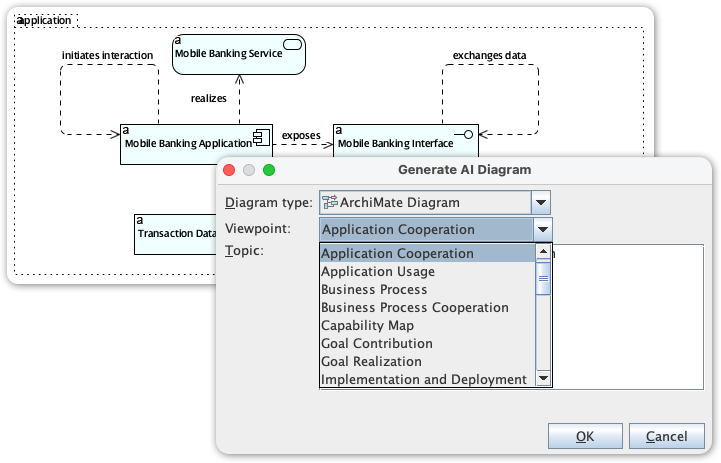
Integrating Visual Paradigm AI into your workflow can significantly enhance the application of ArchiMate principles. Here is how, why, and when to utilize AI-driven modeling:
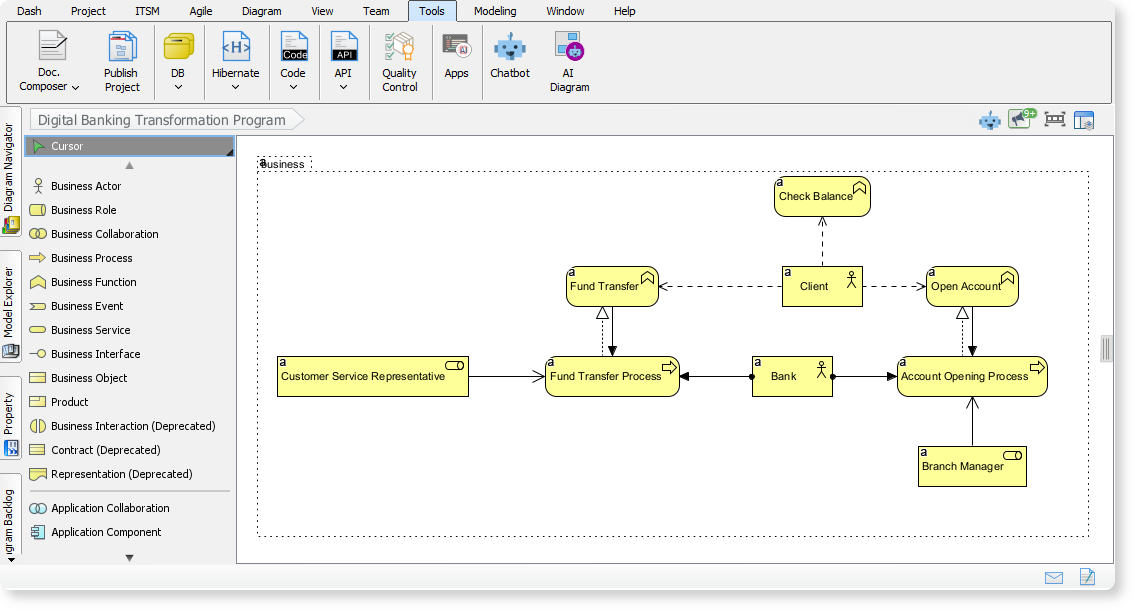
- What it does: It acts as an intelligent assistant that helps generate, organize, and validate architectural views based on textual input or existing data.
- Why use it: Manual modeling can be prone to inconsistency. AI tools help maintain the coherence and integrity of the model as the volume of information grows, ensuring stakeholders can trust the analysis.
- When to use it: Use AI assistance during the initial drafting phase to rapidly prototype viewpoints or when converting complex relationships into simplified visual representations.
- How it helps: It automates the connection between layers—linking business processes to application services—facilitating the “common frame” needed for effective storytelling.
Best Practices
To ensure your architecture practice matures effectively, adhere to these standards recommended by leading architects.
Maintain Model Coherence
While whiteboard sessions are excellent for brainstorming, they lack permanence and rigor. Always transition designs into professional modeling tools. This ensures that the underlying model remains consistent across different views. When a relationship changes in one view, the tool ensures it is reflected globally, preserving the integrity of the architecture description.
Adopt Intentional Simplification
Complexity is the enemy of understanding. Architects should employ intentional simplification to make diagrams accessible to non-architects. This involves utilizing Language Subsets—using only the necessary ArchiMate concepts rather than the entire specification—to avoid overwhelming the audience with technical jargon.
Utilize Visual Encapsulation
When presenting to business stakeholders, prefer nesting over relationships. Visual encapsulation (placing one element inside another) implies a relationship without the visual clutter of connecting lines and arrows. This makes the diagram easier to scan and digest.
Tips and Tricks
Here are practical optimizations to improve the clarity and impact of your ArchiMate models immediately.
Strategic Use of Color
Although the ArchiMate specification does not assign formal meaning to colors, you should use them strategically to guide the viewer’s eye. Use color to:
- Emphasize elements that are currently in scope.
- Highlight gaps or missing capabilities.
- Signal risks, such as using red to denote high-risk data flows or vulnerable infrastructure.
The “Google Maps” Approach
When explaining ArchiMate to stakeholders, use the Google Maps analogy. Just as a map allows a driver, a hiker, and a city planner to view the same location through different layers (traffic, terrain, zoning), ArchiMate allows different stakeholders to see the organization through the lens that matters to their job. Remind them that they do not need to understand every layer—only the one relevant to their navigation.
-
Comprehensive Tutorial: Generating ArchiMate Diagrams with AI: In-depth tutorial showing how to use Visual Paradigm’s AI diagram generator to create ArchiMate diagrams and viewpoints efficiently.
-
Introducing AI-Powered ArchiMate Viewpoints Generator in Visual Paradigm: Visual Paradigm’s latest release features an AI-driven ArchiMate viewpoints generator that automates the creation of enterprise architecture views, enhancing modeling efficiency and accuracy.
-
Full ArchiMate Viewpoints Guide (Examples Included): Complete ArchiMate Viewpoint guide, with 23 official ArchiMate example viewpoints, clear ArchiMate diagram examples and explanation, wrote by certified ArchiMate tool vendor.
-
How to Use ArchiMate to Visualize Information Flows with AI: Sep 17, 2025 · Compared to generic AI tools or simple diagram generators, Visual Paradigm ’s AI -powered modeling software stands out because: It understands ArchiMate -specific concepts, including information flows, viewpoints, and business-technology alignment
-
Using Viewpoints to Support Managerial Decision-Making: A comprehensive guide on how selecting appropriate viewpoints enhances strategic decision-making in enterprise architecture.
-
ArchiMate Strategy Viewpoint Guide: The strategy viewpoint allows the business architect to model a high-level, strategic overview of the strategies (courses of action) of the enterprise, the …
-
ArchiMate Motivation Viewpoint Guide: The motivation viewpoint allows the designer or analyst to model the motivation aspect, without focusing on certain elements within this aspect. For example, …
-
ArchiMate Capability Map Viewpoint Guide: The capability map viewpoint allows the business architect to create a structured overview of the capabilities of the enterprise. A capability map typically …
-
Mapping TOGAF ADM Phases to the ArchiMate … – Cybermedian: Visual Paradigm Enterprise Edition is a certified ArchiMate 3.1 enterprise architecture tool that supports all ArchiMate 3 vocabulary, notation, syntax, and semantics. It includes a powerful ArchiMate drawing tool, viewpoint management tool, and TOGAF Guide-through Process.
-
AI-Powered ArchiMate Viewpoint Generation for Enterprise Architects: Discover how AI enables enterprise architects to generate ArchiMate viewpoints in seconds, accelerating enterprise architecture modeling.