
Introduction
In today’s fast-paced development environment, teams struggle with a common pain point: the disconnect between creating visual models and documenting them. Developers, architects, and business analysts often find themselves jumping between multiple tools, manually exporting diagrams, uploading them to documentation platforms, and constantly updating files when changes occur. It’s a workflow that wastes time and introduces errors.
Enter Visual Paradigm’s Pipeline ecosystem—a solution that promises to bridge this gap. After extensive testing and implementation across various projects, this comprehensive guide explores how the Pipeline transforms the traditional “Concept-to-Docs” workflow from a fragmented process into a seamless, unified experience. Whether you’re a solo developer managing personal projects or part of an enterprise team handling complex system architectures, understanding this ecosystem could revolutionize how you handle technical documentation.
What Users Are Saying About the Pipeline
The Pipeline serves as the connective tissue of the Visual Paradigm ecosystem—a secure, cloud-based centralized repository that stores, manages, and transfers artifacts, the valuable visual assets created across various platforms.
From a user’s perspective, the Pipeline acts as the vital bridge between four core pillars: Visual Paradigm Desktop AI Diagram Generation, AI Chatbot, OpenDocs Knowledge Management Platform, and Step-by-Step AI-Powered Web Apps. The real value becomes apparent when a diagram created in one platform doesn’t remain trapped there but flows instantly to where it’s needed most: documentation and publication hubs.
The Single Source of Truth Advantage: Users report that the Pipeline eliminates the friction of manual downloads and uploads. It preserves the editability of models and ensures that every stakeholder views the most recent revision of a design—no more “final_v2_REALLY_FINAL.png” confusion.
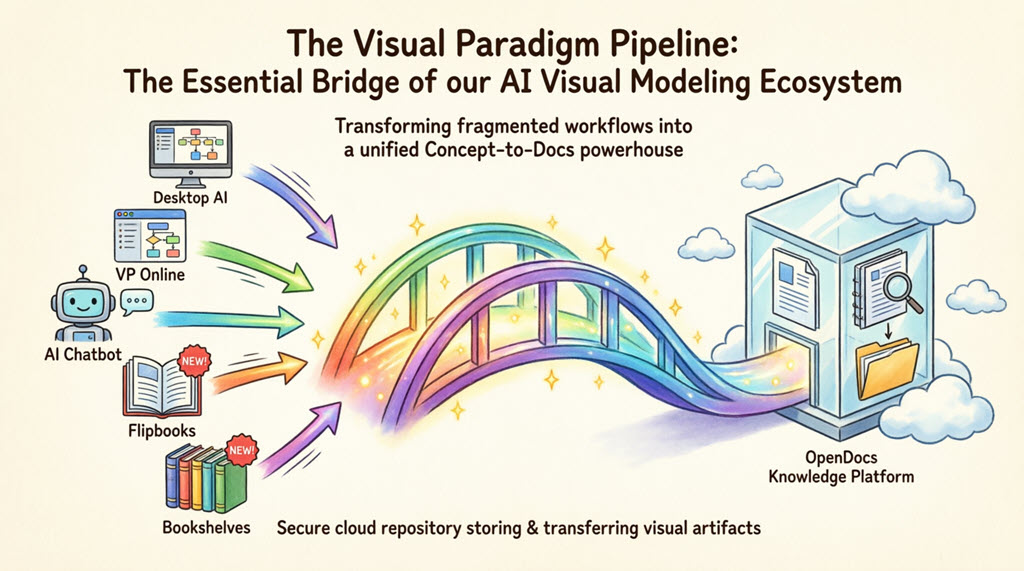
OpenDocs: The Publication Powerhouse Users Love
While the Pipeline serves as the vehicle, Visual Paradigm OpenDocs emerges as the destination. OpenDocs stands out as a premier knowledge management platform specifically engineered to be “diagram-aware.” By utilizing the Pipeline, users can move work from any Visual Paradigm feature directly into professional documents, technical manuals, or knowledge bases.
This “Work-to-Publish” workflow allows teams to:
-
Model with Precision: Use high-end desktop or online tools to create complex system architectures.
-
Generate with Speed: Leverage AI to brainstorm and visualize ideas instantly.
-
Publish with Authority: Seamlessly embed visuals into OpenDocs to create living documentation that evolves alongside projects.
The 5 Core Connections: Real User Workflows
Based on user experiences, here are the five critical ways teams currently leverage the Pipeline to streamline their workflows:
1. Visual Paradigm Desktop to OpenDocs: The Power User’s Choice
For users who create intricate UML, BPMN, or SysML models in professional desktop modeling software, the ability to export to OpenDocs via the pipeline moves local modeling expertise into a global, accessible knowledge base.
User Workflow: Sending Diagrams from Desktop to OpenDocs
-
In Visual Paradigm Desktop, open the diagram you wish to send.
-
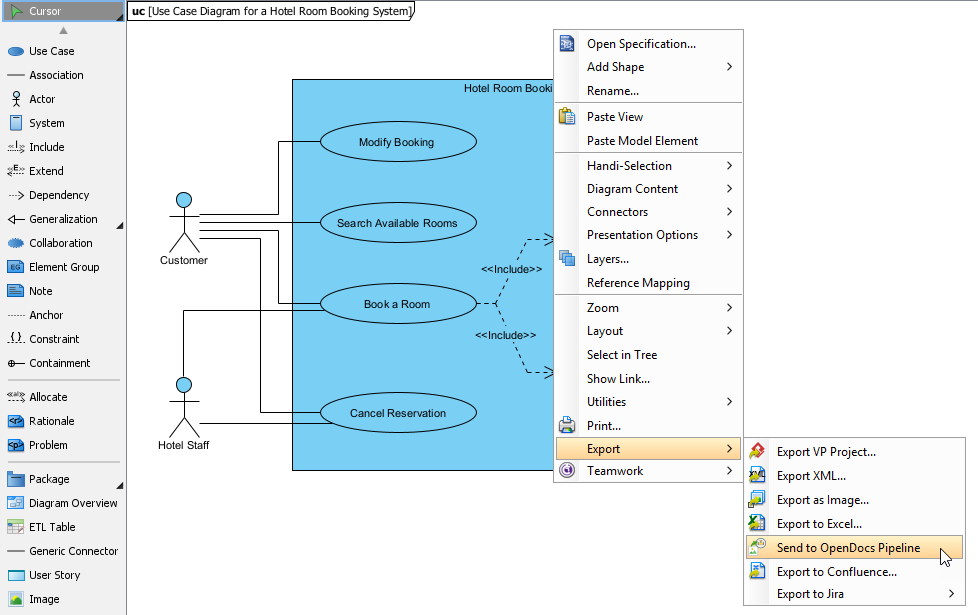
Right-click on the diagram and select Export > Send to OpenDocs Pipeline.
-
When prompted, save your project by clicking OK.
-
(Optional) Enter a comment. This will be visible in the Pipeline pane within OpenDocs to help identify the version or purpose of the artifact.
-
Confirm the export to output your diagram to the cloud.
-
Once your diagram is in the Pipeline, you can place it anywhere in your knowledge base: Open any document page in OpenDocs and click Edit. Click on the page where you want to insert the diagram. On the toolbar, click Insert. In the Insert window, select Pipeline from the left-hand sidebar. Your sent diagrams will appear here.
Extended Reading: New Feature: Seamlessly Export Visual Paradigm Desktop Diagrams to OpenDocs
2. Visual Paradigm Online to OpenDocs: The Cloud-Native Experience
Users working in browser-based environments appreciate that whether designing a technical flowchart or a high-impact marketing graphic, the Pipeline passes work directly to documentation in OpenDocs without a single local download.
User Workflow: Sending Diagrams from Online to OpenDocs
-
Open your diagram or graphic in Visual Paradigm Online.
-
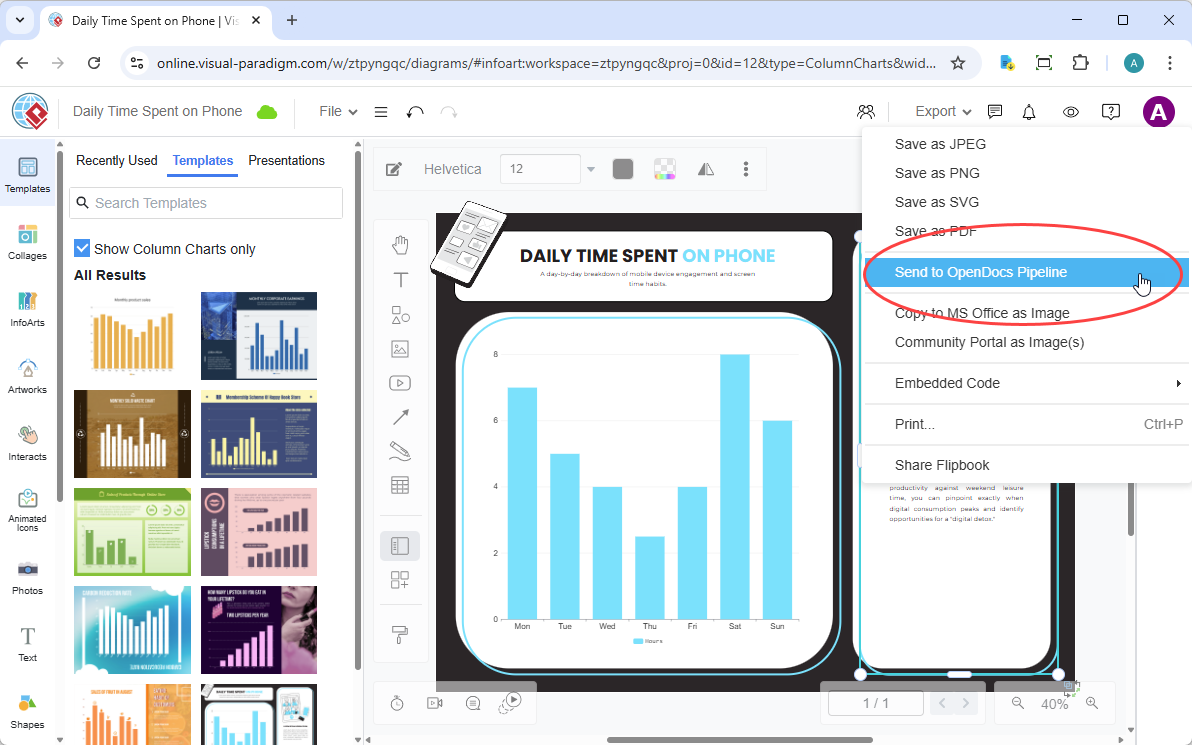
In the top menu, select Export > Send to OpenDocs Pipeline.
-
(Optional) Add a comment to describe the artifact. This makes it easier to find later in the Pipeline pane.
-
Confirm the export. Your visual is now securely stored in the Pipeline.
-
Once your diagram is in the Pipeline, you can place it anywhere in your knowledge base: Open any document page in OpenDocs and click Edit. Click on the page where you want to insert the diagram. On the toolbar, click Insert. In the Insert window, select Pipeline from the left-hand sidebar. Your sent diagrams will appear here.
Extended Reading: New Feature: Send Your Visual Paradigm Online Creations Directly to OpenDocs
3. AI Chatbot to OpenDocs: Conversational Documentation
Users find this feature revolutionary for rapid prototyping. Ask the AI Chatbot to generate a system architecture or a business process diagram, and with one click, that AI-generated artifact is ready to be inserted into OpenDocs pages.
User Workflow: Sending Diagrams from AI Chatbot to OpenDocs
-
Generate Your Diagram Create or refine your diagram (UML, flowchart, architecture, BPMN, etc.) in the AI Chatbot.
-
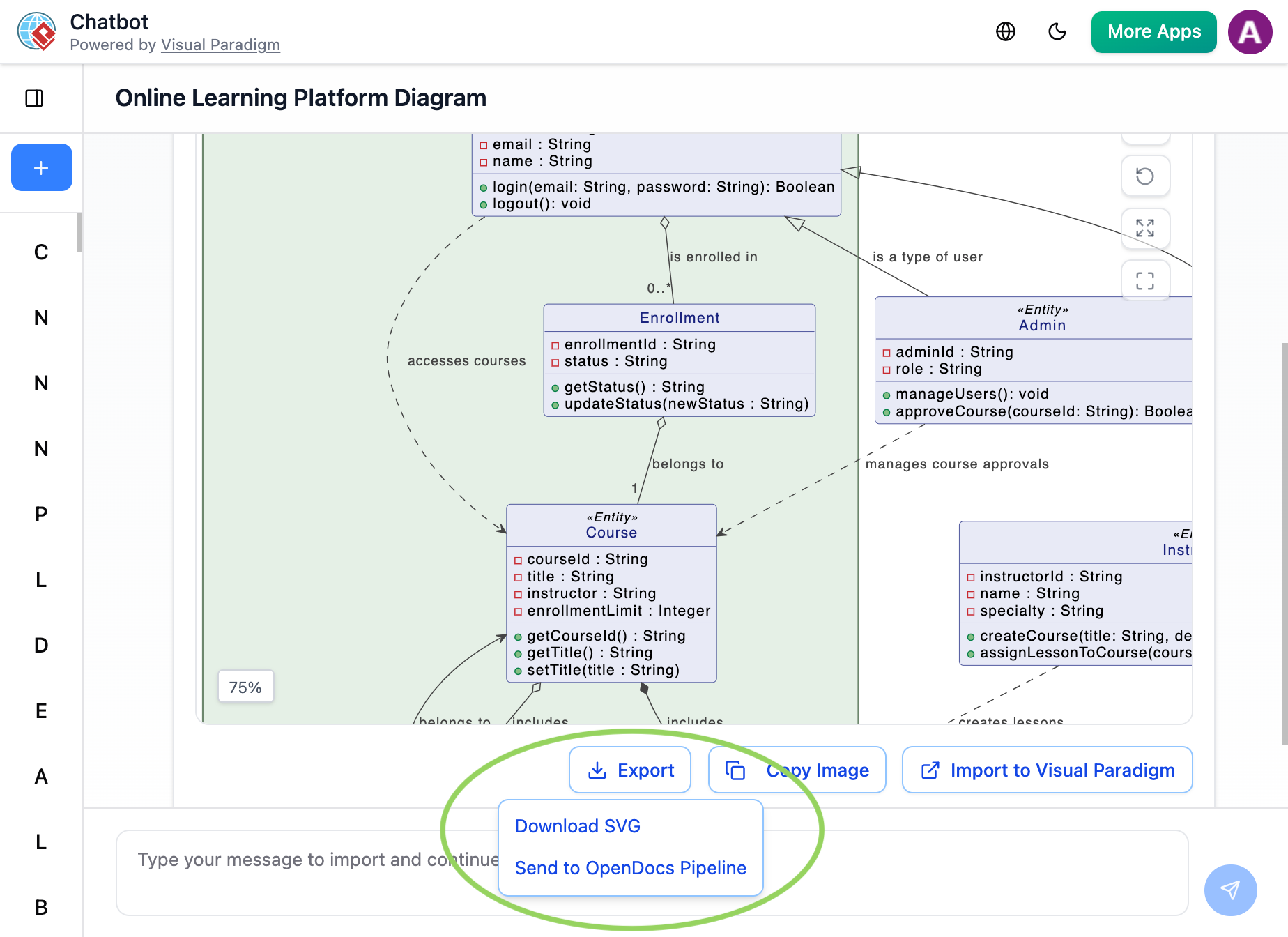
Once the AI has produced the visual you need, click Export and select Send to OpenDocs Pipeline.
-
Go to your desired document page in OpenDocs and enter the editor. Click Insert on the toolbar and select Pipeline. Your AI-generated diagram will be waiting for you in the asset list.
Extended Reading: New Feature Alert: Send Diagrams from Visual Paradigm AI Chatbot Directly to OpenDocs!
4. Flipbooks to OpenDocs: Interactive Media Integration
Users working with digital publications can now send their digital Flipbooks through the Pipeline, allowing them to embed rich, flippable catalogs or brochures directly within OpenDocs pages—transforming static documentation into engaging experiences.
5. Bookshelves to OpenDocs: Organized Publishing at Scale
Teams managing large volumes of information appreciate the ability to send entire Bookshelves to OpenDocs, creating a centralized library of resources within their documentation workspace.
Why Users Call the Pipeline a Game-Changer
| Traditional Workflow | The Pipeline Workflow |
|---|---|
| Manual Export (PNG/JPG) | Instant “Send to Pipeline” |
| Manual Re-uploading on changes | “Update to Latest Revision” in one click |
| Disconnected, static images | Deep-linked, editable artifacts |
| Scattered files on local drives | Centralized cloud repository |
New Integration Review: Sharing Flipbooks to OpenDocs
Users working with digital publications are excited about a new workflow that brings digital publications to life within documentation. The ability to share flipbooks created in Visual Paradigm Online directly to OpenDocs makes manuals, reports, and portfolios more interactive than ever.
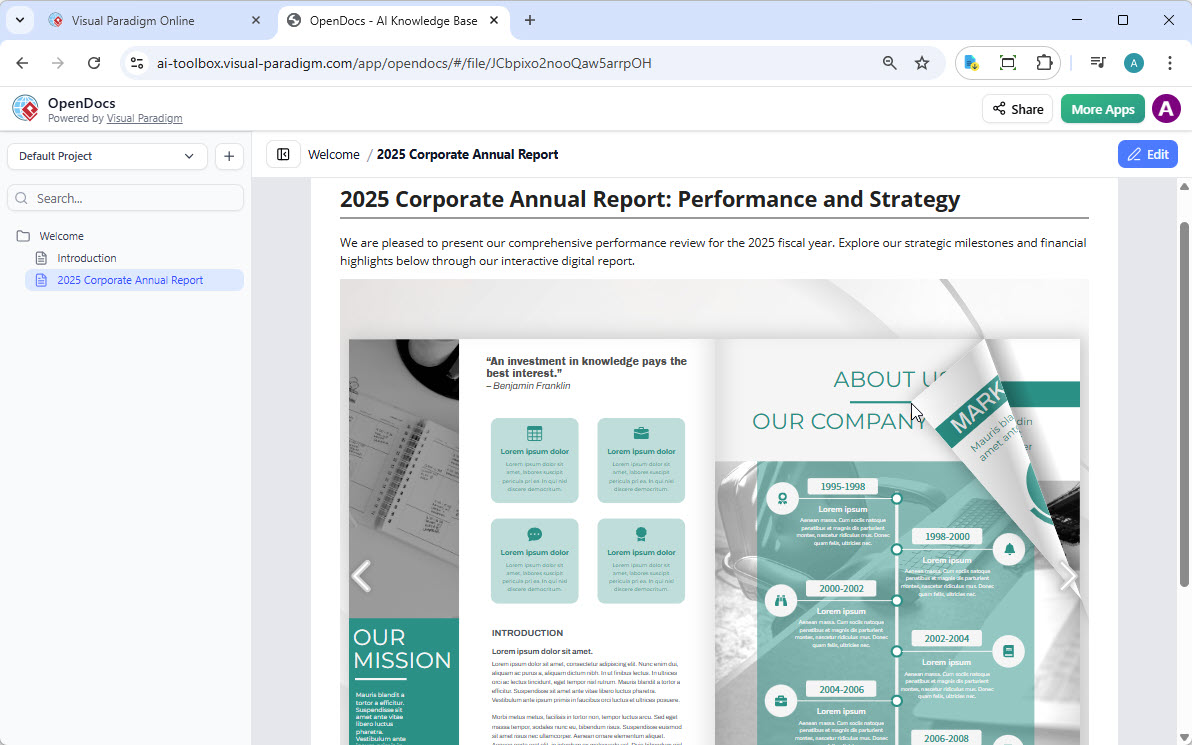
Whether using the flipbook tool to generate professional content or fine-tuning a custom layout in the flipbook maker, this update ensures audiences can access work exactly where they need it.
What Users Can Do with Visual Paradigm Flipbooks
The flipbook software transforms static documents into dynamic, engaging experiences. Users report being able to:
-
Convert & Create: Instantly transform PDFs, Word docs, and PowerPoint slides into flipbooks, or design one from scratch using the drag-and-drop editor.
-
AI-Powered Generation: Use the AI assistant to generate full book outlines, write content, and even create matching illustrations in various art styles.
-
Interactive Elements: Enhance books with embedded videos, audio, clickable links, and realistic page-flipping sound effects.
-
Professional Branding: Customize covers, themes, and backgrounds to match corporate identity.
-
Mobile-First Reading: Every flipbook is fully responsive, ensuring a perfect reading experience on desktops, tablets, and smartphones.
User Workflow: Sharing Flipbooks to OpenDocs
Moving content from Visual Paradigm Online to the OpenDocs pipeline proves simple:
-
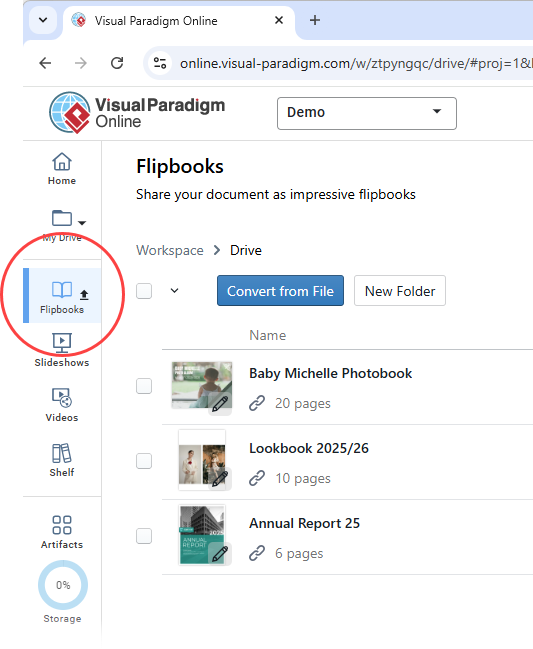
Open your workspace page in Visual Paradigm Online.
-
Select Flipbooks from the left-hand menu to view your library.
-
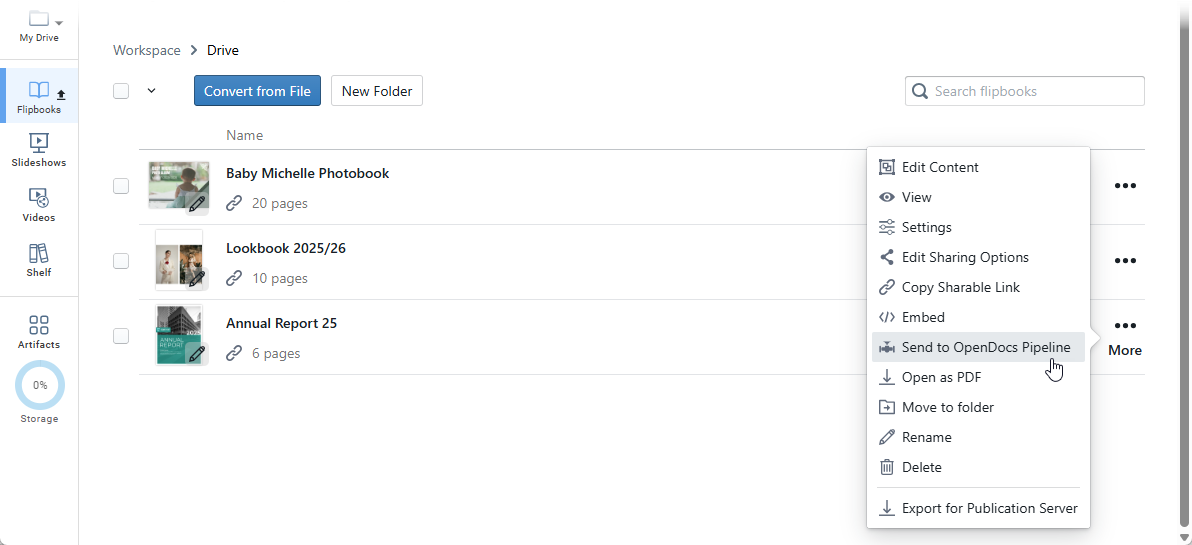
Locate the flipbook you wish to share and click More… on the right side.
-
Select Send to OpenDocs Pipeline.
-
(Optional) Enter a comment regarding this share and click OK to proceed.
User Workflow: Embedding Flipbooks in OpenDocs
Once your flipbook is in the pipeline, follow these steps to place it in your document:
-
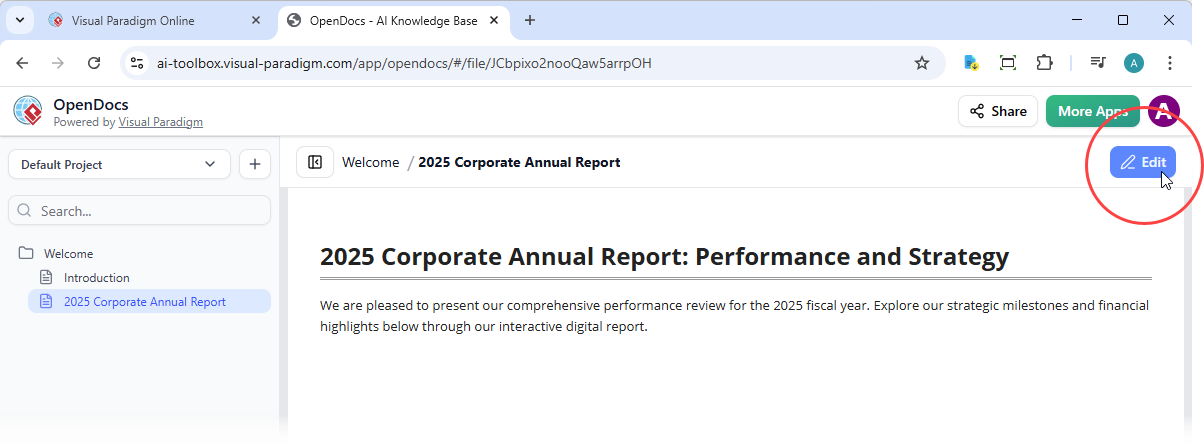
Navigate to the page in OpenDocs where you want to embed the book.
-
Click Edit at the top right of the screen.
-
Position your cursor exactly where you want the flipbook to appear.
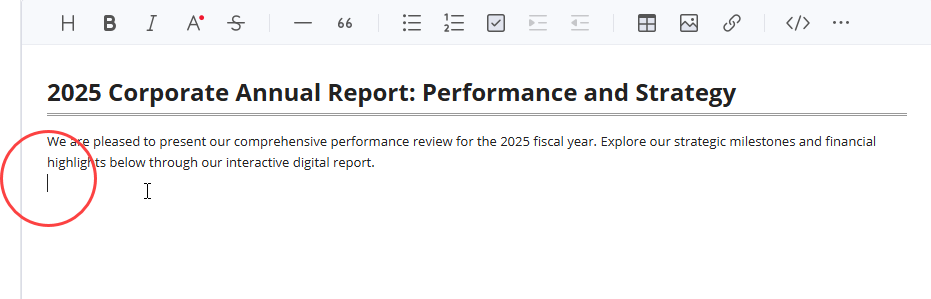
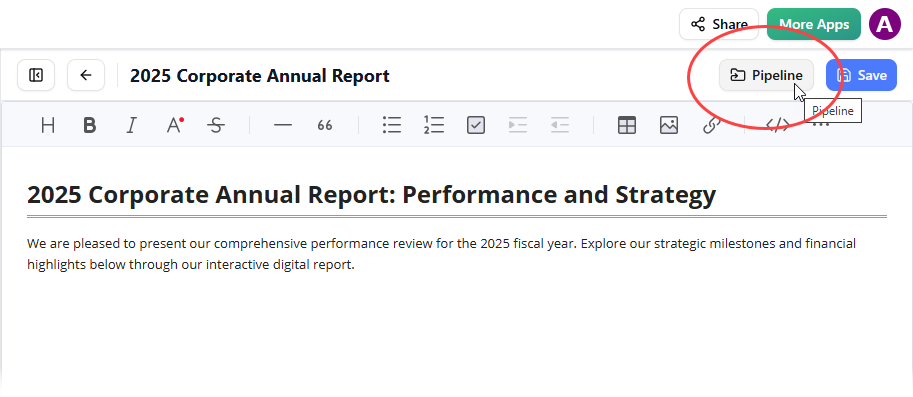
-
Click the Pipeline button located at the top right.
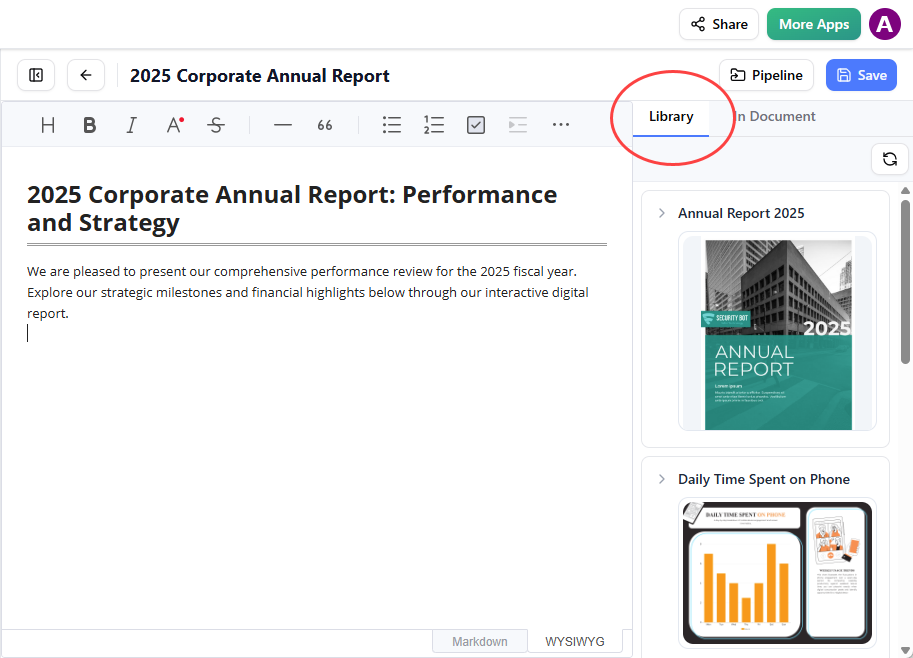
-
Open the Library tab; you will see the flipbook you sent from VP Online.
-
Click on the flipbook to insert it.
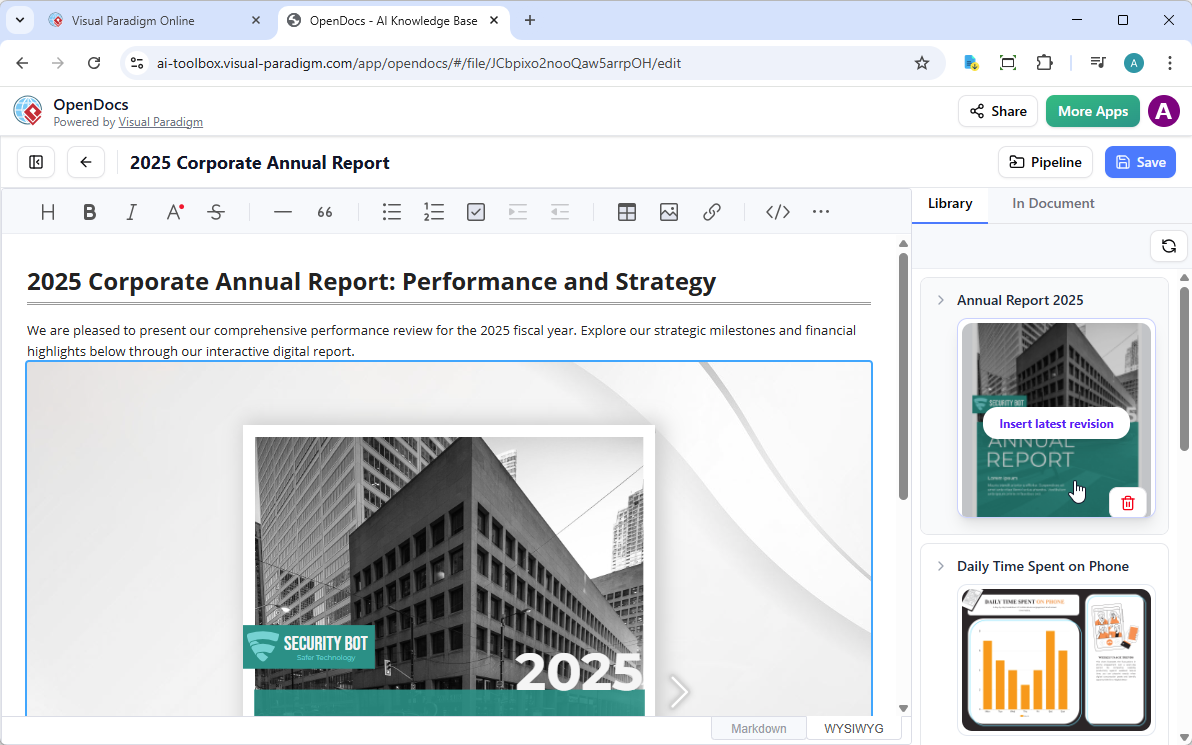
Tip: If the flipbook is added to the end of the page, select it and press Enter to create a new line and adjust the positioning.
New Feature Review: Exporting OpenDocs Knowledge Bases to WordPress
Visual Paradigm OpenDocs — the powerful AI-powered knowledge management platform — now makes it even easier to share rich documentation with the world. With the brand-new WordPress integration, users can export selected pages from their OpenDocs knowledge base directly as a fully functional WordPress Page in just a few clicks.
Whether managing enterprise architecture blueprints, business process models, technical documentation, or any other structured knowledge, this feature allows users to publish professional, diagram-rich content to existing WordPress websites effortlessly.
Why this matters to users: Build a centralized knowledge space in OpenDocs and selectively share subsets of it with stakeholders, clients, or the public — without giving access to everything. Perfect for security-conscious teams or focused content delivery.
Understanding Visual Paradigm OpenDocs from a User Perspective
OpenDocs serves as an intelligent knowledge management tool and knowledge management platform that goes far beyond traditional documentation. It combines a powerful Markdown editor with built-in professional diagramming capabilities, allowing users to create pages that seamlessly mix rich text, technical diagrams, graphic designs, and AI-generated visuals.
Thanks to the Visual Paradigm Pipeline, users can bring diagrams and artifacts from Visual Paradigm Desktop, Visual Paradigm Online, chatbots, and more directly into their OpenDocs workspace. The result? Living, visual-rich knowledge bases that are easy to build, organize, and now — publish.
WordPress Page Export: Sharing Knowledge with Precision
Many teams build comprehensive knowledge hubs in OpenDocs — for example:
-
A root page “Business Domain” with child pages covering various business process models
-
A root page “Technology Domain” with child pages detailing physical architecture and infrastructure models
With the new integration, users can now create multiple targeted WordPress pages, each containing only the specific subset of pages they want to share. This gives full control over what visitors see — ideal for stakeholder presentations, client portals, or public documentation sites.
User Workflow: Exporting OpenDocs Content to WordPress (Step-by-Step)
-
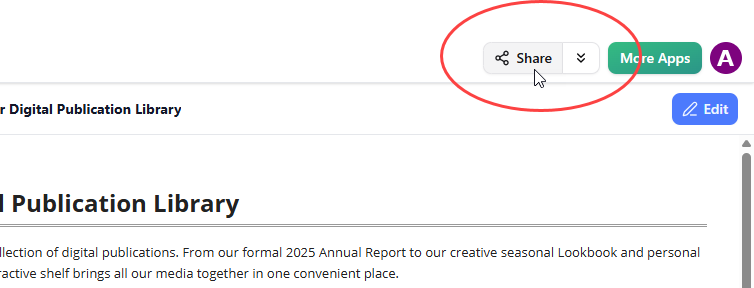
Open your knowledge base in OpenDocs and click the Share button at the top right corner.
-
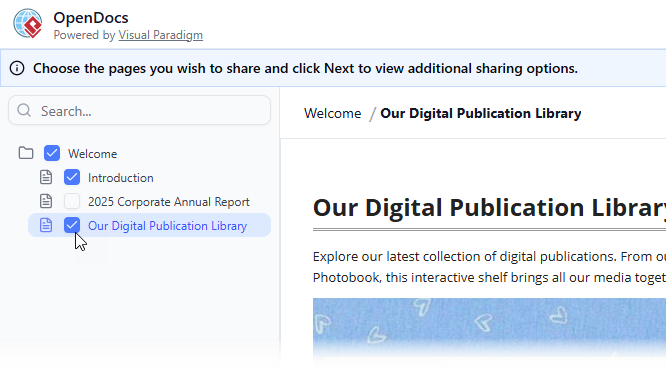
Enter page selection mode. On the left panel, tick the checkboxes for the exact pages (and sub-pages) you want to include in this share. Leave out any sensitive or irrelevant content.
-
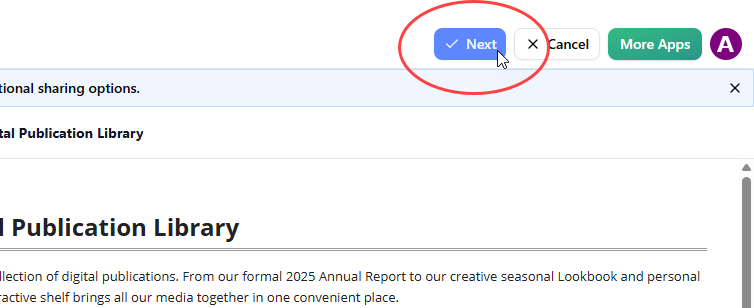
Click Next.
-
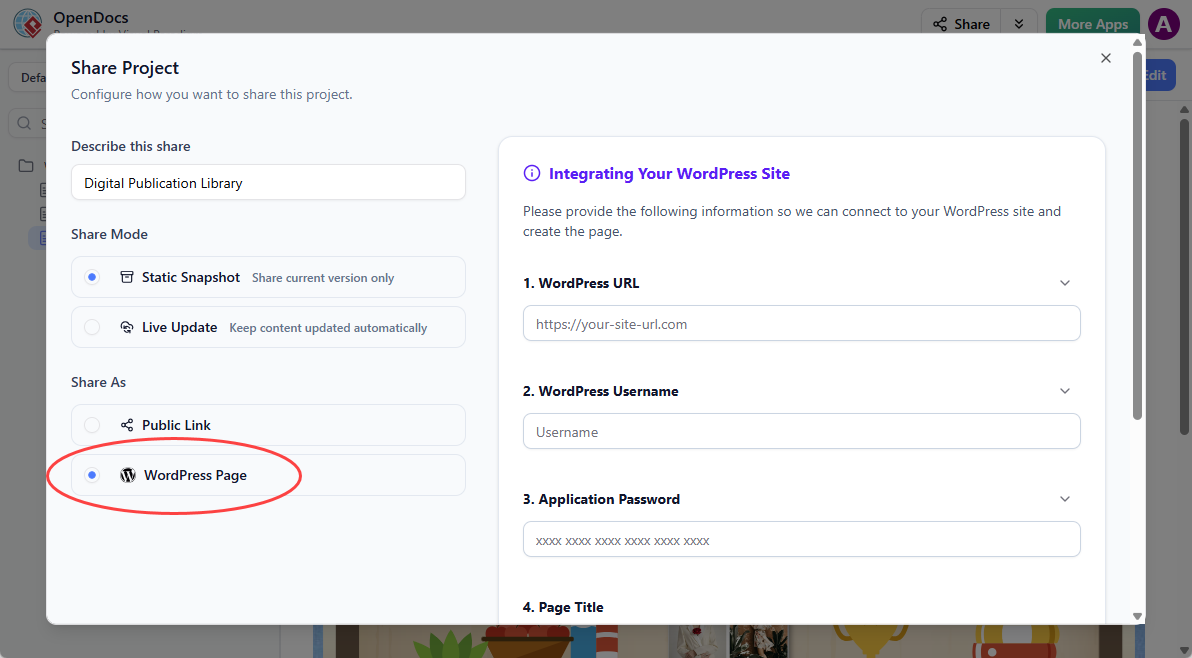
Describe your share — provide a short, clear description of the content (this helps you and your team later).
-
Choose your Sharing Mode:
-
Static Snapshot — creates an archived version that does not update when you edit the original pages. Great for milestones or formal releases.
-
Live Update — the published content stays synchronized with any future changes you make in OpenDocs.
-
-
Under Share As, select WordPress Page.
-
Prepare your WordPress site (one-time setup):
-
Log into your WordPress dashboard.
-
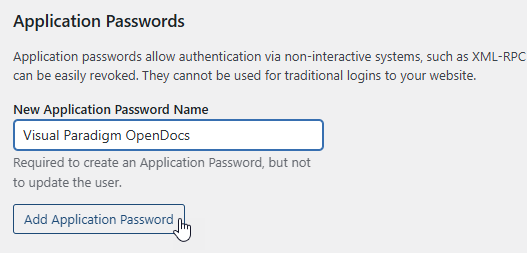
Go to your Profile (click your name at the top right or Users → Profile).

-
Scroll to Application Passwords.
-
Enter a name like “Visual Paradigm OpenDocs” and click Add Application Password.
-
Copy the generated password immediately (you won’t see it again).

-
-
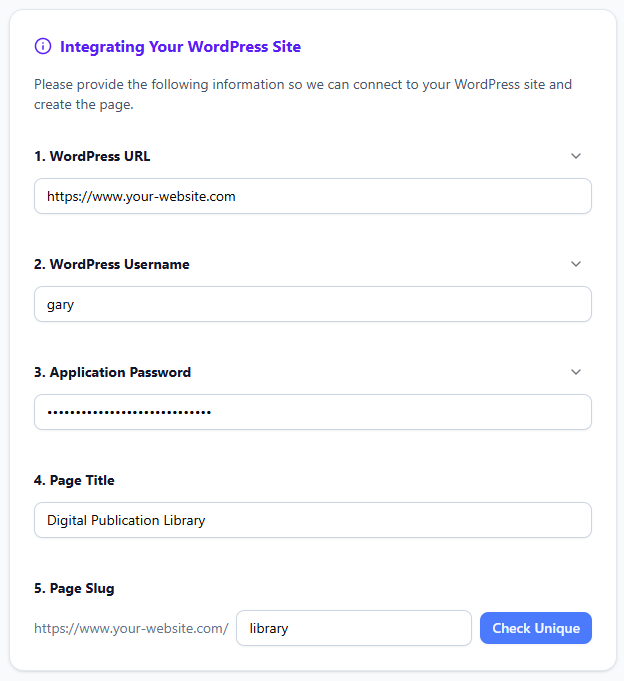
Back in OpenDocs, fill in the connection details:
-
WordPress URL: Your site base URL (e.g., https://www.your-website.com)
-
WordPress username: Your login username
-
Application Password: The one you just created (Visual Paradigm does not store it)
-
Page title: The title that will appear on your WordPress site
-
Page slug: The URL-friendly ending (e.g., “ea-blueprints-2026”). Make sure it is unique.
-
-
Click Check Unique, then Publish to WordPress.

The process usually completes in seconds. Once published, visit your new WordPress page to view the embedded OpenDocs content.
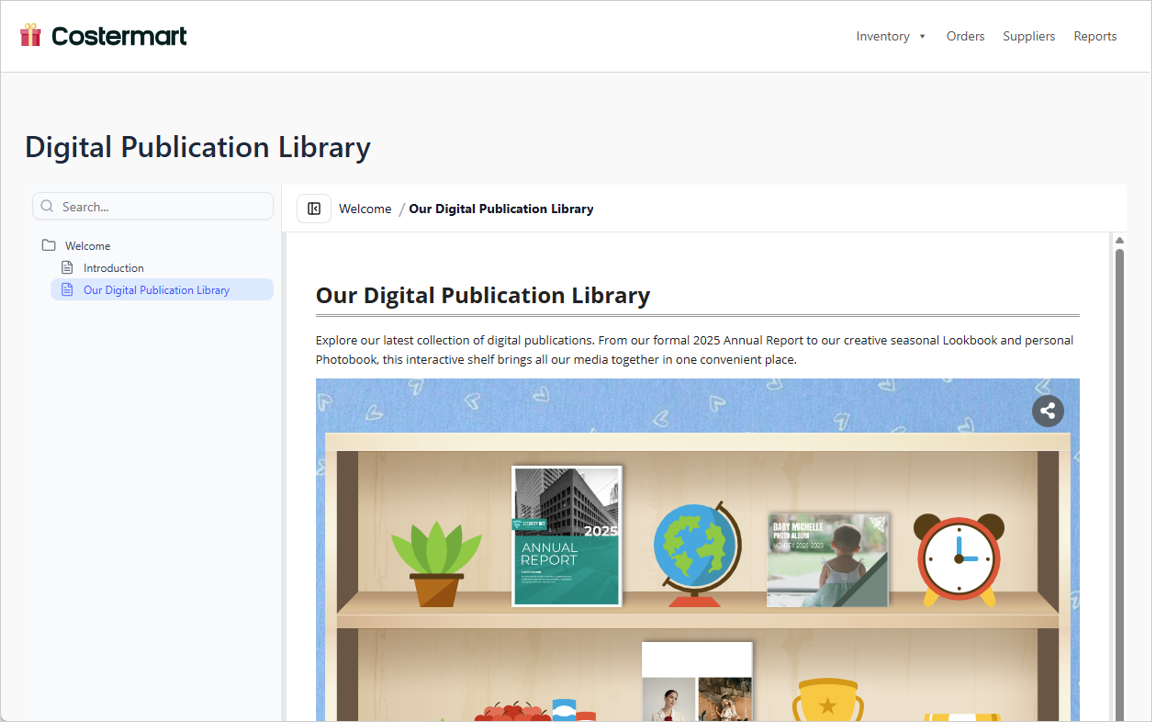
You can also find and further customize the page under Pages in your WordPress admin.
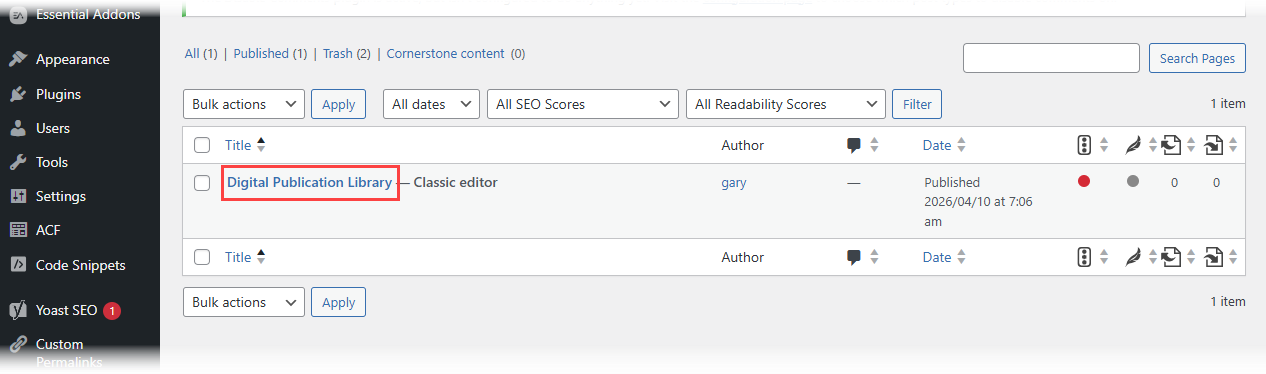
Note: Visual Paradigm never stores your Application Password. For future shares, you can reuse the saved password or generate a new one in WordPress.
WordPress Page Export vs. Embed Code: User Comparison
Visual Paradigm also offers a flexible HTML embed code option that works with any website, not just WordPress. Here’s a quick comparison from user experience:
-
Share as WordPress Page: Fastest way to create a brand-new, clean page automatically. No manual page creation required. Ideal when you want a dedicated documentation page.
-
Embed Code: Gives you more control. Paste the code into an existing WordPress page or any other website to embed the knowledge base exactly where you want it. Best for integrating content within larger pages or non-WordPress sites.
Both options support the same powerful page selection and Static/Live modes.
Benefits for Knowledge Management Teams
This new feature transforms OpenDocs into an even more versatile knowledge management platform. Teams can now:
-
Keep master knowledge bases secure and centralized in OpenDocs
-
Publish tailored views to company websites or client portals
-
Choose between living documents or frozen snapshots for compliance and archiving
-
Deliver rich, visual documentation that includes diagrams, without manual copying or screenshotting
-
Improve collaboration by sharing focused content with different stakeholder groups
Start Building & Sharing Your Knowledge Base Today
Understanding OpenDocs: User Purposes and Core Features
Visual Paradigm OpenDocs serves as an AI-powered, web-based knowledge management platform designed to unify technical documentation with visual modeling. It acts as a “visual knowledge engine,” allowing users to create, organize, and share documents that seamlessly integrate rich text with professional diagrams.
User-Reported Purposes of OpenDocs
The primary goal of OpenDocs is to bridge the gap between complex technical designs and human-readable documentation. Key purposes include:
-
Centralizing Knowledge: Serving as a “single source of truth” for teams, consolidating project specifications, notes, and diagrams into one searchable hub.
-
Eliminating Tool-Switching: Allowing users to create and edit professional diagrams (such as UML, flowcharts, and ERDs) directly within their text documents, rather than jumping between separate software.
-
Automating Documentation: Using built-in AI to generate article drafts, summarize long documents, and even transform natural language prompts into complete, editable diagrams.
-
Creating “Living” Documents: Through an integration called the Pipeline, diagrams created in Visual Paradigm Desktop or Online can be synced to OpenDocs so that documentation updates automatically when the source model changes.
-
Organizing Complex Information: Utilizing a hierarchical “Knowledge Tree” with nested folders and drag-and-drop capabilities to manage large volumes of documentation.
Core Features Users Appreciate
-
AI Diagram Generation: Instantly create professional visuals by describing them in plain English.
-
Rich Markdown Editor: A developer-friendly editor that supports code syntax highlighting, tables, and real-time live previews.
-
Secure One-Click Sharing: Share entire knowledge trees or specific pages via secure, read-only links for stakeholders.
-
Multi-Platform Access: Being 100% web-based, it requires no desktop installation and is accessible from any device.
Conclusion: The Future of Integrated Documentation
After exploring the Visual Paradigm Pipeline ecosystem from multiple user perspectives, one thing becomes clear: this isn’t just another documentation tool—it’s a fundamental shift in how teams approach the relationship between visual modeling and knowledge management.
The Pipeline successfully addresses the age-old problem of documentation drift, where diagrams and documents fall out of sync. By creating a seamless bridge between creation tools (Desktop, Online, AI Chatbot) and the publication platform (OpenDocs), users can finally maintain a single source of truth without sacrificing flexibility or power.
The recent additions—Flipbook integration and WordPress export—demonstrate Visual Paradigm’s commitment to meeting users where they are. Whether you need interactive digital publications for client presentations or need to publish technical documentation to your company’s WordPress site, the ecosystem adapts to your workflow rather than forcing you to adapt to it.
For teams struggling with scattered files, outdated diagrams, and the constant back-and-forth between modeling and documentation tools, the Pipeline ecosystem offers a compelling solution. The ability to create once and publish everywhere—while maintaining editability and version control—represents the kind of workflow efficiency that modern development teams desperately need.
As Visual Paradigm continues to expand this ecosystem, encircling more apps and providing even more ways to bridge the gap between creative modeling and professional publication, users can expect an increasingly seamless experience. The future of technical documentation isn’t just about better tools—it’s about better connections between those tools. And that’s exactly what the Pipeline delivers.
- References
- Visual Paradigm – AI-Powered Knowledge Management Platform: Official product page for OpenDocs featuring AI-powered knowledge management and diagram integration capabilities.
- Visual Paradigm OpenDocs: The Complete Guide to AI-Powered Knowledge Management and Diagram Generation: Comprehensive guide covering OpenDocs features, AI capabilities, and diagram generation workflows.
- Visual Paradigm OpenDocs: The Complete Developer’s Guide to AI-Powered Technical Documentation: Developer-focused guide exploring technical documentation features and AI integration.
- Mastering the Visual Paradigm AI Ecosystem: A Comprehensive Guide: Complete overview of the Visual Paradigm AI ecosystem including Pipeline integration.
- OpenDocs – AI-Powered Knowledge Management Platform: Official OpenDocs tool page with feature details and access information.
- OpenDocs: AI-Powered Knowledge Platform Release: Official release announcement and feature documentation for OpenDocs platform.
- From Model to Manual: A Software Engineer’s Guide to Syncing Visual Paradigm Desktop Diagrams with OpenDocs: Practical guide for engineers on syncing desktop diagrams with OpenDocs.
- Fliplify French Documentation: French language documentation and resources for Visual Paradigm tools.
- Mastering Visual Paradigm OpenDocs: The Ultimate Guide to AI-Powered Knowledge Management and the Pipeline Ecosystem: Ultimate guide covering OpenDocs and the complete Pipeline ecosystem.
- OpenDocs Page-Based Sharing Update: Official update documentation for page-based sharing features and selective content publishing.