
Now Reading: From Blank Canvas to Enterprise-Ready Architecture: My Journey with Visual Paradigm’s AI-Powered Ecosystem
-
01
From Blank Canvas to Enterprise-Ready Architecture: My Journey with Visual Paradigm’s AI-Powered Ecosystem


From Blank Canvas to Enterprise-Ready Architecture: My Journey with Visual Paradigm’s AI-Powered Ecosystem
If you’ve ever stared at a blank diagram canvas, wondering where to begin—what’s the right level of detail? Should I start with a class diagram or a context diagram? How do I make sure this aligns with the team’s vision and technical reality?—then you know the silent frustration behind the “first step” in any modeling journey.
For years, I’ve been on that journey—first as a developer, then as an architect, and now as someone who helps teams bridge the gap between strategy and execution. I’ve used dozens of diagramming tools: Lucidchart, Draw.io, PlantUML, even hand-drawn sketches on whiteboards. Each had its strengths—but none truly understood the intent behind the model. They were static. They were siloed. They didn’t evolve with the conversation.
Then came Visual Paradigm’s AI-Powered Ecosystem—and everything changed.
It wasn’t just another diagramming tool. It felt like a thinking partner—a collaborative intelligence that didn’t just draw pictures, but helped me think through complex systems, from idea to implementation.
Over the past 18 months, I’ve used this ecosystem across multiple projects: leading a cloud migration for a fintech startup, guiding a digital transformation in a mid-sized enterprise, and mentoring agile teams through their first full-scale architecture documentation. What struck me again and again wasn’t just the speed of generation—but the quality of thinking it enabled.
Let me take you behind the scenes.
The Real Challenge: Modeling Isn’t Just Drawing—It’s Communication
We often treat diagrams as final deliverables—polished, static images to be shared in presentations or documentation. But in reality, models are living artifacts. They evolve. They reflect decisions, constraints, trade-offs. And they must be traceable, editable, and collaborative.
Yet most tools treat modeling as a one-way process: you draw, they render. No feedback. No iteration. No connection to code, requirements, or team knowledge.
Visual Paradigm broke that mold.
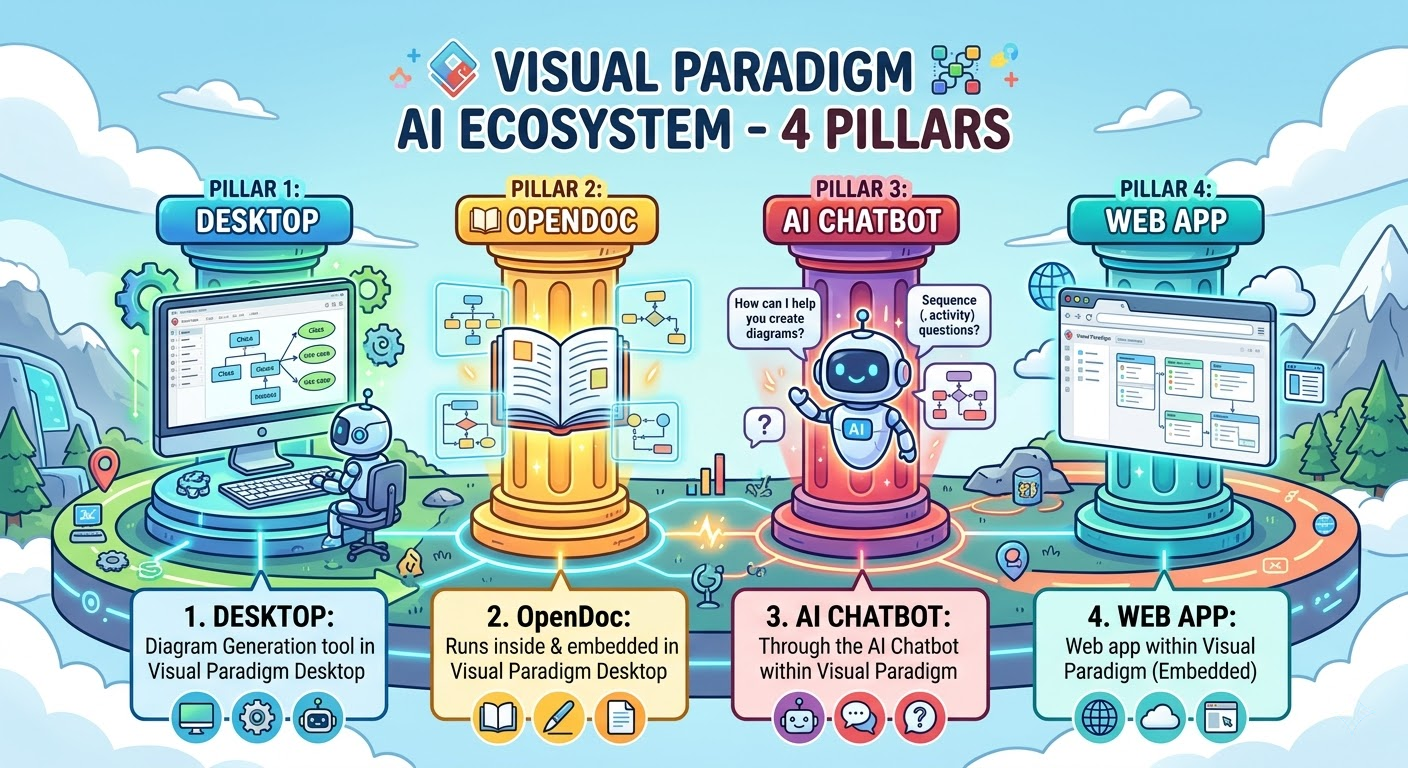
Instead of forcing me into a rigid workflow, it gave me four interconnected pillars—each with a distinct role, yet built to work together like a symphony:
-
VP Desktop – My engine room for precision, code generation, and enterprise-grade modeling.
-
OpenDocs – My knowledge hub, where diagrams breathe inside living documentation.
-
AI Visual Modeling Chatbot – My idea co-pilot, turning plain English into professional diagrams in seconds.
-
AI Apps & Studios – My guided experts, walking me through complex frameworks like TOGAF, C4, or cloud architecture with AI-powered best practices.
What’s most remarkable? Everything is connected. A sketch in the Chatbot becomes a documented process in OpenDocs. A model in OpenDocs gets refined in Desktop. A cloud architecture built in the AI Studio flows into a Jira ticket or a codebase—all while preserving traceability, consistency, and editability.
No more exporting PNGs and manually updating them. No more “I’ll just draw it again later.” No more version chaos.
Why This Ecosystem Feels Like a Leap Forward
I’ve worked with teams that spent weeks documenting a system. With Visual Paradigm’s AI ecosystem, we’ve done the same in days—without sacrificing depth.
Here’s what truly transformed my experience:
✅ No more blank canvas anxiety
I type: “Show me a C4 model for a mobile banking app with authentication, transaction processing, and fraud detection.” In 3 seconds, I have a clean, structured context diagram—ready for discussion.
📌 Example: Using the AI Chatbot, I generated a C4 context diagram in under 10 seconds. The AI correctly interpreted “authentication” as a security layer, “transaction processing” as a component, and “fraud detection” as a sub-component with risk analysis.
✅ Iterative refinement feels natural
“Add a third-party payment gateway,” “Rename ‘User’ to ‘Customer’,” “Show the error flow when payment fails.” The model updates instantly, with intelligent consistency checks.
📌 Example: In a product planning session, I used the AI Chatbot to evolve a sequence diagram in real time—adding alternative flows, error states, and security checks—all through natural language.
✅ Documentation isn’t an afterthought
I embed the same diagram into a PRD in OpenDocs. When I update it in the source, the change reflects everywhere—no manual re-exporting.
📌 Example: I built a cloud architecture diagram in the AI Cloud Architecture Studio, then embedded it into a Confluence page via OpenDocs. Any update in the studio automatically syncs across the documentation.
✅ Enterprise rigor isn’t a burden
I export a UML class diagram to VP Desktop, link it to requirements in Jira, generate code, and even reverse-engineer legacy systems—all in one environment.
📌 Example: For a legacy system modernization, I used VP Desktop to reverse-engineer a Java codebase into a UML class diagram, then traced each class to a user story in Jira—ensuring full compliance and audit readiness.
And the best part? The AI doesn’t replace my judgment—it amplifies it. It surfaces risks, suggests improvements, and keeps me aligned with standards—without dictating my decisions.
The Four Pillars in Action: A Real-World Workflow
Let’s walk through how I used the ecosystem end-to-end in a recent project: designing a secure e-commerce platform for a retail client.
🌟 Step 1: Ideation with the AI Chatbot
I began with a simple prompt:
“Create a C4 model for a secure e-commerce platform with user authentication, product catalog, shopping cart, payment processing, and admin dashboard.”
Within seconds, the AI Visual Modeling Chatbot generated a complete context diagram. I refined it with:
“Add a third-party fraud detection service.”
“Show the data flow from the shopping cart to the payment gateway.”
✅ Result: A clear, conversationally refined C4 model—ready for stakeholder review.
🌟 Step 2: Guided Architecture with AI Apps & Studios
Next, I needed to design the cloud infrastructure. I opened the AI Cloud Architecture Studio, which guided me through a step-by-step wizard:
-
Selected AWS as the cloud provider.
-
Added auto-generated components: EC2 instances, RDS, S3, CloudFront, and WAF.
-
The AI validated security best practices and suggested VPC segmentation.
✅ Result: A production-ready AWS architecture diagram with real AWS icons and relationships—fully compliant with cloud design standards.
🌟 Step 3: Living Documentation in OpenDocs
I exported both diagrams to OpenDocs. Here’s what happened:
-
Embedded the C4 model and cloud architecture directly into a PRD.
-
Added live explanations: “The payment gateway is isolated in a private subnet.”
-
Enabled real-time collaboration: Product managers and DevOps engineers could comment and suggest edits.
-
Changes to the model in OpenDocs automatically synced back to the source.
✅ Result: A single source of truth that evolved with the project—no outdated screenshots, no version mismatches.
🌟 Step 4: Final Delivery in VP Desktop
For the final deliverable, I imported both models into VP Desktop:
-
Added traceability matrices linking components to requirements.
-
Generated UML sequence diagrams for key flows (e.g., checkout process).
-
Exported models to code (Java/Spring Boot) and documentation (PDF, HTML).
-
Pushed updates to Jira and Confluence via integrations.
✅ Result: A fully traceable, code-ready, enterprise-grade architecture—delivered in half the time of traditional methods.
Key Concepts That Define the Ecosystem
| Concept | Description | How It’s Applied |
|---|---|---|
| Generative Core | Shared AI engine powering text-to-diagram creation across 50+ standards (UML, C4, ArchiMate, BPMN, cloud, etc.). | Enables instant diagram generation from plain English in the Chatbot and AI Apps. |
| Iterative Intelligence | Conversational editing, smart refactoring, and consistency checks. | Refine diagrams through natural language: “Add error handling,” “Rename this component.” |
| Traceability & Editability | All models remain fully editable and linked to requirements, code, or docs. | Link a UML class to a Jira ticket or a diagram to a user story in OpenDocs. |
| Closed-Loop Workflow | Seamless flow from idea → model → documentation → code. | Start in Chatbot → refine in OpenDocs → engineer in Desktop → deliver in Studio. |
| Enterprise-Grade Integration | Supports Jira, Confluence, GitHub, code generation, and version control. | Deliver models directly into CI/CD pipelines or documentation systems. |
Why This Ecosystem Is a Game-Changer
This isn’t just a tool. It’s a visual thinking revolution.
-
For product managers: Turn ideas into diagrams in seconds—no design skills needed.
-
For architects: Build enterprise-grade models with AI-assisted compliance and traceability.
-
For developers: Generate code from models and reverse-engineer legacy systems.
-
For teams: Eliminate documentation debt with living, collaborative knowledge bases.
🔗 Learn More:
Final Thoughts: The Future of Modeling Is AI-Powered, Human-Centered
Visual Paradigm’s AI ecosystem doesn’t replace human expertise. It elevates it.
It removes friction. It accelerates innovation. It ensures quality, consistency, and collaboration—without sacrificing control.
Whether you’re a solo developer, an agile team, or an enterprise architect, this ecosystem adapts to your workflow—because the best models aren’t just beautiful.
They’re alive.
And they’re built with you—every step of the way.
✅ Ready to start?
Try the AI Chatbot today.
Explore the AI Apps & Studios for guided modeling.
Build your first OpenDocs page.
And take your modeling to the next level with VP Desktop.
The future of visual modeling is here.
And it’s intelligent.
It’s collaborative.
It’s yours.