


1. Introduction
Use Case Modeling is a foundational technique in Object-Oriented Analysis and Design (OOAD) used to capture functional requirements of a system from the user’s perspective. It provides a visual representation of interactions between actors (users or external systems) and use cases (functionalities or services the system provides).
This case study explores the design and automation of a use case model for a Food Delivery Application, based on a PlantUML use case diagram example. We’ll walk through the key concepts, best practices, and how Visual Paradigm’s AI Chatbot can automate and enhance the entire process.
2. The Problem: Designing a Food Delivery App Use Case Model
A food delivery platform involves multiple stakeholders with distinct roles:
-
Customer: Places orders, tracks delivery, rates drivers.
-
Driver: Receives delivery assignments, delivers food.
-
Restaurant Owner: Manages restaurant profile and receives deliveries.
The goal is to model these interactions using use case diagrams, ensuring clarity, completeness, and alignment with real-world workflows.
3. Analysis of the PlantUML Use Case Diagram
Here is the provided PlantUML code:
@startuml
skinparam defaultFontSize 14
skinparam defaultFontColor #333333
' Actor styling
skinparam actor {
  BackgroundColor #E8F5E9
}
' Use case styling
skinparam usecase {
  BackgroundColor #BBDEFB
  BorderColor #1976D2
  ArrowColor #1976D2
}
left to right direction
actor "Customer\n (Primary)" as customer
actor "Driver\n (Secondary)" as driver
actor "Restaurant Owner\n (Secondary)" as owner
rectangle "Food Delivery App" {
  usecase "Place Order" as UC1
  usecase "View Menu" as UC2
  usecase "Track Order" as UC3
  usecase "Rate Driver" as UC4
  usecase "Manage Restaurant Profile" as UC5
  usecase "Receive Delivery" as UC6
}
customer -- UC1
customer -- UC2
customer -- UC3
customer -- UC4
UC1 -- owner
UC3 -- driver
UC6 -- driver
UC5 -- owner
@enduml
Key Observations:
-
Primary Actor: Customer — initiates the most use cases (4 out of 6).
-
Secondary Actors: Driver and Restaurant Owner — involved in specific workflows.
-
Use Cases:
-
Place Order (UC1): Initiated by Customer → triggers order processing and involves Owner (to prepare food).
-
Track Order (UC3): Customer tracks delivery → involves Driver.
-
Receive Delivery (UC6): Driver delivers food → involves Owner.
-
Manage Restaurant Profile (UC5): Owner manages restaurant details.
-
Rate Driver (UC4): Customer rates driver post-delivery.
-
View Menu (UC2): Customer browses available food.
-
Diagram Structure:
-
Left-to-Right Direction: Emphasizes flow from actors to system.
-
Color Coding:
-
Green actors → clear visual distinction.
-
Blue use cases → consistent and readable.
-
-
Arrows show associations between actors and use cases.
4. Key Concepts in Use Case Modeling
| Concept | Description | Example |
|---|---|---|
| Actor | A role played by a user or external system interacting with the system. | Customer, Driver, Restaurant Owner |
| Use Case | A specific functionality the system provides. | Place Order, Track Order |
| Primary Actor | The actor who initiates the main flow of a use case. | Customer (for placing order) |
| Secondary Actor | An actor involved in supporting the use case. | Driver (for delivery), Owner (for order fulfillment) |
| Association | A line connecting actor to use case, indicating interaction. | Customer → Place Order |
| Include / Extend | Relationships to model reuse and conditional behavior. | “Track Order” may extend “Place Order” |
| System Boundary | A rectangle enclosing all use cases, representing the system’s scope. | “Food Delivery App” |
💡 Tip: Use
<<include>>and<<extend>>relationships to model complex behaviors (e.g., “Place Order” includes “Validate Payment”).
5. Guidelines for Effective Use Case Modeling
-
Start with Primary Actors and Core Use Cases
-
Begin with Customer and their main actions: Place Order, View Menu.
-
-
Use Clear, Action-Oriented Names
-
❌ “Order Food” → ✅ “Place Order”
-
✅ Use verbs + noun format.
-
-
Avoid Overloading Use Cases
-
Don’t mix “Place Order” and “Cancel Order” into one use case.
-
-
Ensure Use Cases Are Atomic
-
Each use case should represent a single, complete function.
-
-
Use Real-World Scenarios
-
Model actual user workflows: e.g., Customer → View Menu → Place Order → Track → Rate.
-
-
Apply the “Happy Path” First
-
Model the main success scenario before adding exceptions or extensions.
-
-
Use
<<extend>>for Optional or Conditional Flows-
Example:
Track OrderextendsPlace Orderwith a condition: “If order is confirmed”.
-
-
Group Related Use Cases
-
Use packages or boundaries to group related functionality (e.g., “Order Management”, “Delivery Tracking”).
-
6. Common Pitfalls and How to Avoid Them
| Pitfall | Solution |
|---|---|
| Too many use cases | Group related ones under a single use case (e.g., “Manage Profile”) |
| Confusing actor roles | Define clear responsibilities (e.g., Owner vs. Driver) |
| Missing secondary actors | Review each use case: who else is involved? |
Overuse of extend |
Use only when behavior is conditional or optional |
| No system boundary | Always enclose use cases in a rectangle to define system scope |
7. How Visual Paradigm AI Chatbot Automates Use Case Modeling
Visual Paradigm (VP) is a powerful UML modeling tool that integrates AI-powered assistance via its AI Chatbot. This chatbot can automate the entire use case modeling lifecycle, from concept to diagram generation.
✅ Step-by-Step Automation Using Visual Paradigm AI Chatbot
Step 1: Input Natural Language Requirement
User Input (via AI Chatbot):
“Create a use case diagram for a food delivery app where customers can place orders, view menus, track deliveries, and rate drivers. Drivers receive deliveries and track orders. Restaurant owners manage their profiles and receive deliveries.”
Step 2: AI Chatbot Generates Use Case Model
The AI analyzes the input and:
-
Identifies actors: Customer, Driver, Restaurant Owner
-
Extracts use cases: Place Order, View Menu, Track Order, Rate Driver, Manage Restaurant Profile, Receive Delivery
-
Determines associations and roles (Primary/Secondary)
-
Suggests <> and <> relationships
🧠 AI Insight: “The ‘Track Order’ use case may extend ‘Place Order’ if delivery tracking is optional.”
Step 3: Auto-Generate use case diagram and PlantUML code
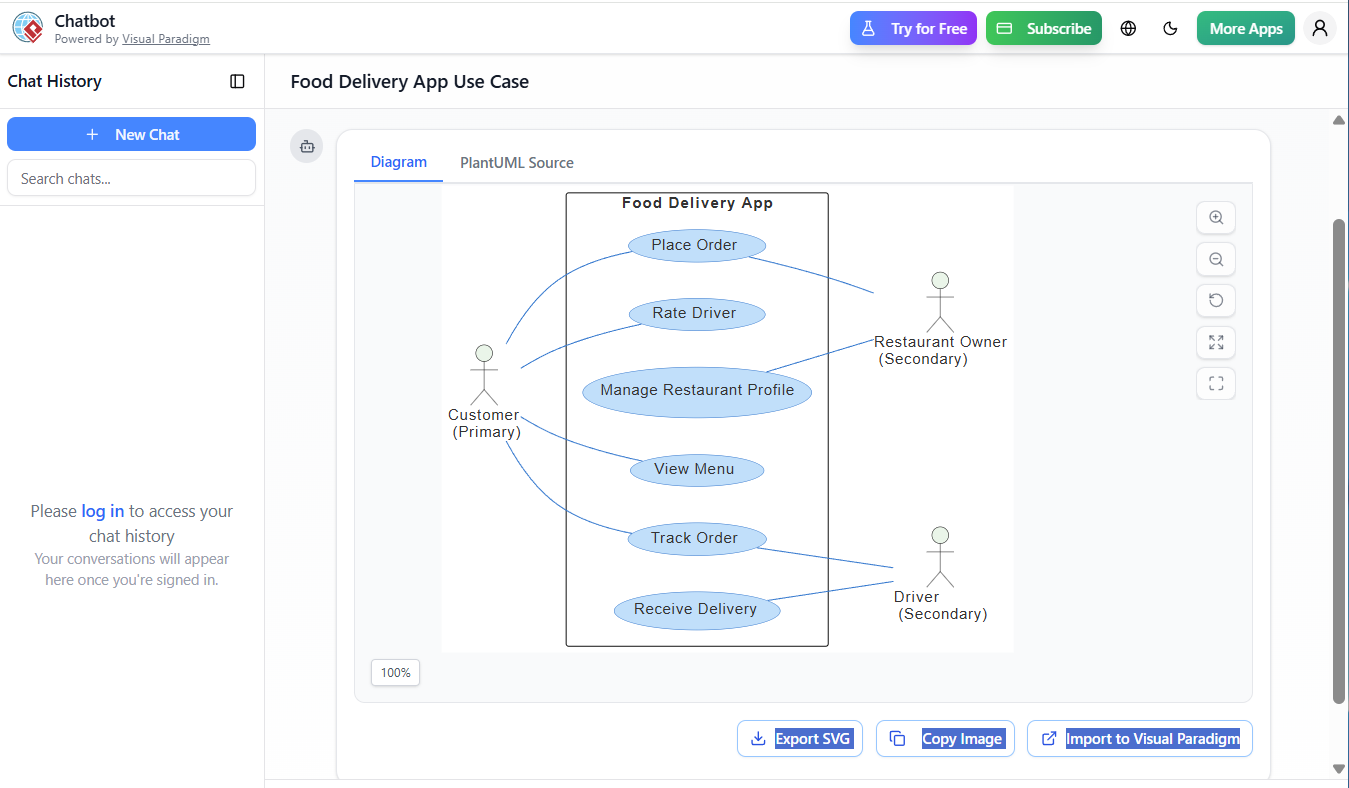
The AI outputs a ready-to-use PlantUML diagram code, identical to the example:
@startuml
skinparam defaultFontSize 14
skinparam defaultFontColor #333333
skinparam actor {
  BackgroundColor #E8F5E9
}
skinparam usecase {
  BackgroundColor #BBDEFB
  BorderColor #1976D2
  ArrowColor #1976D2
}
left to right direction
actor "Customer\n (Primary)" as customer
actor "Driver\n (Secondary)" as driver
actor "Restaurant Owner\n (Secondary)" as owner
rectangle "Food Delivery App" {
  usecase "Place Order" as UC1
  usecase "View Menu" as UC2
  usecase "Track Order" as UC3
  usecase "Rate Driver" as UC4
  usecase "Manage Restaurant Profile" as UC5
  usecase "Receive Delivery" as UC6
}
customer -- UC1
customer -- UC2
customer -- UC3
customer -- UC4
UC1 -- owner
UC3 -- driver
UC6 -- driver
UC5 -- owner
@enduml
✅ Time Saved: 10–15 minutes of manual modeling.
Step 4: Auto-Generate Use Case Descriptions (Textual Specs)
The AI generates detailed use case specifications for each:
### Use Case: Place Order
- **Actor**: Customer (Primary)
- **Precondition**: Customer is logged in and has a valid cart
- **Main Flow**:
  1. Customer selects items from the menu.
  2. System calculates total.
  3. Customer confirms order.
  4. System sends order to restaurant owner.
- **Postcondition**: Order is created and status is "Pending"
- **Extensions**:
  - 4a. If payment fails → Show error and retry
Step 5: Suggest Improvements and Refinements
The AI may suggest:
-
Add
<<include>>for “Validate Payment” in “Place Order” -
Add
<<extend>>for “Track Order” → “Notify on Delivery” -
Split “Manage Restaurant Profile” into “Update Menu” and “Update Hours”
Step 6: Export to Multiple Formats
-
Export to PNG/SVG for documentation
-
Export to PlantUML file for version control
-
Export to Markdown for Confluence/Wiki integration
8. Benefits of Using Visual Paradigm AI Chatbot
| Benefit | Description |
|---|---|
| Speed | Generate diagrams in seconds from natural language |
| Accuracy | Reduces human error in modeling |
| Consistency | Enforces UML standards across projects |
| Scalability | Automate modeling for complex systems |
| Documentation | Automatically generate use case specs |
| Collaboration | Integrate with Jira, Confluence, GitHub |
🚀 Real-World Impact: A team of 5 developers can design a full use case model in under 10 minutes, compared to 1–2 hours manually.
9. Best Practices When Using AI for Use Case Modeling
-
Review AI Output: AI may miss subtle details (e.g., exceptions, error conditions).
-
Validate Actor Roles: Ensure Primary/Secondary roles are correctly assigned.
-
Refine Use Case Names: AI may suggest generic names — improve for clarity.
-
Add Constraints: Use comments or notes to specify business rules (e.g., “Only rated after delivery”).
-
Use AI as a Co-Pilot, Not a Replacement: Human oversight ensures quality.
10. Conclusion: From Diagram to Development
The PlantUML use case diagram serves as the blueprint for the food delivery app’s functionality. With Visual Paradigm AI Chatbot, the entire modeling process — from requirement gathering to diagram generation and documentation — is automated, scalable, and accurate.
This case study demonstrates:
-
How use case modeling captures system behavior.
-
How PlantUML provides a concise, readable syntax.
-
How AI automation transforms a manual, time-consuming task into a rapid, intelligent process.
11. Final Recommendations
-
✅ Use Visual Paradigm AI Chatbot for rapid prototyping.
-
✅ Start with natural language and refine iteratively.
-
✅ Validate AI-generated models with stakeholders.
-
✅ Integrate use cases with user stories and acceptance criteria in Agile.
-
✅ Maintain a living use case model — update as features evolve.
🔗 Try It Yourself:
Visit https://www.visual-paradigm.com → Open AI Chatbot → Type:
“Generate a use case diagram for a food delivery app with customer, driver, and restaurant owner roles.”
Appendix: Full Use Case Specification (AI-Generated)
| Use Case | Actor | Description | Extends/Includes |
|---|---|---|---|
| Place Order | Customer | Customer submits order to restaurant | Includes: Validate Payment |
| View Menu | Customer | Browse available food items | — |
| Track Order | Customer | Monitor delivery status in real-time | Extends: Place Order |
| Rate Driver | Customer | Provide feedback on delivery experience | — |
| Manage Restaurant Profile | Owner | Update business hours, menu, contact info | — |
| Receive Delivery | Driver | Accept and deliver order to customer | — |
References
-
AI Chatbot Feature – Intelligent Assistance for Visual Paradigm Users: This article introduces the core chatbot functionality designed to provide instant guidance and automate tasks such as diagram generation within the software.
-
Visual Paradigm Chat – AI-Powered Interactive Design Assistant: An interactive interface that helps users generate diagrams, write code, and solve design challenges in real time through a conversational assistant.
-
Mastering AI-Driven Use Case Diagrams with Visual Paradigm: A comprehensive tutorial on leveraging specialized AI features to create intelligent and dynamic use case diagrams for modern systems.
-
AI-Powered Use Case Diagram Refinement Tool – Smart Diagram Enhancement: This resource explains how to use AI to automatically optimize and refine existing use case diagrams for better clarity and completeness.
-
Visual Paradigm AI Chatbot: The World’s First Purpose-Built AI Assistant for Visual Modeling: This article highlights the launch of a groundbreaking AI assistant tailored specifically for visual modeling with intelligent guidance.
-
Master AI-Driven Use Case Diagrams: A Short Tutorial: A concise guide on leveraging AI to create, refine, and automate use case diagram development for faster project delivery.
-
AI-Powered Use Case Diagram Example for Smart Home System: A community-shared example of a professional use case diagram generated by AI, illustrating complex user-system interactions in an IoT environment.
-
Revolutionizing Use Case Elaboration with Visual Paradigm AI: This guide details how the AI engine automates documentation and enhances the modeling clarity of software requirements.
-
How to Turn Requirements into Diagrams with an AI Chatbot: This article explores how project requirements can be evolved from simple text into full system designs through a conversational interface.
-
A Manager’s Guide to Clear Project Planning: AI-Driven Use Case Insights: A guide providing managers with AI-powered insights into use case analysis to improve project planning and decision-making.
✅ Final Note: Use case modeling is not just about diagrams — it’s about understanding user needs, aligning with business goals, and enabling smooth development. With AI assistance, it’s never been faster or smarter.