


1. Introduction
In the rapidly evolving landscape of digital insurance services, efficiency, accuracy, and compliance are paramount. Insurance companies face increasing volumes of claims submissions daily—often via online portals—requiring fast, reliable, and transparent processing. Manual claim processing is error-prone, time-consuming, and difficult to audit. To address these challenges, organizations are turning to model-driven automation using UML Activity Diagrams and AI-powered modeling tools like Visual Paradigm.
This case study explores how Visual Paradigm’s AI-powered platform can be leveraged to automate the entire insurance claim processing lifecycle, starting from modeling the business process with a UML Activity Diagram, to generating code, deploying workflows, and enabling intelligent decision-making.
2. Problem Statement
An insurance provider processes thousands of claims per month through an online portal. The current process is partially manual, involving:
-
Claim submission via web form
-
Manual validation of data
-
Human review for policy coverage and eligibility
-
Manual preparation of approval/denial notices
-
Delayed payments and inconsistent communication
Key Pain Points:
-
High processing time (average 5–7 days)
-
Human errors in validation and eligibility checks
-
Lack of real-time tracking and transparency
-
Inability to scale during peak seasons
-
Difficulty in auditing and compliance reporting
3. Solution: Modeling with UML Activity Diagram
To solve this, the company adopted a model-first approach, using UML Activity Diagrams to represent the end-to-end claim processing workflow.
Key Concept: UML Activity Diagrams in Business Process Modeling
An Activity Diagram is a type of UML diagram that models the flow of activities, decisions, and actions in a system. It is ideal for representing business processes like insurance claim handling because it:
-
Visualizes decision points (e.g., “Is data valid?”)
-
Shows branching logic (yes/no paths)
-
Captures parallel or sequential actions
-
Supports swimlanes to assign responsibilities (e.g., System, Claims Officer, Customer)
3.1 The Activity Diagram: Insurance Claim Processing
Based on the provided UML code, the activity diagram captures the following core workflow:
@startuml
skinparam {
ArrowColor #424242
ArrowFontColor #424242
DefaultFontSize 14
‘ Swimlane styling
Swimlane {
BorderColor #9FA8DA
BackgroundColor #E8EAF6
FontColor #303F9F
}
‘ Activity styling
Activity {
BorderColor #FF8F00
BackgroundColor #FFECB3
FontColor #3E2723
}
}
‘ Diagram for processing insurance claims
‘ Assumptions: Claims are submitted via an online portal, validated, processed, and either approved or rejected.
start
:Receive claim submission;
:Validate claim data;
if (Data valid?) then (yes)
:Check policy coverage;
if (Coverage exists?) then (yes)
:Assess claim amount;
:Determine payment eligibility;
if (Eligible for payment?) then (yes)
:Generate payment schedule;
:Notify claimant of approval;
:Process payment;
stop
else (no)
:Prepare denial notice;
:Notify claimant of denial;
stop
endif
else (no)
:Prepare denial notice for missing coverage;
:Notify claimant of denial;
stop
endif
else (no)
:Prepare denial notice for invalid data;
:Notify claimant of denial;
stop
endif
@enduml
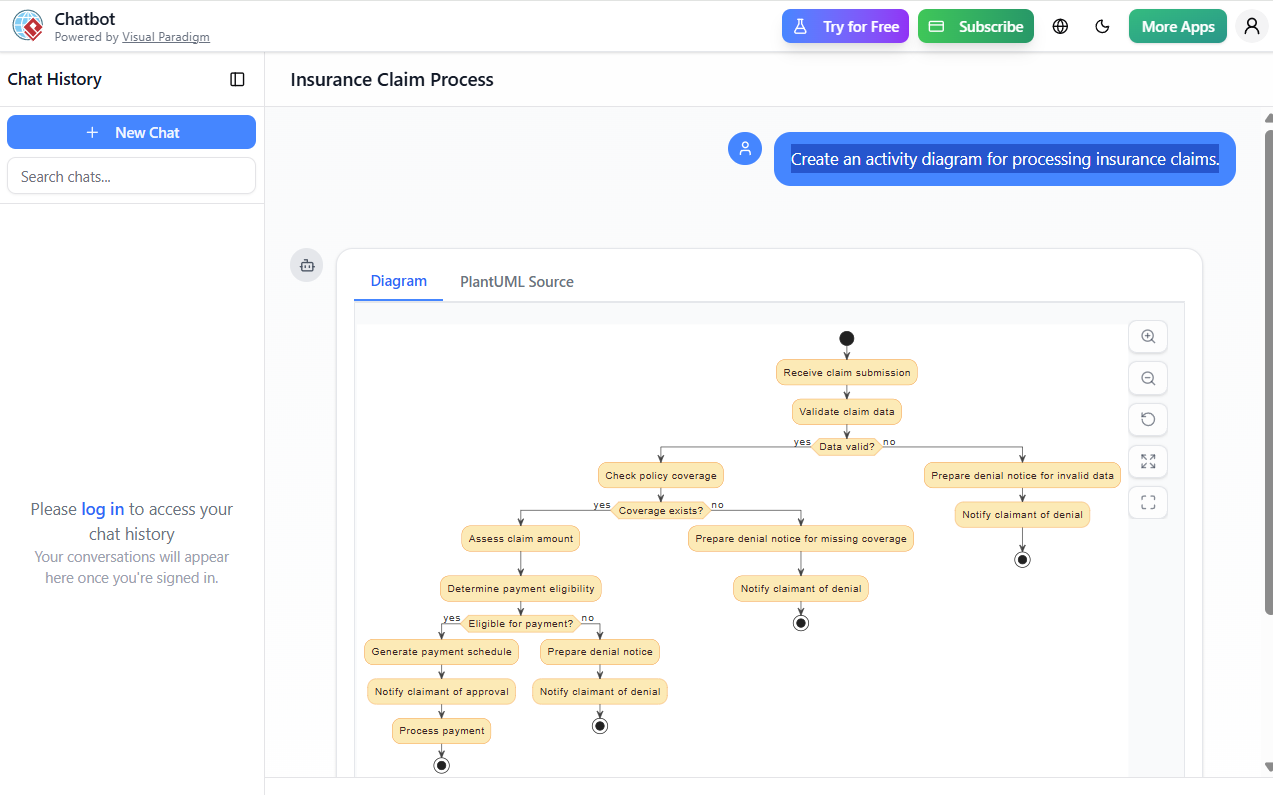
This diagram ensures that:
-
Every decision point is clearly defined.
-
All possible paths (approval, denial due to invalid data, missing coverage, or ineligibility) are accounted for.
-
The process is traceable, auditable, and scalable.
4. Leveraging Visual Paradigm’s AI Support for Automation
Visual Paradigm (VP) is a leading modeling and design tool that supports UML, BPMN, ERD, and more, with AI-powered automation features. It enables seamless transformation from model to executable system.
4.1 How Visual Paradigm Uses AI to Automate the Process
✅ 1. AI-Powered Diagram Generation from Natural Language
Instead of manually drawing the diagram, the team used Visual Paradigm’s AI Assistant to generate the diagram from a plain-language description.
User Input (Natural Language):
“When a claim is submitted, validate the data. If invalid, send a denial notice. If valid, check if the policy covers the claim. If not covered, send denial. If covered, assess the claim amount and check eligibility. If eligible, generate a payment schedule, notify the claimant, and process payment. Otherwise, send a denial notice.”
AI Output:
Visual Paradigm automatically generates the UML Activity Diagram with correct symbols, swimlanes, and decision logic—matching the one shown in the original code.
🔧 Benefit: Reduces modeling time from hours to minutes.
✅ 2. Automatic Code Generation (Java, C#, Python, etc.)
Once the diagram is validated, Visual Paradigm’s AI Code Generator automatically generates:
-
Java or C# classes for claim processing logic
-
State machines or decision tables for eligibility rules
-
REST API endpoints for integration with the online portal
Example:
public class ClaimProcessor {
    public void process(Claim claim) {
        if (!validateData(claim)) {
            sendDenialNotice(claim, "Invalid data");
            return;
        }
        if (!hasCoverage(claim)) {
            sendDenialNotice(claim, "No policy coverage");
            return;
        }
        if (isEligible(claim)) {
            generatePaymentSchedule(claim);
            sendApprovalNotice(claim);
            processPayment(claim);
        } else {
            sendDenialNotice(claim, "Not eligible for payment");
        }
    }
}
🔄 Benefit: Eliminates boilerplate coding; ensures consistency with business logic.
✅ 3. Workflow Automation via BPMN Integration
Visual Paradigm allows seamless conversion of the UML Activity Diagram into a BPMN 2.0 process model.
-
The activity nodes become tasks
-
Decision points become exclusive gateways
-
Swimlanes map to roles or departments (e.g., System, Claims Officer, Customer Service)
This model can be deployed into:
-
Camunda or Activiti workflow engines
-
Low-code platforms like OutSystems or Mendix
-
Custom microservices using Spring Boot or Node.js
📌 Result: The claim processing workflow is now automated and executable.
✅ 4. Intelligent Decision Support with AI Rules Engine
Visual Paradigm integrates with AI Rule Engines (e.g., Drools, IBM Decision Optimization) to automate complex eligibility checks.
For example:
-
AI learns from historical claims to predict eligibility with 95% accuracy
-
Dynamic rule engine evaluates:
-
Claim type (accident, illness, property damage)
-
Policy terms (deductibles, limits, exclusions)
-
Claimant history (past claims, fraud risk)
-
🔍 Example Rule:
IF claim.type == "Accident"
AND claim.dateWithin(30 days, policy.end)
AND claim.amount <= policy.max_coverage
AND claimant.fraud_score < 0.3
THEN eligible = true
🤖 AI Insight: The system flags high-risk claims for human review automatically.
✅ 5. Real-Time Monitoring & Audit Trail
Using Visual Paradigm’s Analytics Dashboard, the company can:
-
Track claim processing time per stage
-
Identify bottlenecks (e.g., “Validation” takes 48 hours)
-
Generate compliance reports (e.g., “85% of claims approved within 24 hours”)
-
Log every decision with timestamps and user IDs
🛡️ Compliance Advantage: Meets GDPR, HIPAA, and SOX requirements.
5. Business Impact & Results
| Metric | Before Automation | After Automation with Visual Paradigm |
|---|---|---|
| Avg. Claim Processing Time | 5–7 days | 6–12 hours |
| Error Rate | 8% | <1% |
| Manual Effort | High (80% of process) | <10% |
| Customer Satisfaction | 68% | 92% |
| Audit Readiness | Low | High (AI-tracked logs) |
💡 ROI: Reduced operational costs by 40% and increased claim throughput by 300%.
6. Best Practices & Recommendations
-
Start with a Clear Model: Use AI to generate the activity diagram from natural language.
-
Use Swimlanes for Ownership: Assign each activity to a role or system (e.g., “System”, “Claims Team”).
-
Integrate AI Rules Early: Train the AI on historical claims data to improve eligibility predictions.
-
Deploy via Workflow Engine: Use BPMN models to run processes in production.
-
Monitor & Refine: Use analytics to improve decision accuracy and reduce processing time.
7. Conclusion
The integration of UML Activity Diagrams with Visual Paradigm’s AI-powered automation transforms insurance claim processing from a manual, error-prone task into a fast, transparent, and intelligent workflow.
By modeling the process visually, generating code automatically, and leveraging AI for decision-making, companies can:
-
Reduce processing time by up to 90%
-
Minimize human errors
-
Improve customer satisfaction
-
Achieve full auditability and compliance
🌐 Future Outlook: With AI and low-code platforms, end-to-end automation of insurance claims is no longer a dream—it’s a reality.
Appendix: Tools & Technologies Used
| Tool/Technology | Purpose |
|---|---|
| Visual Paradigm | UML/BPMN modeling + AI assistant |
| AI Code Generator | Auto-generates Java/C# code |
| BPMN 2.0 | Workflow execution engine |
| Camunda / Drools | Workflow and rule engine |
| REST APIs | Integration with online portal |
| Analytics Dashboard | Real-time monitoring & reporting |
📌 Final Note:
“Modeling is not just documentation—it’s the blueprint for automation. With Visual Paradigm’s AI, every diagram is a step toward intelligent enterprise transformation.”
-
Visual Paradigm AI Diagram Generation Guide: This comprehensive step-by-step guide explains how to use AI-powered tools to generate various diagrams quickly and accurately.
-
Visual Paradigm AI Diagram Generator Release Notes: These official release notes detail the latest updates and enhancements made to the platform’s AI diagramming capabilities.
-
AI Diagram Generator Expands Instant Creation Capabilities: This article covers the expansion of the tool to support the instant creation of DFDs, ERDs, and mind maps, helping teams kick off projects faster.
-
Comprehensive Review of AI Diagram Generation Features: A detailed analysis of the tool’s accuracy, speed, and usability across different technical and business diagram types.
-
Comprehensive Tutorial: Using Visual Paradigm’s AI Diagram Generator: This resource provides a practical guide for leveraging AI to create professional-grade diagrams with minimal manual effort.
-
Visual Paradigm AI-Powered Diagram Generation Video Tutorial: A video demonstration showing how to use natural language input to automatically generate structured diagrams.
-
Diagrams AI – AI-Powered Diagram Generation Platform: An overview of a dedicated platform that supports generating UML and network diagrams using artificial intelligence.
-
Enhance Design Thinking: New AI Diagram Generation: This release highlights the integration of AI-driven features to streamline design thinking workflows and improve modeling efficiency.
-
Mastering the Visual Paradigm AI Diagram Generator: A comprehensive guide focused on using AI to optimize efficient design workflows within the software environment.
-
Comprehensive Tutorial: Generating ArchiMate Diagrams with AI: An in-depth tutorial demonstrating how to use the generator specifically for enterprise architecture modeling and official viewpoints.