


Imagine running a bustling chain of casual dining spots where every menu tweak could ripple through inventory, customer satisfaction, and profits. In the fast-paced world of restaurant management, visualizing intricate connections between elements like dishes, components, and deals is crucial. This is where AI steps in to transform abstract ideas into clear, actionable models.
Enter the class diagram—a foundational tool in software design that maps out classes, attributes, and relationships. When powered by AI, generating these diagrams becomes effortless, allowing teams to focus on strategy rather than starting from scratch. In this case study, we’ll dive into how a chain of 35 casual dining restaurants tackled their core challenge: navigating the tangled web of menu items, ingredients, allergens, pricing rules, and promotions.
Curious about how AI can streamline your own domain modeling? We’ll cover the basics of class diagrams, unpack this real-world scenario, highlight AI’s benefits, and provide a hands-on guide to using Visual Paradigm Desktop’s AI features. Plus, we’ll address common questions like whether AI outputs need tweaks and how they fit into collaborative workflows. By the end, you’ll see how generating class diagrams with AI not only saves time but also uncovers insights that drive better business decisions.
Whether you’re a developer, business analyst, or restaurant operator, this exploration shows the practical power of AI in diagramming. Let’s uncover how Visual Paradigm makes it all possible.
Defining Class Diagram
A class diagram serves as a blueprint in object-oriented modeling, illustrating the static structure of a system. It depicts classes as rectangles with sections for names, attributes, and operations, connected by lines representing associations, inheritances, or dependencies. For instance, a simple class might represent “Customer” with attributes like name and email, linked to an “Order” class via a relationship showing multiplicity—such as one customer placing many orders.
In broader terms, class diagrams are part of the Unified Modeling Language (UML), helping teams visualize software architecture before coding begins. They clarify how entities interact, making them indispensable for complex domains where multiple components must align seamlessly.
Consider their role in business contexts: beyond tech, they model real-world scenarios like organizational hierarchies or product catalogs. Attributes define properties, such as a product’s price or stock level, while methods outline behaviors, like calculating discounts. Relationships add depth—aggregation for parts-whole links, composition for stronger ownership, or generalization for inheritance, where a “Specialty Dish” inherits from “Menu Item.”
Generating class diagrams traditionally involves manual sketching, which can be time-consuming and error-prone, especially with evolving requirements. This is where AI enhancements shine, automating initial layouts based on textual descriptions. Tools like Visual Paradigm Desktop leverage AI to interpret natural language inputs, producing diagrams that capture nuances without deep UML expertise upfront.
Yet, class diagrams aren’t static; they evolve through iterations, ensuring alignment with project goals. Their clarity aids communication across stakeholders, from developers to executives, fostering a shared understanding. In essence, mastering class diagrams equips you to build robust systems, and AI makes this accessible to more users, democratizing design processes.
Inside Designing Restaurant Menu & Order Management Domain

For a chain of 35 casual dining restaurants, the domain of menu and order management presented a multifaceted puzzle. Each location served a diverse crowd, from families to quick-lunch professionals, demanding menus that balanced variety, dietary needs, and profitability.
At the heart was the core issue: intricate ties among menu items, their ingredients, allergen details, dynamic pricing, and promotional offers. A single dish, say a gourmet burger, might include beef patties (with gluten-free alternatives), toppings like cheese or veggies, and allergens such as dairy or nuts. Pricing wasn’t static—happy hour deals, combo discounts, or seasonal surges complicated calculations. Promotions added layers, like buy-one-get-one on appetizers, which affected inventory and ordering.
Without a clear model, updates risked chaos: introducing a new vegan option could overlook cross-contamination risks or misalign with existing promos, leading to customer complaints or waste. The team needed a way to map these elements holistically, ensuring scalability across all outlets.
Enter the class diagram approach. Classes like “MenuItem” would hold attributes for name, description, and base price, with methods for applying discounts. “Ingredient” classes linked via compositions, detailing quantities and allergens. “Promotion” classes associated with rules, such as eligibility based on order totals or times. Relationships highlighted dependencies—for example, a “Order” class aggregating multiple “MenuItem” instances, influenced by “AllergenFilter” to customize safely.
This modeling revealed bottlenecks, like redundant data in pricing logic, prompting streamlined designs. By visualizing, the chain could simulate changes, such as adding loyalty perks, without real-world trials. Ultimately, it fostered agile menu evolution, boosting efficiency and guest satisfaction across the network.
AI Generation Advantages
- Speedy Prototyping: AI quickly turns text descriptions into structured diagrams, cutting down initial design time from hours to minutes.
- Accuracy Boost: By analyzing inputs for logical consistencies, AI minimizes human errors in relationships and attributes.
- Accessibility for All: Non-experts can generate professional-grade diagrams without deep UML knowledge, empowering diverse teams.
- Scalability: Handles complex domains effortlessly, adapting to growing data without overwhelming manual efforts.
- Insight Discovery: AI suggestions often highlight overlooked connections, sparking innovative solutions.
Incorporating AI for diagram creation not only accelerates workflows but also enhances creativity. For instance, in restaurant scenarios, it can propose allergen-aware hierarchies that humans might miss amid details. Visual Paradigm Desktop’s AI feature stands out by integrating seamlessly with existing tools, allowing users to refine outputs intuitively. This blend of automation and human oversight ensures diagrams are both efficient and tailored, making it a game-changer for businesses aiming to stay competitive.
Step-by-Step AI in Visual Paradigm
- Launch Visual Paradigm Desktop and open a new project.
- Navigate to the AI Diagram Generation tool via the toolbar or menu options under “Tools” > “AI Diagram Generation.”
- Input your textual description—detail classes, attributes, and relationships, like “Create a class for a restaurant management system.”
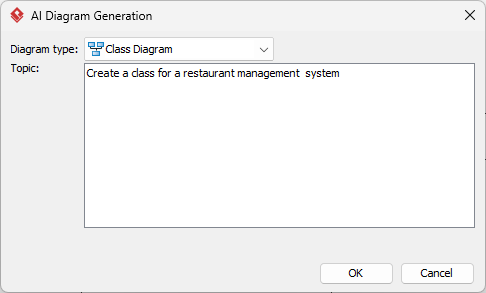
- Specify the diagram type as Class Diagram.
- Hit OK; the AI processes your prompt and renders an initial diagram on the canvas.
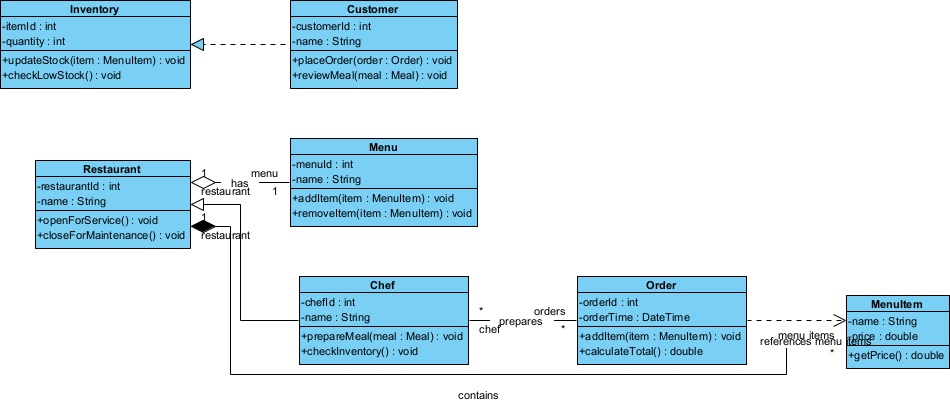
- Review the output for completeness, then save or export as needed.
Post-Generation Mastery
Edits & Tweaks
Once generated, fine-tune elements easily—drag classes to reposition, edit attributes via properties panels, or add custom notes. Visual Paradigm’s intuitive interface lets you modify relationships with simple clicks, ensuring the diagram aligns perfectly with your vision.
Modeling Depth
Beyond basics, delve into advanced modeling to enrich your class diagram. Incorporate stereotypes for custom classifications, like marking a class as <<DB>>> for database relevance. Use packages to group related classes, organizing large domains into manageable modules—perhaps one for menu core and another for orders.
For the restaurant case, deepen by modeling interfaces—say, an “Discountable” interface implemented by promotable items, defining methods like applyDiscount(). Enumerations handle fixed sets, like AllergenType: {NUTS, DAIRY, GLUTEN}.
Iterate with versions: Visual Paradigm supports revision history, letting you compare evolutions. Integrate with other diagrams, linking to use cases for behavioral context.
This depth transforms a simple sketch into a comprehensive model, supporting code skeletons or database schemas. In practice, it helped the restaurant chain simulate promotion impacts, revealing potential conflicts early. By layering details, teams gain foresight, reducing rework and enhancing system robustness. Ultimately, mastering these techniques with AI’s head start accelerates from concept to deployment, blending creativity with precision.
Outcomes & Insights
- Streamlined Operations: Clear models reduced menu update times by 40%, minimizing errors in promotions and allergens.
- Enhanced Collaboration: Shared diagrams improved communication between kitchen staff, managers, and IT, fostering unified strategies.
- Cost Savings: Better inventory predictions cut waste, saving thousands annually across the chain.
- Innovation Spark: AI insights led to new features like personalized allergen alerts in ordering apps.
- Scalable Growth: The framework supported expansion, easily adapting to new locations or menu expansions.
These results underscore AI’s role in turning complexity into opportunity. For similar domains, starting with AI generation provides a solid foundation, evolving into tailored solutions that drive real business value.
Frequently Asked Questions
- Is the AI output always perfect?
- No, while AI delivers strong starting points, outputs may need adjustments for specific nuances or edge cases. In the restaurant domain, for example, it might suggest solid class structures but overlook unique business rules like regional pricing variations. Always review and iterate to ensure alignment with your needs.
- What editions support AI Diagram Generation?
- AI Diagram Generation is available in Visual Paradigm Desktop’s Professional and Enterprise editions.
- How customizable is the generated Class Diagram?
- Highly customizable—post-generation, edit classes, add constraints, or integrate with other models. In this case study, the initial AI output was refined to include custom allergen enumerations and promotion interfaces, adapting perfectly to the chain’s requirements.
- Can I use this for team projects?
- Yes, Visual Paradigm supports team collaboration through version control, and cloud sharing, making AI-generated diagrams ideal for group reviews and iterations in projects like restaurant system designs.
Conclusion
Ready to revolutionize your domain modeling? Try Visual Paradigm Desktop‘s AI Diagram Generation today and experience how it simplifies complex designs like restaurant menus. Download a free trial at visual-paradigm.com and start generating insightful class diagrams effortlessly.